
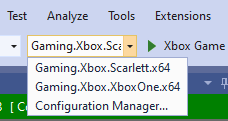
You can use Visual Studio to build both the XBOX Series X|S and the XBOX One versions of your title within a single project or solution. By using Visual Studio in this way, you can more easily manage the source code and build configuration differences that are required to build a title that targets both the XBOX One and the XBOX Series X|S generations. Depending on the structure of your code and the design of your build process, you might choose to build the XBOX One and the XBOX Series X|S versions of a given binary within the same project or with different projects within the same solution. For binaries where the code is largely identical between XBOX Series X|S and XBOX One (for example, non-graphics code), building from the same project likely makes sense. For projects where the code diverges considerably between the two platforms, separate projects might be easier to manage. Use the platform concept in Visual Studio to separate the build configuration settings for your XBOX Series X|S build from the settings that are required for your XBOX One build. Projects you create by using the Visual Studio templates that the Microsoft Game Development Kit (GDK) provides contain definitions for both the XBOX One and the XBOX Series X|S platforms. The name of the XBOX One platform is Gaming.Xbox.XboxOne.x64. The name of the XBOX Series X|S platform is Gaming.Xbox.Scarlett.x64 as shown in the following screenshot. The Gaming.Xbox.XboxOne.x64 and Gaming.Xbox.Scarlett.x64 platforms specify the preprocessor defines, the include and library paths, and other settings that are needed to build your title for either XBOX One or XBOX Series X|S. For example, the Gaming.Xbox.Scarlett.x64 platform sets the following preprocessor define.
This platform adds the following directories to the list of include and library paths by using msbuild properties.
The Gaming.Xbox.XboxOne.x64 platform makes the corresponding changes to the build environment that are needed to build the XBOX One version of your title. Specify these platforms on the command line when building with msbuild as shown in the following code example.

Using other build systems

If your build system isn’t Visual Studio and msbuild, you can determine the changes you need to make to your own build system for cross-generation development by comparing the XBOX Series X|S and XBOX One versions of the msbuild .targets and .props files that the GDK includes. You install these files to the Gaming.Xbox.Scarlett.x64 and Gaming.Xbox.XboxOne.x64 directories under C:\Program Files (x86)\Microsoft GDK\260400\GXDK\VS2019\flatDeployment\MSBuild\Microsoft\VC\v160\Platforms. For more information about the specific settings that are needed to build without using Visual Studio, see Microsoft Game Development Kit porting guide for XBOX One.

See also

Visual Studio
Last modified on August 20, 2026