
Required Visual Studio versions and components
You need Visual Studio version 16.11 or later to use Clang/LLVM with the GDK. Select the C++ Clang Compiler for Windows component under Individual Components when installing Visual Studio.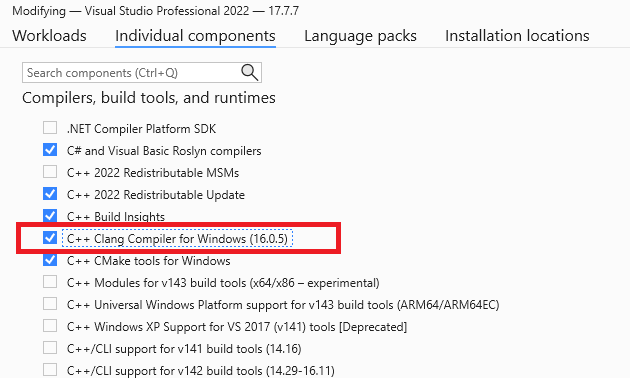
If you modify your existing Visual Studio installation to add the C++ Clang Compiler for Windows after the GDK is installed, you need to repair your GDK installation before using Clang/LLVM.
Gaming.Xbox.*.x64 platforms.
Compiler and linker switches
For theGaming.Xbox.*.x64 platforms, the clang/LLVM command line used with clang-cl.exe always includes the following:
Gaming.Xbox.Scarlett.x64, it also adds -march=znver2. This switch sets AVX2 and a few other features specific to the Hercules CPU.
For Gaming.Xbox.XboxOne.x64, it also adds -march=btver2. This switch sets AVX, F16C, and a few other features specific to the Jaguar CPU.
For more information about the switches recommended for GDK development, see Visual C++ compiler and linker switch recommendations.
Supported CPU intrinsics
Clang/LLVM and GNUC treat SSE SIMD types differently than Visual C++ and the Intel Compiler. Specifically, the __m128, __m128i, and __m128d types are opaque types rather than structs, so you can’t create C++ overloaded functions that use those types. This difference also means direct element access through __m128.m128_f32[] doesn’t compile on clang. For DirectXMath on Clang/LLVM, this difference results in all theXMVECTOR C++ overloads being disabled. You can also opt in to this behavior on Visual C++ for better portability by defining the preprocessor symbol XM_NO_XMVECTOR_OVERLOADS before including the DirectXMath headers.
Visual C++ enables you to use advanced instruction intrinsics even if you’re not currently building with /arch:AVX or /arch:AVX2, but clang/LLVM fails to build in this scenario without the proper compiler switches.
When you use Clang/LLVM, you must add the -march=btver2, -march=znver1, -march=znver2, or -mf16c compiler switch to use the F16C half-precision conversion intrinsics _mm_cvtph_ps or _mm_cvtps_ph.
DirectXMath in the Windows 10 SDK (18363) or earlier used the wrong CPUID intrinsics to implement XMVerifyCPUSupport for Clang/LLVM. This problem is fixed for DirectXMath 3.14 in the Windows 10 SDK (19041) or later.
Using Clang/LLVM with msbuild
To use Clang/LLVM with an msbuild project, set the Platform Toolset to “LLVM (clang-cl)”. You can find Platform Toolset under the General tab in the Visual C++ project properties dialog, as shown in the following figure.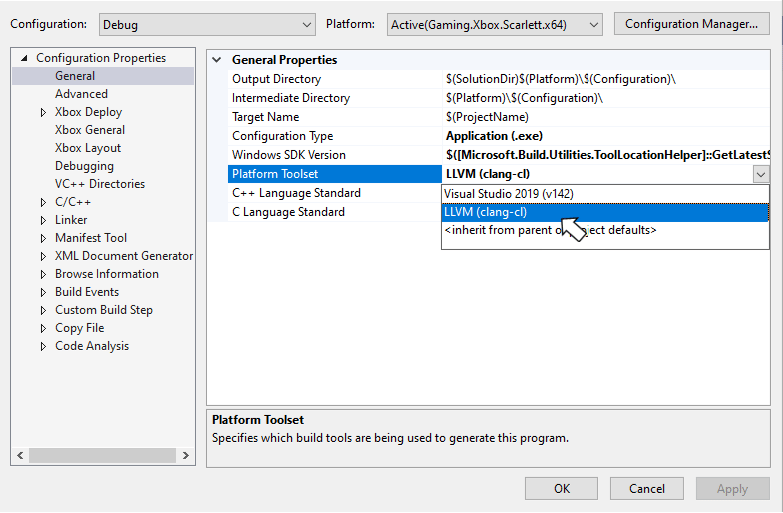
-W#pragma-messages output as a warning, and an -Wunused-value warning:
Using Clang/LLVM with cmake
The CMakeExample and CMakeGDKExample GDK samples provide a good starting point for integrating Clang/LLVM into your cmake projects. You can download these samples from the XBOX Developer Downloads page.Make sure the C++ CMake tools for Windows Visual Studio component is installed before attempting to add Clang/LLVM support to your cmake projects. Visual Studio 2019 (16.11) ships with CMake 3.20. Visual Studio 2022 ships with CMake 3.21 or later.
Using CMakeExample
Use the following steps to enable Clang/LLVM with the CMakeExample project. The CMakeExample was updated in March 2022 to useCMakePresets.json rather than the older CMakeSettings.json solution. CMake Presets are integrated with Visual Studio 2019 16.10 or later. See this blog post.
- Use Visual Studio’s Open Local Folder option to open the Desktop, XBOX Series X|S, or XboxOne folder in the root CMakeExample folder.
CMakePresets.json integration
- In Solution Explorer, double-click the CMakePresets.json file.
XdkEditionTarget variable to match your current GDK edition.
- Select the
x64-Debug-Clangorx64-Release-Clangpreset.
CMakeSettings.json integration
- In Solution Explorer, double-click the CMakeSettings.json file.
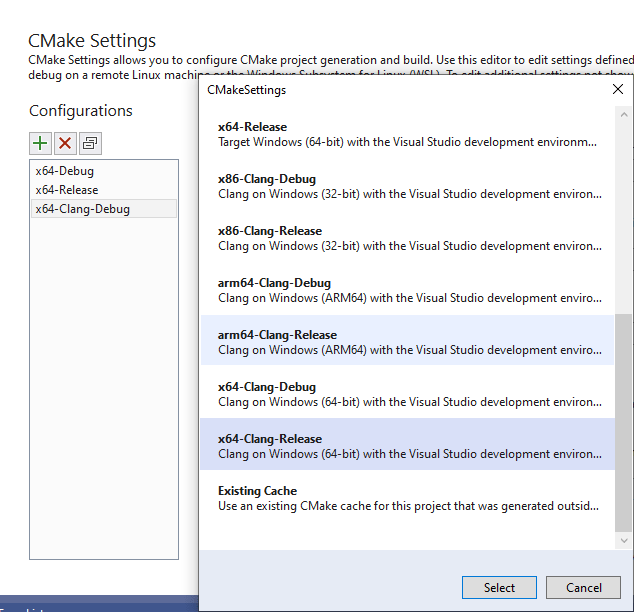
- Select the PLUS icon and choose x64-Clang-Debug and x64-Clang-Release as shown in the following figure. Save the changes.
- Select Edit Json, and then cut and paste the variables section from another configuration to the new Clang configurations as in the following example. Set the
XDKEditionTargetvalue to the one appropriate for your version of the GDK including QFE level.
- After saving all changes, select x64-Clang-Debug or x64-Clang-Release from the build configuration dropdown and build.
Using CMakeGDKExample
Use the following steps to enable Clang/LLVM with the CMakeGDKExample project.- Use Visual Studio’s Open Local Folder option to open the CMakeGDKExample folder.
CMakePresets.json integration
- In Solution Explorer, double-click the CMakePresets.json file.
XdkEditionTarget variable to match your current GDK edition.
- Select the
x64-Scarlett-Clangorx64-XboxOne-Clangpreset.
CMakeSettings.json integration
- In Solution Explorer, double-click the CMakeSettings.json file.
-
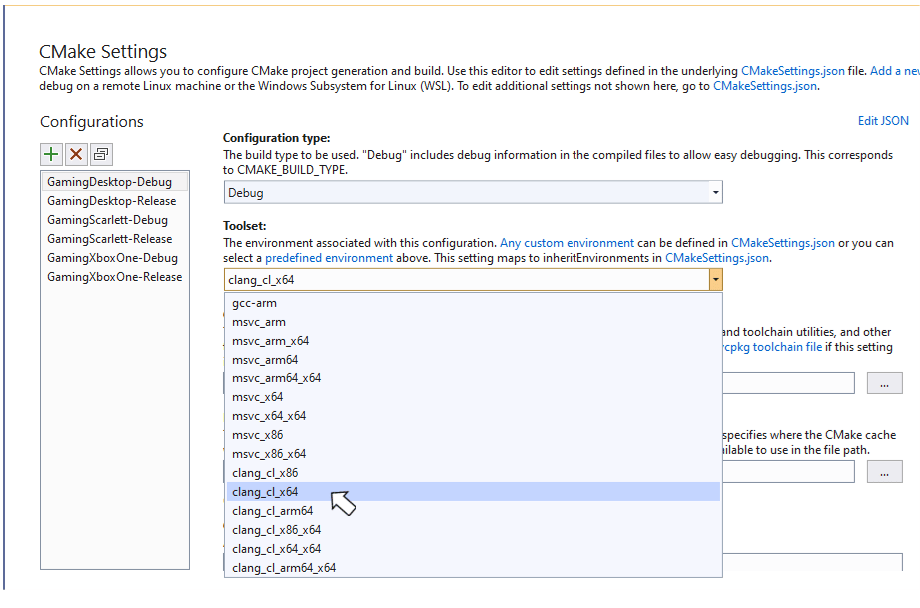
Select the configuration you want to edit. Set the Toolset value to
clang_cl_x64. Save and close.
-
For XBOX One and XBOX Series X|S configurations, select Edit Json and ensure the
XdkEditionTargetvariable matches your GDK edition and QFE level. - Select the desired value from the configuration dropdown and choose Rebuild All from the Build menu.
- Use File -> Open -> Project/Solution to select the generated solution and project. For example:
Obtaining support
For bug reporting for the Visual C++ compiler, use Report a Problem… in Visual Studio For bug reporting for the clang/LLVM compiler, use https://bugs.llvm.org/ For bug reports for the Microsoft Standard C++ Library (also known as STL), use https://github.com/microsoft/STL/issuesKnown issues
- The Clang/LLVM toolset is significantly more verbose than Visual C++, especially when you use
-Wall -Wextra -Wpedantic. At a minimum, suppress the following warnings either on the command line or as a#pragma:
-
The XBOX tooling only works with Microsoft PDBs for debugging symbols, and it doesn’t support the CodeView or DWARF debugging information that LLVM
.ldfiles emit. - Clang/LLVM’s implementation of Link-Time Code Generation is distinctly different from the Microsoft Visual C++ solution. You can’t mix code that uses Link-Time Code Generation between MSVC and clang/LLVM.
-
As of the October 2022 release and the Windows SDK (10.0.22621), C++ static libraries include eXtended Flow Control Guard (XFG) metadata. The
ldlinker before the v15 release always emits a harmless warning when you use these libraries:
-
vcpkg Package Manager MSBuild integration doesn’t work properly with
lld-linksince it uses wildcards in library filenames. You can work around this problem by setting<UseLldLink>false</UseLldLink>in the vcxproj. This problem doesn’t affect vcpkg CMake integration using VS project generators. - When building for XBOX with clang v18 in C++20 mode, two symbols are undefined when using WRL headers due to template evaluation changes.