Setting up PlayFab Authentication using Anonymous Login
This guide shows you how to implement PlayFab authentication using anonymous login APIs with server-side protection, focusing only on CustomID authentication using HTML5/JavaScript.Overview
On June 30, 2025, all newly created titles will have player creation via anonymous APIs disabled.
- Disabled Client-Side Player Creation:
- For newly created titles, all anonymous login APIs on the client side (
LoginWithCustomID,LoginWithAndroidDeviceID,LoginWithIOSDeviceID,LoginWithNintendoSwitchDeviceId) no longer automatically create new player accounts. Titles created before June 30, 2025 can disable anonymous login through Game Manager configuration. - Disabling client-side player creation prevents unauthorized account creation directly from unauthorized clients.
- Only existing players can log in through client-side APIs.
- For newly created titles, all anonymous login APIs on the client side (
- Enabled server-side player creation:
- Player account creation is now handled through server-side APIs (
LoginWithCustomID,LoginWithAndroidDeviceID,LoginWithIOSDeviceID,LoginWithNintendoDeviceId). - This ensures all account creation happens in a secure, controlled environment.
- Player account creation is now handled through server-side APIs (
Prerequisites
- A unique identifier for the player (CustomID)
- A registered PlayFab title
- Your PlayFab title’s secret key
- Familiarity with sign-in basics and best practices
- A server with a valid domain name to serve static HTML files
If you need help with setting up a server, see the Running an HTTP server for testing tutorial. Throughout this guide, we’ll assume your domain is
http://playfab.example.Authentication flow
- Server-side account creation:
- Use
Server/LoginWithCustomIDwith the server API to create new players - Requires a title secret key
- Reference: Server API - Login With Custom ID
- Use
- Client-side Login:
- Use
Client/LoginWithCustomIDwith the client API to log in existing players - Reference: Client API - Login With Custom ID
- Use
Implementation steps
1. Set up your development environment
- Download the JavaScript SDK from the JavaScript SDK documentation
- Install the required Node.js packages:
2. Server-side implementation (Node.js)
Keep your title secret key secure and never expose it in client-side code. The secret key should only be used in secure server environments.
3. Client-side implementation (HTML)
Configuring player creation settings
For existing titles
- Navigate to the PlayFab developer portal and select your title
- Go to Settings.
- Select the API Features tab.
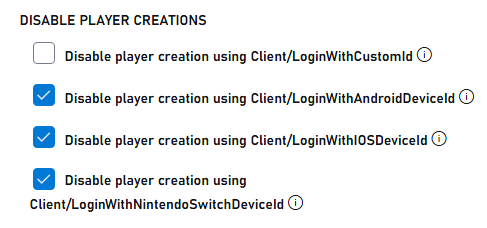
- Check the box to prevent new player accounts from being created via anonymous login APIs
For new titles
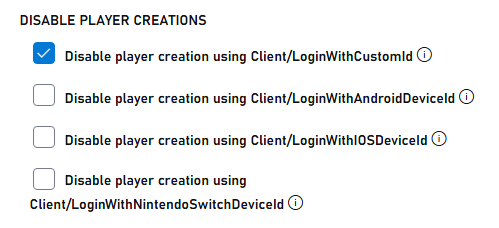
New titles have player creation via anonymous APIs disabled by default. To enable for testing, perform the following:- Navigate to the PlayFab developer portal and select your title
- Go to Settings.
- Select the API Features tab.
- Uncheck the box to allow new player accounts from being created via anonymous login APIs