Managing server capacity
A game servers’ ability to scale in response to player demand is dependent on the number of simultaneous virtual machine cores consumed by a multiplayer server game. If a game server runs out of VM cores, subsequent requests to allocate VMs will fail. Monitoring server capacity is essential to prevent capacity errors or diagnosing scaling problems due to player demand. This article describes the Quota Usage page and how to manage your game server for capacity issues. To access the quota usage page, navigate to the Multiplayer | Servers | Quota menu. The Quota Usage page surfaces peak core usage both in visualized charts and a tabulated format. The data powering these metrics is sampled every 60 minutes.Monitoring peak core usage per region
At the top of the quota usage page is a chart that visualizes peak core usage across the selected regions. Each plot represents the peak usage of the cores quota allocated to a region. The image below demonstrates the peak percentage of cores quota consumed on November 14, 2020 at 3:32 UTC. The South Central US region, for example consumed 27% of its quota at that specific date & time. This further detail of regional quota usage is surfaced in a tooltip when hovering over the plot lines. Users can select the regions plotted on the graph using the dropdown menu located on the top right corner. By default, the regions with the highest percentage of usage are selected.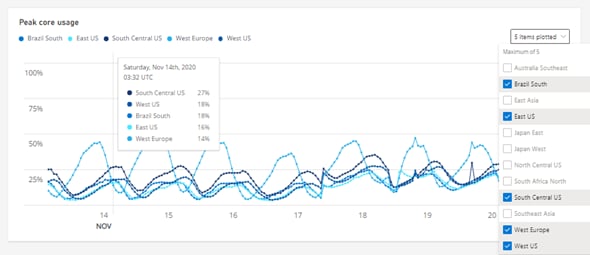
Monitoring peak core usage per build
The quota usage page also tabulates peak core usage for every build within a region. Like the visualization chart described above, the peak core usage table reports the percentage of peak quota core usage per VM SKU family per region. This level of detail can enhance the ability to anticipate or diagnose scaling issues quickly, efficiently, and easily. For example, the image below illustrates core usage across three regions: West Europe, South Central US, and West US. Each table row surfaces the peak core usage and total core quota allocated per region. West Europe is operating at a higher usage (47%) than South Central US (35%) or West US (28%). Expanding a VM family using the chevron button next to the family lists the builds of that region/family that includes their peak usage.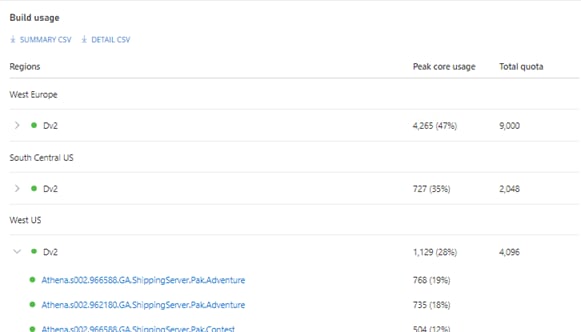
Exporting peak core usage
The peak core usage table supports the ability to export a CSV containing peak usage per build per region. The two export options are:- Summary CSV
- Detail CSV
Detail CSV
The detail CSV contains the data that also produces the peak core usage table but with additional data sampled at 1-minute intervals. Therefore a detailed export of a peak core usage table filtered for the last hour containing a single build deployed in one region produces approximately 60 rows. For example, one build and region row per minute. The schema of the CSV is:
NOTE: Like the core usage table, export data is also dependent on the time series selected at the top of the quota summary page.
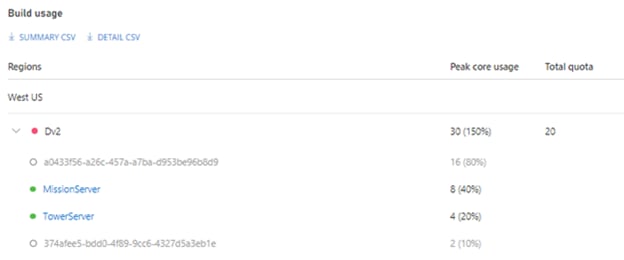
Detecting core quota problems
The Quota Summary page is a powerful resource to help detect core quota problems that impact a game server’s ability to scale. The following tips can be exercised to mitigate scaling problems in advance. Status indicators The build usage table exposes a status indicator next to the region name and the builds within the region. The indicators include: