
OS patch updates for Windows
PlayFab Multiplayers Servers managed Windows containers undergo a methodical OS patch update process to ensure game servers are operating with the latest security updates. Each month, Azure Compute certifies a Windows OS image that is integrated into Multiplayer Servers for developers to choose from the “Windows Server Core Preview” toggle during the build creation process. Developers are encouraged to test their non-production game servers built with the “Windows Server Core Preview” option.
Patch update cycle
The following image illustrates the OS patch level update cycle.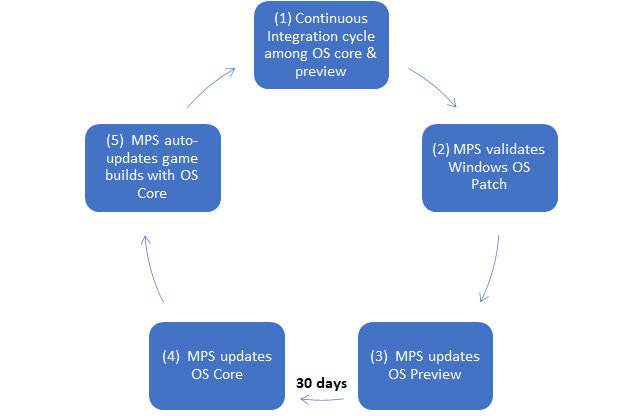
Best practices
- Developers are encouraged to create and test their non-production game server builds with the OS preview image option.
- Developers with a mature build and continuous integration and deployment process should take into consideration that OS image updates cycle every 30 days
Constraints
- The patch update process occurs monthly
- Developers can’t opt out of the monthly OS patch level updates
- The patch update process is only applicable to Windows managed containers and doesn’t apply to custom containers or Linux.
- Game server builds are immutable once created. Therefore, developers can’t toggle between OS image preview and OS image core. - A game server operating in production will be auto-updated to the latest OS core image version if the version that the build was made is older than the latest. This will be applied automatically for any new multiplayer server allocation request only.