Quickstart: GDK
Get started with the PlayFab Services SDK for the Microsoft Game Development Kit (GDK). Follow these steps to include the libraries in your project and try out the sample code for basic PlayFab functionality. This quickstart helps you make your first PlayFab API call using the GDK. Before continuing, make sure you’ve completed the steps in Quickstart: Game Manager, which ensure you have a PlayFab account and are familiar with the PlayFab Game Manager.Requirements
- A PlayFab developer account.
- Visual Studio 2019 or 2022 installed.
- For more information on Visual Studio requirements for GDK development, see SDK & tools requirements.
Project setup
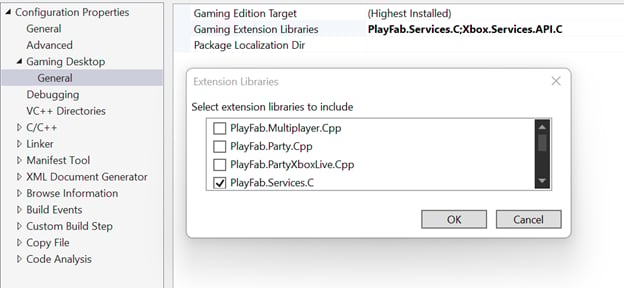
Similar to other GDK extension libraries, add the PlayFab Services SDK through project properties. In your project’s Configuration Properties, under Gaming Desktop > General, select Gaming Extension Libraries. From the prompt, check PlayFab.Services.C.