
What comes with your basic PlayFab Core Services package?
When MPS is enabled, you can use Multiplayer Servers for free in a limited capacity to evaluate the building of multiplayer server games.
The free evaluation mode also includes limit imposed on simultaneous cores activated in game servers. The paid modes, however, allow game developers to request additional server cores for their title.
The maximum simultaneous core quota in the free evaluation modes is:
This is typically not enough to launch a live game, but it can help you evaluate the service and get started.
To learn more about these different virtual machines, see Azure VM Sizes.
The amount of free evaluation capacity provided per month is based on your PlayFab billing mode and is also calculated based on core hours. This means that if you use a **single core ** Av2 series VM (like A1v2), you have 750 free hours. But if you use a **dual core ** Av2 series VM (like A2v2), you have 375 free hours instead—750 divided by 2 equals 375.
Consumption pricing for PlayFab Multiplayer Servers
Games that require Multiplayer Servers must purchase additional capacity through PlayFab’s consumption pricing plan. Below are the PlayFab resources that are used to bill for server utilization:- Virtual machine instance hours - The hours of virtual machine time that your game servers are utilizing. Different virtual machine and container selections are priced at different rates. See Multiplayer Servers detailed price sheet for more information.
- Network egress - The volume of data transmitted by your game servers to the Internet (in gigabytes). Network egress is billed at different rates depending on the originating data center.
Estimating cost with an example
The primary inputs into your multiplayer server deployment are:- The amount of multiplayer activity (total user-minutes).
- The number of users playing in a single session.
- Compute, storage, and networking resources are required for a session.
- Overhead for stand-by sessions.
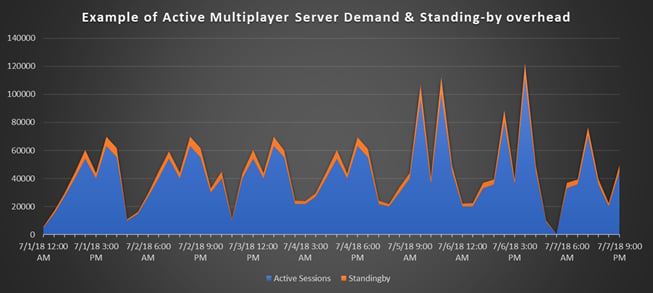
- Standing-by servers - Players don’t want to wait for servers, and PlayFab targets a 3-second response time for fulfilling a server request. PlayFab maintains a set of standing-by servers to ensure that servers are immediately available. As this standing-by pool is consumed by new allocations, PlayFab initializes new standing-by sessions. The number of standing-by sessions required is dependent on how fast new sessions are requested during peak utilization, and how quickly they can be created and initialized.
- Virtual machine fragmentation - If you host multiple sessions on a single virtual machine, there can sometimes be extra stand-by capacity due to fragmentation. In our example of three sessions per virtual machine, a virtual machine might have only one active session, and the remaining two “spaces” are added to the stand-by pool. Until the active session is terminated, the virtual machine must stay online - even if the additional stand-by capacity isn’t needed.
Typically, these sources of overhead increase the required compute-hours by 20%.
Calculating networking
Network egress can be a substantial expense, especially for large multiplayer sessions with many simultaneous connected players (32+). During development and testing, run your server locally to get an estimate of its network utilization during play.How to pay
PlayFab offers three pathways for billing.- Billing through credit card.
- Billing through PlayFab invoicing. This is ideal for many professional projects, but requires you to contact our customer services group to get set up.
- Billing through Azure & Microsoft Enterprise Agreements. This is ideal for organizations that may have a volume deal with Azure or another Microsoft product line. Contact our customer services group or your Azure solutions specialist to learn more.
- PlayFab Essential Services
- PlayFab Multiplayer Servers