
- Overview of audio architecture
- Audio and XBOX One hardware
- Compression formats
- Audio and the XBOX One app model
- XBOX One audio libraries
- Wrap-up: getting started today
Overview of audio architecture
In addition to general CPU power, which can be used for decoding, synthesis, rendering, and other tasks, XBOX One provides several hardware components (as shown in figure 1) that are dedicated to audio processing and that can address the entire unified memory space. Figure 1. An illustration of the hardware-accelerated audio components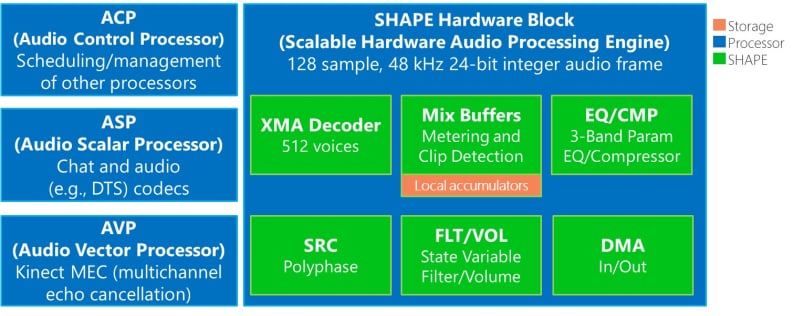
- The Scalable Hardware Audio Processing Engine (SHAPE) makes up the majority of the audio functionality on XBOX One, although the other processors also contribute significant features.
- The Audio Control Processor (ACP) provides state management and scheduling.
- The Audio Scalar Processor (ASP) supports scalar float and vector integer operations.
- The Audio Vector Processor (AVP) supports vector float operations and is designed primarily for Multichannel Echo Cancellation (MEC).
SHAPE
SHAPE is the core hardware that’s dedicated to audio processing. SHAPE performs many of the basic operations that are commonly required on a per-voice basis. Using SHAPE, you can reduce the CPU impact - even for high polyphony and complex signal routings - and still provide the flexibility of SHAPE-CPU data interchange if a title chooses to custom-process a digital signal or to perform analysis or software synthesis. SHAPE operates on 128-sample blocks, with each sample supporting 24-bit integer resolution or 32-bit float, when used by the CPU. At 48 KHz, this represents a 2.67-ms audio frame, which provides a timing resolution that’s higher and a latency that’s lower than those possible with the 256-sample block on XBOX 360. SHAPE offers the following six fixed-function blocks that are focused on common audio tasks.- XMA decoder XMA provides concurrent decodes of 512 XMA-formatted voices. It’s a perceptual codec that was developed for XBOX 360, and it offers user-tunable quality and compression that’s typically between 6:1 and 14:1.
- SRC The high-quality, dedicated, polyphase Sample Rate Convertor (SRC) block allows for high-performance, high-quality frequency resampling of 512 mono channels of audio data. SRC can be used for format conversion, Doppler effect, or pitch variation.
- Mix buffers Mix buffers are the dedicated accumulators for 128 in-place mix channels. They don’t need to access memory, and they have a total of 8192 channels that are available virtually. Mix buffers also provide coarse metering and detection of clipping for debugging and monitoring purposes.
-
FLTVOL
The FLTVOL module provides volume scaling and an implementation of a state-variable filter for 2560 voices or mixes. It’s analogous to the software-exposed
XAudio2per-voice filter that’s available on Windows and XBOX 360. The filter can provide low pass, high pass, band pass, and notch filtering. The filter exposes Q and cutoff/center frequency parameters. Most commonly, it’s used for distance and occlusion modeling. - EQ/CMP The EQ/CMP module provides up to 512 channels of three-band equalization and dynamic-range compression. The EQ consists of three serially cascaded, biquad filters. The compressor has a hard-knee response and supports the sidechain and expander functionality.
- DMA SHAPE has dedicated Direct Memory Access (DMA) hardware to transfer audio data to and from the unified memory space. DMA makes scenarios possible, such as including transferring without a sample-rate converter, transferring of final mix channels, and CPU-based processing in the middle of a SHAPE-based audio graph.
ACP
ACP provides state management and scheduling of all other audio hardware components on the north bridge. It’s unnecessary to involve the CPU in intra-frame processing or in the synchronization or latency that it might introduce.ASP
ASP supports scalar float and vector integer operations. Provided in the hardware are voice-chat codecs: those that manage wireless communication between a voice-chat headset and the console and those that are used to compress and decompress SILK codec voice data for networked voice communication.AVP
AVP supports vector float operations and is designed primarily for MEC and other noise reduction for the next-generation Kinect audio input. AVP supports speech recognition and the chat/arbitrary audio input use. MEC and other noise-reduction processes provide a more intelligible stream of the user’s spoken audio data, even from a talk microphone that’s positioned closer to the output speakers than to the user.Audio and XBOX One hardware
The audio output pipeline on XBOX One eliminates the digital-to-analog converter (DAC) that’s found in previous-generation consoles. All audio is output strictly in the digital realm through HDMI 1.4a or as S/PDIF optical output. HDMI 1.4a allows for high-fidelity, linear, 7.1-channel Pulse Code Modulation (PCM) to be transmitted from the console. Titles default to an output sampling rate of 48 KHz and a bit depth of 24 bits. XBOX One can also support up to four simultaneous outputs to stereo headsets. Each output can represent unique multichannel mixes that are downmixed as required by the output format, such as a headset or the S/PDIF output. XBOX One accepts audio input from a variety of sources, such as the Kinect microphone array, voice chat headsets, and cloud-based resources. In addition, audio can be algorithmically generated through CPU-based computation and manipulated in real time on a CPU, through the SHAPE hardware components, or through both of these methods.Compression formats
XBOX One supports hardware decompression for XMA2, which provides significant storage, bandwidth, and memory reductions over uncompressed PCM.XAudio2 also offers software decoding support for both xWMA and Adaptive Differential Pulse Code Modulation (ADPCM). Although the computation for the ADPCM format has low overhead, as a non-perceptual codec, ADPCM can express noticeable artifacts at lower sampling rates.
Both xWMA and XMA2 have their origins in the codecs developed for Windows Media Audio (WMA) and both have been developed specifically for XBOX games. The subset of the available codecs and parameters used by XMA2 is smaller than the subset used by xWMA. While both xWMA and XMA2 were developed for XBOX, they’re not interchangeable: the headers for each file format differ, and the formats are incompatible with PC versions of Windows. The codecs used for XMA2 and xWMA are slightly different, too, so each will have its own artifacts from the compression system that’s used.
MP3, OGG, and other audio formats for game assets can be provided through title or middleware software codecs that are running on a CPU.
Audio and the XBOX One app model
While in the foreground, an app has full access to the SHAPE hardware. However, when pushed into the background-pinned, picture-in-picture, or some other scenario, the app relinquishes hardware control. By default, its hardware is suspended and it resumes when the title returns to the foreground. This is also true for Exclusive Resource Apps (ERA)s where the software graph is suspended. A title has an option to tear down its audio graph and reconstruct it upon resume. Some titles, particularly Shared Resource Apps (SRAs) that play background music, such as streaming radio, might choose to have some aspects of audio continue to play even while it’s paused. For these scenarios, titles should closely evaluate whether to attempt a seamless transition from hardware to software rendering, or to always play audio that’s intended for background playback via a software-only pipeline. This has implications for compression formats and CPU costs. XMA-compressed assets, for example, require the use of SHAPE hardware and thus won’t be decodable for a background app. For a title that chooses to allocate CPU resources, theXAudio2 audio engine provides software pathways for many functions. Where practical, these functions mimic hardware capabilities, but some computation-intensive processing is either unavailable or implemented differently in software. Titles transitioning from hardware processing to software processing based on the state of an app might want to consider these differences when planning their audio pipelines as shown in the following table.
| Feature| XBOX One hardware capability | XBOX One software capability | Equivalent? |
| --- | --- | --- | --- | --- | --- | --- | --- | --- |
| Sample rate conversion| SRC, polyphase| XAudio2 linear interpolation| No |
| Parametric EQ| EQ/CMP, three-band EQ| Simple one-band EQ or custom digital signal processing (DSP)| No |
| Compressor/limiter| EQ/CMP, hard-knee, sidechain, and expander capabilities| Custom DSP| No |
| Filtering| FLTVOL, state-variable filter| XAudio2 state-variable filter, single-pole LPF, or custom DSP| Yes |
| Mixing| Mix buffers; includes clip detection and metering| Software mixing; custom DSP for clip detection and metering| Yes, for mixing |
XBOX One audio libraries
XBOX One supports two audio-rendering APIs for typical game use, along with a variant of the Windows 8 Media Foundation API for playback of user music.-
XAudio2is a game-focused audio library that’s already available on XBOX 360 and Windows: from Windows XP to Windows 8. We recommendXAudio2for development of most titles. - The Windows Audio Session API (WASAPI) can be used for any custom, exclusively software-implemented pipeline. WASAPI provides only audio-endpoint functionality. The client must implement decompression, sample rate conversion, mixing, and digital-signal processing, as well as interactions with the audio hardware components on XBOX One. Most typically, WASAPI is used by audio middleware solutions.
The Microsoft Cross-Platform Audio Creation Tool (XACT) and
DirectSound aren’t supported in the XBOX One environment. Titles that previously used these technologies should consider the solutions identified in this topic or use approved XBOX One audio middleware options.Wrap-up: getting started today
Title content creators and implementers who are beginning to develop for XBOX One might consider the following when they start to plan.- Plan for 7.1 audio. This encompasses the panning and positioning of prerendered and real-time content. Consider how your title will use each audio channel.
- Explore and understand audio compression options. Understand the acoustic and size differences for XMA, xWMA, and ADPCM compression. To understand expected budget targets on XBOX One, evaluate the quality and bit rate settings for your content.
- Consider the usage patterns for hardware-accelerated DSP, particularly if your title intends to implement simulation of occlusion or obstruction.