
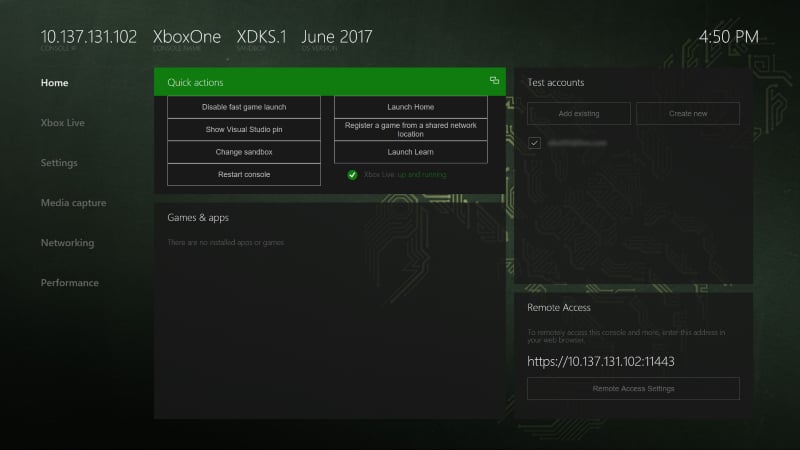
Quick actions
The Quick actions pane contains the following buttons and the status of XBOX services. These buttons provide you with quick access to frequently performed actions.- Disable/Enable fast game launch: Enables fast game launch and leaves the Title OS running when you launch a game, which significantly reduces startup time
- Show Visual Studio pin: Shows a code that you can use to pair the development console with the Visual Studio installation on your development PC
- Change sandbox: Changes the sandbox that the console is in
- Restart console: Restarts the development console
- Launch Home: Launches the retail Home screen
- Register a game from a shared network location: Registers a game from a shared network location
- Launch Learn: Opens the Developer Education app where you can watch videos about XBOX development
Games & apps
Use the Games & apps pane to perform the following actions.- View the list of games and apps that are installed on the development console.
- Quickly launch games and apps.
- View the process lifetime management (PLM) state of games and apps.
- Change PLM states from a context menu.
- Register and run a title from a remote network share. For more information, see Deploying your title to your XBOX Development Kit.
- Configure an overlay folder for a game. For more information, see Managing overlay folders.
Test accounts
Use the Test accounts pane to perform the following actions.- View the list of users that are registered on the console.
- Sign a user in or out with a single click.
- Add users and guest accounts.
- View details of user and guest accounts.