
Drop tables (Legacy Economy)
Economy v1 APIs are in maintenance mode and will not be receiving any new features, only bug fixes. The v1 APIs will be maintained for the foreseeable future. See the Economy v2 Overview to learn more about the next version of PlayFab Economy!
- We assume that you’re already familiar with Catalogs, Inventory, and the PlayFab Game Manager.
- You must have a primary catalog - which contains standard, non-bundle/non-container items.
- You must have defined at least one virtual currency, which you’ll use as a “free” in-game currency.
Once you have set up a similar set of items to work with in your catalog, we’re ready to build the drop tables.
Building drop tables
In Game Manager:- Navigate to your Title.
- Select Economy from the menu on the left.
- Go to the Catalogs tab and choose your primary catalog.
- Select Drop Tables.
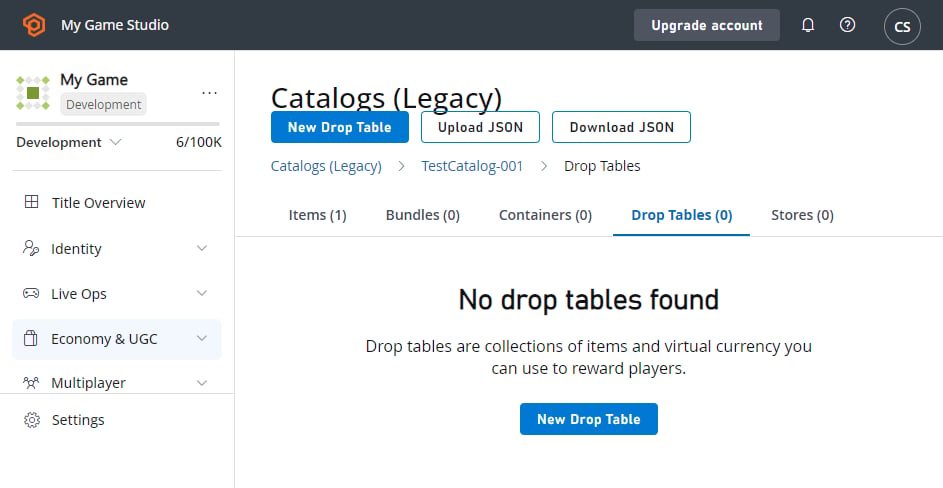
- Select the New Drop Table button.
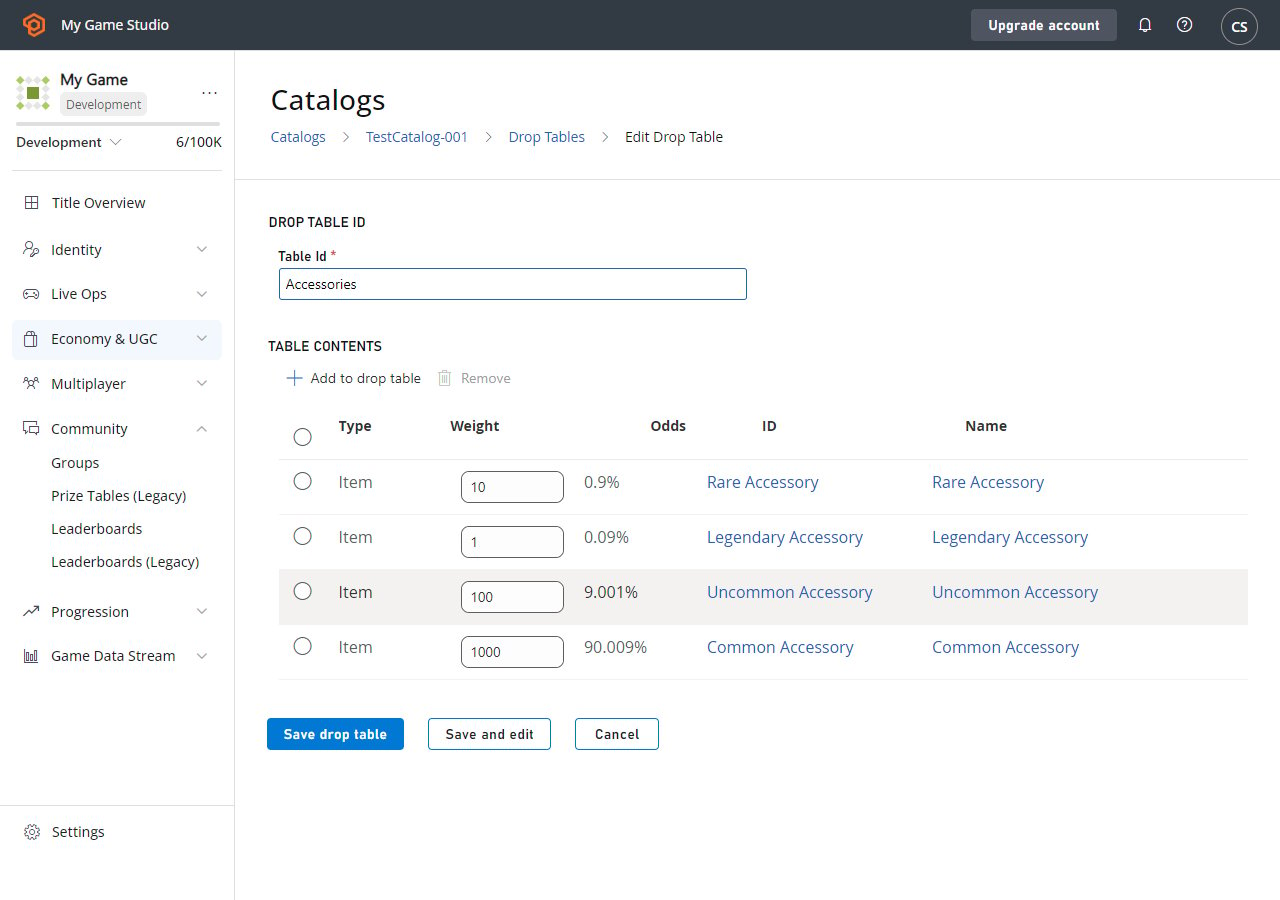
- Set the Table Id to Accessories.
- Select ADD TO DROP TABLE. The Pick multiple items pop-up will appear.
-
Add these items by selecting the Add button next to their ID:
- Common Accessory
- Uncommon Accessory
- Rare Accessory
- Legendary Accessory
- Select the Close button.
-
Adjust the Weight values for the items according to rarity:
- Common: 1000
- Uncommon: 100
- Rare: 10
- Legendary: 1
- Select SAVE DROP TABLE.
- Select the New Drop Table button.
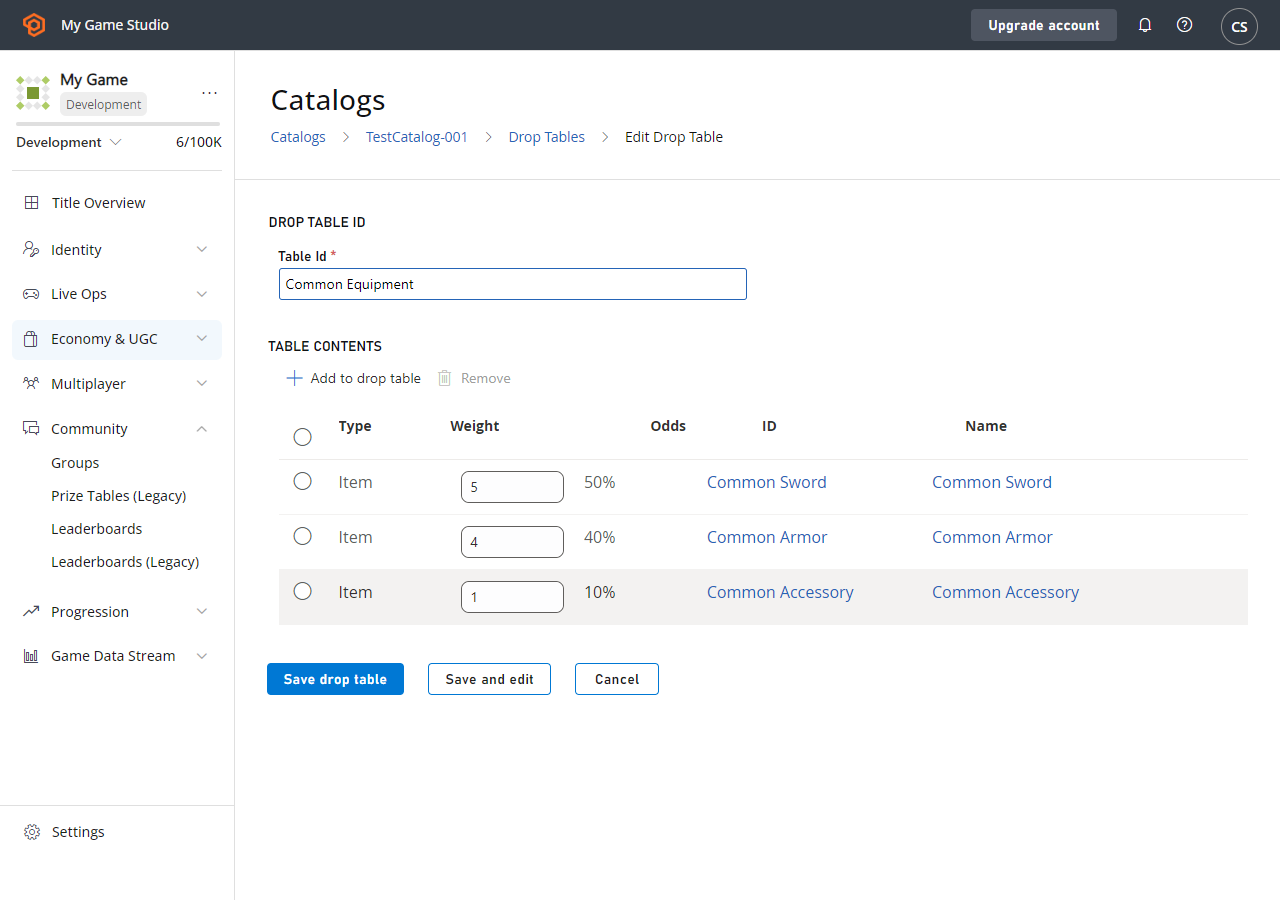
- Set the Table Id to Common Equipment.
- Select ADD TO DROP TABLE. The Pick multiple items pop-up will appear.
-
Add these items by selecting the Add button next to their ID:
- Common Accessory
- Common Armor
- Common Sword
- Select the Close button.
-
Adjust the Weight values for the items according to how the Common Equipment options will be in that slot:
- Common Accessory: 1
- Common Armor: 4
- Common Sword: 5
- Select SAVE DROP TABLE.
Using drop tables
You can access drop tables programmatically using these two PlayFab Server API methods: Using GetRandomResultTables, you can read the raw drop table data that we’ve entered into Game Manager.GetRandomResultTables does not roll random values or award results. The API lets you read the data and parse the information however you see fit.Option 1
itemId that can be used to generate a single item, rolled according to the weights provided.
You can then make a second call, which creates the item and gives it to the player.
Option 2
Advanced drop table usage (setting up a loot crate)
Drop tables can be linked from bundles and containers. Bundles are a great option for virtual currency stores, where a single purchase yields a stack of random items. For example, let’s say we have an 11 Item bundle with specific drop rules. In this case, it’s a customer-facing selling point that we’ll guarantee one legendary item. We’ll also restrict it, so that the player can’t get too lucky, and receive 11 legendaries.New Drop Table
Let’s build a drop table that can literally drop anything - in fact, we’ll actually call it Anything. When creating this drop table, give it other drop tables as its options (on the Pick multiple items pop-up, select the Drop Tables tab to add other drop tables), and assign them appropriate weights.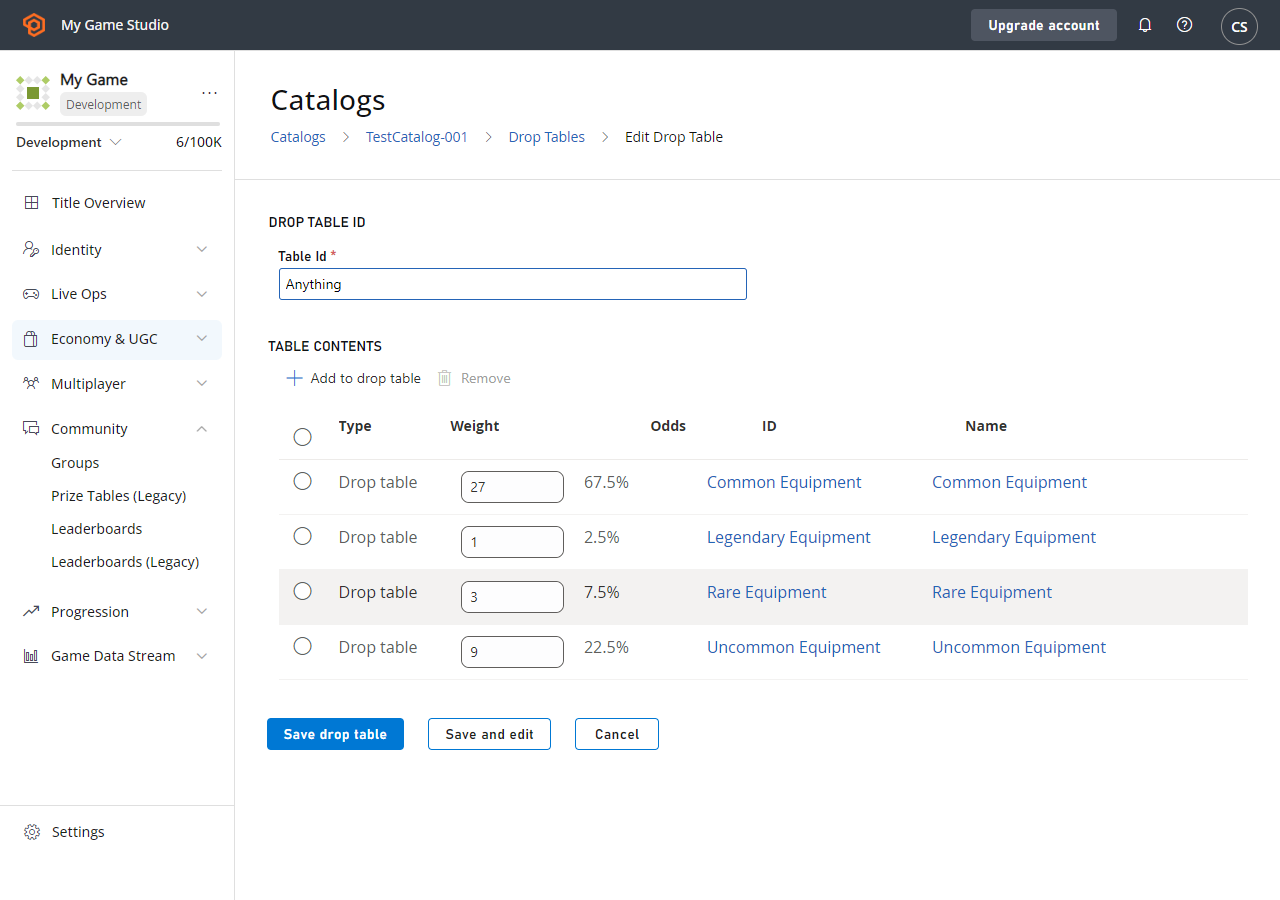
Adding a bundle
At this point, we’re done with drop tables and we’ll add a Bundle.- Select Economy from the menu on the left.
- Go to the Catalogs tab and choose your primary catalog.
- Select Bundles and choose New Bundle.
- Set the Item Id to 11-Item Drop, select Consumable and choose By time 15 Seconds.
- Select ADD TO BUNDLE.
- In the Pick multiple items pop-up, select the Drop tables tab.
- Add the drop tables by selecting the Add button next to their ID.
- Set the Quantity fields to the values shown in the image below.
- Select SAVE BUNDLE.
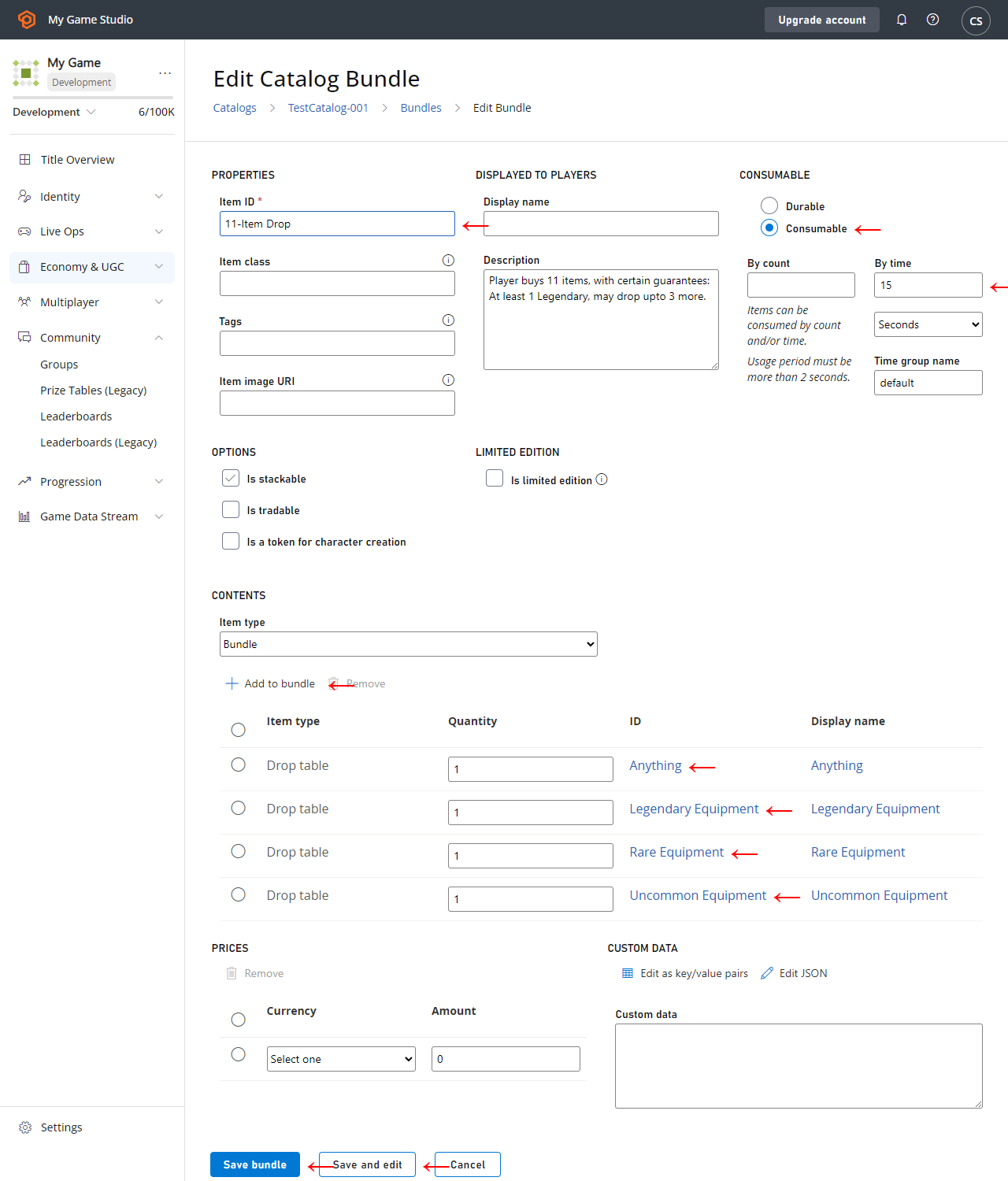
- All items of any kind must have an Item ID.
- A Bundle counts as its own Item, and its contents are delivered at the same time it’s granted. For this reason, we’re making the Bundle itself consumable, and it expires 15 seconds after delivery.
- We add different Drop tables in different quantities to ensure that 11 Items are delivered, but different items roll on different tables.
- First, we guarantee at least 1 legendary item, so the first slot will roll on Legendary Equipment.
- The next 3 slots roll on Anything, which can roll more Legendaries, or roll less desirable common equipment. These rolls will define a good roll vs. a bad one, as these three items can vary widely.
- Finally, we fill in the remaining slots with guaranteed Rare and Uncommon items, ensuring that an 11 Item roll isn’t too good or bad.