
Coordinate system
Devices should report device acceleration as a Y-up right-handed system. Angular velocity follows the right-hand rule about these axes.| Gamepad coordinate system | Handheld coordinate system |
|---|---|
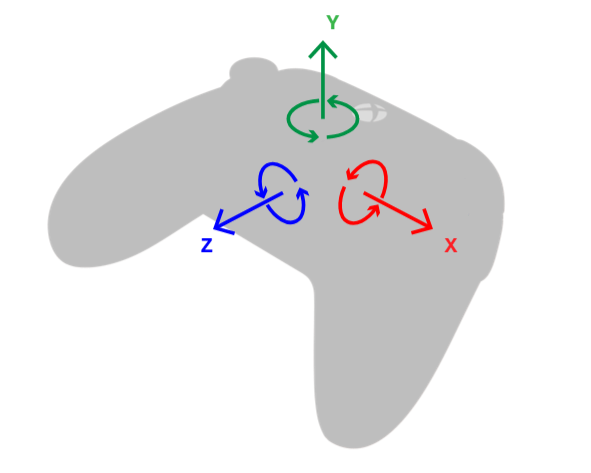 | 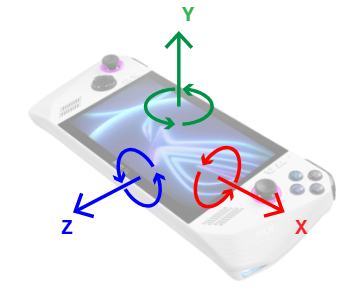 |
- Device laying flat on table:
- Angular velocity at rest is
- From there, lift device upwards: increases
- From there, drop device: decreases
- Rotate device so top edge is in air and bottom edge is on surface:
- While in motion, angular velocity X becomes positive:
- Go back to flat.
- Rotate device so left edge is in air and right edge is on surface:
- While in motion, angular velocity Z becomes negative:
- Go back to flat.
- Rotate device clockwise (opposite to right-hand rule)
- While in motion, angular velocity Y becomes negative:
Remarks
Noise from device vibrations
Low-frequency rumbling or buzzing in the device (such as those caused by haptics) may induce gyrometer noise and affect precision.- Possible hardware mitigation: mechanical isolation of the sensor from the haptics, via intentional placement of sensor or surrounding sensor with vibration-dampening padding material
- Possible software mitigation: use of a low-pass filter
Registry keys
[!IMPORTANT] If your device must pass Windows Hardware Quality Lab certification, add the registry key described below. GameInput will transform the device’s WHQL-compliant output to match the expected output for game developers. Mappings for a device with Vendor ID (VID) VVVV, Product ID (PID) PPPP, Usage Page UUUU, and Usage ID XXXX will be read out from this location in the registry:
[!TIP]
The following subkeys are meant for manufacturers of devices that have already gone to market. If the device has not yet
released, it should correctly report the coordinate system described above and should pass the relevant tests.