
Wheel
一组安排在内部和外部圆形区域内的触控控件。属性
inner - object,可选。最多四个控件,安排在轮盘的内部部分。
outer - array,可选。最多包含 8 个位置的数组,可由控件和/或控件簇填充,这些位置围绕由 wheel 表示的圆形区域的内部区域布置。
outer区域的第一个位置从轮盘顶部(约 1 点方向)开始,顺时针继续。- 可以使用
null跳过一个位置。 - 控件簇始终占用 8 个可用位置中的 2 个——它所指定的位置和随后的一个位置。
备注
玩家可以调整
wheel 控件的大小和旋转。根据玩家的偏好进行自定义时,玩家可以同时更改轮盘的大小和旋转。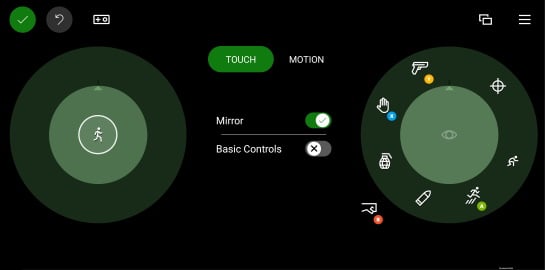
inner区域应用于放置该只手最应易于访问的控件。- 左侧的
inner位置应用于玩家的主要移动控件。 - 需要玩家移动手才能触及的
outer位置应用于不常访问的命令。
示例
示例 1:中央位置有操纵杆且每个外部位置都有自定义按钮的示例轮盘
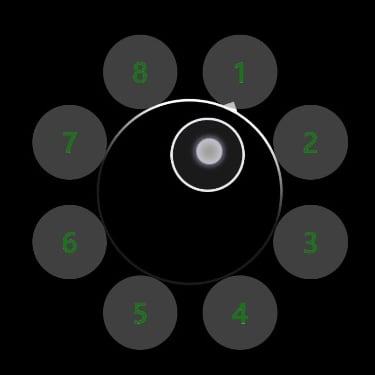
"left": {
    "inner": [
        {
            "type": "joystick",
            "axis": {
                "input": "axisXY",
                "output": "leftJoystick",
                "deadzone": {
                    "threshold": 0.05,
                    "radial": true
                }
            }
        }
    ],
    "outer" : [
        {
            "type": "button",
            "action": "gamepadX",
            "styles": {
                "default" : {
                    "faceImage" : {
                        "type": "asset",
                        "value": "one"
                    },
                    "background" : {
                        "type": "color",
                        "value": "#80808080"
                    }
                }
            }
        },
        {
            "type": "button",
            "action": "gamepadX",
            "styles": {
                "default" : {
                    "faceImage" : {
                        "type": "asset",
                        "value": "two"
                    },
                    "background" : {
                        "type": "color",
                        "value": "#80808080"
                    }
                }
            }
        },
        {
            "type": "button",
            "action": "gamepadX",
            "styles": {
                "default" : {
                    "faceImage" : {
                        "type": "asset",
                        "value": "three"
                    },
                    "background" : {
                        "type": "color",
                        "value": "#80808080"
                    }
                }
            }
        },
        {
            "type": "button",
            "action": "gamepadX",
            "styles": {
                "default" : {
                    "faceImage" : {
                        "type": "asset",
                        "value": "four"
                    },
                    "background" : {
                        "type": "color",
                        "value": "#80808080"
                    }
                }
            }
        },
        {
            "type": "button",
            "action": "gamepadX",
            "styles": {
                "default" : {
                    "faceImage" : {
                        "type": "asset",
                        "value": "five"
                    },
                    "background" : {
                        "type": "color",
                        "value": "#80808080"
                    }
                }
            }
        },
        {
            "type": "button",
            "action": "gamepadX",
            "styles": {
                "default" : {
                    "faceImage" : {
                        "type": "asset",
                        "value": "six"
                    },
                    "background" : {
                        "type": "color",
                        "value": "#80808080"
                    }
                }
            }
        },
        {
            "type": "button",
            "action": "gamepadX",
            "styles": {
                "default" : {
                    "faceImage" : {
                        "type": "asset",
                        "value": "seven"
                    },
                    "background" : {
                        "type": "color",
                        "value": "#80808080"
                    }
                }
            }
        },
        {
            "type": "button",
            "action": "gamepadX",
            "styles": {
                "default" : {
                    "faceImage" : {
                        "type": "asset",
                        "value": "eight"
                    },
                    "background" : {
                        "type": "color",
                        "value": "#80808080"
                    }
                }
            }
        }
    ]
}
示例 2:具有方向键和地图按钮的示例左轮盘
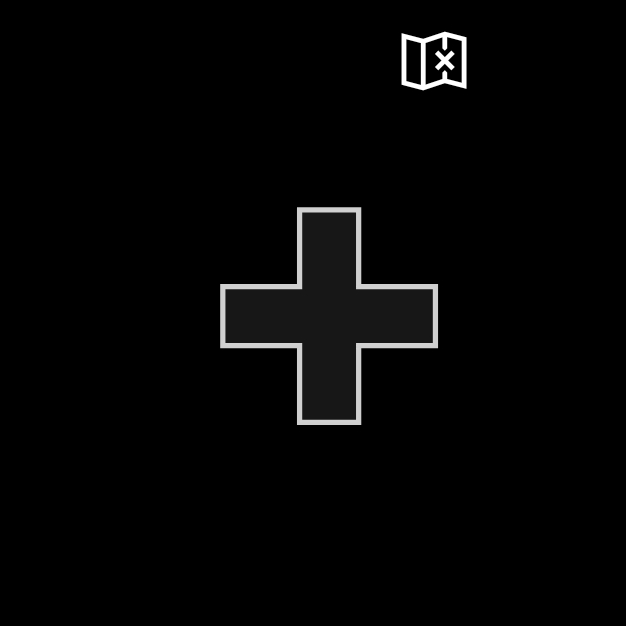
 "left": {
    "inner": [
        {
            "type": "directionalPad",
            "scale": 1.5
        }
    ],
    "outer" : [
        {
            "type": "button",
            "action": "leftBumper",
            "styles": {
                "default" : {
                    "faceImage" : {
                        "type": "icon",
                        "value": "map"
                    }
                }
            }
        },
        null,
        null,
        null,
        null,
        null,
        null
    ]
}
示例 3:具有三个按钮的示例右轮盘
按钮对齐到右手最容易触及的位置。outer 区域中的按钮排成一簇,具有较大的点击区域。
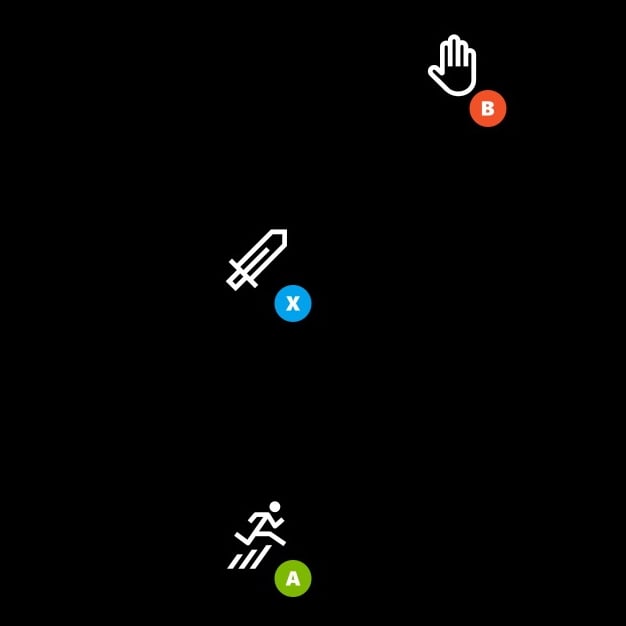
"right": {
    "inner": [
    {
        "type": "button",
        "action": "gamepadX",
        "styles": {
        "default": {
            "faceImage": {
            "type": "icon",
            "value": "sword"
            }
        }
        }
    }
    ],
    "outer": [
    [
        {
            "type": "button",
            "action": "gamepadB",
            "styles": {
                "default": {
                "faceImage": {
                    "type": "icon",
                    "value": "interact"
                }
                }
            }
        },
        null
    ],
    null,
    [
        {
            "type": "button",
            "action": "gamepadA",
            "styles": {
                "default": {
                "faceImage": {
                    "type": "icon",
                    "value": "jump"
                }
                }
            }
        },
        null
    ]
    ]
}
另请参阅
Touch Adaptation Kit 参考Layout