This guide discusses advanced techniques. If applied incorrectly, it is possible to completely disable client access to your title using this feature.
Policy control and structure
Titles use the PlayFab Admin API calls to retrieve and update the access policies. The two specific calls that you use to set the API access policy are GetPolicy and UpdatePolicy. For more information about the Admin API calls, see PlayFab API Reference. To use the Admin API you must provide the developer secret key associated with your title. The Developer key is used to authorize your Title to make Admin API calls. For information about retrieving your secret key, see Secret key management. Each policy contains a list of statements, which act as rules for one or more PlayFab resources. PlayFab defines a default set of policy statements that allows all policies. If you delete this set of policy statement with out replacing it, your Title will not be able to call the Client APIs. The default PlayFab policy statements:- Resource - A string that uniquely identifies one or more PlayFab resources. To describe the API resource, use the convention shown below.
pfrn:api--/API-GROUP/API-CALLSpecify the Client API as theAPI-GROUP:Client,Server, orAdmin. ReplaceAPI-CALLwith an API name such asConfirmPurchase,LoginWithTwitch, orReportPlayer. A resource string supports wildcards. The following resource string matches any resource.pfrn:api--* - Action - A string that describes an operation to perform on the resource. Use
*to match any operation. - Effect - A string that specifies a rule definition. Use
AlloworDenyto allow or deny operations over the resource. - Principal - A string that uniquely identifies the class of the user. Use
*to match any user. - Comment - A user-defined string that provides more information about the policy statement.
- ApiConditions - An optional object that defines advanced rule conditions, for example - Encryption and Signed Headers.
DeleteCharacterFromUser call:
API access policy example
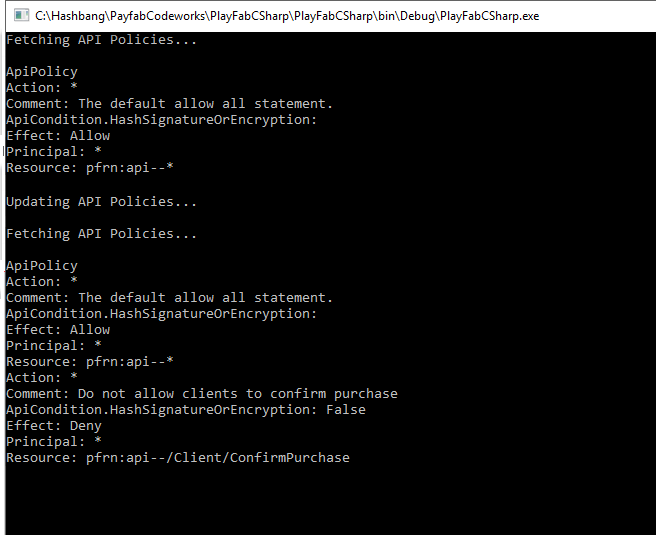
The following code sample shows basic operations with policies. The code performs the following actions:- Retrieves and logs the existing Policy.
- Updates the policy.
- Retrieves and logs the existing Policy again.