
Wheel
안쪽 및 바깥쪽 원형 영역에 배치된 터치 컨트롤 세트입니다.속성
inner - object, optional. 휠의 inner 부분에 배치되는 최대 4개의 컨트롤입니다.
outer - array, optional. wheel이 나타내는 원형 영역의 안쪽 영역 주변에 배치되는 컨트롤 및/또는 control cluster로 채울 수 있는 최대 8개의 슬롯 배열입니다.
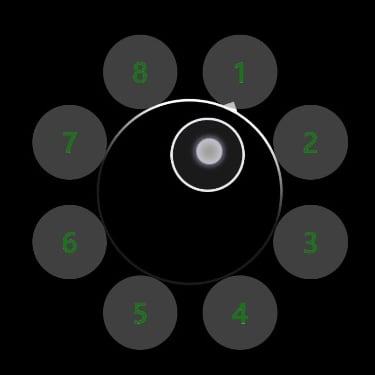
outer영역의 첫 번째 슬롯은 휠의 상단(약 1시 방향)에서 시작하여 시계 방향으로 이어집니다.- 슬롯은
null로 건너뛸 수 있습니다. - control cluster는 사용 가능한 8개의 슬롯 중 2개를 항상 차지합니다. 즉, 지정된 슬롯과 그 다음 슬롯을 차지합니다.
설명
wheel 컨트롤의 크기와 회전은 플레이어가 조정할 수 있습니다. 자신의 취향에 맞게 커스터마이즈할 때, 플레이어는 휠의 크기와 회전을 모두 변경할 수 있습니다.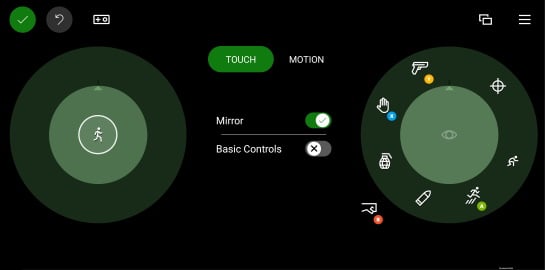
inner영역은 해당 손으로 플레이어에게 가장 접근하기 쉬운 위치에 놓을 컨트롤을 배치하는 데 사용해야 합니다.- 왼쪽의
inner슬롯은 플레이어의 주된 이동 컨트롤에 사용해야 합니다. - 플레이어가 손을 움직여야 도달할 수 있는
outer슬롯은 자주 사용하지 않는 명령에 사용해야 합니다.
예제
예제 1: 중앙에 조이스틱을, 각 outer 슬롯에 사용자 지정 버튼을 배치한 예제 휠
"left": {
    "inner": [
        {
            "type": "joystick",
            "axis": {
                "input": "axisXY",
                "output": "leftJoystick",
                "deadzone": {
                    "threshold": 0.05,
                    "radial": true
                }
            }
        }
    ],
    "outer" : [
        {
            "type": "button",
            "action": "gamepadX",
            "styles": {
                "default" : {
                    "faceImage" : {
                        "type": "asset",
                        "value": "one"
                    },
                    "background" : {
                        "type": "color",
                        "value": "#80808080"
                    }
                }
            }
        },
        {
            "type": "button",
            "action": "gamepadX",
            "styles": {
                "default" : {
                    "faceImage" : {
                        "type": "asset",
                        "value": "two"
                    },
                    "background" : {
                        "type": "color",
                        "value": "#80808080"
                    }
                }
            }
        },
        {
            "type": "button",
            "action": "gamepadX",
            "styles": {
                "default" : {
                    "faceImage" : {
                        "type": "asset",
                        "value": "three"
                    },
                    "background" : {
                        "type": "color",
                        "value": "#80808080"
                    }
                }
            }
        },
        {
            "type": "button",
            "action": "gamepadX",
            "styles": {
                "default" : {
                    "faceImage" : {
                        "type": "asset",
                        "value": "four"
                    },
                    "background" : {
                        "type": "color",
                        "value": "#80808080"
                    }
                }
            }
        },
        {
            "type": "button",
            "action": "gamepadX",
            "styles": {
                "default" : {
                    "faceImage" : {
                        "type": "asset",
                        "value": "five"
                    },
                    "background" : {
                        "type": "color",
                        "value": "#80808080"
                    }
                }
            }
        },
        {
            "type": "button",
            "action": "gamepadX",
            "styles": {
                "default" : {
                    "faceImage" : {
                        "type": "asset",
                        "value": "six"
                    },
                    "background" : {
                        "type": "color",
                        "value": "#80808080"
                    }
                }
            }
        },
        {
            "type": "button",
            "action": "gamepadX",
            "styles": {
                "default" : {
                    "faceImage" : {
                        "type": "asset",
                        "value": "seven"
                    },
                    "background" : {
                        "type": "color",
                        "value": "#80808080"
                    }
                }
            }
        },
        {
            "type": "button",
            "action": "gamepadX",
            "styles": {
                "default" : {
                    "faceImage" : {
                        "type": "asset",
                        "value": "eight"
                    },
                    "background" : {
                        "type": "color",
                        "value": "#80808080"
                    }
                }
            }
        }
    ]
}
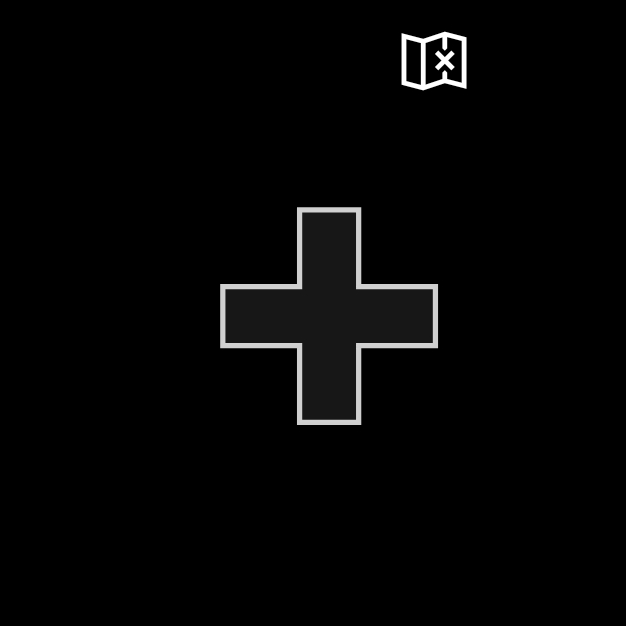
예제 2: 방향 패드와 map 버튼이 있는 왼쪽 휠 예제
 "left": {
    "inner": [
        {
            "type": "directionalPad",
            "scale": 1.5
        }
    ],
    "outer" : [
        {
            "type": "button",
            "action": "leftBumper",
            "styles": {
                "default" : {
                    "faceImage" : {
                        "type": "icon",
                        "value": "map"
                    }
                }
            }
        },
        null,
        null,
        null,
        null,
        null,
        null
    ]
}
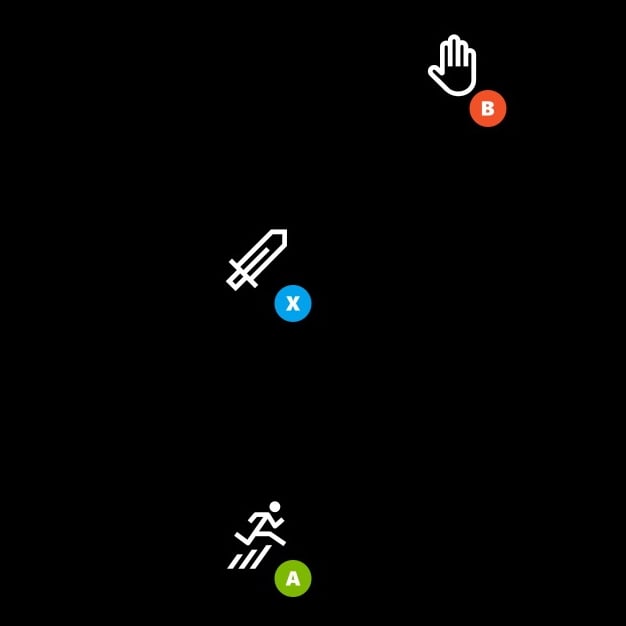
예제 3: 세 개의 버튼이 있는 오른쪽 휠 예제
버튼은 오른손으로 가장 쉽게 닿을 수 있는 위치에 정렬되어 있습니다.outer 영역의 버튼은 더 큰 히트 영역을 갖도록 클러스터로 배치되어 있습니다.
"right": {
    "inner": [
    {
        "type": "button",
        "action": "gamepadX",
        "styles": {
        "default": {
            "faceImage": {
            "type": "icon",
            "value": "sword"
            }
        }
        }
    }
    ],
    "outer": [
    [
        {
            "type": "button",
            "action": "gamepadB",
            "styles": {
                "default": {
                "faceImage": {
                    "type": "icon",
                    "value": "interact"
                }
                }
            }
        },
        null
    ],
    null,
    [
        {
            "type": "button",
            "action": "gamepadA",
            "styles": {
                "default": {
                "faceImage": {
                    "type": "icon",
                    "value": "jump"
                }
                }
            }
        },
        null
    ]
    ]
}
함께 보기
Touch Adaptation Kit 참조Layout