Screen safe areas
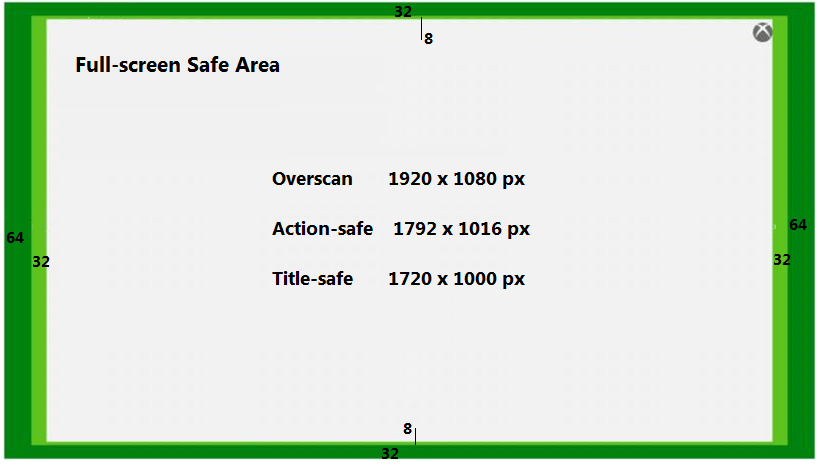
This topic describes the safe areas to use when designing title UI for a range of monitors and TVs. Some TVs have a physical bezel or a configuration setting that obscures the outermost edges of the screen. In addition to this, portions of the edges of the output screen might contain system UI. The overscan border area is the outermost edges of the screen that should contain no important graphic or UI elements because they might be obscured. The action-safe area is the area of display that could potentially be obscured by older TVs (or certain configuration settings on modern TVs), but is safe to have some action or graphics rendered. The title-safe area is the area that game UI elements (menus, titles, and so on), and other content that is core to gameplay or storytelling, should be rendered in.4K
When rendering at 4K, the action-safe area is the inner 95 percent of the rendered screen area. The title-safe area is the inner 90 percent of the rendered screen area. On a 3840 × 2160 screen (4K), the action-safe area is 3648 × 2052 pixels. The title-safe area is 3456 × 1944 pixels.1080p
On a 1920 × 1080 screen (1080p), the action-safe area is 1792 × 1016 pixels. The title-safe area is 1720 × 1000 pixels. Within the action-safe area, the right and left 32 pixels and the top and bottom 8 pixels might contain persistent system UI elements. This area shouldn’t be used for title UI elements. The title-safe area is 1720 × 1000 pixels on a 1920 × 1080 screen. Another way of defining the title-safe area is that the outermost boundaries of it are 96 pixels in from the left and right edges of the screen, and 40 pixels deep from the top and bottom of the screen. All important content, text, and UI elements should be rendered into the title-safe area. In 1080p mode, apps are always rendered at 1080p. If needed, the final output scaler takes that output and scales it to 720p or 480p. 480p has top and bottom horizontal black bars. Figure 1. Microsoft Game Development Kit (GDK) 1080p screen areas.