
Input Stream Architecture
GameInput is built around the concept of an input stream: input from all devices connected to the system is directed into a single contiguous stream of input events, in the order that the input occurred. When multiple devices are generating input simultaneously, this results in a natural interleaving of the input events. Following is an example input stream from multiple input devices.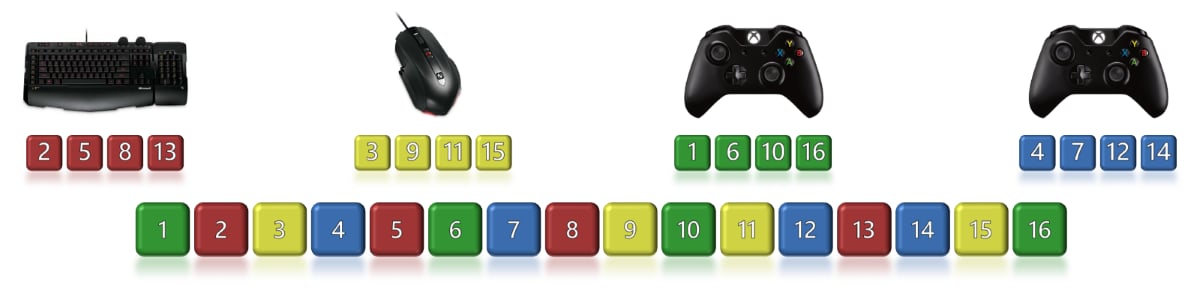
- Double-tapping a button might map to a different combo/move than a single tap.
- The order that two buttons were pressed in might matter.
- The elapsed time between two button presses might matter.
Interfaces
The GameInput API is exposed through a collection of related interfaces, similar to the graphics and audio APIs as shown in the following diagram.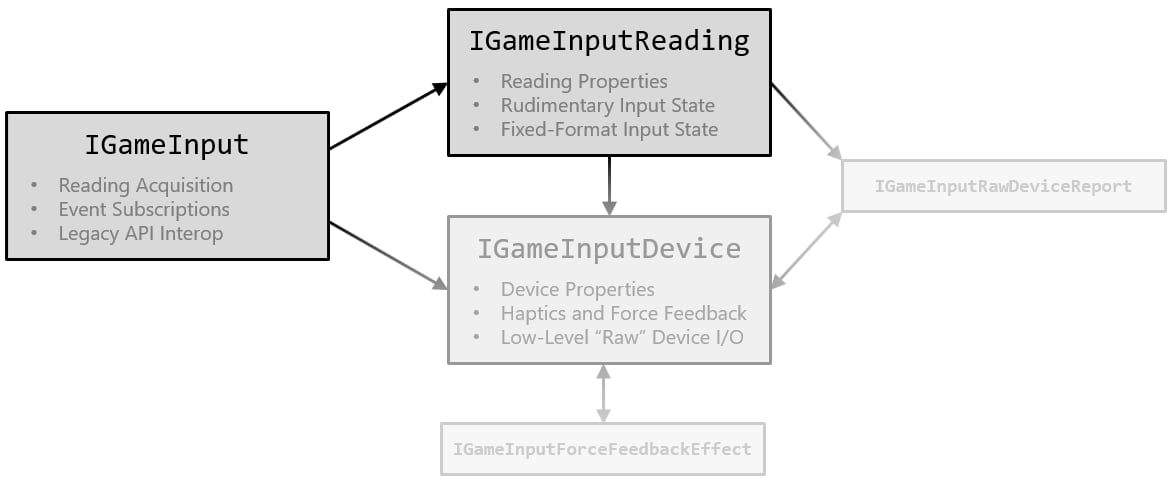
-
IGameInputis the base interface obtained by calling theGameInputCreatefactory function. It contains methods for retrieving readings from the input stream, registering callbacks, and accessing other global functionality. -
IGameInputReadingrepresents a single element in the input stream. It contains methods for retrieving the input state data stored in the reading, and for accessing the device that generated the reading. Readings are also used as points of reference within the input stream, when walking forward and backward through the stream’s other readings. -
IGameInputDevicerepresents a single input device connected to the system. It contains methods for retrieving the device’s properties and current state, and methods for controlling haptic and force feedback on the device. It also contains methods for performing low-level raw device I/O.
Like the graphics and audio APIs, GameInput isn’t a true COM API, even though it exposes interfaces that derive from IUnknown. This style of API is sometimes referred to as “COM lite” or “nano-COM.” While IUnknown is used for reference counting and reflection, the COM runtime infrastructure isn’t used by GameInput. Specifically, this means the following.
- Applications call neither
CoInitializenorCoCreateInstanceto obtain object instances. - COM features such as aggregation and caller-provided interface implementations aren’t supported.
- There’s no cross-process marshaling support, and no apartment/threading model. All objects are agile.
- Interface pointers can be compared directly for object identity, without going through IUnknown.
- Methods aren’t required to return
HRESULTcodes, which often leads to simpler function signatures.
Application Focus
On console, GameInput provides input to an application only when it is in focus. Otherwise, the state returned contains neutral or “rest” values, as if the user isn’t touching the device at all. This eliminates the need for extra input code that deals with change in focus. On PC, by default, input (including system buttons) goes to applications in focus by default. This behavior is changeable by using the SetFocusPolicy method. Any haptic or force feedback being sent to a device is disabled when an application loses focus. It can still call GameInput APIs to set a new feedback state, but the new state won’t be sent to the device. When the application has focus again, the most recent feedback state requested by the application is automatically sent to the device. As a result, applications don’t need to perform any special actions related to input or haptic/force feedback when they gain and lose focus. The GameInput API always does the right thing on their behalf.Reference API documentation
- GameInput (API contents)
- Functions