
Game engine
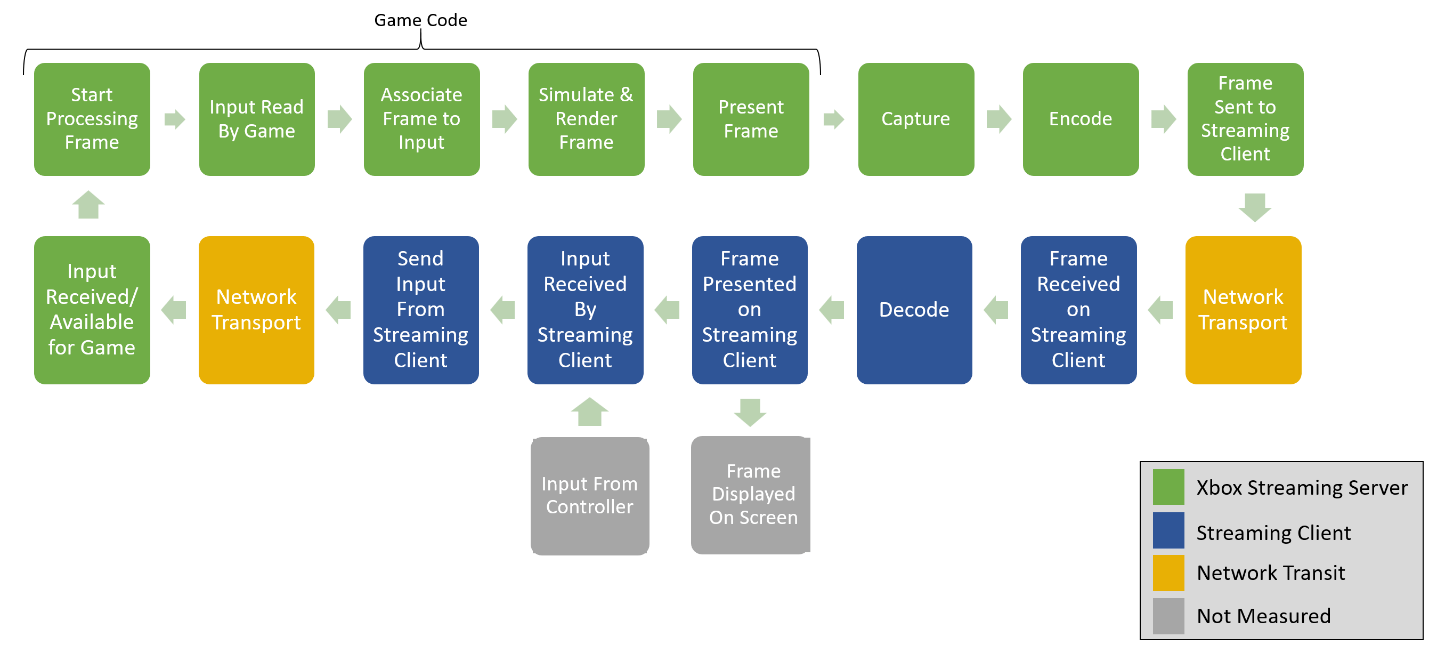
Games typically have several stages that are between receiving a user’s input and rendering the resulting frame as shown in figure 1. Depending on the game, this can vary from taking single-digit milliseconds to hundreds. While game engine latency isn’t different between a streaming server and an XBOX console, a user might experience the impact more when it’s combined with the rest of the stream’s latency. Optimizing game engine latency and frame rate reduces the latency that users experience in your game.Server
In figure 1, the remainder of the XBOX Streaming Server time is spent preparing the frame to send to the client. This is largely during the Capture stage, which retrieves the frame from the GPU, and the Encode stage, which scales and compresses the frame to optimize for network bandwidth.Network
XBOX servers send video to streaming clients and receive input back from the internet. That network connection has variable latency based on the following factors.- The physical distance between the client device and the server.
- Microsoft deploys servers to Azure datacenters around the world to minimize distance as much as possible. Users streaming from their XBOX console might be further away.
- The speed of the user’s internet connection.
- The user’s type of internet connection and hardware.
- For example, 2.4 gigahertz (GHz) wireless network connections often have more latency than 5 GHz connections. Some internet service providers (ISP) also have buffering strategies that increase latency.
XGameStreamingGetStreamAddedLatency returns the standard deviation of the latency (also known as “jitter”).
For more information about simulating streaming network latency, see Simulating latency while testing your game.
Client
When the client receives the video frame, it must decode the frame and present it through its own graphics stack. The client’s graphical hardware determines how long that decoding takes. Additionally, most clients must wait for a localvSync timer to present the next frame. On a client with a 60 Hertz (Hz) screen, that could take an average of 8 ms.
As with games that play on an XBOX console that’s connected to a TV, streaming clients use a display that has its own latency.
The display latency can vary from a fast gaming monitor, with just a couple milliseconds of latency, to an inexpensive mobile display or TV without game mode, that takes hundreds of milliseconds. Displays don’t always report latency, so the XBOX Game Streaming APIs don’t include client display latency.
Controllers and other input methods, such as touch, also have latency. Bluetooth® connections for a controller can add noticeable latency. Like display latency, input latency can’t be measured by the client, and so it isn’t represented by the XBOX Game Streaming APIs.