
Wheel
内側および外側の円形領域に配置された一連のタッチ コントロール。プロパティ
inner - object、省略可。ホイールの inner 部分に配置される最大 4 つのコントロール。
outer - array、省略可。wheel によって表される円形領域の内側領域の周囲に配置される、コントロールおよび/または control cluster で埋めることができる最大 8 スロットの配列。
outerエリアの最初のスロットはホイールの上部 (1 時方向あたり) から始まり、時計回りに続きます。- スロットは
nullでスキップできます。 - control cluster は、常に 8 つの利用可能なスロットのうち 2 つを占有します。すなわち、指定されたスロットとその次のスロットです。
補足
wheel コントロールのサイズと回転はプレイヤーが調整できます。好みに合わせてカスタマイズする際、プレイヤーはホイールのサイズと回転の両方を変更できます。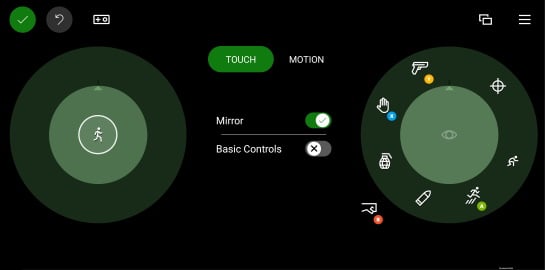
inner領域は、その手にとってプレイヤーが最もアクセスしやすいコントロールを配置するために使用する必要があります。- 左側の
innerスロットは、プレイヤーの主要な移動コントロールに使用してください。 - プレイヤーが手を動かして届かせる必要のある
outerスロットは、頻繁にアクセスしないコマンドに使用してください。
サンプル
例 1: 中央にジョイスティック、各 outer スロットにカスタム ボタンを持つサンプル ホイール
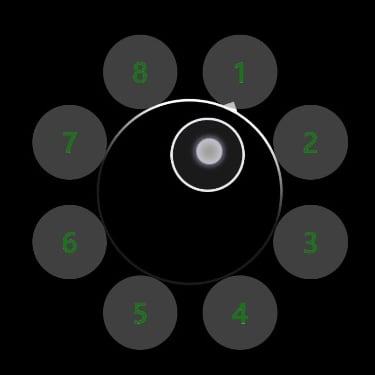
"left": {
    "inner": [
        {
            "type": "joystick",
            "axis": {
                "input": "axisXY",
                "output": "leftJoystick",
                "deadzone": {
                    "threshold": 0.05,
                    "radial": true
                }
            }
        }
    ],
    "outer" : [
        {
            "type": "button",
            "action": "gamepadX",
            "styles": {
                "default" : {
                    "faceImage" : {
                        "type": "asset",
                        "value": "one"
                    },
                    "background" : {
                        "type": "color",
                        "value": "#80808080"
                    }
                }
            }
        },
        {
            "type": "button",
            "action": "gamepadX",
            "styles": {
                "default" : {
                    "faceImage" : {
                        "type": "asset",
                        "value": "two"
                    },
                    "background" : {
                        "type": "color",
                        "value": "#80808080"
                    }
                }
            }
        },
        {
            "type": "button",
            "action": "gamepadX",
            "styles": {
                "default" : {
                    "faceImage" : {
                        "type": "asset",
                        "value": "three"
                    },
                    "background" : {
                        "type": "color",
                        "value": "#80808080"
                    }
                }
            }
        },
        {
            "type": "button",
            "action": "gamepadX",
            "styles": {
                "default" : {
                    "faceImage" : {
                        "type": "asset",
                        "value": "four"
                    },
                    "background" : {
                        "type": "color",
                        "value": "#80808080"
                    }
                }
            }
        },
        {
            "type": "button",
            "action": "gamepadX",
            "styles": {
                "default" : {
                    "faceImage" : {
                        "type": "asset",
                        "value": "five"
                    },
                    "background" : {
                        "type": "color",
                        "value": "#80808080"
                    }
                }
            }
        },
        {
            "type": "button",
            "action": "gamepadX",
            "styles": {
                "default" : {
                    "faceImage" : {
                        "type": "asset",
                        "value": "six"
                    },
                    "background" : {
                        "type": "color",
                        "value": "#80808080"
                    }
                }
            }
        },
        {
            "type": "button",
            "action": "gamepadX",
            "styles": {
                "default" : {
                    "faceImage" : {
                        "type": "asset",
                        "value": "seven"
                    },
                    "background" : {
                        "type": "color",
                        "value": "#80808080"
                    }
                }
            }
        },
        {
            "type": "button",
            "action": "gamepadX",
            "styles": {
                "default" : {
                    "faceImage" : {
                        "type": "asset",
                        "value": "eight"
                    },
                    "background" : {
                        "type": "color",
                        "value": "#80808080"
                    }
                }
            }
        }
    ]
}
例 2: 方向パッドとマップ ボタンを持つサンプルの left ホイール
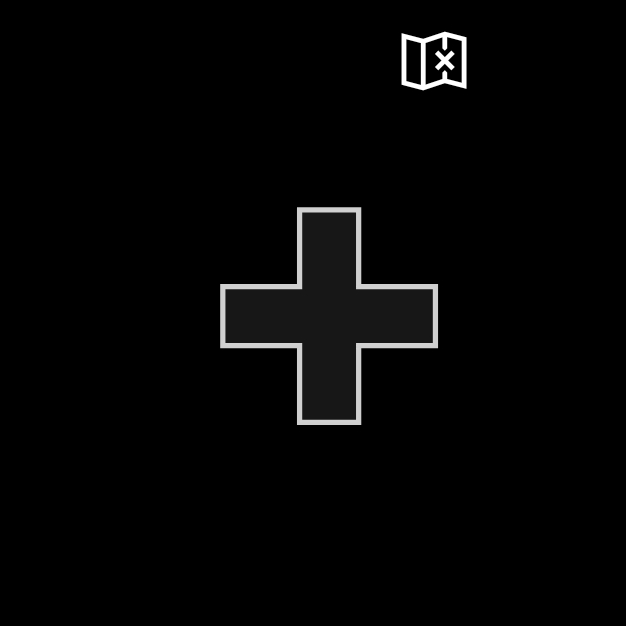
 "left": {
    "inner": [
        {
            "type": "directionalPad",
            "scale": 1.5
        }
    ],
    "outer" : [
        {
            "type": "button",
            "action": "leftBumper",
            "styles": {
                "default" : {
                    "faceImage" : {
                        "type": "icon",
                        "value": "map"
                    }
                }
            }
        },
        null,
        null,
        null,
        null,
        null,
        null
    ]
}
例 3: 3 つのボタンを持つサンプルの right ホイール
ボタンは右手で最も届きやすい位置に配置されています。outer エリアのボタンは、より大きなヒット領域を持つようクラスターに配置されています。
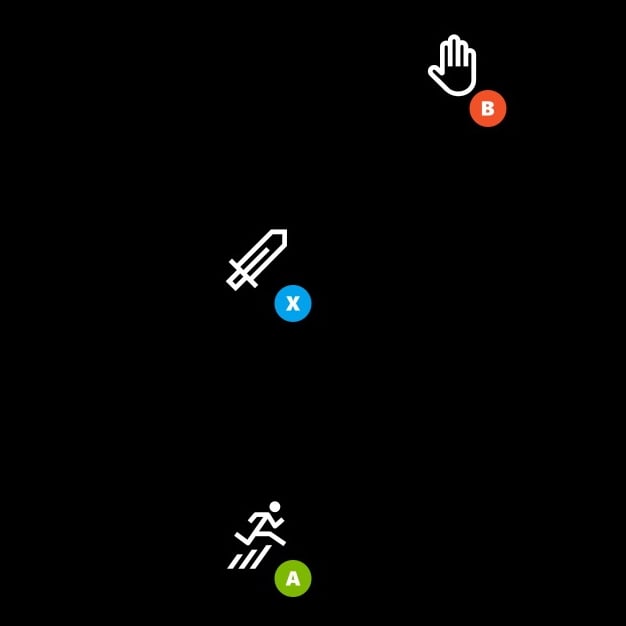
"right": {
    "inner": [
    {
        "type": "button",
        "action": "gamepadX",
        "styles": {
        "default": {
            "faceImage": {
            "type": "icon",
            "value": "sword"
            }
        }
        }
    }
    ],
    "outer": [
    [
        {
            "type": "button",
            "action": "gamepadB",
            "styles": {
                "default": {
                "faceImage": {
                    "type": "icon",
                    "value": "interact"
                }
                }
            }
        },
        null
    ],
    null,
    [
        {
            "type": "button",
            "action": "gamepadA",
            "styles": {
                "default": {
                "faceImage": {
                    "type": "icon",
                    "value": "jump"
                }
                }
            }
        },
        null
    ]
    ]
}
関連項目
Touch Adaptation Kit リファレンスLayout