Recreate Steam leaderboards on XBOX GDK using event-based stats and Partner Center stat rules, with code samples comparing the two leaderboard APIs.
XBOX services leaderboards are derived from user statistics and built by queries. This is different from the leaderboards on Steam, which are driven by “scores” that are uploaded to the API. Similar to achievements, the XBOX Game Development Kit (GDK) has two APIs for statistics: event-based and title-managed. Unlike achievements, we recommend that you use event-based statistics and leaderboards over title-managed. We focus on that API in this topic. For more information about how these two APIs differ, see Event-based vs. title-managed Stats.Both platforms define leaderboards on their portals. The difference is that XBOX services has you first define a stat rule on Partner Center, and then build a leaderboard based on that statistic that the rule drives. Steam, on the other hand, doesn’t make a distinction between the two: you create a leaderboard in their portal or programmatically do so, and then upload user scores directly to that leaderboard.To illustrate how each of these APIs can be used compared to the Steam Leaderboard API, code examples are provided about how to create a leaderboard for furthest distance traveled (the example is from the Steamworks API documentation) on the Steam SDK and the event-based XBOX Game Development Kit (GDK) stats platform. The following sections walk through the logic.
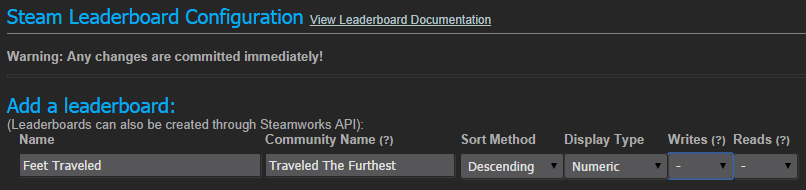
On the Steamworks admin portal, go to Stats & Achievements > Leaderboards. Complete the form as shown in the following screenshot (from the Steamworks documentation).
On Partner Center, go to your game and select XBOX services > Gameplay settings. On the navigation bar on the right pane, select Player Stats > Stat Rules and add a stat rule as Show, configuring it to meet your stat’s needs. Because our stat updates will include a calculated value of how far the player (user) has traveled since the last update, we’ll specify a measurement field for the service to get this value from.
There’s no functional difference if you store the data to update an event in the event’s Measurements or Dimensions field. The two fields exist for use with Application Insights. For more information about this, see [Application Insights API for custom events and
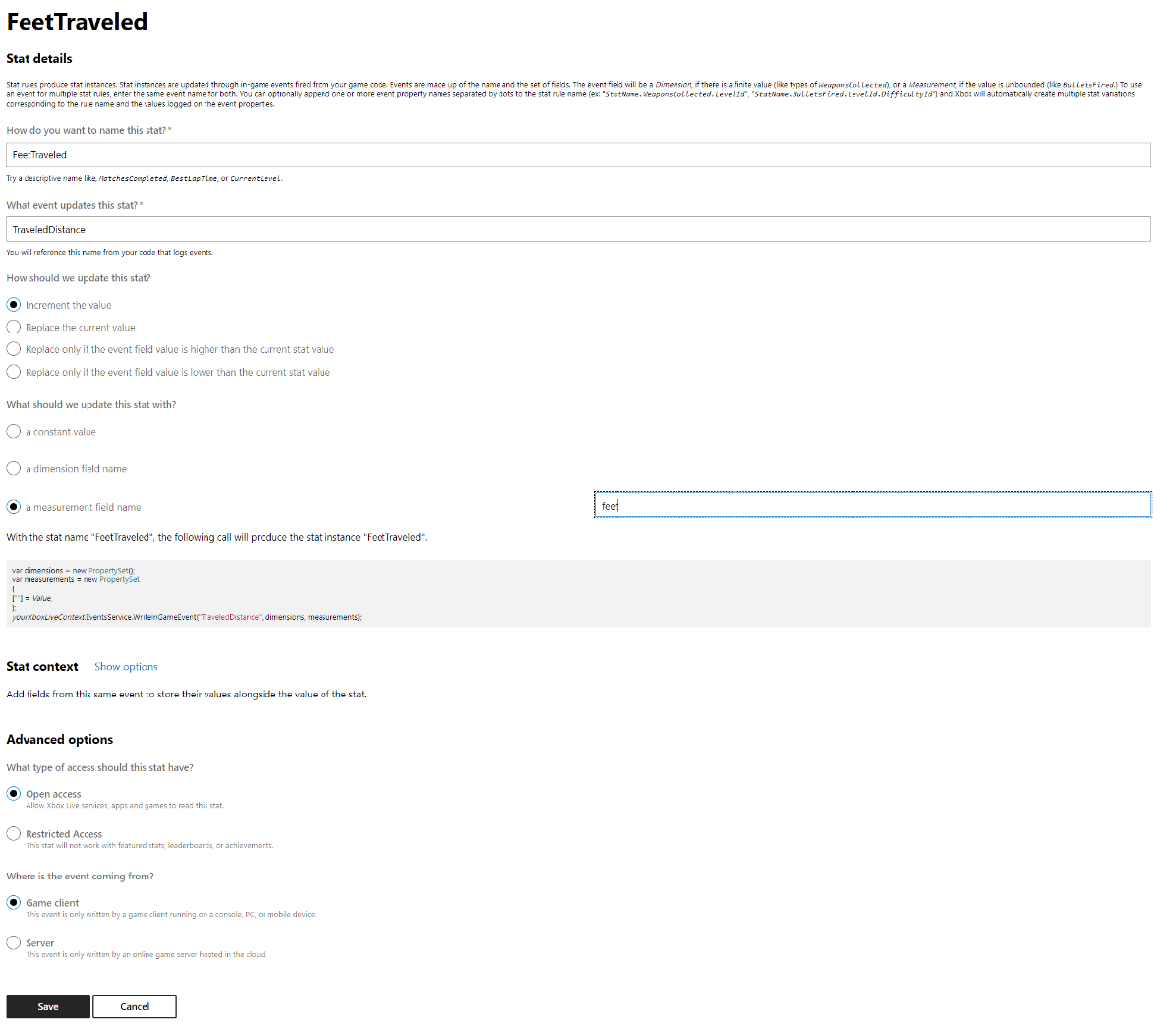
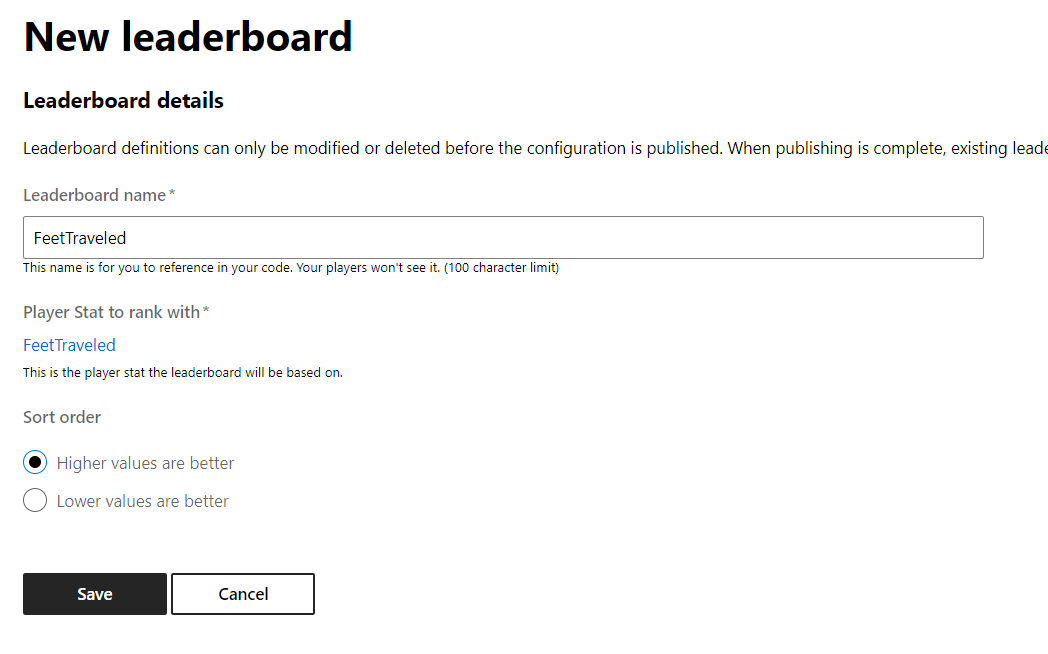
metrics](https://learn.microsoft.com/en-us/azure/azure-monitor/app/api-custom-events-metrics).The following screenshot shows the form that’s used to create a stat rule in Partner Center.After saving, select Leaderboard on the top bar of the right pane and create a new leaderboard that’s driven by the stat you just created as shown in the following screenshot.
On Steamworks, you need to calculate the new total value of feet traveled and send it to the API by using the ISteamUserStats::UploaderLeaderboardScore method.
int32 newFeetTraveled; // Calculate this however you want.const int32* scoreDetails = {}; // Extra values pertaining to the score.SteamLeaderboard_t leaderboard; // Handle for the leaderboard to upload the score to...SteamAPICall_t result = UploadLeaderboardScore( leaderboard, ISteamUserStats::k_ELeaderboardUploadScoreMethodForceUpdate, 100, scoreDetails, int 0);STEAM_CALLBACK(MyGameClass, OnLeaderboardScoreUploaded, LeaderboardScoreUploaded_t);// Handle errors in the OnLeaderboardScoreUploaded callback function.
With event-based stats in the XBOX Game Development Kit (GDK), you simply need to pass the difference in feet traveled to XblEventsWriteInGameEvent because we specified that we want to increment this stat when receiving an event and have specified where to find this diff value in the measurements JSON string, shown as follows.
// Assume that this holds the feet that the user has traveled since the last update.int diffFeetTraveled; std::stringstream ss;ss << "{ \"feet\": " << diffFeetTraveled << " }";std::string measurements = ss.str();HRESULT hr = XblEventsWriteInGameEvent( m_xboxLiveContext, "FeetTraveled", "", measurements.c_str());
Global leaderboards can be fetched with the Steamworks SDK by calling ISteamUserStats::GetLeaderboardEntries, and then calling ISteamUserStats::GetDownloadedLeaderboardEntry in the callback function to get each entry or “row” of the leaderboard.
The XBOX Game Development Kit (GDK) APIs follow a similar pattern. Build a query specifying which leaderboard you want, what scope it should cover, how to sort it, which additional fields it should contain (if any), and more. After calling XblLeaderboardGetLeaderboardAsync with your query, you can use XblLeaderboardGetLeaderboardResultSize and XblLeaderboardGetLeaderboardResult to put the results into your specified buffer and iterate over them as shown in the following code example.
auto asyncBlock = std::make_unique<XAsyncBlock>();asyncBlock->queue = m_taskQueue;asyncBlock->context = nullptr;asyncBlock->callback = [](XAsyncBlock* asyncBlock){ std::unique_ptr<XAsyncBlock> asyncBlockPtr{ asyncBlock }; // Take over ownership of the XAsyncBlock* size_t resultSize; std::vector<uint8_t> leaderboardBuffer; HRESULT hr = XblLeaderboardGetLeaderboardResultSize(asyncBlock, &resultSize); if (SUCCEEDED(hr)) { leaderboardBuffer.resize(resultSize); XblLeaderboardResult* leaderboard{}; hr = XblLeaderboardGetLeaderboardResult(asyncBlock, resultSize, leaderboardBuffer.data(), &leaderboard, nullptr); if (SUCCEEDED(hr)) { // Use XblLeaderboardResult in result. for (int row = 0; row < leaderboard->rowsCount; row++) { uint64_t xuid = leaderboard->rows[row].xboxUserId; uint32_t rank = leaderboard->rows[row].rank; const char** values = leaderboard->rows[row].columnValues; // Do something with the data. } } }};XblLeaderboardQuery leaderboardQuery = {}; strcpy(&leaderboardQuery.scid[0], m_scid.c_str());leaderboardQuery.leaderboardName = leaderboardName.c_str(); leaderboardQuery.xboxUserId = 0;leaderboardQuery.order = XblLeaderboardSortOrder::Descending;leaderboardQuery.skipResultToRank = 0;leaderboardQuery.maxItems = 100;leaderboardQuery.statName = "MyStatName";leaderboardQuery.socialGroup = XblLeaderboardQueryType::None;// See the link as follows for more options in XblLeaderboardQuery.HRESULT hr = XblLeaderboardGetLeaderboardAsync( xboxLiveContext, leaderboardQuery, asyncBlock.get());if (SUCCEEDED(hr)){ // The call succeeded, so release the std::unique_ptr ownership of XAsyncBlock* since the callback will take over ownership. // If the call fails, the std::unique_ptr will keep ownership and delete the XAsyncBlock* asyncBlock.release();}
On Steamworks, you can use the ELeaderboardDataRequest::k_ELeaderboardDataRequestFriends enum to scope the leaderboard to the current user’s friends.In the XBOX Game Development Kit (GDK), this is known as a social leaderboard. To get a social leaderboard from XBOXBOX services, set xboxIUserId equal to the XBOX User ID (XUID) of the current user who is signed in to XBOX services, leaderboardName to nullptr, and the socialGroup as XblSocialGroupType::People or XblSocialGroupType::Favorites in your XblLeaderboardQuery struct. Call XblLeaderboardGetLeaderboardAsync as previously shown.For more information, see XblSocialGroupType.
In addition to the usual user stats that are used to generate Steam-like leaderboards, XBOX services has an additional concept called Featured Stats. Featured Stats appear on several different surfaces across the XBOX ecosystem for your game and can show the values of user’s stats or leaderboards that are already generated. You can create up to 20 Featured Stats for your game.For more information about Featured Stats and how to add them, see Featured Stats overview and Portal configuration of event-based Featured Stats.
When writing events, be careful to avoid hitting the XBOX Services API (XSAPI) too often, because it may cause your game to hit its rate limit. This may cause unexpected behavior and a bad experience for your users. Note that this is an XBOX services concern that isn’t an issue on Steam. Writing stat values on Steam doesn’t cause an API call to the server until your game explicitly syncs them.For events that frequently occur, try batching API calls to be fired after a certain number of events happen or to update on the server at a certain time interval.You can debug your API calls by using the XBOX Live Trace Analyzer (XblTraceAnalyzer.exe).For more information about rate limiting on XBOX services, see Fine-Grained Rate Limiting.