
Multiple networks
PlayFab Party supports using multiple PlayFab Party networks simultaneously. The following diagram provides an example representation of how different objects might relate to each other in a multi-network scenario.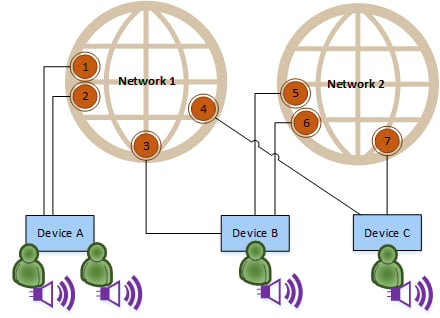
When to use multiple networks
PlayFab Party networks are designed to provide a real-time communication channel between a collection of devices for exchanging game or chat data. Multiple networks often come into play when subsets of devices may need to communicate for differing spans of time. An example scenario for multiple networks is to manage “fire team chat” where a group of players (the fire team) wants to maintain a constant, seamless chat session across multiple game sessions. For example:- Player A, Player B, and Player C want to play an online game together.
- They each create a chat control, join a Party network together, and connect their chat controls to that network enabling chat.
- When they join a multiplayer game session with other players outside of their fire team, they join a separate Party network and create Party endpoints for sending game data to all players in the game session network.
- Player A, Player B, and Player C continue to chat with each other throughout the game session via the fire team network.
- When the game session ends, all players leave its respective Party network but the fire team Party network remains active and its participants continue chatting without any disruptions.