
Segment Dimensions via API
You can now use these three new APIs:- GetAllAnalyticsSegments: Returns a list of segment IDs that have been selected for the Segment dimension.
- AddAnalyticsSegment: Adds a segment to the list of segments used by the Segment dimension.
- RemoveAnalyticsSegment: Removes a segment from the list of segments used by the Segment dimension.
Segment Dimensions via Game Manager
The Trends page now includes a segment dropdown filter and the option to manage segments. From the Game Manager screen:- Navigate to your Title.
- Select Dashboards from the menu on the left.
- Go to the Trends tab.
- Select Manage segments, this opens the Analytics Segments Settings window.
- Select the Segments to be included in the segment filter on the trends page.
- Save your selection.
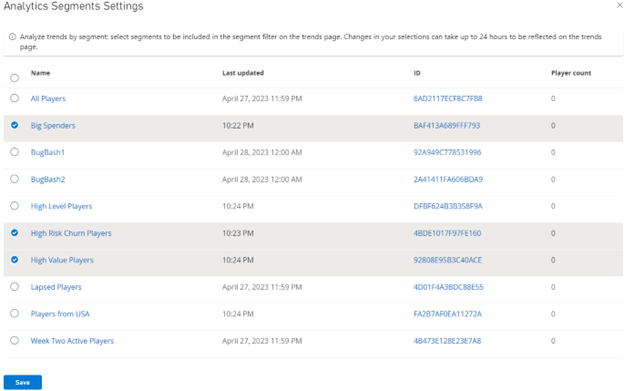
Changes in your selections of segments can take up to 24 hours to be reflected on the trends page.
- Select the Segment dropdown.
- Select which segment you would like to filter.