
Player Churn Prediction quickstart
Prerequisites
- Sign in to PlayFab portal.
- Navigate to your title.
Create a Churn Prediction segment and apply mitigation strategy
Note - Churn Prediction segments can only be created 48 hours after the feature has been enabled for the title.- On the Players page, select the Segments tab at the top.
- Select New Segment.
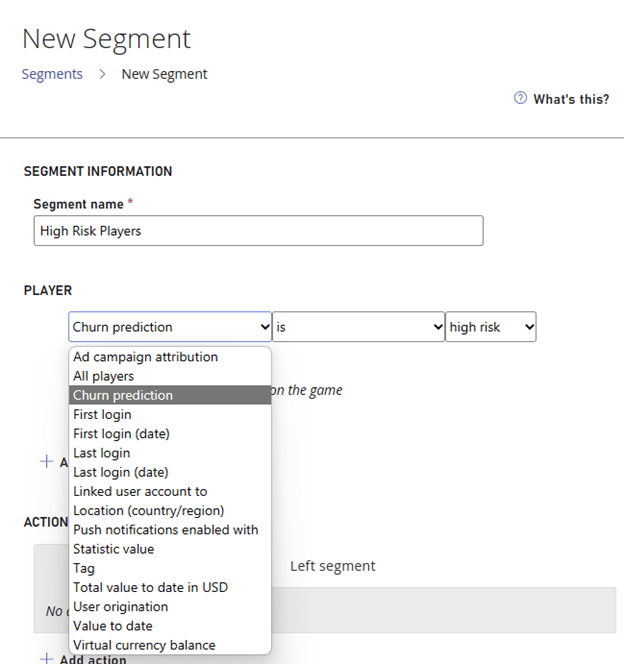
- Enter a descriptive name as the Segment name. For example, “MyChurnPredictionSegment”.
-
Under Players, select Churn Prediction and then select High Risk as the churn category.
-
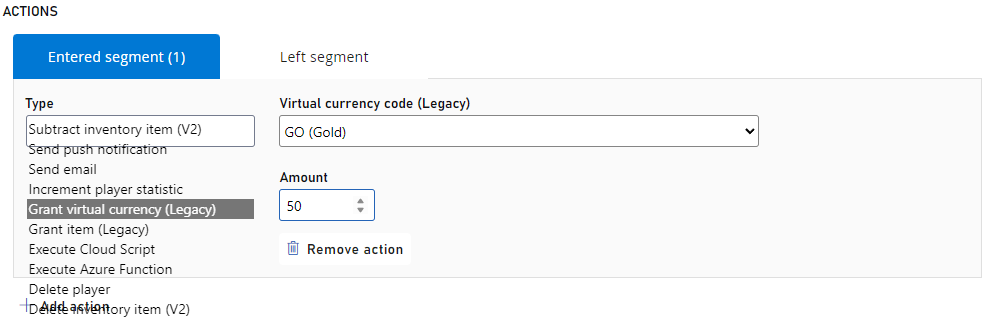
Actions, select Add Action.

-
For Type, select Grant Virtual Currency.
For Virtual currency code, select GC (Game Coins).
For Amount, enter 50 as the amount you would like to grant to the player.
- Navigate back to Segments page to see your newly created churn segment and the count of players within that segment.