
The Event Partitioning feature is in private preview. This means it’s only available to be used by specific titles we enable it for. We anticipate ongoing changes to it, without notice, as we continue gathering feedback and optimizing for customer use.
What to expect after setting an event for partitioning?
Changes happen in both Azure Blob Storage and Azure Data Explorer when an event is set to be partitioned.Azure Blob Storage
Once you set an event to be partitioned, those events are written to your Azure Blob Storage account in a separate folder named “Partitioned”. Within the event’s subdirectory, the data will be divided into further subdirectories by date and hour. The format of the data will be the same parquet format that is used for events that aren’t partitioned.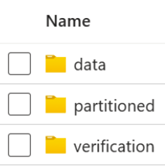

Azure Data Explorer
Once you set an event to be partitioned, those events are written to your Azure Data Explorer in a separate table. The table is named using the event’s full name. You’ll be able to see its respective table in Azure Data Explorer.