> ## Documentation Index
> Fetch the complete documentation index at: https://devdocs.xbox.com/llms.txt
> Use this file to discover all available pages before exploring further.
# PC 遊戲開發的 Visual Studio 專案範本
> PC 遊戲開發的 Visual Studio 專案範本
本主題說明 Visual Studio 中可用的 Windows PC 遊戲專案範本。
## 專案範本
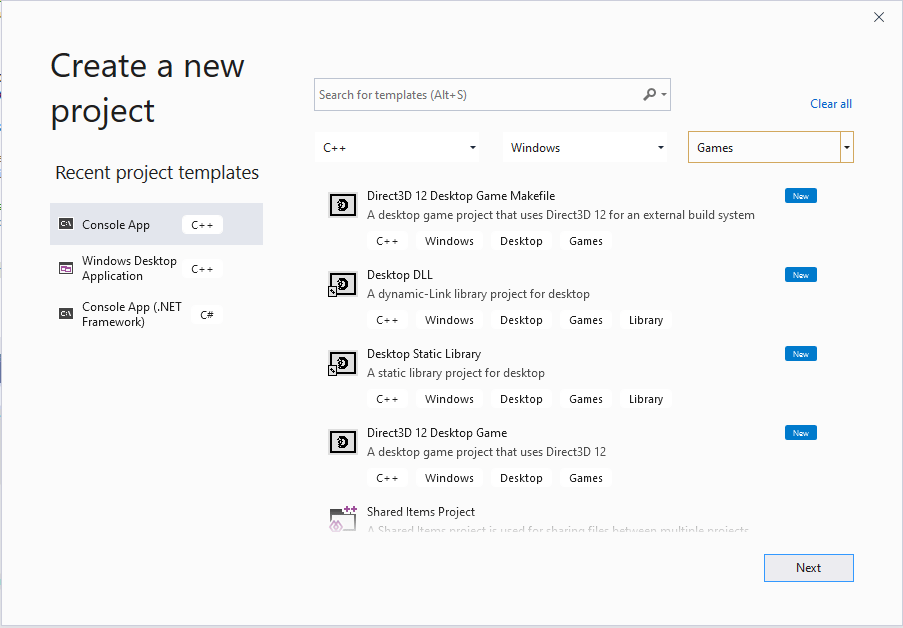
Microsoft Game Development Kit (GDK) 會安裝下列 Visual Studio C++ 專案範本。
* **Direct3D 12 Desktop Game (Classic):** 適用於 Windows 遊戲的專案,使用 Direct3D 12 與 C++,搭配「內建」x64 MSBuild 平台。
* **Direct3D 12 Desktop Game:** 適用於 Windows 遊戲的專案,使用 Direct3D 12 與 C++,搭配 Gaming.Desktop.x64 MSBuild 自訂平台。
* **Direct3D 12 Desktop Game Makefile:** 適用於 Windows 遊戲的專案,使用 Direct3D 12 與 C++,並使用外部建置系統。
* **Desktop Static Library:** 適用於 Windows 靜態程式庫的專案,搭配 Gaming.Desktop.x64 MSBuild 自訂平台。
* **Desktop DLL:** 適用於 Windows 動態連結程式庫的專案,搭配 Gaming.Desktop.x64 MSBuild 自訂平台。
### 獨立範本
除了使用已安裝的 GDK 範本進行桌面與掌機開發之外,另有一個完全獨立的專案範本,使用 [vc Package Manager](https://aka.ms/vcpkg) 新增 *Microsoft GDK*、*DirectX 12 Agility SDK* 等的套件版本。這可作為在 Microsoft Store 與 XBOX PC App 中發行的基準。此套件同時包含 MSBuild 與 CMake 專案範本,且需要 Visual Studio 2022 v17.6 或更新版本。
請參閱 [Visual Studio Marketplace](https://aka.ms/gdktemplates)。
## 尋找 Microsoft Game Development Kit (GDK) 專案範本
在 Visual Studio 2019 或 Visual Studio 2022 的 **建立新專案** 對話方塊中搜尋與篩選,即可找到 Microsoft Game Development Kit (GDK) 範本。將篩選條件設為 **C++** 語言、**Windows** 平台與 **Games** 專案類型,即可找到 Microsoft Game Development Kit (GDK) 範本,如下列螢幕擷取畫面所示。
 ## Gaming.Desktop.x64 平台、msbuild 檔案與屬性
Microsoft Game Development Kit (GDK) 定義了一個名為 Gaming.Desktop.x64 的 msbuild 平台,供 Windows PC 遊戲開發使用。Gaming.Desktop.x64 包含一組 msbuild 屬性與目標檔案,用於定義必要的前置處理器指示詞 (例如 `_GAMING_DESKTOP`),並設定路徑,例如在建置遊戲時,能在 *C:\Program Files (x86)\Microsoft GDK\edition\GRDK* 底下正確找到延伸程式庫、Include 檔案與程式庫。如需 Gaming.Desktop.x64 平台所定義之 msbuild 屬性與目標的具體詳細資料,請參閱[在不安裝 Microsoft Game Development Kit 的情況下設定專案](/zh-TW/build/console-features/build-without-install/project-configuration-withoutinstall)。
## 搭配 Microsoft Game Development Kit (GDK) 使用 x64 平台
以 PC 為目標但不使用自訂 Gaming.Desktop.x64 MSBuild 平台時,專案檔必須實作所有必要的功能。
* 為了支援「並存」安裝,專案必須選取適當的版本。這可以透過在 *Globals* 區段中設定屬性來完成:
```xml theme={null}
...
$(GRDKLatest)
```
使用 `GRDKLatest` 環境變數時,預設為開發電腦上安裝的最新版本,其格式為 **C:\Program Files (x86)\Microsoft GDK\\GRDK\\**。
> 在其餘的建置設定中,我們會使用 **GDKPCEditionPath** 屬性。不建議在專案檔的其他部分直接將 `GRDKLatest` 作為屬性使用,因為這會讓試用新版本、管理更新、重現問題等變得更困難。如果您使用自訂 .props 檔案來驅動建置流程,請將 `GDKPCEditionPath` 放在其中,而不是放在每個專案檔中。另請注意,此屬性需要尾端斜線,以符合 MSBuild 慣例。
對於 VS 2019,您也必須確定使用 x64 原生版本的工具。對於 VS 2022,這是預設值,因此為選用。
```xml theme={null}
...
x64
```
* 任何必要的 Microsoft Game Development Kit (GDK) 延伸程式庫都必須視需要包含適當的 include/lib 路徑與可轉散發 DLL。這可以透過修改 vcxproj 檔案的 *ExtensionSettings* 匯入來完成:
**Microsoft GDK (2024 年 10 月) 或更新版本:**
```xml theme={null}
```
**Microsoft GDK (2024 年 6 月) 或更早版本:**
```xml theme={null}
```
* VC++ 目錄屬性 **ExecutablePath**、**IncludePath** 與 **LibraryPath** 應更新為包含 Microsoft Game Development Kit (GDK) 路徑。
```xml theme={null}
$(GameDK)bin;$(ExecutablePath)
$(GDKPCEditionPath)GameKit\Include;$(Console_SdkIncludeRoot);$(IncludePath);
$(GDKPCEditionPath)GameKit\lib\amd64;$(Console_SdkLibPath);$(LibraryPath)
```
```xml theme={null}
$(GameDK)bin;$(ExecutablePath)
$(GDKPCEditionPath)GameKit\Include;$(Console_SdkIncludeRoot);$(IncludePath);
$(GDKPCEditionPath)GameKit\lib\amd64;$(Console_SdkLibPath);$(LibraryPath)
```
對於可執行檔路徑,我們直接使用 `GameDK` 環境變數,因為它不是「並存」的。必要時,也可以在自訂 .props 檔案中以屬性覆寫此值。
**Console\_SdkIncludeRoot** 與 **Console\_SdkLibPath** 屬性是由 Microsoft Game Development Kit (GDK) *ExtensionLibrary.props* 提供,同時相容於 x64 PC 與 XBOX。
* 對於您平台的 *ItemDefinitionGroups*,請務必將 `_GAMING_DESKTOP` 新增至前置處理器定義,以便在使用程式庫或其他中介軟體時與 Gaming.Desktop.x64 保持一致。
```xml theme={null}
_GAMING_DESKTOP;WIN32;_DEBUG;_WINDOWS;%(PreprocessorDefinitions)
```
```xml theme={null}
_GAMING_DESKTOP;WIN32;NDEBUG;_WINDOWS;%(PreprocessorDefinitions)
```
* 同樣在 *ItemDefinitionGroups* 中,將下列程式庫新增至其他程式庫相依性。具體來說,GameRuntime 需要 `xgameruntime.lib`,PC 上的 GameInput 需要 `gameinput.lib`。
```xml theme={null}
xgameruntime.lib;gameinput.lib;d3d12.lib;dxgi.lib;dxguid.lib;uuid.lib;kernel32.lib;user32.lib;%(AdditionalDependencies)
```
* 最後一個必要元素是在建置輸出中將來源 **MicrosoftGameConfig.mgc** 檔案轉換為必要的 **MicrosoftGame.config**。這可以實作為建置自訂:
```xml theme={null}
copy %(Identity) "$(OutDir)MicrosoftGame.config"
makepkg.exe localize /d "$(OutDir)" /pd "$(OutDir)" /gc "%(Identity)"
MGC Compile
$(OutDir)MicrosoftGame.config
```
**MicrosoftGame.config** 也需要必要的標誌資產才能有效,這可以透過複製檔案來完成:
```xml theme={null}
```
> 從 *Direct3D 12 Desktop Game (Classic)* 範本建立專案,並檢閱其中的上述設定以及一些其他建議。
## 另請參閱
[Visual Studio (適用於 PC 遊戲開發)](/zh-TW/tools/tools-pc/visualstudio/gr-visualstudio-toc)
## Related topics
- [Visual Studio](/zh-TW/tools/tools-pc/visualstudio/index.md)
- [Visual Studio (內容)](/zh-TW/tools/tools-pc/visualstudio/gr-visualstudio-toc.md)
- [XBOX 開發的 Visual Studio 專案範本](/zh-TW/tools/tools-console/visualstudio/durango-visual-studio-templates.md)
- [PC 遊戲開發的 Visual Studio 屬性](/zh-TW/tools/tools-pc/visualstudio/gr-vs-property-pages.md)
- [使用 GDK 專案範本開始新的 PC 遊戲](/zh-TW/build/gdk-and-engines/guides/gdk-project-templates.md)
## Gaming.Desktop.x64 平台、msbuild 檔案與屬性
Microsoft Game Development Kit (GDK) 定義了一個名為 Gaming.Desktop.x64 的 msbuild 平台,供 Windows PC 遊戲開發使用。Gaming.Desktop.x64 包含一組 msbuild 屬性與目標檔案,用於定義必要的前置處理器指示詞 (例如 `_GAMING_DESKTOP`),並設定路徑,例如在建置遊戲時,能在 *C:\Program Files (x86)\Microsoft GDK\edition\GRDK* 底下正確找到延伸程式庫、Include 檔案與程式庫。如需 Gaming.Desktop.x64 平台所定義之 msbuild 屬性與目標的具體詳細資料,請參閱[在不安裝 Microsoft Game Development Kit 的情況下設定專案](/zh-TW/build/console-features/build-without-install/project-configuration-withoutinstall)。
## 搭配 Microsoft Game Development Kit (GDK) 使用 x64 平台
以 PC 為目標但不使用自訂 Gaming.Desktop.x64 MSBuild 平台時,專案檔必須實作所有必要的功能。
* 為了支援「並存」安裝,專案必須選取適當的版本。這可以透過在 *Globals* 區段中設定屬性來完成:
```xml theme={null}
...
$(GRDKLatest)
```
使用 `GRDKLatest` 環境變數時,預設為開發電腦上安裝的最新版本,其格式為 **C:\Program Files (x86)\Microsoft GDK\\GRDK\\**。
> 在其餘的建置設定中,我們會使用 **GDKPCEditionPath** 屬性。不建議在專案檔的其他部分直接將 `GRDKLatest` 作為屬性使用,因為這會讓試用新版本、管理更新、重現問題等變得更困難。如果您使用自訂 .props 檔案來驅動建置流程,請將 `GDKPCEditionPath` 放在其中,而不是放在每個專案檔中。另請注意,此屬性需要尾端斜線,以符合 MSBuild 慣例。
對於 VS 2019,您也必須確定使用 x64 原生版本的工具。對於 VS 2022,這是預設值,因此為選用。
```xml theme={null}
...
x64
```
* 任何必要的 Microsoft Game Development Kit (GDK) 延伸程式庫都必須視需要包含適當的 include/lib 路徑與可轉散發 DLL。這可以透過修改 vcxproj 檔案的 *ExtensionSettings* 匯入來完成:
**Microsoft GDK (2024 年 10 月) 或更新版本:**
```xml theme={null}
```
**Microsoft GDK (2024 年 6 月) 或更早版本:**
```xml theme={null}
```
* VC++ 目錄屬性 **ExecutablePath**、**IncludePath** 與 **LibraryPath** 應更新為包含 Microsoft Game Development Kit (GDK) 路徑。
```xml theme={null}
$(GameDK)bin;$(ExecutablePath)
$(GDKPCEditionPath)GameKit\Include;$(Console_SdkIncludeRoot);$(IncludePath);
$(GDKPCEditionPath)GameKit\lib\amd64;$(Console_SdkLibPath);$(LibraryPath)
```
```xml theme={null}
$(GameDK)bin;$(ExecutablePath)
$(GDKPCEditionPath)GameKit\Include;$(Console_SdkIncludeRoot);$(IncludePath);
$(GDKPCEditionPath)GameKit\lib\amd64;$(Console_SdkLibPath);$(LibraryPath)
```
對於可執行檔路徑,我們直接使用 `GameDK` 環境變數,因為它不是「並存」的。必要時,也可以在自訂 .props 檔案中以屬性覆寫此值。
**Console\_SdkIncludeRoot** 與 **Console\_SdkLibPath** 屬性是由 Microsoft Game Development Kit (GDK) *ExtensionLibrary.props* 提供,同時相容於 x64 PC 與 XBOX。
* 對於您平台的 *ItemDefinitionGroups*,請務必將 `_GAMING_DESKTOP` 新增至前置處理器定義,以便在使用程式庫或其他中介軟體時與 Gaming.Desktop.x64 保持一致。
```xml theme={null}
_GAMING_DESKTOP;WIN32;_DEBUG;_WINDOWS;%(PreprocessorDefinitions)
```
```xml theme={null}
_GAMING_DESKTOP;WIN32;NDEBUG;_WINDOWS;%(PreprocessorDefinitions)
```
* 同樣在 *ItemDefinitionGroups* 中,將下列程式庫新增至其他程式庫相依性。具體來說,GameRuntime 需要 `xgameruntime.lib`,PC 上的 GameInput 需要 `gameinput.lib`。
```xml theme={null}
xgameruntime.lib;gameinput.lib;d3d12.lib;dxgi.lib;dxguid.lib;uuid.lib;kernel32.lib;user32.lib;%(AdditionalDependencies)
```
* 最後一個必要元素是在建置輸出中將來源 **MicrosoftGameConfig.mgc** 檔案轉換為必要的 **MicrosoftGame.config**。這可以實作為建置自訂:
```xml theme={null}
copy %(Identity) "$(OutDir)MicrosoftGame.config"
makepkg.exe localize /d "$(OutDir)" /pd "$(OutDir)" /gc "%(Identity)"
MGC Compile
$(OutDir)MicrosoftGame.config
```
**MicrosoftGame.config** 也需要必要的標誌資產才能有效,這可以透過複製檔案來完成:
```xml theme={null}
```
> 從 *Direct3D 12 Desktop Game (Classic)* 範本建立專案,並檢閱其中的上述設定以及一些其他建議。
## 另請參閱
[Visual Studio (適用於 PC 遊戲開發)](/zh-TW/tools/tools-pc/visualstudio/gr-visualstudio-toc)
## Related topics
- [Visual Studio](/zh-TW/tools/tools-pc/visualstudio/index.md)
- [Visual Studio (內容)](/zh-TW/tools/tools-pc/visualstudio/gr-visualstudio-toc.md)
- [XBOX 開發的 Visual Studio 專案範本](/zh-TW/tools/tools-console/visualstudio/durango-visual-studio-templates.md)
- [PC 遊戲開發的 Visual Studio 屬性](/zh-TW/tools/tools-pc/visualstudio/gr-vs-property-pages.md)
- [使用 GDK 專案範本開始新的 PC 遊戲](/zh-TW/build/gdk-and-engines/guides/gdk-project-templates.md)