> ## Documentation Index
> Fetch the complete documentation index at: https://devdocs.xbox.com/llms.txt
> Use this file to discover all available pages before exploring further.
# Visual Studio 2022 支援注意事項
> Visual Studio 2022 支援注意事項
[Visual Studio 2022](https://visualstudio.microsoft.com/) 支援 Microsoft Game Development Kit (GDK) 開發,並依據 [Visual Studio 產品生命週期與服務](https://learn.microsoft.com/visualstudio/productinfo/vs-servicing)為 17.8、17.10、17.12 與 17.14 提供長期支援通道。
Visual Studio 2022 17.0 - 17.7 版已於 2025 年 1 月終止支援。
Visual Studio 2022 17.0 - 17.4 版已於 2024 年 7 月終止支援。
## 安裝 Visual Studio 2022
Microsoft Game Development Kit (GDK) 支援使用 Visual Studio 2022 的 **Professional** 版或 **Enterprise** 版進行開發。不支援 Community 版。
ARM 型裝置不支援 GDK Visual Studio 延伸模組 (VSIX) 元件。若要使用 GDK Visual Studio 專案範本、屬性頁與偵錯延伸模組,請在 x64 型開發電腦上安裝 GDK。
安裝 Visual Studio 2022 時,您必須在安裝期間選取 **使用 C++ 的遊戲開發** 工作負載,如下列螢幕擷取畫面所示。
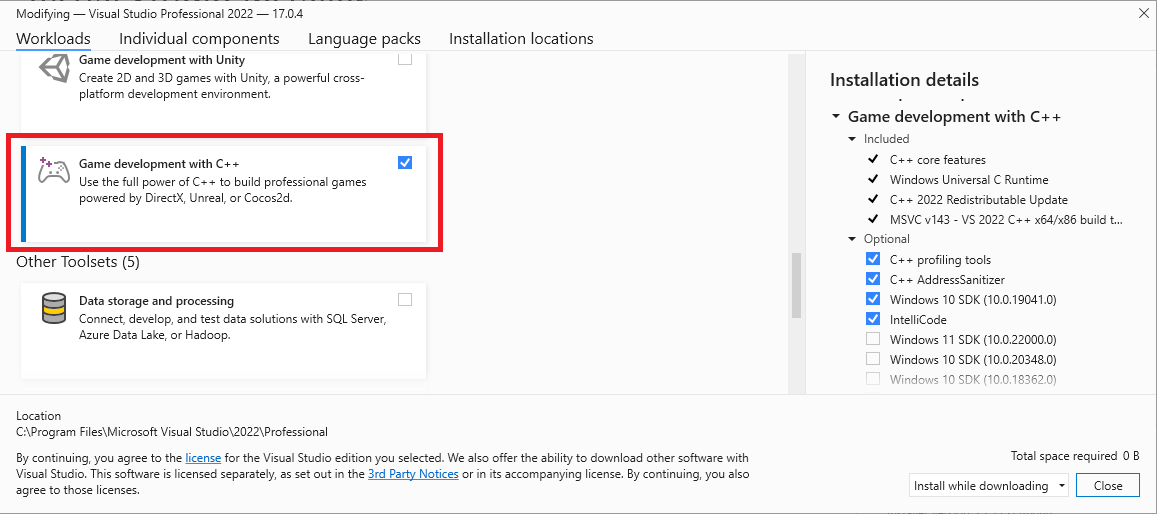 除了遊戲開發所需的核心 C++ 工具之外,請確定已安裝 **Windows 10 SDK (19041)** 或 **Windows 11 SDK (22000)** 元件,以提供使用 Microsoft Game Development Kit (GDK) 建置遊戲所需的 Windows 10 SDK。
> 也可以使用 *Windows 10 SDK* (20348)、*Windows SDK for Windows 11* (10.0.22000) 或 *Windows SDK for Windows 11, Version 22H2* (10.0.22621),但並非必要。對於 2023 年 10 月版本,強烈建議在 PC 開發中使用 *Windows 11 SDK* 或更新版本。
雖然並非必要,但安裝 **使用 C++ 的桌面開發** 工作負載可提供更多您可能覺得有用的工具與範例。例如,如果您使用 Clang/LLVM 工具組進行建置,則需要 **使用 C++ 的桌面開發**。
如果您正在建置使用 Unity 的遊戲,請安裝 **使用 Unity 的遊戲開發** 工作負載。
## 安裝選用工具組
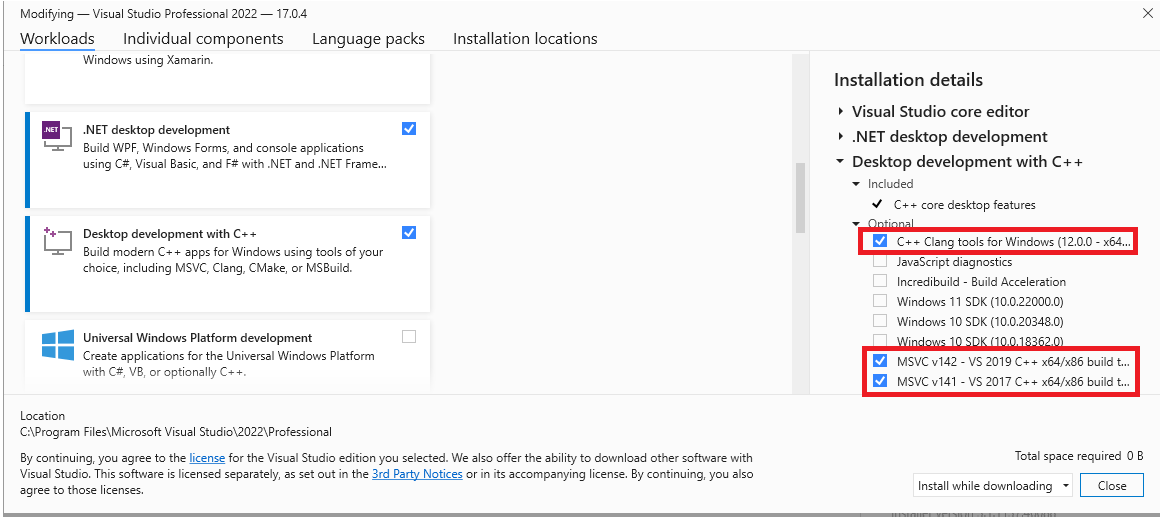
Visual Studio 2022 版本的 MVSC 建置工具 (版本 **v143**) 會隨 **使用 C++ 的遊戲開發** 工作負載一起安裝。除了 **v143** 工具組之外,Microsoft Game Development Kit (GDK) 也支援使用下列工具組進行建置:
* v142 (Visual Studio 2019 工具組)
* 適用於 Windows 的 C++ Clang 工具
這種彈性可讓您升級至 Visual Studio 2022 IDE,而不需要更新工具組。
選用工具組可在 **使用 C++ 的桌面開發** 工作負載底下找到,或在 Visual Studio 安裝對話方塊中搜尋 **個別元件**。
除了遊戲開發所需的核心 C++ 工具之外,請確定已安裝 **Windows 10 SDK (19041)** 或 **Windows 11 SDK (22000)** 元件,以提供使用 Microsoft Game Development Kit (GDK) 建置遊戲所需的 Windows 10 SDK。
> 也可以使用 *Windows 10 SDK* (20348)、*Windows SDK for Windows 11* (10.0.22000) 或 *Windows SDK for Windows 11, Version 22H2* (10.0.22621),但並非必要。對於 2023 年 10 月版本,強烈建議在 PC 開發中使用 *Windows 11 SDK* 或更新版本。
雖然並非必要,但安裝 **使用 C++ 的桌面開發** 工作負載可提供更多您可能覺得有用的工具與範例。例如,如果您使用 Clang/LLVM 工具組進行建置,則需要 **使用 C++ 的桌面開發**。
如果您正在建置使用 Unity 的遊戲,請安裝 **使用 Unity 的遊戲開發** 工作負載。
## 安裝選用工具組
Visual Studio 2022 版本的 MVSC 建置工具 (版本 **v143**) 會隨 **使用 C++ 的遊戲開發** 工作負載一起安裝。除了 **v143** 工具組之外,Microsoft Game Development Kit (GDK) 也支援使用下列工具組進行建置:
* v142 (Visual Studio 2019 工具組)
* 適用於 Windows 的 C++ Clang 工具
這種彈性可讓您升級至 Visual Studio 2022 IDE,而不需要更新工具組。
選用工具組可在 **使用 C++ 的桌面開發** 工作負載底下找到,或在 Visual Studio 安裝對話方塊中搜尋 **個別元件**。
 > 自 2024 年 10 月版本起,不再支援 Visual Studio 2017 工具組 `v141`。
## 為專案選取工具組
專案要使用的工具組是使用專案屬性頁中的 **平台工具組** 屬性來指定。
> 自 2024 年 10 月版本起,不再支援 Visual Studio 2017 工具組 `v141`。
## 為專案選取工具組
專案要使用的工具組是使用專案屬性頁中的 **平台工具組** 屬性來指定。
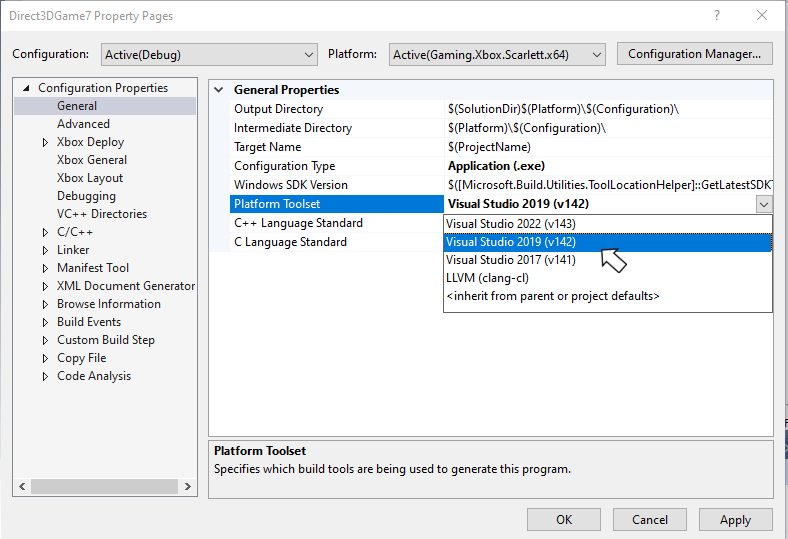 **PlatformToolset** 屬性也可以在專案檔中手動指定,如下列屬性群組所示。
```xml theme={null}
Application
v142
true
Unicode
false
false
```
## Visual Studio 2022 服務模型
Visual Studio 2022 包含新的服務模型,可讓您選取服務基準,然後只取得該基準的更新。此新模型取代了先前 Visual Studio 版本的服務模型,先前的模型強烈建議使用最新可用版本。如需 Visual Studio 2022 服務模型的詳細資訊,請參閱 [Visual Studio 產品生命週期與服務](https://learn.microsoft.com/visualstudio/productinfo/vs-servicing)。
## 回報錯誤
**Visual C++ 編譯器**的錯誤報告應 (盡可能) 透過 Visual Studio 的 *回報問題...* 進行回報。請參閱 [Microsoft Docs](https://learn.microsoft.com/visualstudio/ide/how-to-report-a-problem-with-visual-studio) 與[開發人員社群](https://aka.ms/feedback/report?space=62)網站。請務必閱讀[此頁面](https://aka.ms/compilerbug),以了解如何為編譯器建立良好錯誤報告的詳細資訊。
如果需要私人資訊才能重現問題,您可以在公開報告問題中新增標示為「僅限 Microsoft」的註解。
若要回報 **clang/LLVM for Windows 編譯器**的錯誤,請使用 [https://bugs.llvm.org/](https://bugs.llvm.org/)
若要回報 **Microsoft 標準 C++ 程式庫** (又稱 STL) 的錯誤,請使用 [https://github.com/microsoft/STL/issues](https://github.com/microsoft/STL/issues)
一如往常,對於需要提報的重大問題,歡迎與您的 *Microsoft 代表*聯絡。
## 另請參閱
[PC 遊戲開發的 Visual Studio](/zh-TW/tools/tools-pc/visualstudio/gr-visualstudio-toc)
## Related topics
- [Visual Studio](/zh-TW/tools/tools-pc/visualstudio/index.md)
- [Visual Studio (內容)](/zh-TW/tools/tools-pc/visualstudio/gr-visualstudio-toc.md)
- [用於主機開發的 Visual Studio](/zh-TW/tools/tools-console/visualstudio/visualstudio.md)
- [Visual Studio 2022 GDK 支援注意事項](/zh-TW/tools/tools-console/visualstudio/vs-2022-support-notes.md)
- [Visual Studio 2019 支援注意事項](/zh-TW/tools/tools-pc/visualstudio/gr-vs-2019-support-notes.md)
**PlatformToolset** 屬性也可以在專案檔中手動指定,如下列屬性群組所示。
```xml theme={null}
Application
v142
true
Unicode
false
false
```
## Visual Studio 2022 服務模型
Visual Studio 2022 包含新的服務模型,可讓您選取服務基準,然後只取得該基準的更新。此新模型取代了先前 Visual Studio 版本的服務模型,先前的模型強烈建議使用最新可用版本。如需 Visual Studio 2022 服務模型的詳細資訊,請參閱 [Visual Studio 產品生命週期與服務](https://learn.microsoft.com/visualstudio/productinfo/vs-servicing)。
## 回報錯誤
**Visual C++ 編譯器**的錯誤報告應 (盡可能) 透過 Visual Studio 的 *回報問題...* 進行回報。請參閱 [Microsoft Docs](https://learn.microsoft.com/visualstudio/ide/how-to-report-a-problem-with-visual-studio) 與[開發人員社群](https://aka.ms/feedback/report?space=62)網站。請務必閱讀[此頁面](https://aka.ms/compilerbug),以了解如何為編譯器建立良好錯誤報告的詳細資訊。
如果需要私人資訊才能重現問題,您可以在公開報告問題中新增標示為「僅限 Microsoft」的註解。
若要回報 **clang/LLVM for Windows 編譯器**的錯誤,請使用 [https://bugs.llvm.org/](https://bugs.llvm.org/)
若要回報 **Microsoft 標準 C++ 程式庫** (又稱 STL) 的錯誤,請使用 [https://github.com/microsoft/STL/issues](https://github.com/microsoft/STL/issues)
一如往常,對於需要提報的重大問題,歡迎與您的 *Microsoft 代表*聯絡。
## 另請參閱
[PC 遊戲開發的 Visual Studio](/zh-TW/tools/tools-pc/visualstudio/gr-visualstudio-toc)
## Related topics
- [Visual Studio](/zh-TW/tools/tools-pc/visualstudio/index.md)
- [Visual Studio (內容)](/zh-TW/tools/tools-pc/visualstudio/gr-visualstudio-toc.md)
- [用於主機開發的 Visual Studio](/zh-TW/tools/tools-console/visualstudio/visualstudio.md)
- [Visual Studio 2022 GDK 支援注意事項](/zh-TW/tools/tools-console/visualstudio/vs-2022-support-notes.md)
- [Visual Studio 2019 支援注意事項](/zh-TW/tools/tools-pc/visualstudio/gr-vs-2019-support-notes.md)