> ## Documentation Index
> Fetch the complete documentation index at: https://devdocs.xbox.com/llms.txt
> Use this file to discover all available pages before exploring further.
# 檔案總管頁面
> 檔案總管頁面
使用檔案總管頁面瀏覽主機上的檔案系統,如下列螢幕擷取畫面所示。
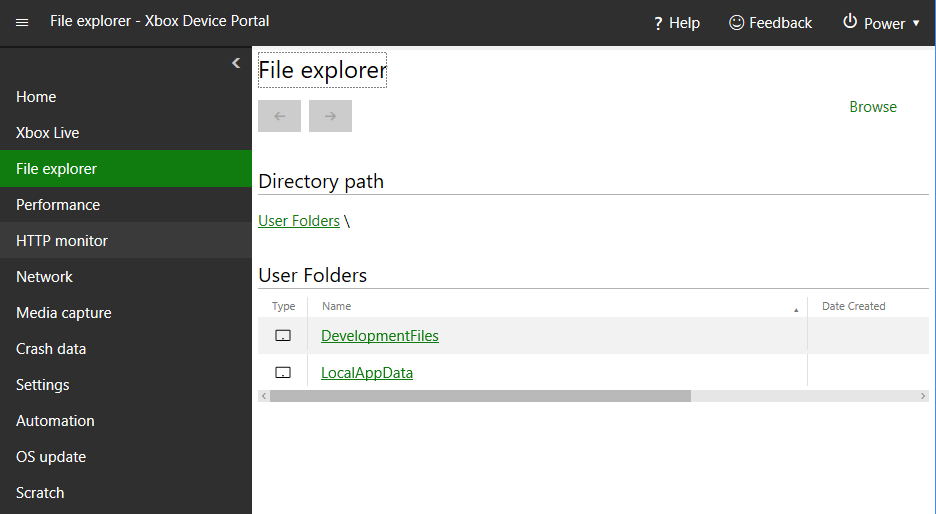 檔案總管頁面具有下列窗格。
## 目錄路徑窗格
使用目錄路徑窗格查看目前正在檢視之目錄的路徑。
## 目錄內容窗格
使用目錄內容窗格查看目前正在檢視之目錄的內容。
## 將檔案上傳至此目錄窗格
使用將檔案上傳至此目錄窗格,將檔案從開發電腦上傳至目前正在檢視的目錄。
## Related topics
- [XBOX Device Portal (XBOX 上的 Windows Device Portal)](/zh-TW/tools/tools-console/wdp/index.md)
- [Game Saves 逐步解說與範例](/zh-TW/build/core-features/common/game-save/game-saves-walkthroughs-and-samples.md)
- [在 Partner Center 中設定遊戲儲存空間](/zh-TW/services/xbox-services/storage/title-storage/config/live-title-storage-portal-config.md)
- [Visual Studio 中的分析導引最佳化](/zh-TW/tools/tools-console/pgo/pgo_full.md)
- [套件 (傳統體驗)](/zh-TW/publishing/game-publishing/concepts/packages-overview.md)
檔案總管頁面具有下列窗格。
## 目錄路徑窗格
使用目錄路徑窗格查看目前正在檢視之目錄的路徑。
## 目錄內容窗格
使用目錄內容窗格查看目前正在檢視之目錄的內容。
## 將檔案上傳至此目錄窗格
使用將檔案上傳至此目錄窗格,將檔案從開發電腦上傳至目前正在檢視的目錄。
## Related topics
- [XBOX Device Portal (XBOX 上的 Windows Device Portal)](/zh-TW/tools/tools-console/wdp/index.md)
- [Game Saves 逐步解說與範例](/zh-TW/build/core-features/common/game-save/game-saves-walkthroughs-and-samples.md)
- [在 Partner Center 中設定遊戲儲存空間](/zh-TW/services/xbox-services/storage/title-storage/config/live-title-storage-portal-config.md)
- [Visual Studio 中的分析導引最佳化](/zh-TW/tools/tools-console/pgo/pgo_full.md)
- [套件 (傳統體驗)](/zh-TW/publishing/game-publishing/concepts/packages-overview.md)