> ## Documentation Index
> Fetch the complete documentation index at: https://devdocs.xbox.com/llms.txt
> Use this file to discover all available pages before exploring further.
# 當機資料頁面
> 當機資料頁面
使用當機資料頁面設定要為主機收集的當機傾印類型,並檢視任何已收集的當機傾印,如下列螢幕擷取畫面所示。
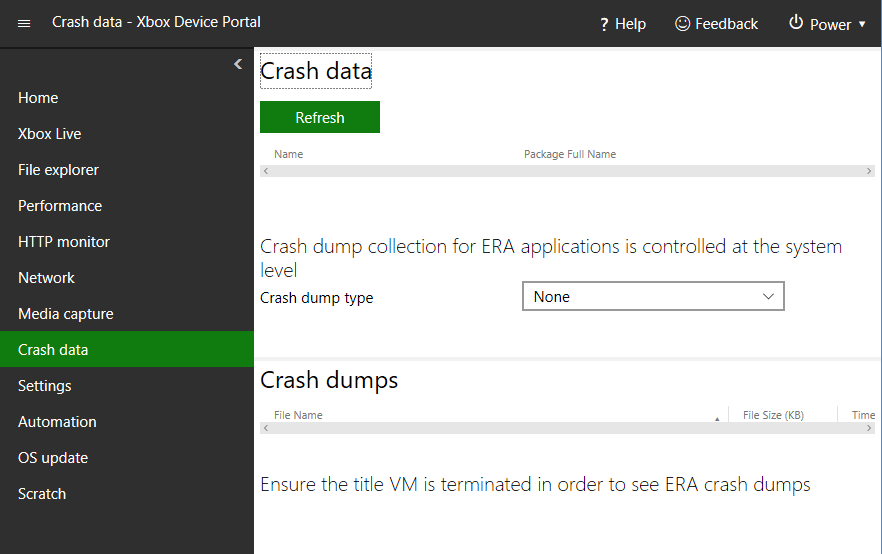 當機資料頁面具有下列窗格。
## 當機資料窗格
使用當機資料窗格設定要為主機收集的當機傾印類型。
## 當機傾印窗格
使用當機傾印窗格檢視任何已收集的當機傾印。
## Related topics
- [XBOX Device Portal (XBOX 上的 Windows Device Portal)](/zh-TW/tools/tools-console/wdp/index.md)
- [遊戲事件資料頁面](/zh-TW/tools/tools-console/wdp/windows-device-portal-on-xbox-game-event-data.md)
- [在 RETAIL 沙箱中測試的建議](/zh-TW/publishing/game-publishing/publishing-processes/managed-creators/publishing-processes-recommendations-for-testing-in-retail.md)
- [為遊戲設定遊戲中繼資料](/zh-TW/publishing/game-publishing/tutorial-xbox-managed/how-to-add-metadata.md)
- [伺服器概觀頁面](/zh-TW/services/playfab/multiplayer/servers/build-server-overview.md)
當機資料頁面具有下列窗格。
## 當機資料窗格
使用當機資料窗格設定要為主機收集的當機傾印類型。
## 當機傾印窗格
使用當機傾印窗格檢視任何已收集的當機傾印。
## Related topics
- [XBOX Device Portal (XBOX 上的 Windows Device Portal)](/zh-TW/tools/tools-console/wdp/index.md)
- [遊戲事件資料頁面](/zh-TW/tools/tools-console/wdp/windows-device-portal-on-xbox-game-event-data.md)
- [在 RETAIL 沙箱中測試的建議](/zh-TW/publishing/game-publishing/publishing-processes/managed-creators/publishing-processes-recommendations-for-testing-in-retail.md)
- [為遊戲設定遊戲中繼資料](/zh-TW/publishing/game-publishing/tutorial-xbox-managed/how-to-add-metadata.md)
- [伺服器概觀頁面](/zh-TW/services/playfab/multiplayer/servers/build-server-overview.md)