> ## Documentation Index
> Fetch the complete documentation index at: https://devdocs.xbox.com/llms.txt
> Use this file to discover all available pages before exploring further.
# XBOX 的 Address Sanitizer 支援
> XBOX 的 Address Sanitizer 支援
與大多數 C++ 程式一樣,遊戲可能會受到一類影響程式正確性與程式穩定性的錯誤所困擾,這就是為什麼從 Visual Studio 2022 開始,Microsoft C/C++ 編譯器 (MSVC) 與 IDE 支援 AddressSanitizer (ASan) 技術。這是一種編譯器與執行階段技術,可在沒有誤判的情況下揭露許多難以發現的錯誤,例如:
* 配置/解除配置不相符,以及 new/delete 類型不相符
* 對堆積而言過大的配置
* calloc 溢位與 alloca 溢位
* 重複釋放與釋放後使用
* 全域變數溢位
* 堆積緩衝區溢位
* 對齊值的對齊無效
* memcpy 與 strncat 參數重疊
* 堆疊緩衝區溢位與下溢
* 傳回後使用堆疊與超出範圍後使用堆疊
* 記憶體在被標記為汙染後仍被使用
如需 ASan 的詳細資訊,請參閱 Visual Studio 頁面:[AddressSanitizer](https://learn.microsoft.com/cpp/sanitizers/asan) (Microsoft Docs)
## 在編譯器中啟用 ASan
Address Sanitizer 已與 Visual Studio 專案系統、CMake 建置系統以及 IDE 整合。專案可以使用一個額外的編譯器選項 *`/fsanitize=address`*,或在 Visual Studio 中設定專案屬性來啟用 AddressSanitizer:
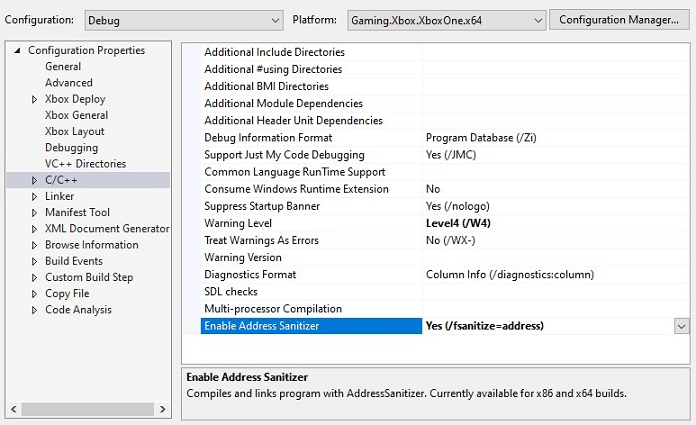 此選項與 x64 的所有最佳化層級與組態相容。不過,它與 `edit-and-continue`、`incremental linking` 以及 `/RTC` **不相容**,使用 ASan 編譯之前必須停用這些選項。
啟用 ASan 時,需要將額外的程式庫連結至您的程式碼。建置系統會自動新增此參考。這也需要您在專案的 ***連結器 > 一般*** 底下設定「其他程式庫目錄」。請確定 `$(VC_LibraryPath_VC_x64)` 值是清單中的最後一個,以避免將其用於其他程式庫,如下所示:
此選項與 x64 的所有最佳化層級與組態相容。不過,它與 `edit-and-continue`、`incremental linking` 以及 `/RTC` **不相容**,使用 ASan 編譯之前必須停用這些選項。
啟用 ASan 時,需要將額外的程式庫連結至您的程式碼。建置系統會自動新增此參考。這也需要您在專案的 ***連結器 > 一般*** 底下設定「其他程式庫目錄」。請確定 `$(VC_LibraryPath_VC_x64)` 值是清單中的最後一個,以避免將其用於其他程式庫,如下所示:
 ## ASan 執行階段需求
當遊戲在啟用 ASan 的情況下建置時,執行階段需要另外一個 DLL 才能啟用此功能。根據預設,在編譯器中啟用 ASan 時,它會將 DLL 複製到專案的輸出目錄,然後應將其部署至主機上可執行檔旁。
如有需要,可以在 Visual Studio 的 `$(VC_ExecutablePath_x64)` 目錄中手動找到這些 DLL。視組建版本而定,XBOX 需要下列兩者之一:
| DLL 檔案名稱 | 組建類型 |
| - | - |
| `clang_rt.asan_dbg_dynamic-x86_64.dll` | 偵錯組建 |
| `clang_rt.asan_dynamic-x86_64.dll` | 發行組建 |
## 執行階段偵錯工具支援
在附加偵錯工具的情況下執行已啟用 ASan 的遊戲時,如果發現錯誤,它會中斷進入偵錯工具並顯示詳細報告,讓您判斷錯誤發生的位置。
但是,如果您在未附加偵錯工具的情況下執行 (例如在自動化測試架構中),錯誤資訊會顯示在標準輸出中,而遊戲會終止。這很有幫助,但您可能需要更多狀態資訊才能找出當機的根本原因,這時就需要當機傾印支援。
如果您在未附加偵錯工具的情況下執行,並且需要在當時解析符號,則需要將 `llvm-symbolizer.exe` 檔案與遊戲 EXE 一起部署。此檔案位於與上列 ASan 執行階段 DLL 相同的位置。
## 執行階段當機傾印支援
從 Visual Studio 16.9.8 或 16.10.2 開始,ASan 可以設定為儲存包含與錯誤相關聯之中繼資料的當機傾印檔案。Visual Studio 中的偵錯工具可以剖析傾印檔案中儲存的中繼資料,以提供更多有關當機的內容。您可以針對每個組建設定此當機傾印儲存、儲存這些二進位成品,然後在 IDE 中以適當的原始碼索引進行檢視。
當機傾印文件位於此處:
[設定當機傾印](https://learn.microsoft.com/cpp/sanitizers/asan-offline-crash-dumps) (Microsoft Docs)
但上述連結的方法需要設定環境變數,而 XBOX 不支援此做法,因此實作了替代方法。若要將當機傾印支援新增至您的 XBOX 遊戲,只需定義一個函式回呼,將必要的當機傾印檔案名稱資訊提供給 ASan 即可,以下顯示三個範例。
檔案名稱通常具有 ***.dmp*** 後置字元,以遵循 Visual Studio IDE 慣例
```c++ theme={null}
// 1. Use a hardcoded dump name
extern "C" const wchar_t* __vcasan_save_dumps()
{
return L"myCrashDump.dmp";
}
// 2. Programmatically build the dump name
extern "C" const wchar_t* __vcasan_save_dumps()
{
return TestFramework.buildName + TestFramework.buildInfo + TestFramework.dateTime;
}
// 3. You can conditionally choose NOT to collect a crash dump
extern "C" const wchar_t* __vcasan_save_dumps()
{
// Choose to create a crash dump based on a runtime flag
if ( gCollectCrashDumps )
{
return L"myCrashDump.dmp";
}
else
{
// Returning NULL stops ASan creating a crash dump
return NULL;
};
}
```
此函式傳回的名稱沒有特定需求,但必須是執行程式碼之目標裝置上的有效檔案路徑。例如,將當機傾印寫入主機上的 D: 磁碟機,就表示在開發期間可以輕鬆找到並擷取這些傾印。
我們也新增了變更所產生之當機傾印類型的功能。在某些情況下,簡單的「分級」傾印就足以查看處理序失敗位置的呼叫堆疊,但對於某些問題,您可能需要問題發生時的周圍記憶體。為此,我們提供了三種可設定的當機傾印類型,這些類型受 XBOX 平台支援,並與主機及 xbWatson 所產生的當機傾印類型相符。
與先前的函式一樣,此覆寫在 XBOX 上為**選用**,但如果您想在未附加偵錯工具的情況下使用當機傾印收集 ASan 資訊,強烈建議使用。如果您提供傾印檔案名稱,但**未**提供傾印類型覆寫,則無法在 XBOX 上產生有效的當機傾印。
此回呼會傳回一個數字,表示所需的傾印類型。有效的類型如下列範例所示:
```c++ theme={null}
extern "C" const signed int __vcasan_override_dumptype()
{
// The current valid values are:
// 0 : Triage Dump
// 1 : Mini Dump
// 2 : Heap Dump
// Values outside this range are defaulted to 2 (Full Heap)
// This example uses Heap Dumps which give the most information
return 2;
}
```
## ASan 程式碼範例
此程式碼示範如何輕鬆地將這些函式新增至現有的程式碼基底,並視需要進行調整:
```c++ theme={null}
#include
extern "C" const wchar_t* __vcasan_save_dumps()
{
// Specify dump filename
return L"myCrashDump.dmp";
}
extern "C" const signed int __vcasan_override_dumptype()
{
// Full heap dump requested
return 2;
}
static const int arraySize = 8;
static int asanArray[arraySize];
static int asanAccumulator = 0;
int main()
{
// ASan should use the callback functions that we have provided
for (int loop = 0; loop <= arraySize; loop++)
{
// We don't really care about accumulating the values
// We just want to access outside the array causing an ASan error
asanAccumulator += asanArray[loop];
}
// If we get here, we have failed as ASan should have caught the error above
printf("fail");
return 0;
}
```
透過此命令列編譯程式碼:
```c++ theme={null}
cl /nologo /fsanitize=address /Zi ASanTest.cpp
```
執行時,此程式碼會擲回 ASan 例外狀況,並依上述函式的指定產生當機傾印。您可以將這些函式整合至現有的程式碼基底,並在啟用 ASan 時產生您選擇的當機傾印。
## 已知問題
* Visual Studio 2019 (16.11) ASan 與 Game OS 不相容。
* 在 17.12 與 17.13 的初始版本中,ASan DLL 與 Game OS 不相容,且將無法載入。此問題已在 17.12.6 與 17.13.3 中修正。
* Game OS 的 ASan 支援出現迴歸,導致 Visual Studio 2022 在啟動時當機,此問題已在 Visual Studio 2022 17.14.29 與 Visual Studio 2026 18.4.1 中修正。
* 在 XBOX 上於偵錯工具下執行時,會定期發出下列例外狀況訊息,但可以放心忽略。
```
Exception thrown at 0x00007FF8FCAAFCF6 (clang_rt.asan_dynamic-x86_64.dll) in game.exe: 0xE0736171: Access violation reading location 0x000017FF1F9E1250.
```
## Related topics
- [SetGraphicsRootShaderResourceView](/zh-TW/reference/graphics/d3d12/interfaces/id3d12graphicscommandlist/methods/id3d12graphicscommandlist_setgraphicsrootshaderresourceview_public.md)
- [支援的 NLS 函式](/zh-TW/build/game-principles/localization/supported-nls-apis.md)
- [適用於 GDK 的 PlayFab Services](/zh-TW/services/playfab/sdks/platforms/gdk.md)
- [GetGPUVirtualAddress](/zh-TW/reference/graphics/d3d12/interfaces/id3d12resource/methods/id3d12resource_getgpuvirtualaddress_public.md)
- [ApuIsVirtualAddressValid](/zh-TW/reference/audio/apu/functions/apuisvirtualaddressvalid.md)
## ASan 執行階段需求
當遊戲在啟用 ASan 的情況下建置時,執行階段需要另外一個 DLL 才能啟用此功能。根據預設,在編譯器中啟用 ASan 時,它會將 DLL 複製到專案的輸出目錄,然後應將其部署至主機上可執行檔旁。
如有需要,可以在 Visual Studio 的 `$(VC_ExecutablePath_x64)` 目錄中手動找到這些 DLL。視組建版本而定,XBOX 需要下列兩者之一:
| DLL 檔案名稱 | 組建類型 |
| - | - |
| `clang_rt.asan_dbg_dynamic-x86_64.dll` | 偵錯組建 |
| `clang_rt.asan_dynamic-x86_64.dll` | 發行組建 |
## 執行階段偵錯工具支援
在附加偵錯工具的情況下執行已啟用 ASan 的遊戲時,如果發現錯誤,它會中斷進入偵錯工具並顯示詳細報告,讓您判斷錯誤發生的位置。
但是,如果您在未附加偵錯工具的情況下執行 (例如在自動化測試架構中),錯誤資訊會顯示在標準輸出中,而遊戲會終止。這很有幫助,但您可能需要更多狀態資訊才能找出當機的根本原因,這時就需要當機傾印支援。
如果您在未附加偵錯工具的情況下執行,並且需要在當時解析符號,則需要將 `llvm-symbolizer.exe` 檔案與遊戲 EXE 一起部署。此檔案位於與上列 ASan 執行階段 DLL 相同的位置。
## 執行階段當機傾印支援
從 Visual Studio 16.9.8 或 16.10.2 開始,ASan 可以設定為儲存包含與錯誤相關聯之中繼資料的當機傾印檔案。Visual Studio 中的偵錯工具可以剖析傾印檔案中儲存的中繼資料,以提供更多有關當機的內容。您可以針對每個組建設定此當機傾印儲存、儲存這些二進位成品,然後在 IDE 中以適當的原始碼索引進行檢視。
當機傾印文件位於此處:
[設定當機傾印](https://learn.microsoft.com/cpp/sanitizers/asan-offline-crash-dumps) (Microsoft Docs)
但上述連結的方法需要設定環境變數,而 XBOX 不支援此做法,因此實作了替代方法。若要將當機傾印支援新增至您的 XBOX 遊戲,只需定義一個函式回呼,將必要的當機傾印檔案名稱資訊提供給 ASan 即可,以下顯示三個範例。
檔案名稱通常具有 ***.dmp*** 後置字元,以遵循 Visual Studio IDE 慣例
```c++ theme={null}
// 1. Use a hardcoded dump name
extern "C" const wchar_t* __vcasan_save_dumps()
{
return L"myCrashDump.dmp";
}
// 2. Programmatically build the dump name
extern "C" const wchar_t* __vcasan_save_dumps()
{
return TestFramework.buildName + TestFramework.buildInfo + TestFramework.dateTime;
}
// 3. You can conditionally choose NOT to collect a crash dump
extern "C" const wchar_t* __vcasan_save_dumps()
{
// Choose to create a crash dump based on a runtime flag
if ( gCollectCrashDumps )
{
return L"myCrashDump.dmp";
}
else
{
// Returning NULL stops ASan creating a crash dump
return NULL;
};
}
```
此函式傳回的名稱沒有特定需求,但必須是執行程式碼之目標裝置上的有效檔案路徑。例如,將當機傾印寫入主機上的 D: 磁碟機,就表示在開發期間可以輕鬆找到並擷取這些傾印。
我們也新增了變更所產生之當機傾印類型的功能。在某些情況下,簡單的「分級」傾印就足以查看處理序失敗位置的呼叫堆疊,但對於某些問題,您可能需要問題發生時的周圍記憶體。為此,我們提供了三種可設定的當機傾印類型,這些類型受 XBOX 平台支援,並與主機及 xbWatson 所產生的當機傾印類型相符。
與先前的函式一樣,此覆寫在 XBOX 上為**選用**,但如果您想在未附加偵錯工具的情況下使用當機傾印收集 ASan 資訊,強烈建議使用。如果您提供傾印檔案名稱,但**未**提供傾印類型覆寫,則無法在 XBOX 上產生有效的當機傾印。
此回呼會傳回一個數字,表示所需的傾印類型。有效的類型如下列範例所示:
```c++ theme={null}
extern "C" const signed int __vcasan_override_dumptype()
{
// The current valid values are:
// 0 : Triage Dump
// 1 : Mini Dump
// 2 : Heap Dump
// Values outside this range are defaulted to 2 (Full Heap)
// This example uses Heap Dumps which give the most information
return 2;
}
```
## ASan 程式碼範例
此程式碼示範如何輕鬆地將這些函式新增至現有的程式碼基底,並視需要進行調整:
```c++ theme={null}
#include
extern "C" const wchar_t* __vcasan_save_dumps()
{
// Specify dump filename
return L"myCrashDump.dmp";
}
extern "C" const signed int __vcasan_override_dumptype()
{
// Full heap dump requested
return 2;
}
static const int arraySize = 8;
static int asanArray[arraySize];
static int asanAccumulator = 0;
int main()
{
// ASan should use the callback functions that we have provided
for (int loop = 0; loop <= arraySize; loop++)
{
// We don't really care about accumulating the values
// We just want to access outside the array causing an ASan error
asanAccumulator += asanArray[loop];
}
// If we get here, we have failed as ASan should have caught the error above
printf("fail");
return 0;
}
```
透過此命令列編譯程式碼:
```c++ theme={null}
cl /nologo /fsanitize=address /Zi ASanTest.cpp
```
執行時,此程式碼會擲回 ASan 例外狀況,並依上述函式的指定產生當機傾印。您可以將這些函式整合至現有的程式碼基底,並在啟用 ASan 時產生您選擇的當機傾印。
## 已知問題
* Visual Studio 2019 (16.11) ASan 與 Game OS 不相容。
* 在 17.12 與 17.13 的初始版本中,ASan DLL 與 Game OS 不相容,且將無法載入。此問題已在 17.12.6 與 17.13.3 中修正。
* Game OS 的 ASan 支援出現迴歸,導致 Visual Studio 2022 在啟動時當機,此問題已在 Visual Studio 2022 17.14.29 與 Visual Studio 2026 18.4.1 中修正。
* 在 XBOX 上於偵錯工具下執行時,會定期發出下列例外狀況訊息,但可以放心忽略。
```
Exception thrown at 0x00007FF8FCAAFCF6 (clang_rt.asan_dynamic-x86_64.dll) in game.exe: 0xE0736171: Access violation reading location 0x000017FF1F9E1250.
```
## Related topics
- [SetGraphicsRootShaderResourceView](/zh-TW/reference/graphics/d3d12/interfaces/id3d12graphicscommandlist/methods/id3d12graphicscommandlist_setgraphicsrootshaderresourceview_public.md)
- [支援的 NLS 函式](/zh-TW/build/game-principles/localization/supported-nls-apis.md)
- [適用於 GDK 的 PlayFab Services](/zh-TW/services/playfab/sdks/platforms/gdk.md)
- [GetGPUVirtualAddress](/zh-TW/reference/graphics/d3d12/interfaces/id3d12resource/methods/id3d12resource_getgpuvirtualaddress_public.md)
- [ApuIsVirtualAddressValid](/zh-TW/reference/audio/apu/functions/apuisvirtualaddressvalid.md)