> ## Documentation Index
> Fetch the complete documentation index at: https://devdocs.xbox.com/llms.txt
> Use this file to discover all available pages before exploring further.
# PIX 自訂記憶體配置器
> PIX 自訂記憶體配置器
PIX 時間擷取可以追蹤自訂記憶體配置器所進行的記憶體配置與釋放。本主題說明如何為自訂配置器加上註解,讓 PIX 能夠看到它們。
## 從自訂配置器回報記憶體配置與釋放
[PIXRecordMemoryAllocationEvent](/zh-TW/reference/tools/pix3/functions/pixrecordmemoryallocationevent) 與 [PIXRecordMemoryFreeEvent](/zh-TW/reference/tools/pix3/functions/pixrecordmemoryfreeevent) API 提供 PIX 在時間擷取中顯示遊戲自訂記憶體配置器內所有記憶體配置資訊所需的資料。提供此資料後,PIX 會為您的自訂配置器顯示與 [XMemVirtualAlloc](/zh-TW/reference/system/xmem/functions/xmemvirtualalloc)/VirtualFree 以及 HeapAlloc/HeapFree 呼叫相同的所有資料。
若要呼叫 [PIXRecordMemoryAllocationEvent](/zh-TW/reference/tools/pix3/functions/pixrecordmemoryallocationevent) 與 [PIXRecordMemoryFreeEvent](/zh-TW/reference/tools/pix3/functions/pixrecordmemoryfreeevent) 並在 PIX 中檢視產生的資料,請在原始程式碼中包含 pixmemory.h,並確保已定義 USE\_PIX。請依下列範例所示呼叫 [PIXRecordMemoryAllocationEvent](/zh-TW/reference/tools/pix3/functions/pixrecordmemoryallocationevent) 與 [PIXRecordMemoryFreeEvent](/zh-TW/reference/tools/pix3/functions/pixrecordmemoryfreeevent)。
```cpp theme={null}
#include "pixmemory.h"
void* TitleAllocate(size_t size, UINT64 metadata)
{
void *pAddress = layer_allocate(size);
if (pAddress == NULL)
return NULL;
PIXRecordMemoryAllocationEvent(TITLE_ALLOCATOR, pAddress, size, metadata);
return pAddress;
}
void TitleFree(void* baseAddress, size_t size, UINT64 metadata)
{
layer_free(baseAddress, 0);
PIXRecordMemoryFreeEvent(TITLE_ALLOCATOR, baseAddress, size, metadata);
}
```
## 在 PIX 中檢視配置與釋放事件
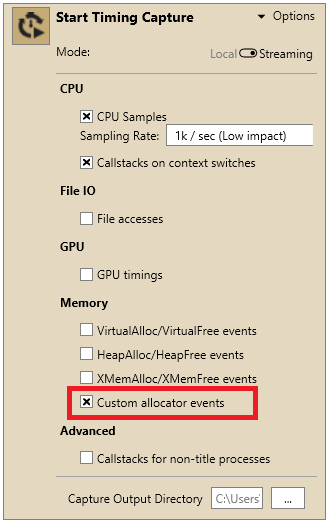
若要查看與您呼叫 [PIXRecordMemoryAllocationEvent](/zh-TW/reference/tools/pix3/functions/pixrecordmemoryallocationevent) 與 [PIXRecordMemoryFreeEvent](/zh-TW/reference/tools/pix3/functions/pixrecordmemoryfreeevent) 相對應的記憶體事件,請在開始時間擷取之前選取 **Custom Allocator events** 核取方塊,如下圖所示。
 PIX 會在時間擷取的 **Range Details** 檢視中,將自訂配置與釋放的資訊與其他配置類型的資料一起顯示。如需詳細資訊,請參閱[分析時間擷取中的記憶體使用量與效能](/zh-TW/tools/tools-console/pix/pix-timing-captures-memory)。
## 另請參閱
[PIX](/zh-TW/tools/tools-console/pix/pix)
[PIXRecordMemoryAllocationEvent](/zh-TW/reference/tools/pix3/functions/pixrecordmemoryallocationevent)
[PIXRecordMemoryFreeEvent](/zh-TW/reference/tools/pix3/functions/pixrecordmemoryfreeevent)
[分析時間擷取中的記憶體使用量與效能](/zh-TW/tools/tools-console/pix/pix-timing-captures-memory)
## Related topics
- [PIXRecordMemoryAllocationEvent](/zh-TW/reference/tools/pix3/functions/pixrecordmemoryallocationevent.md)
- [PIXRecordMemoryFreeEvent](/zh-TW/reference/tools/pix3/functions/pixrecordmemoryfreeevent.md)
- [適用於 GDK 遊戲的 XBOX 與 Windows 版 PIX](/zh-TW/tools/tools-console/pix/index.md)
- [NDA 主題目錄 - Microsoft Learn 線上連結](/zh-TW/nda/nda-topic-directory.md)
- [PlayFab Unified SDK 中的記憶體管理](/zh-TW/services/playfab/sdks/unified-sdk/memory-management.md)
PIX 會在時間擷取的 **Range Details** 檢視中,將自訂配置與釋放的資訊與其他配置類型的資料一起顯示。如需詳細資訊,請參閱[分析時間擷取中的記憶體使用量與效能](/zh-TW/tools/tools-console/pix/pix-timing-captures-memory)。
## 另請參閱
[PIX](/zh-TW/tools/tools-console/pix/pix)
[PIXRecordMemoryAllocationEvent](/zh-TW/reference/tools/pix3/functions/pixrecordmemoryallocationevent)
[PIXRecordMemoryFreeEvent](/zh-TW/reference/tools/pix3/functions/pixrecordmemoryfreeevent)
[分析時間擷取中的記憶體使用量與效能](/zh-TW/tools/tools-console/pix/pix-timing-captures-memory)
## Related topics
- [PIXRecordMemoryAllocationEvent](/zh-TW/reference/tools/pix3/functions/pixrecordmemoryallocationevent.md)
- [PIXRecordMemoryFreeEvent](/zh-TW/reference/tools/pix3/functions/pixrecordmemoryfreeevent.md)
- [適用於 GDK 遊戲的 XBOX 與 Windows 版 PIX](/zh-TW/tools/tools-console/pix/index.md)
- [NDA 主題目錄 - Microsoft Learn 線上連結](/zh-TW/nda/nda-topic-directory.md)
- [PlayFab Unified SDK 中的記憶體管理](/zh-TW/services/playfab/sdks/unified-sdk/memory-management.md)