> ## Documentation Index
> Fetch the complete documentation index at: https://devdocs.xbox.com/llms.txt
> Use this file to discover all available pages before exploring further.
# PIX GPU 計時
> PIX GPU 計時
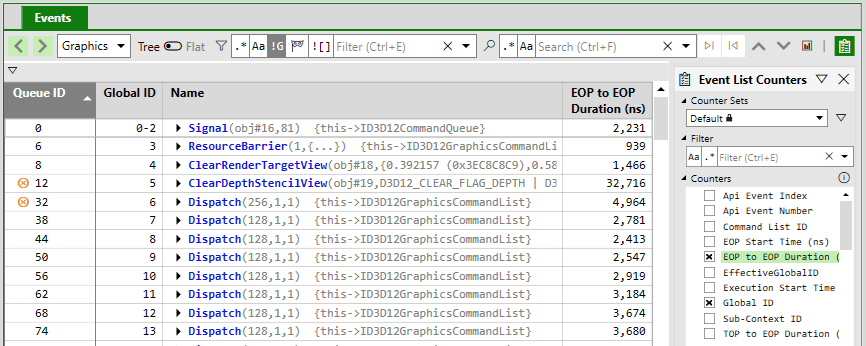
PIX 會在 **Events** 檢視中顯示每個全域 ID 的計時。預設為 EOP to EOP Duration,您可以從 **Events** 檢視工具列開啟 **Event List Counters** 面板,以取得其他計時計數器。
 | 計數器 | 描述 |
| - | - |
| EOP to EOP Duration | 從上一個項目的 EOP (管線結束) 時間戳記到此項目之 EOP 時間戳記的時間。平行執行的工作項目看起來會比單獨執行時更短。 |
| TOP to EOP Duration | 從此項目的 TOP (管線開始) 時間戳記到此項目之 EOP 時間戳記的時間。由於 GPU 爭用,平行執行的工作項目看起來會比單獨執行時更長。 |
| EOP Start Time | 上一個項目的 EOP 時間戳記。 |
| Execution Start Time | 此項目的 TOP 時間戳記。 |
## 何時收集計時?
PIX 會在開始分析並收集佔用率資料時收集計時。收集佔用率會帶來一些分析額外負荷,因此在 XBOX Series X|S 主機上分析的擷取有兩種收集資料的模式。您可以從 **Events** 檢視與 **Timeline** 檢視在這兩種模式之間切換。
| 計數器 | 描述 |
| - | - |
| EOP to EOP Duration | 從上一個項目的 EOP (管線結束) 時間戳記到此項目之 EOP 時間戳記的時間。平行執行的工作項目看起來會比單獨執行時更短。 |
| TOP to EOP Duration | 從此項目的 TOP (管線開始) 時間戳記到此項目之 EOP 時間戳記的時間。由於 GPU 爭用,平行執行的工作項目看起來會比單獨執行時更長。 |
| EOP Start Time | 上一個項目的 EOP 時間戳記。 |
| Execution Start Time | 此項目的 TOP 時間戳記。 |
## 何時收集計時?
PIX 會在開始分析並收集佔用率資料時收集計時。收集佔用率會帶來一些分析額外負荷,因此在 XBOX Series X|S 主機上分析的擷取有兩種收集資料的模式。您可以從 **Events** 檢視與 **Timeline** 檢視在這兩種模式之間切換。
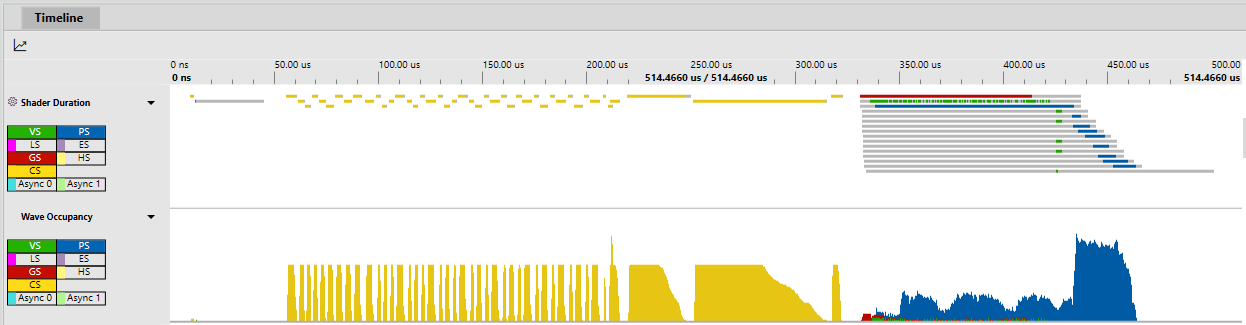 預設模式會在擷取的單次播放中同時收集佔用率資料與計時資料。佔用率資料填入後,分析額外負荷會回報在 **Events** 檢視中。如果您想查看整個擷取中的佔用率 (波、執行緒、VGPR、LDS 等),此模式很實用。
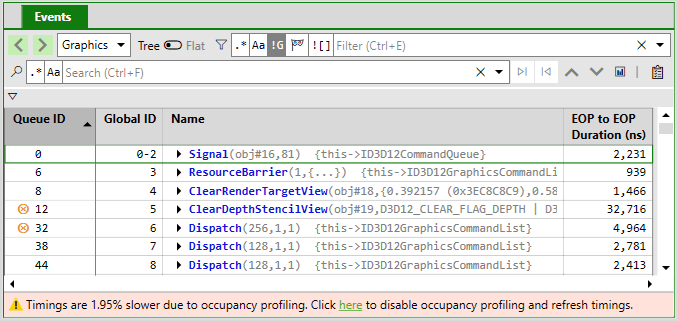 第二種模式不會收集佔用率資料,以盡可能測量最準確的計時。
 ## 計時的差異
**Dr. PIX** 與 **Shader Trace** 等各種功能會在主機上播放擷取,同時啟用或停用硬體功能。這可能導致計時與 **Events** 檢視的計時略有不同,或每次執行之間略有差異,但執行之間有些微差異是預期中的情況。
## Related topics
- [PIX GPU 擷取與效能分析](/zh-TW/tools/tools-console/pix/gpu/index.md)
- [NDA 主題目錄 - Microsoft Learn 線上連結](/zh-TW/nda/nda-topic-directory.md)
- [XBOX Series 主機上的 PIX GPU 追蹤擷取](/zh-TW/tools/tools-console/pix/gpu-trace/index.md)
- [用於 GPU 著色器分析的 PIX Shader Explorer](/zh-TW/tools/tools-console/pix/shader-explorer/index.md)
- [PIX3](/zh-TW/reference/tools/pix3/pix3_members.md)
## 計時的差異
**Dr. PIX** 與 **Shader Trace** 等各種功能會在主機上播放擷取,同時啟用或停用硬體功能。這可能導致計時與 **Events** 檢視的計時略有不同,或每次執行之間略有差異,但執行之間有些微差異是預期中的情況。
## Related topics
- [PIX GPU 擷取與效能分析](/zh-TW/tools/tools-console/pix/gpu/index.md)
- [NDA 主題目錄 - Microsoft Learn 線上連結](/zh-TW/nda/nda-topic-directory.md)
- [XBOX Series 主機上的 PIX GPU 追蹤擷取](/zh-TW/tools/tools-console/pix/gpu-trace/index.md)
- [用於 GPU 著色器分析的 PIX Shader Explorer](/zh-TW/tools/tools-console/pix/shader-explorer/index.md)
- [PIX3](/zh-TW/reference/tools/pix3/pix3_members.md)