> ## Documentation Index
> Fetch the complete documentation index at: https://devdocs.xbox.com/llms.txt
> Use this file to discover all available pages before exploring further.
# 使用 SmartMatch 配對
> 在您的多人遊戲中使用 XBOX SmartMatch 配對建立比賽票證工作階段、設定玩家屬性、管理 QoS,以及重複使用遊戲工作階段。
本主題說明如何使用 SmartMatch 在多人遊戲中配對玩家。
[流程圖:SmartMatch 配對程序](#flow-chart-smartmatch-matchmaking-process)
[建立比賽票證工作階段和比賽票證](#creating-a-match-ticket-session-and-a-match-ticket)
[在工作階段和玩家上設定配對屬性](#setting-matchmaking-attributes-on-the-session-and-players)
[進行配對](#making-the-match)
[維護比賽票證](#maintaining-the-match-ticket)
[將遊戲工作階段重複使用為比賽票證工作階段](#reusing-the-game-session-as-a-match-ticket-session)
[刪除比賽票證](#deleting-the-match-ticket)
[使用 XBOX Compute 為遊戲執行配對](#performing-matchmaking-for-games-using-xbox-live-compute)
[另請參閱](#see-also)
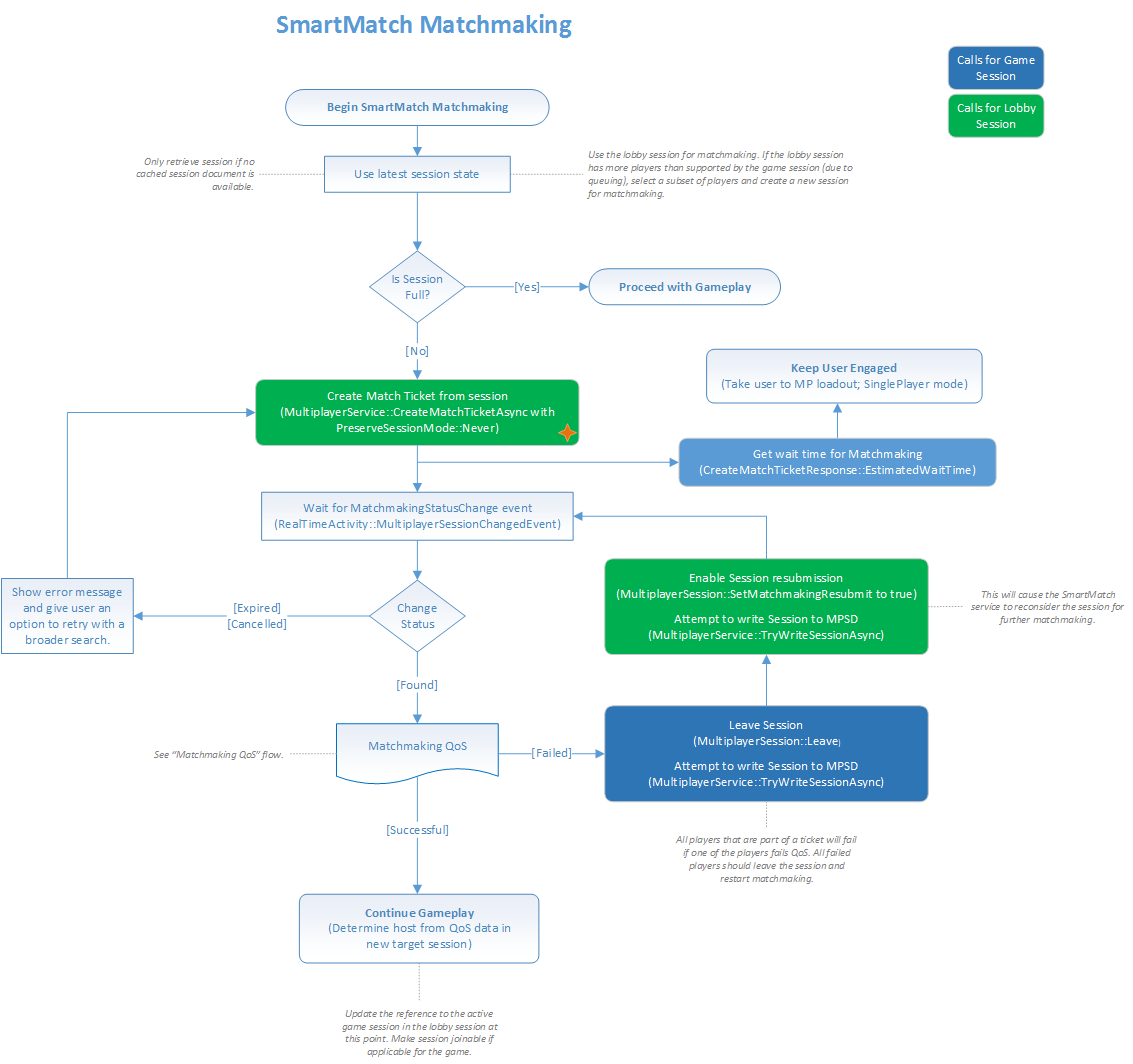
## 流程圖:SmartMatch 配對程序
下列流程圖說明 SmartMatch 配對程序。
 [返回本主題頂端。](#top)
## 建立比賽票證工作階段和比賽票證
在配對程序開始之前,配對「偵察者」會設定比賽票證工作階段,以代表想要一起進入配對的一群人員。
此群組中的所有玩家都會使用 [XblMultiplayerSessionJoin](/zh-TW/reference/live/xsapi-c/multiplayer_c/functions/xblmultiplayersessionjoin) 加入工作階段。
建立票證工作階段並填入玩家之後,遊戲會使用 [XblMatchmakingCreateMatchTicketAsync](/zh-TW/reference/live/xsapi-c/matchmaking_c/functions/xblmatchmakingcreatematchticketasync) 將工作階段提交至配對服務。
此方法會建立代表票證工作階段的比賽票證,然後將票證工作階段中的 `/servers/matchmaking/properties/system/status` 欄位更新為 `searching`。
如需詳細資訊,請參閱「多人遊戲工作」主題中的[建立比賽票證](/zh-TW/services/xbox-services/multiplayer/mpsd/how-to/live-mpsd-how-tos#camt)一節。
比賽票證建立方法的回應是 [XblCreateMatchTicketResponse](/zh-TW/reference/live/xsapi-c/matchmaking_c/structs/xblcreatematchticketresponse) 物件。
回應包含比賽票證識別碼。它是一個 GUID,可用於透過刪除票證來取消配對。
回應也包含漏斗的平均等待時間,可用來設定玩家的期望。
[返回本主題頂端。](#top)
## 在工作階段和玩家上設定配對屬性
將工作階段提交至配對時,遊戲可以設定配對服務用來將該工作階段與其他工作階段分組的屬性。
遊戲可以在票證層級或在每位成員層級指定屬性。
### 在比賽票證層級設定配對屬性
遊戲會在 [XblMatchmakingCreateMatchTicketAsync](/zh-TW/reference/live/xsapi-c/matchmaking_c/functions/xblmatchmakingcreatematchticketasync) 方法的 `ticketAttributesJson` 參數中提交比賽票證層級的屬性。
在票證層級指定的屬性會覆寫在每位成員層級指定的相同屬性。
### 在每位成員層級設定配對屬性
遊戲會在比賽票證工作階段中的每位成員上指定每位成員的屬性。
這些屬性是透過使用屬性名稱 `matchAttrs` 呼叫 [XblMultiplayerSessionCurrentUserSetCustomPropertyJson](/zh-TW/reference/live/xsapi-c/multiplayer_c/functions/xblmultiplayersessioncurrentusersetcustompropertyjson) 來設定的。
此呼叫會將屬性放在票證工作階段中每位玩家的 `/members/{index}/properties/custom/matchAttrs` 欄位中。
配對程序會根據在漏斗的 XBOX 服務設定中為該屬性指定的 `flatten` 方法,將每位成員的屬性「扁平化」為單一票證層級屬性。
這是在 [Partner Center](https://partner.microsoft.com/dashboard) 中設定的。
[返回本主題頂端。](#top)
## 進行配對
設定好票證工作階段和比賽票證之後,配對服務會將所代表的票證工作階段與代表其他群組的其他票證工作階段配對,然後建立或識別比賽目標工作階段。
服務也會在目標工作階段中為已配對的玩家建立保留,然後將票證工作階段標記為已配對。
多人遊戲工作階段目錄 (MPSD) 會通知遊戲票證工作階段的此項變更。
遊戲接著必須採取步驟來初始化目標工作階段,以確認有足夠的玩家在場。遊戲會執行服務品質 (QoS) 檢查,以確保玩家可以成功地彼此連線。
如果初始化或 QoS 失敗,遊戲會將票證工作階段標記為重新提交至配對,以便找到另一個群組。
如需詳細資訊,請參閱[目標工作階段初始化和 QoS](/zh-TW/services/xbox-services/multiplayer/matchmaking/concepts/live-matchmaking-target-session)。
在比賽活動期間,會對工作階段的 JSON 物件進行下列變更。
* `/servers/matchmaking/properties/system/status` 欄位設定為 `found`
* `/servers/matchmaking/properties/system/targetSessionRef` 欄位設定為目標工作階段
* 每個票證工作階段的 `/members/{index}/properties/custom/matchAttrs` 欄位複製到 `/members/{index}/constants/custom/matchmakingResult/playerAttrs` 欄位
* 對於每位玩家,票證屬性會從比賽票證中的 `ticketAttributes` 欄位複製到 `/members/{index}/constants/custom/matchmakingResult/ticketAttrs` 欄位
[返回本主題頂端。](#top)
## 維護比賽票證
配對服務使用為工作階段建立比賽票證時的票證工作階段快照。
因此,如果有任何玩家加入或離開票證工作階段,遊戲必須使用配對服務刪除比賽票證,然後重新建立它。
[返回本主題頂端。](#top)
## 將遊戲工作階段重複使用為比賽票證工作階段
兩個 `preserveSession` 設定為 `Always` 的工作階段無法彼此配對,因為它們無法合併。遊戲所使用的配對流程應考慮到這一點。
遊戲可以將現有的遊戲工作階段重複使用為比賽票證工作階段,以尋找更多玩家加入已在進行中的遊戲。
若要啟用此功能,遊戲必須在 `preserveSession` 參數設定為 [XblPreserveSessionMode](/zh-TW/reference/live/xsapi-c/matchmaking_c/enums/xblpreservesessionmode)`::Always` 的情況下呼叫 [XblMatchmakingCreateMatchTicketAsync](/zh-TW/reference/live/xsapi-c/matchmaking_c/functions/xblmatchmakingcreatematchticketasync) 來建立比賽票證。
配對服務接著會確保用於票證的現有工作階段在整個配對程序中都會保留,並成為最終的目標工作階段。
[返回本主題頂端。](#top)
## 刪除比賽票證
若要刪除比賽票證,遊戲會呼叫 [XblMatchmakingDeleteMatchTicketAsync](/zh-TW/reference/live/xsapi-c/matchmaking_c/functions/xblmatchmakingdeletematchticketasync)。
刪除票證會:
1. 停止票證工作階段中玩家的配對。
2. 將票證工作階段中的 `/servers/matchmaking/properties/system/status` 欄位更新為 `canceled`。
[返回本主題頂端。](#top)
## 使用 XBOX Compute 為遊戲執行配對
以下是讓玩家配對進入以 XBOX Compute 為基礎之遊戲的高階步驟。
類似的流程應適用於由第三方裝載的遊戲。
1. 偵察者會建立代表群組的票證工作階段。此工作階段包含位於工作階段設定 `/constants/system/measurementServerAddresses` 中的潛在資料中心清單。如果資料中心清單是靜態的,它來自工作階段範本;或者,它來自用戶端在第一次從 XBOX Compute 取得清單之後,於建立工作階段時寫入的內容。此工作階段也包含 `targetSessionConstants/custom/gameServerPlatform` 物件中的 `gsiSetId`、`gameVariantId` 和 `maxAllowedPlayers` 值。
2. 群組中的所有其他玩家加入票證工作階段。
3. 群組的所有成員從票證工作階段的 `/constants/system` 物件下載 `measurementServerAddresses` 值、使用平台 API 對它們執行 Ping,然後將偏好資料中心的已排序清單上傳至工作階段,如 `/members/{index}/properties/system/serverMeasurements` 中所定義。
> \[!NOTE]
> 遊戲可以使用 [XblMultiplayerSessionConstantsSetMeasurementServerAddressesJson](/zh-TW/reference/live/xsapi-c/multiplayer_c/functions/xblmultiplayersessionconstantssetmeasurementserveraddressesjson) 方法和 [XblMultiplayerSessionConstants](/zh-TW/reference/live/xsapi-c/multiplayer_c/structs/xblmultiplayersessionconstants)`::MeasurementServerAddressesJson`,設定和擷取工作階段中的 `measurementServerAddresses` 值。
4. 偵察者呼叫 [XblMatchmakingCreateMatchTicketAsync](/zh-TW/reference/live/xsapi-c/matchmaking_c/functions/xblmatchmakingcreatematchticketasync),並傳入對票證工作階段的參考。
> \[!NOTE]
> 如果票證工作階段物件的常數不相符,建立票證方法可能不會成功。您可以在漏斗中新增 `MUST` 規則,以防止與常數不相符的玩家配對,從而避免此問題。
如果 [XblMatchTicketDetailsResponse](/zh-TW/reference/live/xsapi-c/matchmaking_c/structs/xblmatchticketdetailsresponse)`::PreserveSession` 設定為 `Never`,配對服務會將每位成員的伺服器測量複製到票證的內部表示中。
它會將票證成員的伺服器測量扁平化為票證的單一伺服器測量集合,並以 `special` 票證屬性的形式儲存在票證的內部表示中。
如果 [XblMatchTicketDetailsResponse](/zh-TW/reference/live/xsapi-c/matchmaking_c/structs/xblmatchticketdetailsresponse)`::PreserveSession` 設定為 `Always`,則不會使用伺服器測量。
配對服務會改為將工作階段的 `/properties/system/matchmaking/serverConnectionString` 值,以大小為 1 且延遲為零的 `serverMeasurements` 集合形式複製到票證的內部表示中。
5. 配對服務會將票證工作階段與代表其他群組的其他工作階段配對,並將伺服器測量集合納入考量。服務會嘗試將該群組與具有相同高度偏好資料中心的其他群組配對。
6. 找到已配對的群組之後,配對服務會建立或識別目標工作階段,並新增從配對在一起的票證工作階段中的所有玩家。服務會將已配對群組的最終扁平化伺服器測量寫入 `/properties/system/serverConnectionStringCandidates`。它會將目標工作階段中每位新增成員最初提交的伺服器測量寫入 `/members/{index}/constants/system/matchmakingResult/serverMeasurements`。
7. 所有玩家都會如先前所述對目標工作階段執行初始化。不過,由於玩家將連線至 XBOX Compute,因此他們不會彼此執行 QoS 來確認連線。
8. 所有玩家開始遊玩。
[返回本主題頂端。](#top)
## 另請參閱
[配對概觀](/zh-TW/services/xbox-services/multiplayer/matchmaking/live-matchmaking-overview)
## Related topics
- [SmartMatch 配對](/zh-TW/services/xbox-services/multiplayer/matchmaking/live-matchmaking-nav.md)
- [使用 SmartMatch 配對玩遊戲 (流程圖)](/zh-TW/services/xbox-services/multiplayer/mpm/concepts/flowcharts/live-mpm-play-with-smartmatch-matchmaking.md)
- [使用 SmartMatch 和 MPM 進行多人遊戲配對](/zh-TW/services/xbox-services/multiplayer/mpm/how-to/live-play-multiplayer-with-matchmaking.md)
- [配對概念](/zh-TW/services/xbox-services/multiplayer/matchmaking/concepts/live-matchmaking-concepts-nav.md)
- [概念](/zh-TW/services/xbox-services/multiplayer/matchmaking/concepts/index.md)
[返回本主題頂端。](#top)
## 建立比賽票證工作階段和比賽票證
在配對程序開始之前,配對「偵察者」會設定比賽票證工作階段,以代表想要一起進入配對的一群人員。
此群組中的所有玩家都會使用 [XblMultiplayerSessionJoin](/zh-TW/reference/live/xsapi-c/multiplayer_c/functions/xblmultiplayersessionjoin) 加入工作階段。
建立票證工作階段並填入玩家之後,遊戲會使用 [XblMatchmakingCreateMatchTicketAsync](/zh-TW/reference/live/xsapi-c/matchmaking_c/functions/xblmatchmakingcreatematchticketasync) 將工作階段提交至配對服務。
此方法會建立代表票證工作階段的比賽票證,然後將票證工作階段中的 `/servers/matchmaking/properties/system/status` 欄位更新為 `searching`。
如需詳細資訊,請參閱「多人遊戲工作」主題中的[建立比賽票證](/zh-TW/services/xbox-services/multiplayer/mpsd/how-to/live-mpsd-how-tos#camt)一節。
比賽票證建立方法的回應是 [XblCreateMatchTicketResponse](/zh-TW/reference/live/xsapi-c/matchmaking_c/structs/xblcreatematchticketresponse) 物件。
回應包含比賽票證識別碼。它是一個 GUID,可用於透過刪除票證來取消配對。
回應也包含漏斗的平均等待時間,可用來設定玩家的期望。
[返回本主題頂端。](#top)
## 在工作階段和玩家上設定配對屬性
將工作階段提交至配對時,遊戲可以設定配對服務用來將該工作階段與其他工作階段分組的屬性。
遊戲可以在票證層級或在每位成員層級指定屬性。
### 在比賽票證層級設定配對屬性
遊戲會在 [XblMatchmakingCreateMatchTicketAsync](/zh-TW/reference/live/xsapi-c/matchmaking_c/functions/xblmatchmakingcreatematchticketasync) 方法的 `ticketAttributesJson` 參數中提交比賽票證層級的屬性。
在票證層級指定的屬性會覆寫在每位成員層級指定的相同屬性。
### 在每位成員層級設定配對屬性
遊戲會在比賽票證工作階段中的每位成員上指定每位成員的屬性。
這些屬性是透過使用屬性名稱 `matchAttrs` 呼叫 [XblMultiplayerSessionCurrentUserSetCustomPropertyJson](/zh-TW/reference/live/xsapi-c/multiplayer_c/functions/xblmultiplayersessioncurrentusersetcustompropertyjson) 來設定的。
此呼叫會將屬性放在票證工作階段中每位玩家的 `/members/{index}/properties/custom/matchAttrs` 欄位中。
配對程序會根據在漏斗的 XBOX 服務設定中為該屬性指定的 `flatten` 方法,將每位成員的屬性「扁平化」為單一票證層級屬性。
這是在 [Partner Center](https://partner.microsoft.com/dashboard) 中設定的。
[返回本主題頂端。](#top)
## 進行配對
設定好票證工作階段和比賽票證之後,配對服務會將所代表的票證工作階段與代表其他群組的其他票證工作階段配對,然後建立或識別比賽目標工作階段。
服務也會在目標工作階段中為已配對的玩家建立保留,然後將票證工作階段標記為已配對。
多人遊戲工作階段目錄 (MPSD) 會通知遊戲票證工作階段的此項變更。
遊戲接著必須採取步驟來初始化目標工作階段,以確認有足夠的玩家在場。遊戲會執行服務品質 (QoS) 檢查,以確保玩家可以成功地彼此連線。
如果初始化或 QoS 失敗,遊戲會將票證工作階段標記為重新提交至配對,以便找到另一個群組。
如需詳細資訊,請參閱[目標工作階段初始化和 QoS](/zh-TW/services/xbox-services/multiplayer/matchmaking/concepts/live-matchmaking-target-session)。
在比賽活動期間,會對工作階段的 JSON 物件進行下列變更。
* `/servers/matchmaking/properties/system/status` 欄位設定為 `found`
* `/servers/matchmaking/properties/system/targetSessionRef` 欄位設定為目標工作階段
* 每個票證工作階段的 `/members/{index}/properties/custom/matchAttrs` 欄位複製到 `/members/{index}/constants/custom/matchmakingResult/playerAttrs` 欄位
* 對於每位玩家,票證屬性會從比賽票證中的 `ticketAttributes` 欄位複製到 `/members/{index}/constants/custom/matchmakingResult/ticketAttrs` 欄位
[返回本主題頂端。](#top)
## 維護比賽票證
配對服務使用為工作階段建立比賽票證時的票證工作階段快照。
因此,如果有任何玩家加入或離開票證工作階段,遊戲必須使用配對服務刪除比賽票證,然後重新建立它。
[返回本主題頂端。](#top)
## 將遊戲工作階段重複使用為比賽票證工作階段
兩個 `preserveSession` 設定為 `Always` 的工作階段無法彼此配對,因為它們無法合併。遊戲所使用的配對流程應考慮到這一點。
遊戲可以將現有的遊戲工作階段重複使用為比賽票證工作階段,以尋找更多玩家加入已在進行中的遊戲。
若要啟用此功能,遊戲必須在 `preserveSession` 參數設定為 [XblPreserveSessionMode](/zh-TW/reference/live/xsapi-c/matchmaking_c/enums/xblpreservesessionmode)`::Always` 的情況下呼叫 [XblMatchmakingCreateMatchTicketAsync](/zh-TW/reference/live/xsapi-c/matchmaking_c/functions/xblmatchmakingcreatematchticketasync) 來建立比賽票證。
配對服務接著會確保用於票證的現有工作階段在整個配對程序中都會保留,並成為最終的目標工作階段。
[返回本主題頂端。](#top)
## 刪除比賽票證
若要刪除比賽票證,遊戲會呼叫 [XblMatchmakingDeleteMatchTicketAsync](/zh-TW/reference/live/xsapi-c/matchmaking_c/functions/xblmatchmakingdeletematchticketasync)。
刪除票證會:
1. 停止票證工作階段中玩家的配對。
2. 將票證工作階段中的 `/servers/matchmaking/properties/system/status` 欄位更新為 `canceled`。
[返回本主題頂端。](#top)
## 使用 XBOX Compute 為遊戲執行配對
以下是讓玩家配對進入以 XBOX Compute 為基礎之遊戲的高階步驟。
類似的流程應適用於由第三方裝載的遊戲。
1. 偵察者會建立代表群組的票證工作階段。此工作階段包含位於工作階段設定 `/constants/system/measurementServerAddresses` 中的潛在資料中心清單。如果資料中心清單是靜態的,它來自工作階段範本;或者,它來自用戶端在第一次從 XBOX Compute 取得清單之後,於建立工作階段時寫入的內容。此工作階段也包含 `targetSessionConstants/custom/gameServerPlatform` 物件中的 `gsiSetId`、`gameVariantId` 和 `maxAllowedPlayers` 值。
2. 群組中的所有其他玩家加入票證工作階段。
3. 群組的所有成員從票證工作階段的 `/constants/system` 物件下載 `measurementServerAddresses` 值、使用平台 API 對它們執行 Ping,然後將偏好資料中心的已排序清單上傳至工作階段,如 `/members/{index}/properties/system/serverMeasurements` 中所定義。
> \[!NOTE]
> 遊戲可以使用 [XblMultiplayerSessionConstantsSetMeasurementServerAddressesJson](/zh-TW/reference/live/xsapi-c/multiplayer_c/functions/xblmultiplayersessionconstantssetmeasurementserveraddressesjson) 方法和 [XblMultiplayerSessionConstants](/zh-TW/reference/live/xsapi-c/multiplayer_c/structs/xblmultiplayersessionconstants)`::MeasurementServerAddressesJson`,設定和擷取工作階段中的 `measurementServerAddresses` 值。
4. 偵察者呼叫 [XblMatchmakingCreateMatchTicketAsync](/zh-TW/reference/live/xsapi-c/matchmaking_c/functions/xblmatchmakingcreatematchticketasync),並傳入對票證工作階段的參考。
> \[!NOTE]
> 如果票證工作階段物件的常數不相符,建立票證方法可能不會成功。您可以在漏斗中新增 `MUST` 規則,以防止與常數不相符的玩家配對,從而避免此問題。
如果 [XblMatchTicketDetailsResponse](/zh-TW/reference/live/xsapi-c/matchmaking_c/structs/xblmatchticketdetailsresponse)`::PreserveSession` 設定為 `Never`,配對服務會將每位成員的伺服器測量複製到票證的內部表示中。
它會將票證成員的伺服器測量扁平化為票證的單一伺服器測量集合,並以 `special` 票證屬性的形式儲存在票證的內部表示中。
如果 [XblMatchTicketDetailsResponse](/zh-TW/reference/live/xsapi-c/matchmaking_c/structs/xblmatchticketdetailsresponse)`::PreserveSession` 設定為 `Always`,則不會使用伺服器測量。
配對服務會改為將工作階段的 `/properties/system/matchmaking/serverConnectionString` 值,以大小為 1 且延遲為零的 `serverMeasurements` 集合形式複製到票證的內部表示中。
5. 配對服務會將票證工作階段與代表其他群組的其他工作階段配對,並將伺服器測量集合納入考量。服務會嘗試將該群組與具有相同高度偏好資料中心的其他群組配對。
6. 找到已配對的群組之後,配對服務會建立或識別目標工作階段,並新增從配對在一起的票證工作階段中的所有玩家。服務會將已配對群組的最終扁平化伺服器測量寫入 `/properties/system/serverConnectionStringCandidates`。它會將目標工作階段中每位新增成員最初提交的伺服器測量寫入 `/members/{index}/constants/system/matchmakingResult/serverMeasurements`。
7. 所有玩家都會如先前所述對目標工作階段執行初始化。不過,由於玩家將連線至 XBOX Compute,因此他們不會彼此執行 QoS 來確認連線。
8. 所有玩家開始遊玩。
[返回本主題頂端。](#top)
## 另請參閱
[配對概觀](/zh-TW/services/xbox-services/multiplayer/matchmaking/live-matchmaking-overview)
## Related topics
- [SmartMatch 配對](/zh-TW/services/xbox-services/multiplayer/matchmaking/live-matchmaking-nav.md)
- [使用 SmartMatch 配對玩遊戲 (流程圖)](/zh-TW/services/xbox-services/multiplayer/mpm/concepts/flowcharts/live-mpm-play-with-smartmatch-matchmaking.md)
- [使用 SmartMatch 和 MPM 進行多人遊戲配對](/zh-TW/services/xbox-services/multiplayer/mpm/how-to/live-play-multiplayer-with-matchmaking.md)
- [配對概念](/zh-TW/services/xbox-services/multiplayer/matchmaking/concepts/live-matchmaking-concepts-nav.md)
- [概念](/zh-TW/services/xbox-services/multiplayer/matchmaking/concepts/index.md)