> ## Documentation Index
> Fetch the complete documentation index at: https://devdocs.xbox.com/llms.txt
> Use this file to discover all available pages before exploring further.
# 在 Partner Center 中設定資料共用
> 透過在 Partner Center 中設定功能領域共用原則,授與隨附應用程式、Web 服務和其他遊戲存取您 XBOX 服務資料的權限。
您可以使用 [Partner Center](https://developer.microsoft.com/dashboard/windows/overview) 允許其他服務、遊戲和應用程式存取您遊戲的 XBOX 服務設定和資料。
例如,您可能希望 Web 服務在您的網站上顯示排行榜,或者您可能有一個隨附應用程式,可以存取遊戲的遊戲儲存體以檢視或修改已儲存的遊戲資料。
本主題不適用於 XBOX Creators Program 中的遊戲。
根據預設,只有遊戲本身可以存取儲存在 XBOX 服務上的設定和資料。
您可以在 Partner Center 上設定資料共用來變更此行為。
## 新增設定:
1. 前往 [Partner Center](https://developer.microsoft.com/dashboard/windows/overview),然後選取您的遊戲。
2. 在左側瀏覽窗格中選取 **XBOX services** > **Gameplay settings**。**Gameplay Setting** 頁面隨即出現。
3. 選取 **Access Policies** 連結。**Feature area sharing** 區段會出現在 **Gameplay Setting** 頁面中。
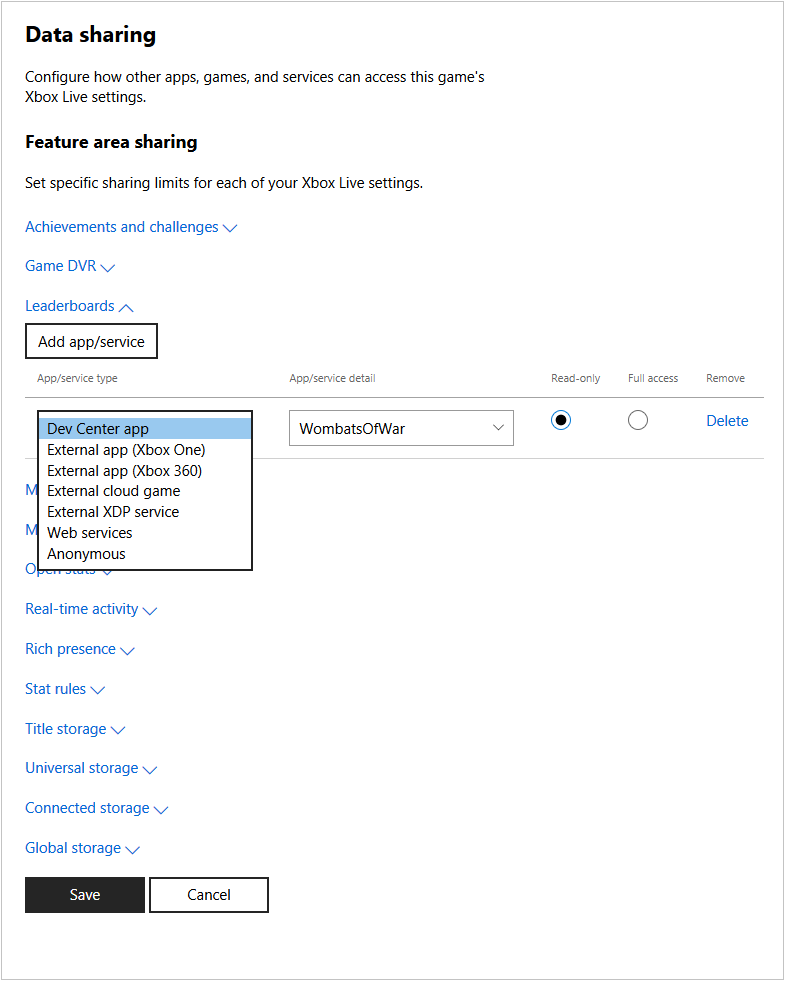 4. 選取您想要授與存取權的設定,例如 **Game DVR** 或 **Leaderboards**,然後選取 **Add app/service**。
新的一列會新增至已設定可存取該設定之應用程式/服務清單的底部。
在 Game DVR 中,預設會有一列 "Anonymous"。
Anonymous 應用程式/服務類型可讓 XBOX 服務在 XBOX 體驗中分享遊戲短片;例如,此類型會讓 Game DVR 短片出現在遊戲的遊戲中樞中。
新遊戲預設會針對 Game DVR 設定為 Anonymous。
請勿從 Game DVR 區段刪除 Anonymous 類型。
5. 在下拉式方塊中選取應用程式或服務的類型 (例如 **Dev Center app** 或 **Anonymous**),並填寫詳細資料方塊,以指出將存取資料之應用程式或服務的應用程式、遊戲識別碼或服務識別碼。
6. 選取應用程式或服務只能讀取資料,還是具有資料的完整存取權。
7. 針對每個設定,以及需要存取這些設定的每個應用程式或服務重複上述步驟。若要移除項目,請選取 **Delete**。
8. 完成時,選取 **Save** 按鈕。
## Related topics
- [入口網站設定概觀](/zh-TW/services/xbox-services/fundamentals/portal-config/live-portal-config-overview.md)
- [入口網站設定](/zh-TW/services/xbox-services/fundamentals/portal-config/index.md)
- [在 Partner Center 中設定 XBOX Data Platform 2013](/zh-TW/publishing/game-publishing/how-to/data-platform-2013/how-to-configure-data-platform-2013.md)
- [在 Partner Center 中設定存取原則](/zh-TW/services/xbox-services/fundamentals/s2s-auth-calls/custom-service-config/access-policies/config/live-access-policies-udc.md)
- [在 Partner Center 中設定 XBOX 產品](/zh-TW/publishing/game-publishing/publishing-processes/managed-creators/publishing-processes-product-onboarding-and-configuration.md)
4. 選取您想要授與存取權的設定,例如 **Game DVR** 或 **Leaderboards**,然後選取 **Add app/service**。
新的一列會新增至已設定可存取該設定之應用程式/服務清單的底部。
在 Game DVR 中,預設會有一列 "Anonymous"。
Anonymous 應用程式/服務類型可讓 XBOX 服務在 XBOX 體驗中分享遊戲短片;例如,此類型會讓 Game DVR 短片出現在遊戲的遊戲中樞中。
新遊戲預設會針對 Game DVR 設定為 Anonymous。
請勿從 Game DVR 區段刪除 Anonymous 類型。
5. 在下拉式方塊中選取應用程式或服務的類型 (例如 **Dev Center app** 或 **Anonymous**),並填寫詳細資料方塊,以指出將存取資料之應用程式或服務的應用程式、遊戲識別碼或服務識別碼。
6. 選取應用程式或服務只能讀取資料,還是具有資料的完整存取權。
7. 針對每個設定,以及需要存取這些設定的每個應用程式或服務重複上述步驟。若要移除項目,請選取 **Delete**。
8. 完成時,選取 **Save** 按鈕。
## Related topics
- [入口網站設定概觀](/zh-TW/services/xbox-services/fundamentals/portal-config/live-portal-config-overview.md)
- [入口網站設定](/zh-TW/services/xbox-services/fundamentals/portal-config/index.md)
- [在 Partner Center 中設定 XBOX Data Platform 2013](/zh-TW/publishing/game-publishing/how-to/data-platform-2013/how-to-configure-data-platform-2013.md)
- [在 Partner Center 中設定存取原則](/zh-TW/services/xbox-services/fundamentals/s2s-auth-calls/custom-service-config/access-policies/config/live-access-policies-udc.md)
- [在 Partner Center 中設定 XBOX 產品](/zh-TW/publishing/game-publishing/publishing-processes/managed-creators/publishing-processes-product-onboarding-and-configuration.md)