> ## Documentation Index
> Fetch the complete documentation index at: https://devdocs.xbox.com/llms.txt
> Use this file to discover all available pages before exploring further.
# 在 Partner Center 中設定權限
> 使用 Partner Center 為您的遊戲設定 XBOX 權限,包括每個沙箱的廣播限制,以及不需要 Gold 的免費遊玩多人遊戲。
權限設定頁面決定玩家是否會被限制將您的遊戲串流到串流服務,或玩家是否能夠在沒有 XBOX Live Gold 的情況下遊玩您的免費遊玩多人遊戲 (如果適用)。
您可以透過下列方式找到 **Privileges** 區段。
1. 登入 [Partner Center](https://developer.microsoft.com/dashboard)。
2. 從首頁選取 **Apps and games** 工作區。**Apps and games | Overview** 頁面隨即出現。
3. 在 **Apps and games | Overview** 頁面上,使用 **Search** 尋找並選取您的遊戲。
4. 如果遊戲已獲得 XBOX 服務的內容核准,您會在左側導覽的 **XBOX services** 區段下看到多個區段。
在 **XBOX Services** 區段下選取 **Privileges**
權限頁面有兩個您可以設定的設定。第一個是玩家是否會被限制將您的遊戲串流到串流服務。第二個是玩家是否能夠在沒有 XBOX Live Gold 的情況下遊玩您的免費遊玩多人遊戲 (如果適用)。
## 廣播權限
根據預設,您的遊戲不會限制在任何串流平台上進行廣播;只有在您想要限制廣播時,才需要變更此頁面。
您可以透過三種方式設定廣播:
* 允許在所有地方廣播,請選取 **Allow broadcasting this title to viewers on any streaming platform**。
* 限制在所有地方廣播,請選取 **Restrict users from broadcasting for this title**。
* 依沙箱限制廣播,請在 **Restrict broadcasting from select sandboxes** 區段中新增沙箱。
若要限制特定沙箱上的廣播,請按一下 **Restrict broadcasting from select sandboxes** 區段中的 **Add** 按鈕。
從下拉式清單中選擇目標沙箱,然後核取下方的方塊,以限制該遊戲在所選沙箱上的廣播。
若要移除廣播限制,可以刪除沙箱覆寫。
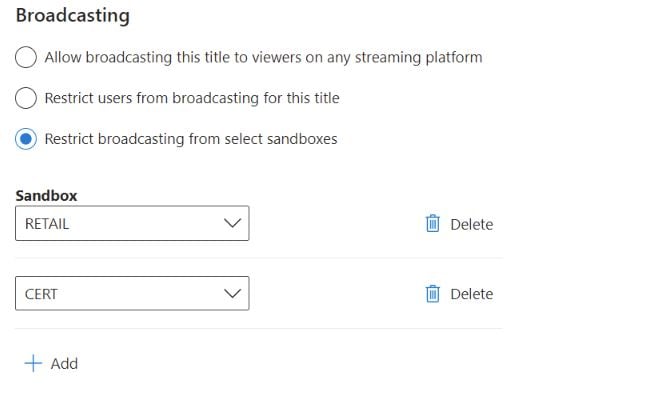 核取方塊以停用廣播,只會禁止透過 XBOX 主機或 PC 上的 Windows 遊戲列進行串流。選取 **Restrict users from broadcasting for this title** 並不會防止使用擷取卡或其他外部擷取或串流服務。
## 多人遊戲權限
某些遊戲可能符合被視為免費遊玩的資格。這表示玩家不需要支付 Gold 存取費用,就能透過 XBOX 網路與其他人在線上遊玩您的遊戲。一旦獲得核准,您就可以在此頁面上設定多人遊戲權限。
根據預設,您的遊戲不允許 Silver XBOX Live 使用者遊玩多人遊戲;如果您想要為遊戲啟用免費遊玩,就需要變更此頁面。
您可以透過三種方式設定免費遊玩多人遊戲:
* 在所有地方停用此權限,請選取 **Disabled**,這也是預設值。
* 在所有地方允許此權限,請選取 **Allow in all sandboxes**。
* 在特定沙箱中允許,請透過 **Allow in specific sandboxes** 區段。
若要在特定沙箱中允許免費遊玩權限,請選取 **Allow in specific sandboxes** 區段中的 **Add** 按鈕。
從下拉式清單中選擇目標沙箱,然後核取下方的方塊,以允許該遊戲在所選沙箱上的免費遊玩權限。
若要移除限制,可以刪除沙箱覆寫。
若要保留對此頁面上之設定所做的任何設定變更,請選取 **Save** 按鈕。
## Related topics
- [Partner Center 中的權限設定](/zh-TW/services/xbox-services/fundamentals/identity/privileges/config/live-privileges-config-nav.md)
- [入口網站設定概觀](/zh-TW/services/xbox-services/fundamentals/portal-config/live-portal-config-overview.md)
- [設定](/zh-TW/services/xbox-services/fundamentals/identity/privileges/config/index.md)
- [在 Partner Center 中設定資料共用](/zh-TW/services/xbox-services/fundamentals/portal-config/live-data-sharing-udc.md)
- [在 Partner Center 中設定 Web 服務](/zh-TW/services/xbox-services/fundamentals/s2s-auth-calls/custom-service-config/web-services/live-web-services.md)
核取方塊以停用廣播,只會禁止透過 XBOX 主機或 PC 上的 Windows 遊戲列進行串流。選取 **Restrict users from broadcasting for this title** 並不會防止使用擷取卡或其他外部擷取或串流服務。
## 多人遊戲權限
某些遊戲可能符合被視為免費遊玩的資格。這表示玩家不需要支付 Gold 存取費用,就能透過 XBOX 網路與其他人在線上遊玩您的遊戲。一旦獲得核准,您就可以在此頁面上設定多人遊戲權限。
根據預設,您的遊戲不允許 Silver XBOX Live 使用者遊玩多人遊戲;如果您想要為遊戲啟用免費遊玩,就需要變更此頁面。
您可以透過三種方式設定免費遊玩多人遊戲:
* 在所有地方停用此權限,請選取 **Disabled**,這也是預設值。
* 在所有地方允許此權限,請選取 **Allow in all sandboxes**。
* 在特定沙箱中允許,請透過 **Allow in specific sandboxes** 區段。
若要在特定沙箱中允許免費遊玩權限,請選取 **Allow in specific sandboxes** 區段中的 **Add** 按鈕。
從下拉式清單中選擇目標沙箱,然後核取下方的方塊,以允許該遊戲在所選沙箱上的免費遊玩權限。
若要移除限制,可以刪除沙箱覆寫。
若要保留對此頁面上之設定所做的任何設定變更,請選取 **Save** 按鈕。
## Related topics
- [Partner Center 中的權限設定](/zh-TW/services/xbox-services/fundamentals/identity/privileges/config/live-privileges-config-nav.md)
- [入口網站設定概觀](/zh-TW/services/xbox-services/fundamentals/portal-config/live-portal-config-overview.md)
- [設定](/zh-TW/services/xbox-services/fundamentals/identity/privileges/config/index.md)
- [在 Partner Center 中設定資料共用](/zh-TW/services/xbox-services/fundamentals/portal-config/live-data-sharing-udc.md)
- [在 Partner Center 中設定 Web 服務](/zh-TW/services/xbox-services/fundamentals/s2s-auth-calls/custom-service-config/web-services/live-web-services.md)