> ## Documentation Index
> Fetch the complete documentation index at: https://devdocs.xbox.com/llms.txt
> Use this file to discover all available pages before exploring further.
# 在 Partner Center 中設定當地語系化字串
> 使用 localization.xml 下載和上傳工作流程,在 Partner Center 中設定 XBOX Live 成就和 XSAPI 值的當地語系化字串。
本主題說明如何在 Partner Center 中設定當地語系化字串。這些值會決定遊戲設定 (例如成就) 在系統 UI 和 XSAPI 呼叫 (例如 `XblAchievementsGetAchievementAsync`) 中的顯示方式。當系統目前的語言設定沒有可用的當地語系化字串時,[XBOX 服務語言後援](/zh-TW/services/xbox-services/community/localized-strings/live-language-fallback)程序會決定要使用哪種語言。
例如,如果成就在 Partner Center 中有 en-US 當地語系化字串 "Hello, World!" 和 es-MX 字串 "¡Hola, mundo!",就會產生下列情況:
| 系統設定 | 使用的語言 | 在系統 UI 和 XSAPI 呼叫中的顯示 |
| - | - | - |
| en-US | en-US | "Hello, World!" |
| es-MX | es-MX | "¡Hola, mundo!" |
| es-AR | es-MX\* | "¡Hola, mundo!" |
| zh-CN | en-US\* | "Hello, World!" |
\*XBOX 服務語言後援
若要將所有 XBOX 服務設定當地語系化為您遊戲支援的所有語言,請使用 Partner Center 中的 **Localized strings** 頁面。您在後續 XBOX 服務頁面上建立的服務設定會新增至您下載的檔案中。
使用 [Partner Center](https://partner.microsoft.com/dashboard) 以與您遊戲相關聯的所有語言設定當地語系化字串。
**在 Partner Center 中新增字串設定**
1. 在 Partner Center 中,選取 **XBOX services** > **Gameplay settings** > **Localized strings**。您遊戲的 **Localized strings** 設定頁面隨即出現。
2. 選取 **Download**。localization.xml 檔案會下載到您的本機電腦。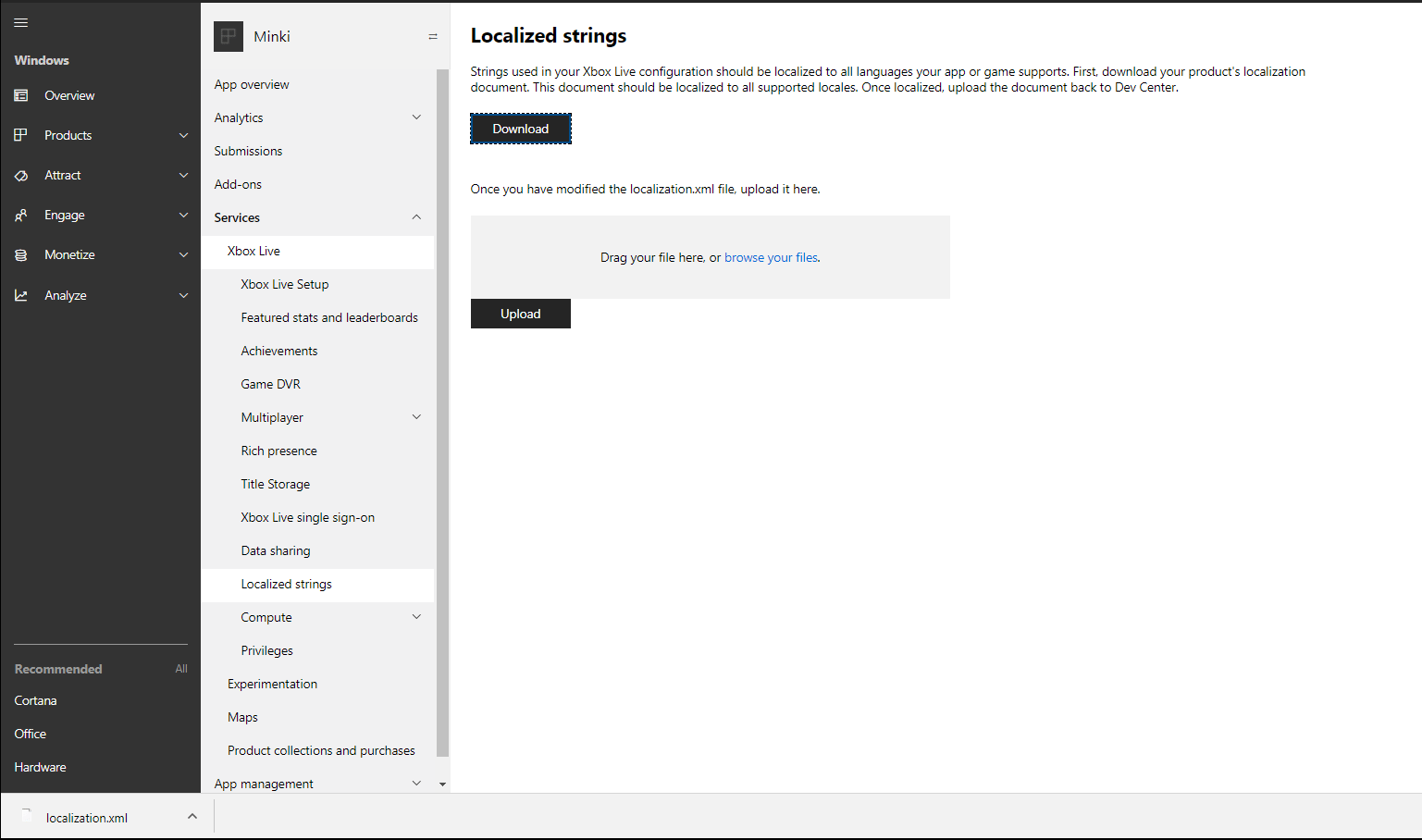 3. 在下列影片範例中,您可以複製 `Donuts Eaten` 標記,並將 locale 的值變更為您選擇的語言,以及變更當地語系化字串的值,以新增當地語系化字串。為避免錯誤,您必須在開發人員顯示地區設定中至少有一個 `Value` 標記。`locale` 屬性的值必須包含語言代碼,後面接著連字號 (-) 和國家/地區代碼。例如,`locale="en-US"` 表示在美國使用的英文。如需詳細資訊,請參閱 Partner Center 支援的語言和地區設定。
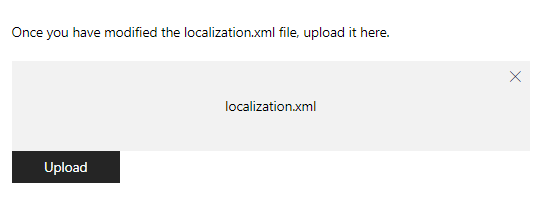
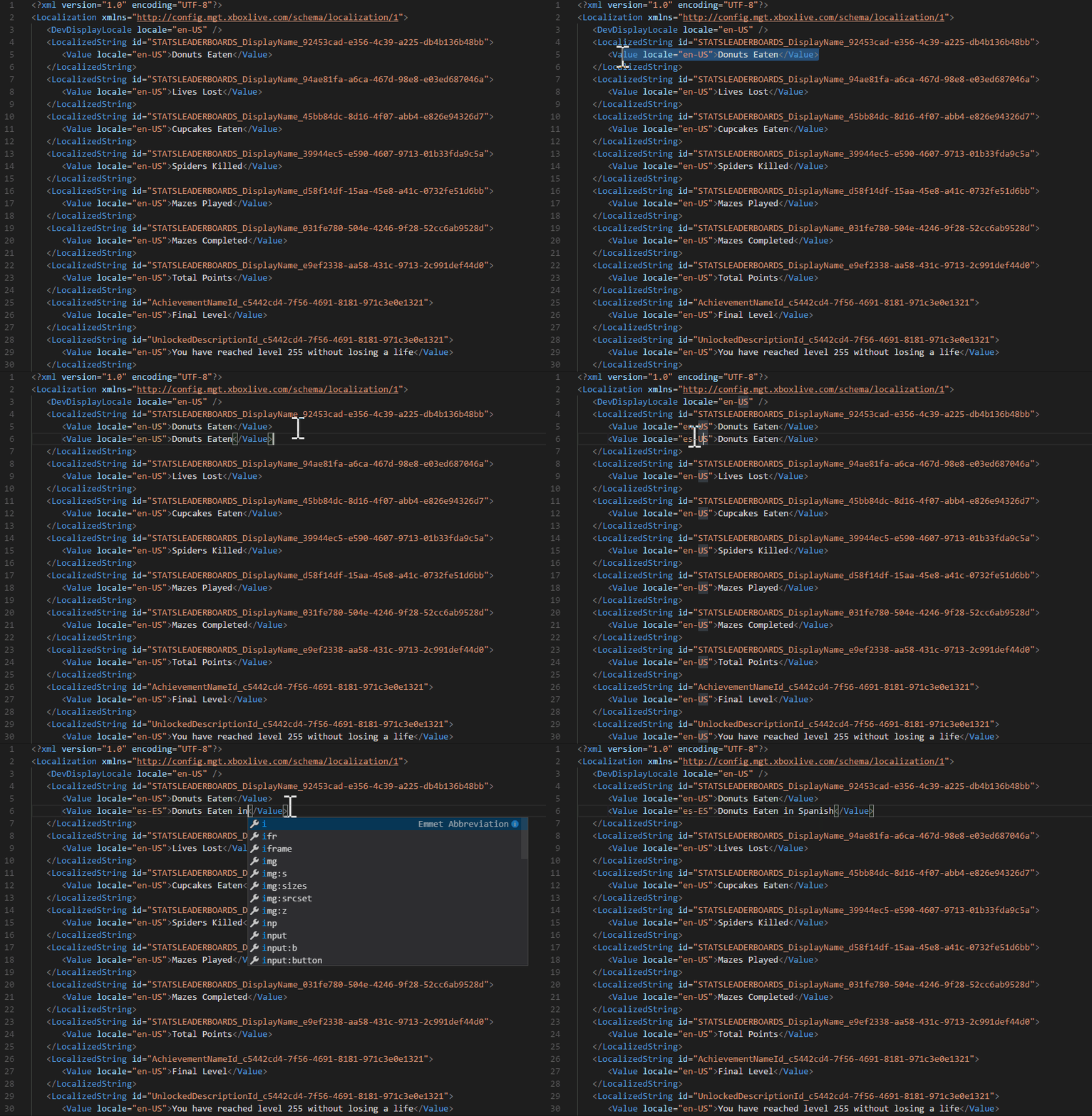 4. 新增所有當地語系化字串之後,將 .xml 檔案拖曳至提供的方塊 (如下所示),或瀏覽您的本機電腦,以上傳該檔案。
 下表顯示上傳 localization.xml 檔案時可能出現的錯誤訊息。
| 錯誤 | 原因 |
| - | - |
| Failed XSD Validation: The element 'LocalizedString' in namespace '[https://config.mgt.xboxlive.com/schema/localization/1](https://config.mgt.xboxlive.com/schema/localization/1)' cannot contain text. List of possible elements expected: 'Value' in namespace '[https://config.mgt.xboxlive.com/schema/localization/1](https://config.mgt.xboxlive.com/schema/localization/1)' | 當 XML 文件格式不正確時,就會發生此錯誤。 |
| Localization string is missing an entry for the developer display locale. | 當當地語系化字串缺少地區設定與開發人員顯示地區設定相符的項目時,就會發生此錯誤。 |
| Failed XSD Validation: The 'locale' attribute is invalid - The value ' ' is invalid according to its datatype '[https://config.mgt.xboxlive.com/schema/localization/1:NonEmptyString](https://config.mgt.xboxlive.com/schema/localization/1:NonEmptyString)' - The Pattern constraint failed. | 當當地語系化字串在 `` 標記中缺少地區設定值時,就會發生此錯誤。`locale` 屬性的值必須包含語言代碼,後面接著連字號 (-) 和國家/地區代碼。 |
## 另請參閱
[XBOX Live 語言後援](/zh-TW/services/xbox-services/community/localized-strings/live-language-fallback)
## Related topics
- [當地語系化字串](/zh-TW/services/xbox-services/community/localized-strings/live-localized-strings-nav.md)
- [入口網站設定概觀](/zh-TW/services/xbox-services/fundamentals/portal-config/live-portal-config-overview.md)
- [XBOX 服務語言後援](/zh-TW/services/xbox-services/community/localized-strings/live-language-fallback.md)
- [在 Partner Center 中設定 Game DVR](/zh-TW/services/xbox-services/fundamentals/portal-config/live-game-dvr.md)
- [在 Partner Center 中設定 XBOX 服務設定](/zh-TW/services/xbox-services/fundamentals/portal-config/live-config-xbl-setup.md)
下表顯示上傳 localization.xml 檔案時可能出現的錯誤訊息。
| 錯誤 | 原因 |
| - | - |
| Failed XSD Validation: The element 'LocalizedString' in namespace '[https://config.mgt.xboxlive.com/schema/localization/1](https://config.mgt.xboxlive.com/schema/localization/1)' cannot contain text. List of possible elements expected: 'Value' in namespace '[https://config.mgt.xboxlive.com/schema/localization/1](https://config.mgt.xboxlive.com/schema/localization/1)' | 當 XML 文件格式不正確時,就會發生此錯誤。 |
| Localization string is missing an entry for the developer display locale. | 當當地語系化字串缺少地區設定與開發人員顯示地區設定相符的項目時,就會發生此錯誤。 |
| Failed XSD Validation: The 'locale' attribute is invalid - The value ' ' is invalid according to its datatype '[https://config.mgt.xboxlive.com/schema/localization/1:NonEmptyString](https://config.mgt.xboxlive.com/schema/localization/1:NonEmptyString)' - The Pattern constraint failed. | 當當地語系化字串在 `` 標記中缺少地區設定值時,就會發生此錯誤。`locale` 屬性的值必須包含語言代碼,後面接著連字號 (-) 和國家/地區代碼。 |
## 另請參閱
[XBOX Live 語言後援](/zh-TW/services/xbox-services/community/localized-strings/live-language-fallback)
## Related topics
- [當地語系化字串](/zh-TW/services/xbox-services/community/localized-strings/live-localized-strings-nav.md)
- [入口網站設定概觀](/zh-TW/services/xbox-services/fundamentals/portal-config/live-portal-config-overview.md)
- [XBOX 服務語言後援](/zh-TW/services/xbox-services/community/localized-strings/live-language-fallback.md)
- [在 Partner Center 中設定 Game DVR](/zh-TW/services/xbox-services/fundamentals/portal-config/live-game-dvr.md)
- [在 Partner Center 中設定 XBOX 服務設定](/zh-TW/services/xbox-services/fundamentals/portal-config/live-config-xbl-setup.md)