> ## Documentation Index
> Fetch the complete documentation index at: https://devdocs.xbox.com/llms.txt
> Use this file to discover all available pages before exploring further.
# 快速入門 - 適用於 C# 的 PlayFab 用戶端程式庫
> 安裝 PlayFabAllSDK NuGet 套件,並使用 Visual Studio 在 C# .NET Core 主控台應用程式中進行您的第一次 PlayFab 用戶端 API 呼叫。
# 快速入門:適用於 C# 的 PlayFab 用戶端程式庫
開始使用適用於 C# 的 PlayFab 用戶端程式庫。請依照步驟安裝套件,並試用基本工作的範例程式碼。
本快速入門可協助您使用適用於 C# 的用戶端程式庫進行第一次 PlayFab API 呼叫。
[API 參考文件](/zh-TW/services/playfab/api-references)
## 需求
* [PlayFab 開發人員帳戶](https://developer.playfab.com)。
* 已安裝 [Visual Studio](https://visualstudio.microsoft.com/)。
## CSharp 專案設定
安裝
1. 開啟 Visual Studio,然後選取 **Create a new project**。
2. 選取 C# 的 **Console App (.Net Core)**。
3. 安裝 **PlayFabAllSDK** 的 NuGet 套件。
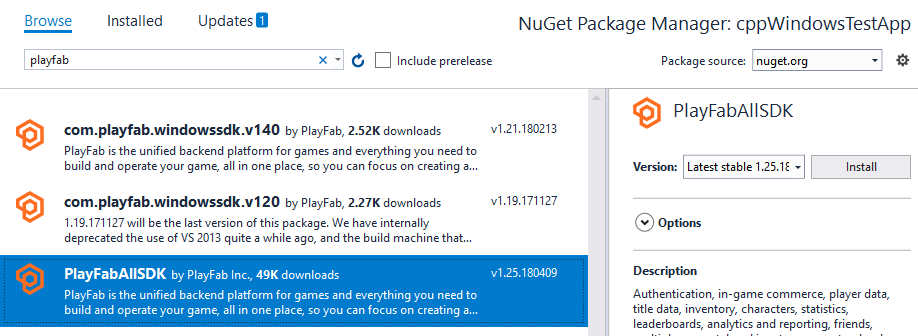 此時,您應該能夠成功編譯專案。輸出視窗應包含類似下列範例的內容。
```output theme={null}
1>------ Build started: Project: CSharpGettingStarted, Configuration: Debug Any CPU ------
1> CSharpGettingStarted -> c:\dev\CSharpGettingStarted\CSharpGettingStarted\bin\Debug\CSharpGettingStarted.exe
========== Build: 1 succeeded, 0 failed, 0 up-to-date, 0 skipped ==========
```
## 設定您的第一次 API 呼叫
本指南提供進行第一次 PlayFab API 呼叫所需的最少步驟。確認是透過主控台輸出完成的。
您的新專案應包含一個名為 Program.cs 的檔案,這是 Visual Studio 自動建立的。開啟該檔案,並將內容取代為下方範例中的程式碼 (貼上程式碼之後,您可能需要重新整理檔案才能看到)。API 呼叫的確認將透過寫入主控台輸出的訊息完成。
```csharp theme={null}
using System;
using System.Threading;
using System.Threading.Tasks;
using PlayFab;
using PlayFab.ClientModels;
public static class Program
{
private static bool _running = true;
static void Main(string[] args)
{
PlayFabSettings.staticSettings.TitleId = "144"; // Please change this value to your own titleId from PlayFab Game Manager
var request = new LoginWithCustomIDRequest { CustomId = "GettingStartedGuide", CreateAccount = true };
var loginTask = PlayFabClientAPI.LoginWithCustomIDAsync(request);
// If you want a synchronous result, you can call loginTask.Wait() - Note, this will halt the program until the function returns
while (_running)
{
if (loginTask.IsCompleted) // You would probably want a more sophisticated way of tracking pending async API calls in a real game
{
OnLoginComplete(loginTask);
}
// Presumably this would be your main game loop, doing other things
Thread.Sleep(1);
}
Console.WriteLine("Done! Press any key to close");
Console.ReadKey(); // This halts the program and waits for the user
}
private static void OnLoginComplete(Task> taskResult)
{
var apiError = taskResult.Result.Error;
var apiResult = taskResult.Result.Result;
if (apiError != null)
{
Console.ForegroundColor = ConsoleColor.Red; // Make the error more visible
Console.WriteLine("Something went wrong with your first API call. :(");
Console.WriteLine("Here's some debug information:");
Console.WriteLine(PlayFabUtil.GenerateErrorReport(apiError));
Console.ForegroundColor = ConsoleColor.Gray; // Reset to normal
}
else if (apiResult != null)
{
Console.WriteLine("Congratulations, you made your first successful API call!");
}
_running = false; // Because this is just an example, successful login triggers the end of the program
}
}
```
## 完成並執行
當您執行此程式時,主控台中會顯示下列輸出
"Congratulations, you made your first successful API call! Done! Press any key to close."
* 現在,您可以開始進行其他 API 呼叫並建置您的遊戲。
* 若要建置系統管理公用程式,請參閱位於 `{CSharpSdk}/PlayFabClientSDK/sources` 的 PlayFab CSharpSdk zip 檔案中的替代來源檔案。
如需所有可用用戶端 API 呼叫的清單或許多其他文章,請參閱 [PlayFab API 參考](/zh-TW/services/playfab/api-references)。
## Related topics
- [Unreal Engine 快速入門](/zh-TW/services/playfab/sdks/unreal/quickstart.md)
- [適用於原生與 Phaser 的 JavaScript 快速入門](/zh-TW/services/playfab/sdks/javascript/quickstart.md)
- [NodeJS 快速入門](/zh-TW/services/playfab/sdks/nodejs/quickstart.md)
- [Unity 快速入門](/zh-TW/services/playfab/sdks/unity3d/quickstart.md)
- [適用於 Postman 的 PlayFab REST API 集合快速入門](/zh-TW/services/playfab/sdks/postman/postman-quickstart.md)
此時,您應該能夠成功編譯專案。輸出視窗應包含類似下列範例的內容。
```output theme={null}
1>------ Build started: Project: CSharpGettingStarted, Configuration: Debug Any CPU ------
1> CSharpGettingStarted -> c:\dev\CSharpGettingStarted\CSharpGettingStarted\bin\Debug\CSharpGettingStarted.exe
========== Build: 1 succeeded, 0 failed, 0 up-to-date, 0 skipped ==========
```
## 設定您的第一次 API 呼叫
本指南提供進行第一次 PlayFab API 呼叫所需的最少步驟。確認是透過主控台輸出完成的。
您的新專案應包含一個名為 Program.cs 的檔案,這是 Visual Studio 自動建立的。開啟該檔案,並將內容取代為下方範例中的程式碼 (貼上程式碼之後,您可能需要重新整理檔案才能看到)。API 呼叫的確認將透過寫入主控台輸出的訊息完成。
```csharp theme={null}
using System;
using System.Threading;
using System.Threading.Tasks;
using PlayFab;
using PlayFab.ClientModels;
public static class Program
{
private static bool _running = true;
static void Main(string[] args)
{
PlayFabSettings.staticSettings.TitleId = "144"; // Please change this value to your own titleId from PlayFab Game Manager
var request = new LoginWithCustomIDRequest { CustomId = "GettingStartedGuide", CreateAccount = true };
var loginTask = PlayFabClientAPI.LoginWithCustomIDAsync(request);
// If you want a synchronous result, you can call loginTask.Wait() - Note, this will halt the program until the function returns
while (_running)
{
if (loginTask.IsCompleted) // You would probably want a more sophisticated way of tracking pending async API calls in a real game
{
OnLoginComplete(loginTask);
}
// Presumably this would be your main game loop, doing other things
Thread.Sleep(1);
}
Console.WriteLine("Done! Press any key to close");
Console.ReadKey(); // This halts the program and waits for the user
}
private static void OnLoginComplete(Task> taskResult)
{
var apiError = taskResult.Result.Error;
var apiResult = taskResult.Result.Result;
if (apiError != null)
{
Console.ForegroundColor = ConsoleColor.Red; // Make the error more visible
Console.WriteLine("Something went wrong with your first API call. :(");
Console.WriteLine("Here's some debug information:");
Console.WriteLine(PlayFabUtil.GenerateErrorReport(apiError));
Console.ForegroundColor = ConsoleColor.Gray; // Reset to normal
}
else if (apiResult != null)
{
Console.WriteLine("Congratulations, you made your first successful API call!");
}
_running = false; // Because this is just an example, successful login triggers the end of the program
}
}
```
## 完成並執行
當您執行此程式時,主控台中會顯示下列輸出
"Congratulations, you made your first successful API call! Done! Press any key to close."
* 現在,您可以開始進行其他 API 呼叫並建置您的遊戲。
* 若要建置系統管理公用程式,請參閱位於 `{CSharpSdk}/PlayFabClientSDK/sources` 的 PlayFab CSharpSdk zip 檔案中的替代來源檔案。
如需所有可用用戶端 API 呼叫的清單或許多其他文章,請參閱 [PlayFab API 參考](/zh-TW/services/playfab/api-references)。
## Related topics
- [Unreal Engine 快速入門](/zh-TW/services/playfab/sdks/unreal/quickstart.md)
- [適用於原生與 Phaser 的 JavaScript 快速入門](/zh-TW/services/playfab/sdks/javascript/quickstart.md)
- [NodeJS 快速入門](/zh-TW/services/playfab/sdks/nodejs/quickstart.md)
- [Unity 快速入門](/zh-TW/services/playfab/sdks/unity3d/quickstart.md)
- [適用於 Postman 的 PlayFab REST API 集合快速入門](/zh-TW/services/playfab/sdks/postman/postman-quickstart.md)