> ## Documentation Index
> Fetch the complete documentation index at: https://devdocs.xbox.com/llms.txt
> Use this file to discover all available pages before exploring further.
# 經濟系統定價計量
> 了解 PlayFab 經濟系統目錄的可計費計量、它們所測量的動作,以及目錄用量如何轉換為 PlayFab 帳單上的費用。
# 目錄定價計量
PlayFab 經濟系統 V2 目錄 API 有兩種以用量為基礎的計量類別:要求和儲存體。本頁面概述並定義這些計量,包括其測量和計算方式。如需 PlayFab 定價模型的詳細資訊,請參閱 [PlayFab 定價概觀](/zh-TW/services/playfab/pricing/pricing-overview)。
PlayFab 經濟系統 V2 的一般用量可能會計入其他 PlayFab 計量,例如 PlayStream 事件。
## 要求
要求計量由任何 UGC API 呼叫或 CDN 要求的回應大小決定。對於三種 PlayFab 方案中的每一種,根據大小有五種不同的費率:
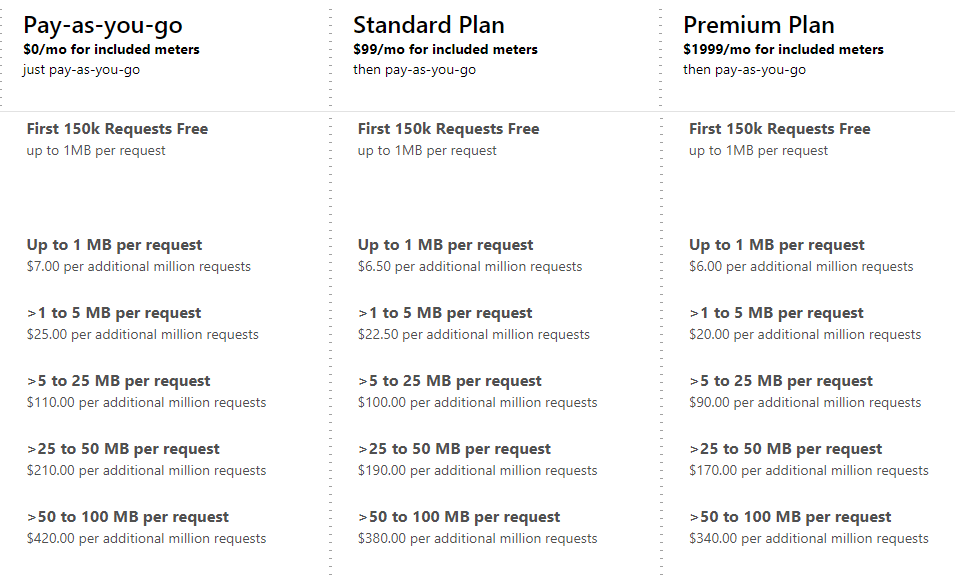 如果您打算儲存大於 100 MB 的內容,請與我們連絡。
## 儲存體
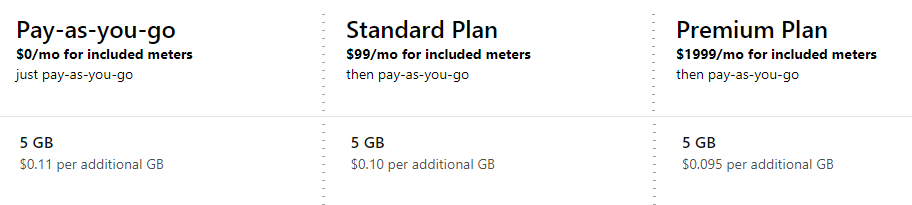
儲存體計量由所有內容 (檔案和影像) 的總大小決定。所有定價方案都包含 5 GB。如需更多儲存空間,此計量根據方案有三種不同的費率。
如果您打算儲存大於 100 MB 的內容,請與我們連絡。
## 儲存體
儲存體計量由所有內容 (檔案和影像) 的總大小決定。所有定價方案都包含 5 GB。如需更多儲存空間,此計量根據方案有三種不同的費率。
 此計量包括與尚未發佈之物品,以及無法透過公用目錄看到之物品相關聯的內容。如需如何從公用目錄隱藏物品的詳細資訊,請參閱[目錄物品狀態](/zh-TW/services/playfab/economy-monetization/economy-v2/catalog/item-status)。
## 內含計量
無論所選方案為何,所有 PlayFab 客戶都有一組內含計量:
| 計量 | 內含數量 |
| - | :-: |
| 最多 1 MB 的要求 | 150k 個要求 |
| 儲存體 | 5 GB |
開發模式中的工作室必須在啟用 UGC 之前輸入付款資訊,超額部分將根據所述費率收費。
## 帳單範例
讓我們逐步了解一個範例客戶的目錄用量,並查看其每月帳單。此範例遊戲使用\_隨用隨付\_方案。讓我們從單一使用者開始。此使用者前往內容探索頁面並搜尋「恐龍」。向使用者顯示 10 個結果,每個結果都有標題和縮圖影像。使用者選取一項內容,這會顯示完整的中繼資料,包括描述、評分和另外四張影像。使用者認為內容看起來夠有趣,因此選取下載按鈕。
現在讓我們看看此案例驅動了哪些計量用量:
* 此使用者前往內容探索頁面並搜尋「恐龍」。向使用者顯示 10 個結果,每個結果都有標題和縮圖影像。
* `SearchItems` 呼叫傳回 10 個具有基本中繼資料的物品,產生一個「**最多 1 MB 的要求**」。
* 10 張縮圖中的每一張都是從 CDN 要求的。假設五張略小於 1 MB,五張略大於 1 MB。此案例產生五個「**最多 1 MB 的要求**」和四個「**最多 5 MB 的要求**」。
* 使用者選取一項內容,這會顯示完整的中繼資料,包括描述、評分和另外四張影像。
* `GetItem` 呼叫傳回一個具有完整中繼資料的物品,產生一個**最多 1 MB 的要求**
* `GetRatings` 呼叫傳回一個物品的評分,產生一個**最多 1 MB 的要求**
* 四張影像中的每一張都是從 CDN 要求的。作為較高品質的影像,兩張影像\_小於\_ 5 MB,兩張影像\_大於\_ 5 MB。此案例產生兩個「**最多 5 MB 的要求**」和兩個「**最多 25 MB 的要求**」。
* 使用者認為內容看起來夠有趣,因此選取下載按鈕。
* 從 CDN 要求內容。作為大型內容,它是 20 MB。此案例產生一個**最多 25 MB 的要求**。
| 計量 | 要求計數 |
| - | - |
| 最多 1 MB | 8 |
| 最多 5 MB | 7 |
| 最多 25 MB | 3 |
| 最多 50 MB | 0 |
| 最多 100 MB | 0 |
接著,此遊戲有 10,000 位使用者在 30 天的月份中每天執行此案例一次 (300,000 次)——大致相當於單一使用者平均每 9 秒執行一次。此案例會產生下列計量用量:
| 計量 | 要求計數 |
| - | - |
| 最多 1 MB | 240 萬 |
| 最多 5 MB | 210 萬 |
| 最多 25 MB | 90 萬 |
| 最多 50 MB | 0 |
| 最多 100 MB | 0 |
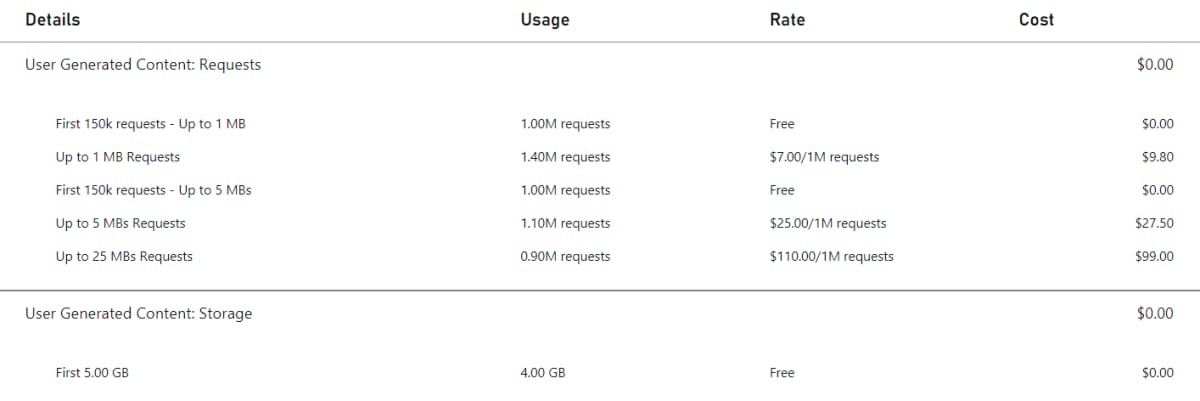
如果某個遊戲是工作室中唯一使用 UGC 的遊戲,且該遊戲在月底儲存了 4 GB 的 UGC (完全由內含的 5 GB 涵蓋,因此**儲存體**計量不會產生任何費用),最終的 UGC 帳單如下所示:
此計量包括與尚未發佈之物品,以及無法透過公用目錄看到之物品相關聯的內容。如需如何從公用目錄隱藏物品的詳細資訊,請參閱[目錄物品狀態](/zh-TW/services/playfab/economy-monetization/economy-v2/catalog/item-status)。
## 內含計量
無論所選方案為何,所有 PlayFab 客戶都有一組內含計量:
| 計量 | 內含數量 |
| - | :-: |
| 最多 1 MB 的要求 | 150k 個要求 |
| 儲存體 | 5 GB |
開發模式中的工作室必須在啟用 UGC 之前輸入付款資訊,超額部分將根據所述費率收費。
## 帳單範例
讓我們逐步了解一個範例客戶的目錄用量,並查看其每月帳單。此範例遊戲使用\_隨用隨付\_方案。讓我們從單一使用者開始。此使用者前往內容探索頁面並搜尋「恐龍」。向使用者顯示 10 個結果,每個結果都有標題和縮圖影像。使用者選取一項內容,這會顯示完整的中繼資料,包括描述、評分和另外四張影像。使用者認為內容看起來夠有趣,因此選取下載按鈕。
現在讓我們看看此案例驅動了哪些計量用量:
* 此使用者前往內容探索頁面並搜尋「恐龍」。向使用者顯示 10 個結果,每個結果都有標題和縮圖影像。
* `SearchItems` 呼叫傳回 10 個具有基本中繼資料的物品,產生一個「**最多 1 MB 的要求**」。
* 10 張縮圖中的每一張都是從 CDN 要求的。假設五張略小於 1 MB,五張略大於 1 MB。此案例產生五個「**最多 1 MB 的要求**」和四個「**最多 5 MB 的要求**」。
* 使用者選取一項內容,這會顯示完整的中繼資料,包括描述、評分和另外四張影像。
* `GetItem` 呼叫傳回一個具有完整中繼資料的物品,產生一個**最多 1 MB 的要求**
* `GetRatings` 呼叫傳回一個物品的評分,產生一個**最多 1 MB 的要求**
* 四張影像中的每一張都是從 CDN 要求的。作為較高品質的影像,兩張影像\_小於\_ 5 MB,兩張影像\_大於\_ 5 MB。此案例產生兩個「**最多 5 MB 的要求**」和兩個「**最多 25 MB 的要求**」。
* 使用者認為內容看起來夠有趣,因此選取下載按鈕。
* 從 CDN 要求內容。作為大型內容,它是 20 MB。此案例產生一個**最多 25 MB 的要求**。
| 計量 | 要求計數 |
| - | - |
| 最多 1 MB | 8 |
| 最多 5 MB | 7 |
| 最多 25 MB | 3 |
| 最多 50 MB | 0 |
| 最多 100 MB | 0 |
接著,此遊戲有 10,000 位使用者在 30 天的月份中每天執行此案例一次 (300,000 次)——大致相當於單一使用者平均每 9 秒執行一次。此案例會產生下列計量用量:
| 計量 | 要求計數 |
| - | - |
| 最多 1 MB | 240 萬 |
| 最多 5 MB | 210 萬 |
| 最多 25 MB | 90 萬 |
| 最多 50 MB | 0 |
| 最多 100 MB | 0 |
如果某個遊戲是工作室中唯一使用 UGC 的遊戲,且該遊戲在月底儲存了 4 GB 的 UGC (完全由內含的 5 GB 涵蓋,因此**儲存體**計量不會產生任何費用),最終的 UGC 帳單如下所示:
 ## 資源
* 如需每個計量最新的價格檢視,請參閱 [PlayFab 定價](https://playfab.com/pricing/)
* 請參閱[用量最佳做法](/zh-TW/services/playfab/pricing/consumption-best-practices),了解如何為您的遊戲維持最低的計量用量率和成本
## 相關 API
下列 API 會讓經濟系統目錄計量遞增:
* [CreateDraftItem](https://learn.microsoft.com/en-us/rest/api/services/playfab/economy/catalog/create-draft-item)
* [CreateUploadUrls](https://learn.microsoft.com/en-us/rest/api/services/playfab/economy/catalog/create-upload-urls)
* [DeleteEntityItemReviews](https://learn.microsoft.com/en-us/rest/api/services/playfab/economy/catalog/delete-entity-item-reviews)
* [DeleteItem](https://learn.microsoft.com/en-us/rest/api/services/playfab/economy/catalog/delete-item)
* [GetCatalogConfig](https://learn.microsoft.com/en-us/rest/api/services/playfab/economy/catalog/get-catalog-config)
* [GetDraftItem](https://learn.microsoft.com/en-us/rest/api/services/playfab/economy/catalog/get-draft-item)
* [GetEntityDraftItems](https://learn.microsoft.com/en-us/rest/api/services/playfab/economy/catalog/get-entity-draft-items)
* [GetEntityItemReview](https://learn.microsoft.com/en-us/rest/api/services/playfab/economy/catalog/get-entity-item-review)
* [GetItem](https://learn.microsoft.com/en-us/rest/api/services/playfab/economy/catalog/get-item)
* [GetItemModerationState](https://learn.microsoft.com/en-us/rest/api/services/playfab/economy/catalog/get-item-moderation-state)
* [GetItemPublishStatus](https://learn.microsoft.com/en-us/rest/api/services/playfab/economy/catalog/get-item-publish-status)
* [GetItemReviews](https://learn.microsoft.com/en-us/rest/api/services/playfab/economy/catalog/get-item-reviews)
* [GetItemReviewSummary](https://learn.microsoft.com/en-us/rest/api/services/playfab/economy/catalog/get-item-review-summary)
* [GetItems](https://learn.microsoft.com/en-us/rest/api/services/playfab/economy/catalog/get-items)
* [PublishDraftItem](https://learn.microsoft.com/en-us/rest/api/services/playfab/economy/catalog/publish-draft-item)
* [ReportItem](https://learn.microsoft.com/en-us/rest/api/services/playfab/economy/catalog/report-item)
* [ReportItemReview](https://learn.microsoft.com/en-us/rest/api/services/playfab/economy/catalog/report-item-review)
* [ReviewItem](https://learn.microsoft.com/en-us/rest/api/services/playfab/economy/catalog/review-item)
* [SearchItems](https://learn.microsoft.com/en-us/rest/api/services/playfab/economy/catalog/search-items)
* [SetItemModerationState](https://learn.microsoft.com/en-us/rest/api/services/playfab/economy/catalog/set-item-moderation-state)
* [SubmitItemReviewVote](https://learn.microsoft.com/en-us/rest/api/services/playfab/economy/catalog/submit-item-review-vote)
* [TakedownItemReviews](https://learn.microsoft.com/en-us/rest/api/services/playfab/economy/catalog/takedown-item-reviews)
* [UpdateCatalogConfig](https://learn.microsoft.com/en-us/rest/api/services/playfab/economy/catalog/update-catalog-config)
* [UpdateDraftItem](https://learn.microsoft.com/en-us/rest/api/services/playfab/economy/catalog/update-draft-item)
任何對 CDN 的呼叫也會讓經濟系統目錄計量遞增
## Related topics
- [定價計量](/zh-TW/services/playfab/pricing/meters/meters.md)
- [PlayFab 定價概觀](/zh-TW/services/playfab/pricing/pricing-overview.md)
- [物品欄寫入計量 API 描述](/zh-TW/services/playfab/pricing/meters/economy-writes.md)
- [物品欄讀取計量 API 描述](/zh-TW/services/playfab/pricing/meters/economy-reads.md)
- [PlayFab 用量最佳做法](/zh-TW/services/playfab/pricing/consumption-best-practices.md)
## 資源
* 如需每個計量最新的價格檢視,請參閱 [PlayFab 定價](https://playfab.com/pricing/)
* 請參閱[用量最佳做法](/zh-TW/services/playfab/pricing/consumption-best-practices),了解如何為您的遊戲維持最低的計量用量率和成本
## 相關 API
下列 API 會讓經濟系統目錄計量遞增:
* [CreateDraftItem](https://learn.microsoft.com/en-us/rest/api/services/playfab/economy/catalog/create-draft-item)
* [CreateUploadUrls](https://learn.microsoft.com/en-us/rest/api/services/playfab/economy/catalog/create-upload-urls)
* [DeleteEntityItemReviews](https://learn.microsoft.com/en-us/rest/api/services/playfab/economy/catalog/delete-entity-item-reviews)
* [DeleteItem](https://learn.microsoft.com/en-us/rest/api/services/playfab/economy/catalog/delete-item)
* [GetCatalogConfig](https://learn.microsoft.com/en-us/rest/api/services/playfab/economy/catalog/get-catalog-config)
* [GetDraftItem](https://learn.microsoft.com/en-us/rest/api/services/playfab/economy/catalog/get-draft-item)
* [GetEntityDraftItems](https://learn.microsoft.com/en-us/rest/api/services/playfab/economy/catalog/get-entity-draft-items)
* [GetEntityItemReview](https://learn.microsoft.com/en-us/rest/api/services/playfab/economy/catalog/get-entity-item-review)
* [GetItem](https://learn.microsoft.com/en-us/rest/api/services/playfab/economy/catalog/get-item)
* [GetItemModerationState](https://learn.microsoft.com/en-us/rest/api/services/playfab/economy/catalog/get-item-moderation-state)
* [GetItemPublishStatus](https://learn.microsoft.com/en-us/rest/api/services/playfab/economy/catalog/get-item-publish-status)
* [GetItemReviews](https://learn.microsoft.com/en-us/rest/api/services/playfab/economy/catalog/get-item-reviews)
* [GetItemReviewSummary](https://learn.microsoft.com/en-us/rest/api/services/playfab/economy/catalog/get-item-review-summary)
* [GetItems](https://learn.microsoft.com/en-us/rest/api/services/playfab/economy/catalog/get-items)
* [PublishDraftItem](https://learn.microsoft.com/en-us/rest/api/services/playfab/economy/catalog/publish-draft-item)
* [ReportItem](https://learn.microsoft.com/en-us/rest/api/services/playfab/economy/catalog/report-item)
* [ReportItemReview](https://learn.microsoft.com/en-us/rest/api/services/playfab/economy/catalog/report-item-review)
* [ReviewItem](https://learn.microsoft.com/en-us/rest/api/services/playfab/economy/catalog/review-item)
* [SearchItems](https://learn.microsoft.com/en-us/rest/api/services/playfab/economy/catalog/search-items)
* [SetItemModerationState](https://learn.microsoft.com/en-us/rest/api/services/playfab/economy/catalog/set-item-moderation-state)
* [SubmitItemReviewVote](https://learn.microsoft.com/en-us/rest/api/services/playfab/economy/catalog/submit-item-review-vote)
* [TakedownItemReviews](https://learn.microsoft.com/en-us/rest/api/services/playfab/economy/catalog/takedown-item-reviews)
* [UpdateCatalogConfig](https://learn.microsoft.com/en-us/rest/api/services/playfab/economy/catalog/update-catalog-config)
* [UpdateDraftItem](https://learn.microsoft.com/en-us/rest/api/services/playfab/economy/catalog/update-draft-item)
任何對 CDN 的呼叫也會讓經濟系統目錄計量遞增
## Related topics
- [定價計量](/zh-TW/services/playfab/pricing/meters/meters.md)
- [PlayFab 定價概觀](/zh-TW/services/playfab/pricing/pricing-overview.md)
- [物品欄寫入計量 API 描述](/zh-TW/services/playfab/pricing/meters/economy-writes.md)
- [物品欄讀取計量 API 描述](/zh-TW/services/playfab/pricing/meters/economy-reads.md)
- [PlayFab 用量最佳做法](/zh-TW/services/playfab/pricing/consumption-best-practices.md)