> ## Documentation Index
> Fetch the complete documentation index at: https://devdocs.xbox.com/llms.txt
> Use this file to discover all available pages before exploring further.
# 使用玩家頁面
> 使用純文字查閱或針對 PlayerProfile 資料行的 KQL 複雜查詢搜尋 PlayFab Game Manager 玩家頁面,以檢查和篩選帳戶。
## 監視玩家
您可以使用 **Players** 頁面檢查遊戲中的玩家。
* 前往 **Game Manager** 頁面。
* 從左側功能表中選取 **Players**。
* 選取 **Players** 索引標籤。
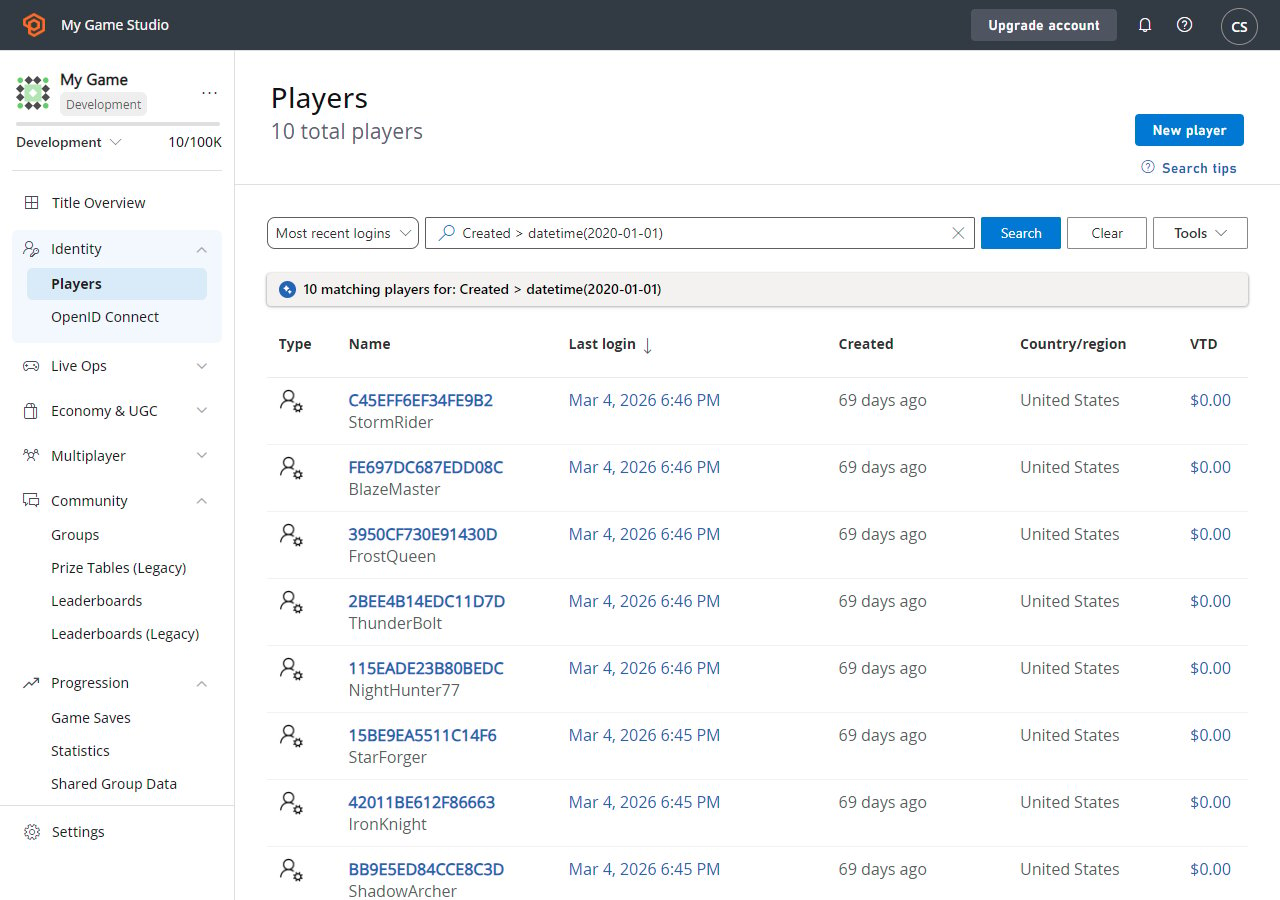 在此頁面上,您可以以表格格式檢查已註冊玩家的清單。表格包含玩家的一般資訊。
您可以選取玩家識別碼標籤 (藍色) 來[檢查特定玩家的詳細資料](/zh-TW/services/playfab/player-progression/player-data/player-details)。您也可以使用 **Search Query** 欄位查詢玩家。
## 搜尋技巧
**Search** 查詢欄位接受兩種類型的查詢:
1. **簡單**:在搜尋方塊中輸入純文字,以傳回 ID 資料行上的文字字串相符項目。
2. **複雜**:使用 [KQL 語法](https://learn.microsoft.com/en-us/azure/data-explorer/kusto/query/)建構查詢。
您可以從右上角的 **Search Tips** 按鈕存取範例複雜查詢。選取範例查詢會自動以正確的 KQL 語法填入搜尋方塊。接著您可以編輯查詢以符合您的使用案例。
Player Profile 表格有許多屬性,並非所有屬性都會在 UI 中呈現。不過,您可以使用複雜查詢搜尋任何這些 [PlayerProfile](/zh-TW/services/playfab/api-references/events/data-types/playerprofile) 資料行。
請記住——您可以使用任何[可搜尋的玩家欄位](/zh-TW/services/playfab/api-references/events/data-types/playerprofile)作為查詢參數。
## Related topics
- [使用玩家詳細資料](/zh-TW/services/playfab/player-progression/player-data/player-details.md)
- [使用玩家統計資料](/zh-TW/services/playfab/community/leaderboards/tournaments-leaderboards/using-player-statistics.md)
- [使用玩家自訂屬性進行進階區段](/zh-TW/services/playfab/live-service-management/game-configuration/segmentation/advanced-segmentation.md)
- [使用玩家物品欄](/zh-TW/services/playfab/player-progression/player-data/player-inventory.md)
- [使用玩家發行者資料獎勵多遊戲遊玩](/zh-TW/services/playfab/player-progression/player-data/using-player-publisher-data.md)
在此頁面上,您可以以表格格式檢查已註冊玩家的清單。表格包含玩家的一般資訊。
您可以選取玩家識別碼標籤 (藍色) 來[檢查特定玩家的詳細資料](/zh-TW/services/playfab/player-progression/player-data/player-details)。您也可以使用 **Search Query** 欄位查詢玩家。
## 搜尋技巧
**Search** 查詢欄位接受兩種類型的查詢:
1. **簡單**:在搜尋方塊中輸入純文字,以傳回 ID 資料行上的文字字串相符項目。
2. **複雜**:使用 [KQL 語法](https://learn.microsoft.com/en-us/azure/data-explorer/kusto/query/)建構查詢。
您可以從右上角的 **Search Tips** 按鈕存取範例複雜查詢。選取範例查詢會自動以正確的 KQL 語法填入搜尋方塊。接著您可以編輯查詢以符合您的使用案例。
Player Profile 表格有許多屬性,並非所有屬性都會在 UI 中呈現。不過,您可以使用複雜查詢搜尋任何這些 [PlayerProfile](/zh-TW/services/playfab/api-references/events/data-types/playerprofile) 資料行。
請記住——您可以使用任何[可搜尋的玩家欄位](/zh-TW/services/playfab/api-references/events/data-types/playerprofile)作為查詢參數。
## Related topics
- [使用玩家詳細資料](/zh-TW/services/playfab/player-progression/player-data/player-details.md)
- [使用玩家統計資料](/zh-TW/services/playfab/community/leaderboards/tournaments-leaderboards/using-player-statistics.md)
- [使用玩家自訂屬性進行進階區段](/zh-TW/services/playfab/live-service-management/game-configuration/segmentation/advanced-segmentation.md)
- [使用玩家物品欄](/zh-TW/services/playfab/player-progression/player-data/player-inventory.md)
- [使用玩家發行者資料獎勵多遊戲遊玩](/zh-TW/services/playfab/player-progression/player-data/using-player-publisher-data.md)