> ## Documentation Index
> Fetch the complete documentation index at: https://devdocs.xbox.com/llms.txt
> Use this file to discover all available pages before exploring further.
# 使用玩家物品欄
> 使用以伺服器為權威的用戶端和伺服器 API 處理 PlayFab 玩家物品欄,以購買物品、授與貨幣,以及管理以目錄為基礎的內容。
# 玩家物品欄
## 需求
若要使用玩家物品欄,您必須為您的遊戲定義目錄。如需詳細資訊,請閱讀我們的[目錄](/zh-TW/services/playfab/economy-monetization/economy/items/catalogs)教學課程。
您也可以選擇為目錄定義商店。
目錄是遊戲中所有可用物品的清單,而商店則是目錄中物品的子集,可選擇設定獨特的定價。
每個目錄可以定義多個商店,讓您可以根據使用者區段或其他因素,向玩家呈現不同的物品集。
透過 [**Game Manager**](https://developer.playfab.com/) 或我們的系統管理 **[SetCatalogItems](xref:titleid.playfabapi.com.admin.title-widedatamanagement.setcatalogitems)** 或 **[UpdateCatalogItems](xref:titleid.playfabapi.com.admin.title-widedatamanagement.updatecatalogitems)** API 呼叫定義目錄後,您就可以在用戶端和伺服器上使用各種物品欄 API 呼叫。
## API 概觀
所有物品欄 API 呼叫的設計都是*以伺服器為權威*且安全的。正確使用時,客戶將無法作弊,或取得他們未賺取的物品。
**用戶端**:
* 使用虛擬貨幣購買物品:**[PurchaseItem](xref:titleid.playfabapi.com.client.playeritemmanagement.purchaseitem)**
* 進行真實貨幣購買:**[StartPurchase](xref:titleid.playfabapi.com.client.playeritemmanagement.startpurchase), [PayForPurchase](xref:titleid.playfabapi.com.client.playeritemmanagement.payforpurchase), [ConfirmPurchase](xref:titleid.playfabapi.com.client.playeritemmanagement.confirmpurchase)**
* 可以檢視玩家擁有的物品:**[GetUserInventory](xref:titleid.playfabapi.com.client.playeritemmanagement.getuserinventory)**
* 可以移除物品:**[ConsumeItem](xref:titleid.playfabapi.com.client.playeritemmanagement.consumeitem), [UnlockContainerInstance](xref:titleid.playfabapi.com.client.playeritemmanagement.unlockcontainerinstance)**
* 可以交易物品:**[OpenTrade](xref:titleid.playfabapi.com.client.trading.opentrade), [GetPlayerTrades](xref:titleid.playfabapi.com.client.trading.getplayertrades), [AcceptTrade](xref:titleid.playfabapi.com.client.trading.accepttrade), [CancelTrade](xref:titleid.playfabapi.com.client.trading.canceltrade)**
**伺服器**:
* 可以贈送/授與物品:**[GrantItemsToUser](xref:titleid.playfabapi.com.server.playeritemmanagement.grantitemstouser)**
* 可以檢視物品:**[GetUserInventory](xref:titleid.playfabapi.com.server.playeritemmanagement.getuserinventory)**
* 可以修改物品:**[ModifyItemUses](xref:titleid.playfabapi.com.server.playeritemmanagement.modifyitemuses), [UpdateUserInventoryItemCustomData](xref:titleid.playfabapi.com.server.playeritemmanagement.updateuserinventoryitemcustomdata)**
* 可以移除物品:**[RevokeInventoryItem](xref:titleid.playfabapi.com.server.playeritemmanagement.revokeinventoryitem), [ConsumeItem](xref:titleid.playfabapi.com.server.playeritemmanagement.consumeitem), [UnlockContainerInstance](xref:titleid.playfabapi.com.server.playeritemmanagement.unlockcontainerinstance)**
下方所示的範例說明呼叫這些 API 方法的程式碼區塊,並設定玩家物品欄的基本使用案例。
供您參考,這些範例來自 **Unicorn Battle**,這是我們為了示範 PlayFab 功能而建置的範例遊戲。
下方使用的 **AU** 虛擬貨幣是 **Gold**,這是透過與怪物戰鬥賺取的免費貨幣 (請參閱我們的[貨幣](/zh-TW/services/playfab/economy-monetization/economy-v2/tutorials/currencies)教學課程)。
在開始之前,我們將定義一些公用程式函式,這些函式將在本指南的大多數範例中使用和重複使用。
```csharp theme={null}
// **** Shared example utility functions ****
// This is typically NOT how you handle success
// You will want to receive a specific result-type for your API, and utilize the result parameters
void LogSuccess(PlayFabResultCommon result) {
var requestName = result.Request.GetType().Name;
Debug.Log(requestName + " successful");
}
// Error handling can be very advanced, such as retry mechanisms, logging, or other options
// The simplest possible choice is just to log it
void LogFailure(PlayFabError error) {
Debug.LogError(error.GenerateErrorReport());
}
```
## 僅限用戶端的範例:購買並消耗生命藥水
用戶端 API 呼叫順序:[PurchaseItem](xref:titleid.playfabapi.com.client.playeritemmanagement.purchaseitem)、[GetUserInventory](xref:titleid.playfabapi.com.client.playeritemmanagement.getuserinventory)、[ConsumeItem](xref:titleid.playfabapi.com.server.playeritemmanagement.consumeitem)
首先,我們必須在目錄中定義物品。
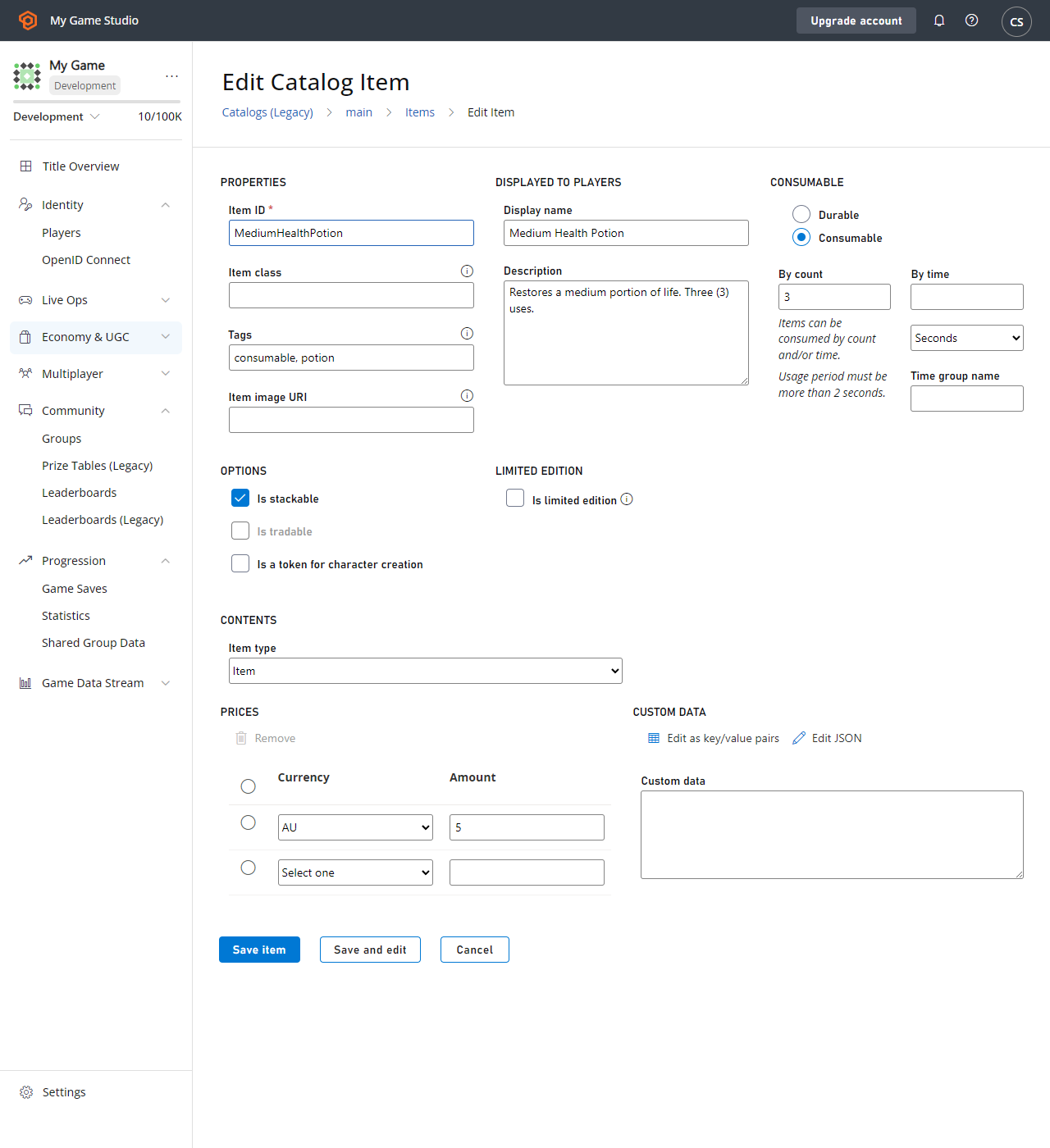 以下是**生命藥水**的 `CatalogItem` 需求。
* `PurchaseItem` 需要正的物品價格 (`5 AU`)。
* `ConsumeItem` 需要物品為 `Consumable`,且具有正的物品計數 (`3`)。
* 進行購買的玩家必須在其虛擬貨幣餘額中有五個 AU 可用。
下方提供每個呼叫的程式碼。
```csharp theme={null}
void MakePurchase() {
PlayFabClientAPI.PurchaseItem(new PurchaseItemRequest {
// In your game, this should just be a constant matching your primary catalog
CatalogVersion = "CharacterClasses",
ItemId = "MediumHealthPotion",
Price = 5,
VirtualCurrency = "AU"
}, LogSuccess, LogFailure);
}
void GetInventory() {
PlayFabClientAPI.GetUserInventory(new GetUserInventoryRequest(), LogSuccess, LogFailure);
}
void ConsumePotion() {
PlayFabClientAPI.ConsumeItem(new ConsumeItemRequest {
ConsumeCount = 1,
// This is a hex-string value from the GetUserInventory result
ItemInstanceId = "potionInstanceId"
}, LogSuccess, LogFailure);
}
```
## 範例:玩家獲得並開啟容器
API 呼叫順序:
* PlayFab 伺服器 API [GrantItemsToUser](xref:titleid.playfabapi.com.server.playeritemmanagement.grantitemstouser)
* PlayFab 用戶端 API [UnlockContainerInstance](xref:titleid.playfabapi.com.client.playeritemmanagement.unlockcontainerinstance)
首先,我們必須從目錄中定義的容器開始。在此範例中,我們為容器選取了 **CrystalContainer**。
此範例也示範使用鑰匙開啟容器——鑰匙是*選用*物品,也必須位於玩家物品欄中,`UnlockContainerInstance` 呼叫才能成功。
以下是**生命藥水**的 `CatalogItem` 需求。
* `PurchaseItem` 需要正的物品價格 (`5 AU`)。
* `ConsumeItem` 需要物品為 `Consumable`,且具有正的物品計數 (`3`)。
* 進行購買的玩家必須在其虛擬貨幣餘額中有五個 AU 可用。
下方提供每個呼叫的程式碼。
```csharp theme={null}
void MakePurchase() {
PlayFabClientAPI.PurchaseItem(new PurchaseItemRequest {
// In your game, this should just be a constant matching your primary catalog
CatalogVersion = "CharacterClasses",
ItemId = "MediumHealthPotion",
Price = 5,
VirtualCurrency = "AU"
}, LogSuccess, LogFailure);
}
void GetInventory() {
PlayFabClientAPI.GetUserInventory(new GetUserInventoryRequest(), LogSuccess, LogFailure);
}
void ConsumePotion() {
PlayFabClientAPI.ConsumeItem(new ConsumeItemRequest {
ConsumeCount = 1,
// This is a hex-string value from the GetUserInventory result
ItemInstanceId = "potionInstanceId"
}, LogSuccess, LogFailure);
}
```
## 範例:玩家獲得並開啟容器
API 呼叫順序:
* PlayFab 伺服器 API [GrantItemsToUser](xref:titleid.playfabapi.com.server.playeritemmanagement.grantitemstouser)
* PlayFab 用戶端 API [UnlockContainerInstance](xref:titleid.playfabapi.com.client.playeritemmanagement.unlockcontainerinstance)
首先,我們必須從目錄中定義的容器開始。在此範例中,我們為容器選取了 **CrystalContainer**。
此範例也示範使用鑰匙開啟容器——鑰匙是*選用*物品,也必須位於玩家物品欄中,`UnlockContainerInstance` 呼叫才能成功。
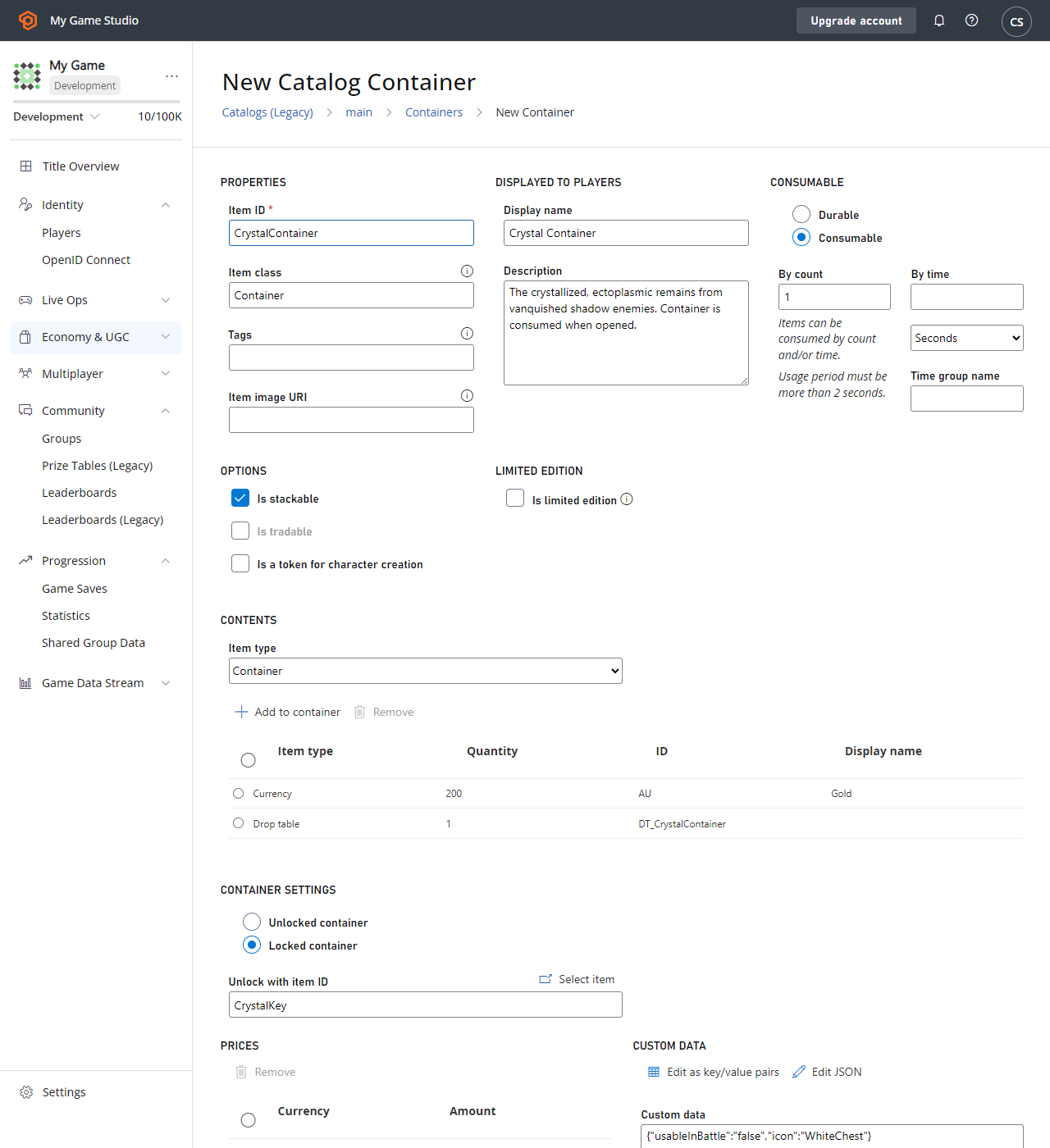 在此範例中,**CrystalContainer** 的 `CatalogItem` 需求包括:
* **CrystalContainer** 必須定義為 **Container**。
* **Container** 可以選擇性地定義 **Key Item**,之後就需要它才能解鎖 **Container**——在此案例中為 **CrystalKey**。
* 強烈建議您的 **Container** 和任何 **Key** *都*設為 **Consumable**,並具有正的使用次數,讓它們在使用後從玩家物品欄中移除。
### 伺服器程式碼
```csharp theme={null}
void GrantItem() {
PlayFabServerAPI.GrantItemsToUser(new GrantItemsToUserRequest {
// In your game, this should just be a constant
CatalogVersion = "CharacterClasses",
// Servers must define which character they're modifying in every API call
PlayFabId = "playFabId",
ItemIds = new List { "CrystalContainer" }
}, LogSuccess, LogFailure);
}
```
### 用戶端程式碼
```csharp theme={null}
void OpenContainer() {
PlayFabClientAPI.UnlockContainerInstance(new UnlockContainerInstanceRequest {
// In your game, this should just be a constant matching your primary catalog
CatalogVersion = "CharacterClasses",
ContainerItemInstanceId = "containerInstanceId",
KeyItemInstanceId = "keyInstanceId"
}, LogSuccess, LogFailure);
}
```
### 消耗鑰匙和容器
在上一個範例中,建議鑰匙和/或容器為*可消耗*,不過這只是建議。
但如果容器及其鑰匙 (如果有) *不可消耗*,容器就可以*無限次*重新開啟,每次都會將其內容授與玩家。
由於玩家物品欄容量*並非*無限,強烈不建議使用此模式。解鎖可消耗容器時,容器和所使用的可消耗鑰匙都會自動*減少*其使用次數,當使用次數達到零時,就會從玩家物品欄中移除。
### 可行的選項
**可消耗容器**,無**鑰匙**:最基本的模式,容器在開啟時被消耗,且沒有鑰匙。
**可消耗容器、可消耗鑰匙**:簡單的鎖定容器案例,允許玩家使用鑰匙開啟容器。*兩者*都會被消耗,玩家只能使用仍有剩餘使用次數的鑰匙開啟仍有剩餘使用次數的容器。
**耐久容器、可消耗鑰匙**:這允許玩家在每次找到鑰匙時開啟容器。鑰匙會被消耗,且只有在鑰匙仍有剩餘使用次數時才能開啟容器。
**可消耗容器、耐久鑰匙**:這允許玩家保留一把可以開啟*所有*以其作為鑰匙物品之容器的鑰匙。容器會被消耗,但玩家保留稍後使用鑰匙開啟容器的能力。
## 範例:向玩家收購物品欄物品
由於收購流程因遊戲而異,因此沒有向玩家收購物品欄物品的內建 API。不過,您可以使用*現有的* API 方法打造您自己的 **SellItem** 體驗:
* PlayFab 伺服器 API [RevokeInventoryItem](xref:titleid.playfabapi.com.server.playeritemmanagement.revokeinventoryitem)\*\* 可讓您移除物品欄物品。
* PlayFab 伺服器 API [AddUserVirtualCurrency](xref:titleid.playfabapi.com.server.playeritemmanagement.adduservirtualcurrency)\*\* 可以退還適當數量的虛擬貨幣。目前無法透過 PlayFab API 方法退還真實貨幣。
物品和虛擬貨幣之間有密切的關係。如需詳細資訊,請參閱我們的[貨幣](/zh-TW/services/playfab/economy-monetization/economy-v2/tutorials/currencies)教學課程。
下列 CloudScript 函式將上述兩個伺服器呼叫合併為單一用戶端可存取的呼叫。
```javascript theme={null}
var SELL_PRICE_RATIO = 0.75;
function SellItem_internal(soldItemInstanceId, requestedVcType) {
var inventory = server.GetUserInventory({ PlayFabId: currentPlayerId });
var itemInstance = null;
for (var i = 0; i < inventory.Inventory.length; i++) {
if (inventory.Inventory[i].ItemInstanceId === soldItemInstanceId)
itemInstance = inventory.Inventory[i];
}
if (!itemInstance)
throw "Item instance not found"; // Protection against client providing incorrect data
var catalog = server.GetCatalogItems({ CatalogVersion: itemInstance.CatalogVersion });
var catalogItem = null;
for (var c = 0; c < catalog.Catalog.length; c++) {
if (itemInstance.ItemId === catalog.Catalog[c].ItemId)
catalogItem = catalog.Catalog[c];
}
if (!catalogItem)
throw "Catalog Item not found"; // Title catalog consistency check (You should never remove a catalog/catalogItem if any player owns that item
var buyPrice = 0;
if (catalogItem.VirtualCurrencyPrices.hasOwnProperty(requestedVcType))
buyPrice = catalogItem.VirtualCurrencyPrices[requestedVcType];
if (buyPrice <= 0)
throw "Cannot redeem this item for: " + requestedVcType; // The client requested a virtual currency which doesn't apply to this item
// Once we get here all safety checks are passed - Perform the sell
var sellPrice = Math.floor(buyPrice * SELL_PRICE_RATIO);
server.AddUserVirtualCurrency({ PlayFabId: currentPlayerId, Amount: sellPrice, VirtualCurrency: requestedVcType });
server.RevokeInventoryItem({ PlayFabId: currentPlayerId, ItemInstanceId: soldItemInstanceId });
}
handlers.SellItem = function (args) {
if (!args || !args.soldItemInstanceId || !args.requestedVcType)
throw "Invalid input parameters, expected soldItemInstanceId and requestedVcType";
SellItem_internal(args.soldItemInstanceId, args.requestedVcType);
};
```
### 最佳做法
* 在進行任何變更之前,請務必確認所有用戶端輸入資訊都是*有效的*。
* CloudScript 並非不可部分完成,因此呼叫順序很重要:**AddUserVirtualCurrency** 可能成功,而 **RevokeInventoryItem** 可能失敗。
一般而言,在此程序中給予玩家一些他們*未*賺取的東西,會比在*沒有*補償的情況下拿走某些東西更好。
接著就可以從用戶端存取此 CloudScript 函式。
```csharp theme={null}
void SellItem()
{
PlayFabClientAPI.ExecuteCloudScript(new ExecuteCloudScriptRequest
{
// This must match "SellItem" from the "handlers.SellItem = ..." line in the CloudScript file
FunctionName = "SellItem",
FunctionParameter = new Dictionary{
// This is a hex-string value from the GetUserInventory result
{ "soldItemInstanceId", "sellItemInstanceId" },
// Which redeemable virtual currency should be used in your game
{ "requestedVcType", "AU" },
}
}, LogSuccess, LogFailure);
}
```
## Related topics
- [定價計量](/zh-TW/services/playfab/pricing/meters/meters.md)
- [使用玩家發行者資料獎勵多遊戲遊玩](/zh-TW/services/playfab/player-progression/player-data/using-player-publisher-data.md)
- [PlayFab 用量最佳做法](/zh-TW/services/playfab/pricing/consumption-best-practices.md)
- [player_redeemed_coupon](/zh-TW/services/playfab/api-references/events/Player/player-redeemed-coupon.md)
- [PlayFab 玩家進度文件](/zh-TW/services/playfab/player-progression/index.md)
在此範例中,**CrystalContainer** 的 `CatalogItem` 需求包括:
* **CrystalContainer** 必須定義為 **Container**。
* **Container** 可以選擇性地定義 **Key Item**,之後就需要它才能解鎖 **Container**——在此案例中為 **CrystalKey**。
* 強烈建議您的 **Container** 和任何 **Key** *都*設為 **Consumable**,並具有正的使用次數,讓它們在使用後從玩家物品欄中移除。
### 伺服器程式碼
```csharp theme={null}
void GrantItem() {
PlayFabServerAPI.GrantItemsToUser(new GrantItemsToUserRequest {
// In your game, this should just be a constant
CatalogVersion = "CharacterClasses",
// Servers must define which character they're modifying in every API call
PlayFabId = "playFabId",
ItemIds = new List { "CrystalContainer" }
}, LogSuccess, LogFailure);
}
```
### 用戶端程式碼
```csharp theme={null}
void OpenContainer() {
PlayFabClientAPI.UnlockContainerInstance(new UnlockContainerInstanceRequest {
// In your game, this should just be a constant matching your primary catalog
CatalogVersion = "CharacterClasses",
ContainerItemInstanceId = "containerInstanceId",
KeyItemInstanceId = "keyInstanceId"
}, LogSuccess, LogFailure);
}
```
### 消耗鑰匙和容器
在上一個範例中,建議鑰匙和/或容器為*可消耗*,不過這只是建議。
但如果容器及其鑰匙 (如果有) *不可消耗*,容器就可以*無限次*重新開啟,每次都會將其內容授與玩家。
由於玩家物品欄容量*並非*無限,強烈不建議使用此模式。解鎖可消耗容器時,容器和所使用的可消耗鑰匙都會自動*減少*其使用次數,當使用次數達到零時,就會從玩家物品欄中移除。
### 可行的選項
**可消耗容器**,無**鑰匙**:最基本的模式,容器在開啟時被消耗,且沒有鑰匙。
**可消耗容器、可消耗鑰匙**:簡單的鎖定容器案例,允許玩家使用鑰匙開啟容器。*兩者*都會被消耗,玩家只能使用仍有剩餘使用次數的鑰匙開啟仍有剩餘使用次數的容器。
**耐久容器、可消耗鑰匙**:這允許玩家在每次找到鑰匙時開啟容器。鑰匙會被消耗,且只有在鑰匙仍有剩餘使用次數時才能開啟容器。
**可消耗容器、耐久鑰匙**:這允許玩家保留一把可以開啟*所有*以其作為鑰匙物品之容器的鑰匙。容器會被消耗,但玩家保留稍後使用鑰匙開啟容器的能力。
## 範例:向玩家收購物品欄物品
由於收購流程因遊戲而異,因此沒有向玩家收購物品欄物品的內建 API。不過,您可以使用*現有的* API 方法打造您自己的 **SellItem** 體驗:
* PlayFab 伺服器 API [RevokeInventoryItem](xref:titleid.playfabapi.com.server.playeritemmanagement.revokeinventoryitem)\*\* 可讓您移除物品欄物品。
* PlayFab 伺服器 API [AddUserVirtualCurrency](xref:titleid.playfabapi.com.server.playeritemmanagement.adduservirtualcurrency)\*\* 可以退還適當數量的虛擬貨幣。目前無法透過 PlayFab API 方法退還真實貨幣。
物品和虛擬貨幣之間有密切的關係。如需詳細資訊,請參閱我們的[貨幣](/zh-TW/services/playfab/economy-monetization/economy-v2/tutorials/currencies)教學課程。
下列 CloudScript 函式將上述兩個伺服器呼叫合併為單一用戶端可存取的呼叫。
```javascript theme={null}
var SELL_PRICE_RATIO = 0.75;
function SellItem_internal(soldItemInstanceId, requestedVcType) {
var inventory = server.GetUserInventory({ PlayFabId: currentPlayerId });
var itemInstance = null;
for (var i = 0; i < inventory.Inventory.length; i++) {
if (inventory.Inventory[i].ItemInstanceId === soldItemInstanceId)
itemInstance = inventory.Inventory[i];
}
if (!itemInstance)
throw "Item instance not found"; // Protection against client providing incorrect data
var catalog = server.GetCatalogItems({ CatalogVersion: itemInstance.CatalogVersion });
var catalogItem = null;
for (var c = 0; c < catalog.Catalog.length; c++) {
if (itemInstance.ItemId === catalog.Catalog[c].ItemId)
catalogItem = catalog.Catalog[c];
}
if (!catalogItem)
throw "Catalog Item not found"; // Title catalog consistency check (You should never remove a catalog/catalogItem if any player owns that item
var buyPrice = 0;
if (catalogItem.VirtualCurrencyPrices.hasOwnProperty(requestedVcType))
buyPrice = catalogItem.VirtualCurrencyPrices[requestedVcType];
if (buyPrice <= 0)
throw "Cannot redeem this item for: " + requestedVcType; // The client requested a virtual currency which doesn't apply to this item
// Once we get here all safety checks are passed - Perform the sell
var sellPrice = Math.floor(buyPrice * SELL_PRICE_RATIO);
server.AddUserVirtualCurrency({ PlayFabId: currentPlayerId, Amount: sellPrice, VirtualCurrency: requestedVcType });
server.RevokeInventoryItem({ PlayFabId: currentPlayerId, ItemInstanceId: soldItemInstanceId });
}
handlers.SellItem = function (args) {
if (!args || !args.soldItemInstanceId || !args.requestedVcType)
throw "Invalid input parameters, expected soldItemInstanceId and requestedVcType";
SellItem_internal(args.soldItemInstanceId, args.requestedVcType);
};
```
### 最佳做法
* 在進行任何變更之前,請務必確認所有用戶端輸入資訊都是*有效的*。
* CloudScript 並非不可部分完成,因此呼叫順序很重要:**AddUserVirtualCurrency** 可能成功,而 **RevokeInventoryItem** 可能失敗。
一般而言,在此程序中給予玩家一些他們*未*賺取的東西,會比在*沒有*補償的情況下拿走某些東西更好。
接著就可以從用戶端存取此 CloudScript 函式。
```csharp theme={null}
void SellItem()
{
PlayFabClientAPI.ExecuteCloudScript(new ExecuteCloudScriptRequest
{
// This must match "SellItem" from the "handlers.SellItem = ..." line in the CloudScript file
FunctionName = "SellItem",
FunctionParameter = new Dictionary{
// This is a hex-string value from the GetUserInventory result
{ "soldItemInstanceId", "sellItemInstanceId" },
// Which redeemable virtual currency should be used in your game
{ "requestedVcType", "AU" },
}
}, LogSuccess, LogFailure);
}
```
## Related topics
- [定價計量](/zh-TW/services/playfab/pricing/meters/meters.md)
- [使用玩家發行者資料獎勵多遊戲遊玩](/zh-TW/services/playfab/player-progression/player-data/using-player-publisher-data.md)
- [PlayFab 用量最佳做法](/zh-TW/services/playfab/pricing/consumption-best-practices.md)
- [player_redeemed_coupon](/zh-TW/services/playfab/api-references/events/Player/player-redeemed-coupon.md)
- [PlayFab 玩家進度文件](/zh-TW/services/playfab/player-progression/index.md)