> ## Documentation Index
> Fetch the complete documentation index at: https://devdocs.xbox.com/llms.txt
> Use this file to discover all available pages before exploring further.
# 玩家禁止系統
> 使用 Game Manager、ReportPlayer 和伺服器 API 禁止管理呼叫套用 PlayFab 玩家禁止,以使違規者的驗證權杖失效。
玩家禁止功能可讓您限制某些違反規則的玩家存取遊戲。對玩家套用玩家禁止後,任何現有的玩家驗證權杖都會失效,且該玩家未來的驗證嘗試都會遭到拒絕。玩家禁止可以是永久的,也可以是指定時間範圍內的暫時禁止,並可套用至玩家識別碼或 IP 位址。禁止的範圍限定於單一遊戲,不適用於您[命名空間](/zh-TW/services/playfab/live-service-management/game-configuration/entities)中的任何其他遊戲。
對於新的整合,我們建議使用專用的 [IP 禁止系統](/zh-TW/services/playfab/player-progression/player-data/ip-bans),而不是在玩家禁止中指定 IP 位址。
下列教學課程示範如何使用 PlayFab API 和 Game Manager 來運用禁止系統。
## 識別
雖然您的遊戲可能有自訂系統來識別作弊者和違規者,但 PlayFab 提供了玩家對玩家的檢舉機制。基本上,您依賴玩家來檢舉其他有問題的玩家。
若要讓用戶端檢舉特定玩家,請在用戶端程式碼中使用下列程式碼片段。
```csharp theme={null}
public void ReportPlayer(string problematicPlayerId, string reason) {
PlayFabClientAPI.ReportPlayer(new ReportPlayerClientRequest() {
ReporteeId = problematicPlayerId,
Comment = reason
}, result => {
//... Handle success
}, error => {
Debug.Log(error.GenerateErrorReport());
});
}
```
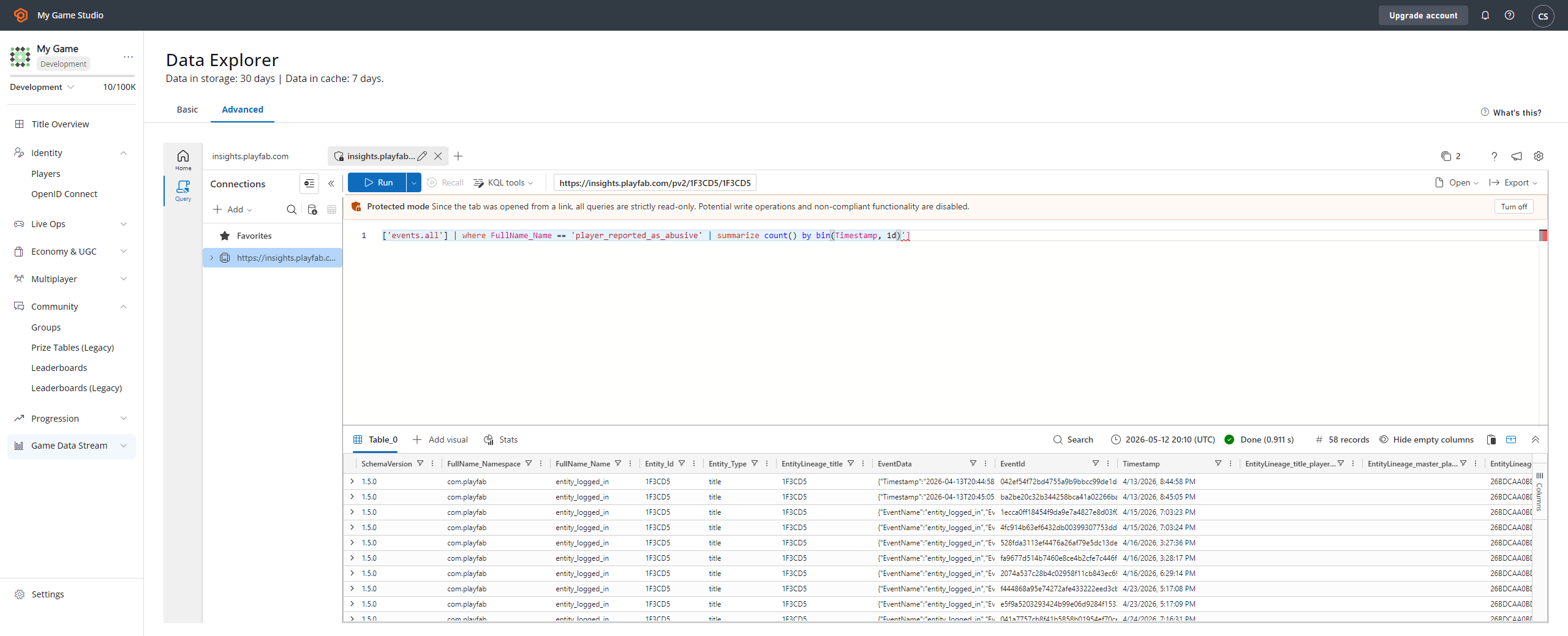
此 API 呼叫會產生:
* 一個**檢舉事件**,您可以透過 **Analytics** 工具 **(1)** 找到它。
* 選取 **player\_reported\_as\_abusive** 事件類型 **(2)**。
* 這會顯示:
* **事件名稱 (3)**。
* 被檢舉的**玩家識別碼 (4)**。
 ## 套用禁止
識別出有問題的玩家後,您可以套用禁止。有兩種方式可以套用禁止:透過 Game Manager 手動套用,或透過程式碼以程式設計方式套用。
### 從 Game Manager 建立禁止
您的社群管理代表可能想要使用 Game Manager 套用禁止。
1. 瀏覽至 Players 區段。
2. 找到並選取有問題的玩家。
3. 瀏覽至 **Bans** 索引標籤。
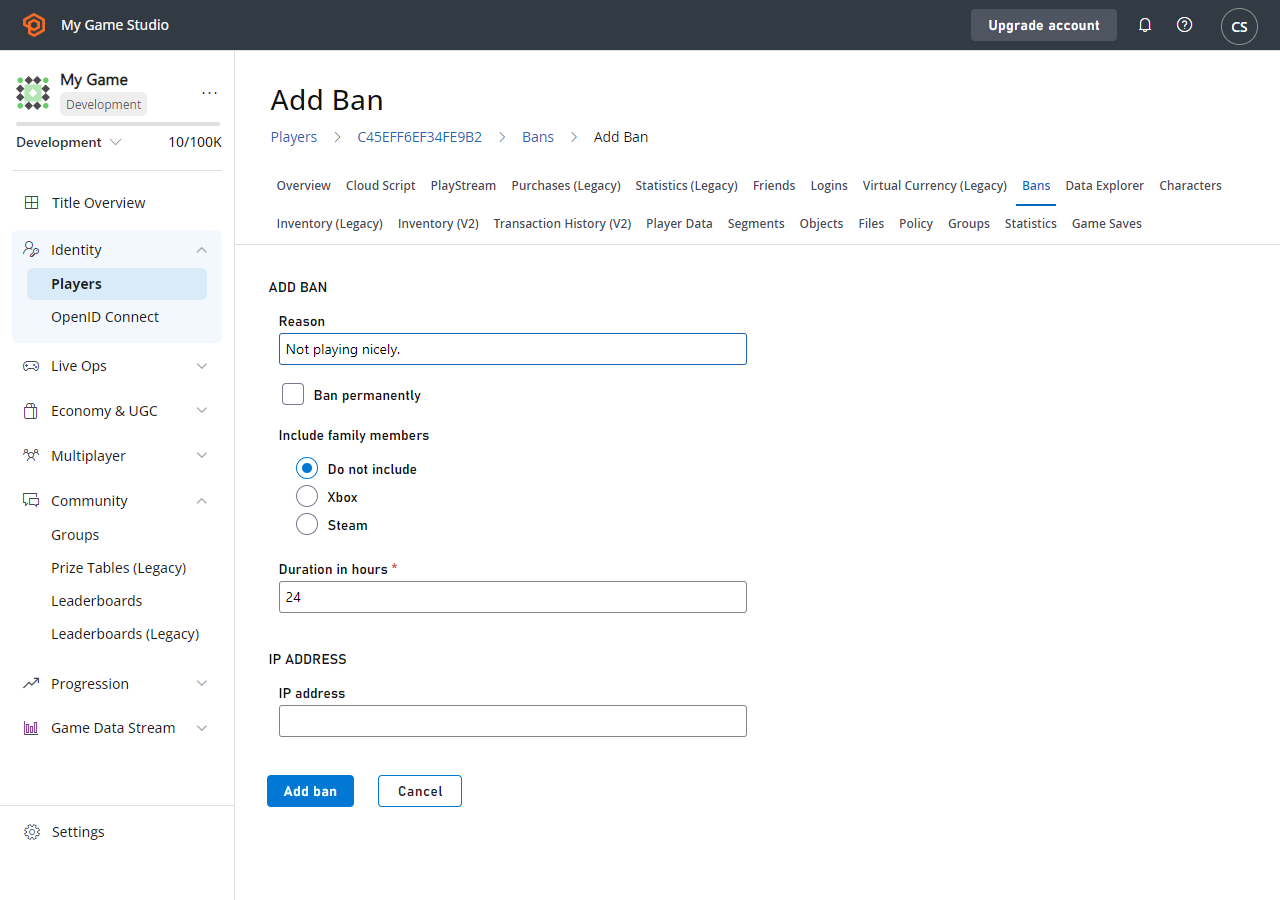
4. 選取 **Add Ban** 以顯示 **Add Ban** 表單。
5. 輸入禁止的 **Reason** 和所需的持續時間。您也可以選擇依特定 **IP ADDRESS (4)** 進行 **Ban**。
6. 最後,選取 **ADD BAN** 按鈕。
## 套用禁止
識別出有問題的玩家後,您可以套用禁止。有兩種方式可以套用禁止:透過 Game Manager 手動套用,或透過程式碼以程式設計方式套用。
### 從 Game Manager 建立禁止
您的社群管理代表可能想要使用 Game Manager 套用禁止。
1. 瀏覽至 Players 區段。
2. 找到並選取有問題的玩家。
3. 瀏覽至 **Bans** 索引標籤。
4. 選取 **Add Ban** 以顯示 **Add Ban** 表單。
5. 輸入禁止的 **Reason** 和所需的持續時間。您也可以選擇依特定 **IP ADDRESS (4)** 進行 **Ban**。
6. 最後,選取 **ADD BAN** 按鈕。
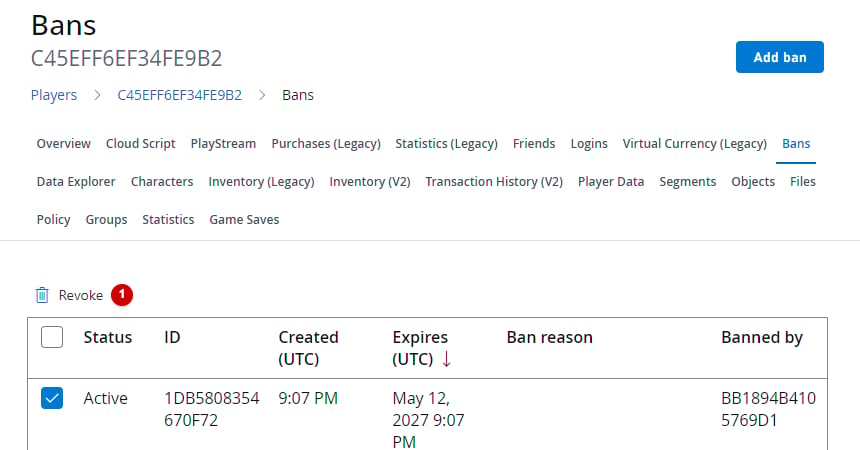
 如果一切設定正確,您會在表格中看到新的 **Ban**。您可以選擇在 **REVOKE BANS** 欄位中選取 **Ban** 來手動移除它。
 ### 從伺服器或服務建立禁止
或者,您可以使用下方提供的程式碼片段,透過 [Services SDK](/zh-TW/services/playfab/sdks/playfab-sdk-intro) 以程式碼套用禁止。
```csharp theme={null}
public void AddBan(string playerId, uint hours) {
PlayFabServerAPI.BanUsers(new BanUsersRequest() {
Bans = new List() {
new BanRequest() {
DurationInHours = hours,
PlayFabId = playerId,
Reason = "Automatic ban for WH",
}
}
}, result => {
//... Handle success
}, error => {
Debug.Log(error.GenerateErrorReport());
});
}
```
透過程式碼套用的禁止也會顯示在 Game Manager 中目標玩家的禁止表格中。
PlayFab 伺服器 SDK 方法提供更多選項,例如 **IP** 位址禁止。
您套用的每個禁止都會獲得一個指派的識別碼。請考慮使用下列伺服器 SDK API 方法進行精確的禁止管理:
* [GetUserBans](xref:titleid.playfabapi.com.server.accountmanagement.getuserbans)
* [RevokeAllBansForUser](xref:titleid.playfabapi.com.server.accountmanagement.revokeallbansforuser)
* [RevokeBans](xref:titleid.playfabapi.com.server.accountmanagement.revokebans)
* [UpdateBans](xref:titleid.playfabapi.com.server.accountmanagement.updatebans)
您可以將 CloudScript 函式作為可能禁止玩家之自動化系統的一部分。若要深入了解 CloudScript,請參閱我們的教學課程[撰寫自訂 CloudScript](/zh-TW/services/playfab/live-service-management/service-gateway/automation/cloudscript/writing-custom-cloudscript)。
## 另請參閱
[BanUsers](xref:titleid.playfabapi.com.server.accountmanagement.banusers)
## Related topics
- [IP 禁止系統](/zh-TW/services/playfab/player-progression/player-data/ip-bans.md)
- [服務對服務多人遊戲工作階段管理](/zh-TW/services/xbox-services/fundamentals/s2s-auth-calls/s2s-calls/s2s-call-patterns/live-mpsd-service-to-service.md)
- [設定 XBOX services](/zh-TW/publishing/game-publishing/concepts/xbox-services.md)
- [人員系統 (好友清單) 概觀](/zh-TW/services/xbox-services/community/people-system/live-people-system-overview.md)
- [人員系統 (好友清單)](/zh-TW/services/xbox-services/community/people-system/live-people-system-nav.md)
### 從伺服器或服務建立禁止
或者,您可以使用下方提供的程式碼片段,透過 [Services SDK](/zh-TW/services/playfab/sdks/playfab-sdk-intro) 以程式碼套用禁止。
```csharp theme={null}
public void AddBan(string playerId, uint hours) {
PlayFabServerAPI.BanUsers(new BanUsersRequest() {
Bans = new List() {
new BanRequest() {
DurationInHours = hours,
PlayFabId = playerId,
Reason = "Automatic ban for WH",
}
}
}, result => {
//... Handle success
}, error => {
Debug.Log(error.GenerateErrorReport());
});
}
```
透過程式碼套用的禁止也會顯示在 Game Manager 中目標玩家的禁止表格中。
PlayFab 伺服器 SDK 方法提供更多選項,例如 **IP** 位址禁止。
您套用的每個禁止都會獲得一個指派的識別碼。請考慮使用下列伺服器 SDK API 方法進行精確的禁止管理:
* [GetUserBans](xref:titleid.playfabapi.com.server.accountmanagement.getuserbans)
* [RevokeAllBansForUser](xref:titleid.playfabapi.com.server.accountmanagement.revokeallbansforuser)
* [RevokeBans](xref:titleid.playfabapi.com.server.accountmanagement.revokebans)
* [UpdateBans](xref:titleid.playfabapi.com.server.accountmanagement.updatebans)
您可以將 CloudScript 函式作為可能禁止玩家之自動化系統的一部分。若要深入了解 CloudScript,請參閱我們的教學課程[撰寫自訂 CloudScript](/zh-TW/services/playfab/live-service-management/service-gateway/automation/cloudscript/writing-custom-cloudscript)。
## 另請參閱
[BanUsers](xref:titleid.playfabapi.com.server.accountmanagement.banusers)
## Related topics
- [IP 禁止系統](/zh-TW/services/playfab/player-progression/player-data/ip-bans.md)
- [服務對服務多人遊戲工作階段管理](/zh-TW/services/xbox-services/fundamentals/s2s-auth-calls/s2s-calls/s2s-call-patterns/live-mpsd-service-to-service.md)
- [設定 XBOX services](/zh-TW/publishing/game-publishing/concepts/xbox-services.md)
- [人員系統 (好友清單) 概觀](/zh-TW/services/xbox-services/community/people-system/live-people-system-overview.md)
- [人員系統 (好友清單)](/zh-TW/services/xbox-services/community/people-system/live-people-system-nav.md)