> ## Documentation Index
> Fetch the complete documentation index at: https://devdocs.xbox.com/llms.txt
> Use this file to discover all available pages before exploring further.
# 教學課程:取得玩家設定檔
> 在 Unity 中使用 GetPlayerProfile 擷取 PlayFab 玩家設定檔資料、設定 PlayerProfileViewConstraints,並讀取建立和上次登入的時間戳記。
# 教學課程:取得玩家設定檔
在本教學課程中,您將學習如何:
\[!div class="checklist"] \* 建立具有顯示名稱的使用者 \* 進行玩家設定檔呼叫 \* 取得玩家建立時間和上次登入時間 \* 為遊戲設定玩家設定檔檢視條件約束 \* 透過登入作業取得玩家設定檔
## 需求
* [PlayFab 開發人員帳戶](https://developer.playfab.com)。
* 已安裝的 Unity Editor。若要透過 Unity Hub 安裝供個人使用的 Unity,或供專業使用的 Unity+,請參閱[下載 Unity](https://unity3d.com/get-unity/download)。
PlayFab Unity3D SDK 支援 Unity Editor 5.3 版 (2015 年 12 月發行) 及更新版本。
* Unity 專案 \* 可以是下列任一項:
* 全新的專案。如需詳細資訊,請參閱[第一次啟動 Unity](https://docs.unity3d.com/550/Documentation/Manual/GettingStarted.html)。
* 引導式教學課程專案。如需詳細資訊,請參閱[開始使用 Unity](https://learn.unity.com/)。
* 現有的專案。
* PlayFab [Unity3D SDK](/zh-TW/services/playfab/sdks/unity3d)。
在本教學課程中,您需要具備如何為遊戲建立玩家的基本知識,以便對玩家執行 `GetPlayerProfile`。
如果您不熟悉 Game Manager,也值得閱讀 [Game Manager 快速入門](/zh-TW/services/playfab/live-service-management/gamemanager/quickstart),因為我們會在其中設定設定檔條件約束。
本文中的 C# 範例是針對 Unity SDK 撰寫的。Unity SDK 使用事件驅動模型來處理非同步工作。若要使用 C# SDK 執行範例程式碼,您必須修改程式碼以使用非同步 Task 模型。必須修改的方法會在簽章中的方法名稱後附加 Async。例如,Unity SDK 中的 SetObject 在 C# SDK 中會變成 SetObjectAsync。如需詳細資訊,請參閱[使用 async 和 await 進行非同步程式設計](https://learn.microsoft.com/en-us/dotnet/csharp/programming-guide/concepts/async/)。
## 建立具有顯示名稱的使用者
第一步是建立玩家並為使用者新增顯示名稱。此範例將建立顯示名稱為 `UnicornTossMaster` 的新使用者。
```csharp theme={null}
void CreatePlayerAndUpdateDisplayName() {
PlayFabClientAPI.LoginWithCustomID( new LoginWithCustomIDRequest {
CustomId = "PlayFabGetPlayerProfileCustomId",
CreateAccount = true
}, result => {
Debug.Log("Successfully logged in a player with PlayFabId: " + result.PlayFabId);
UpdateDisplayName();
}, error => Debug.LogError(error.GenerateErrorReport()));
}
void UpdateDisplayName() {
PlayFabClientAPI.UpdateUserTitleDisplayName( new UpdateUserTitleDisplayNameRequest {
DisplayName = "UnicornTossMaster"
}, result => {
Debug.Log("The player's display name is now: " + result.DisplayName);
}, error => Debug.LogError(error.GenerateErrorReport()));
}
```
主控台輸出應顯示:
```
Successfully logged in a player with PlayFabId: SOME_PLAYFAB_ID
The player's display name is now: UnicornTossMaster
```
## 進行玩家設定檔呼叫
下一步是為玩家建立非常基本的設定檔
下列範例使用基本的 [GetPlayerProfile](xref:titleid.playfabapi.com.server.accountmanagement.getplayerprofile) 呼叫。
```csharp theme={null}
void GetPlayerProfile(string playFabId) {
PlayFabClientAPI.GetPlayerProfile( new GetPlayerProfileRequest() {
PlayFabId = playFabId,
ProfileConstraints = new PlayerProfileViewConstraints() {
ShowDisplayName = true
}
},
result => Debug.Log("The player's DisplayName profile data is: " + result.PlayerProfile.DisplayName),
error => Debug.LogError(error.GenerateErrorReport()));
}
```
回應包含 [PlayerProfileModel](xref:titleid.playfabapi.com.server.accountmanagement.getplayerprofile#playerprofilemodel) 物件,其中包含玩家的顯示名稱 `UnicornTossMaster`。
## 取得玩家建立時間和上次登入時間
[PlayerProfileModel](xref:titleid.playfabapi.com.server.accountmanagement.getplayerprofile#playerprofilemodel) 物件中有相當多關於玩家的資料。在上一個步驟中,發出了 `GetPlayerProfile`,而收到的回應只包含顯示名稱資訊。
下一步是取得玩家*更多*的設定檔資料。若要這麼做,請在 [PlayerProfileViewConstraints](xref:titleid.playfabapi.com.server.accountmanagement.getplayerprofile#playerprofileviewconstraints) 要求參數中加入其他欄位來呼叫 `GetPlayerProfile`。
下列 **C#** 範例修改步驟 2 中的 `GetPlayerProfile` 方法,並在 [ProfileConstraints](xref:titleid.playfabapi.com.server.accountmanagement.getplayerprofile#playerprofileviewconstraints) 中設定 `Created` 和 `LastLogin` 欄位的旗標,以呼叫 `GetPlayerProfile` 要求這些欄位。
**在此步驟中,這將是一次不成功的呼叫!!!**
```csharp theme={null}
void CreatePlayerAndUpdateDisplayName(string playFabId) {
PlayFabClientAPI.GetPlayerProfile( new GetPlayerProfileRequest() {
PlayFabId = playFabId,
ProfileConstraints = new PlayerProfileViewConstraints {
ShowDisplayName = true,
ShowCreated = true,
ShowLastLogin = true
}
},
result => Debug.Log("The player's profile Created date is: " + result.PlayerProfile.Created),
error => Debug.LogError(error.GenerateErrorReport()));
}
```
如果您此時執行此範例程式碼,它會傳回 `Error Code 1303`、`RequestViewConstraintParamsNotAllowed` 錯誤,以及一則指出有 `Invalid view constraints` 的錯誤訊息,並附上遊戲目前所設定之條件約束的 JSON 輸出。
發生此錯誤是因為您尚未在遊戲的設定檔條件約束設定中,設定顯示 `Created` 和 `LastLogin` 的能力。
## 為遊戲設定玩家設定檔檢視條件約束
若要在呼叫 [GetPlayerProfile](xref:titleid.playfabapi.com.server.accountmanagement.getplayerprofile) API 時取得更多資料,您需要設定可用資料的條件約束。這些設定位於 Game Manager 中遊戲的設定內。
根據預設,**ALLOW CLIENT ACCESS TO PROFILE PROPERTIES:** 只啟用了 **Display name**,這讓您可以擷取 **Display Name** 值。
若要為遊戲設定其他條件約束:
* 在 [Game Manager](https://developer.playfab.com) 中,選取您的遊戲。
* 選取左上角的齒輪圖示,然後選取 **Title settings**。
* 選取 **Client Profile Options** 索引標籤。
* 若要在 [ProfileConstraints](xref:titleid.playfabapi.com.server.accountmanagement.getplayerprofile#playerprofileviewconstraints) 中同時啟用 **Created** 和 **LastLogin**,請勾選 **Creation date** 和 **Last login time**,然後選取 **SAVE CLIENT PROFILE OPTIONS**。
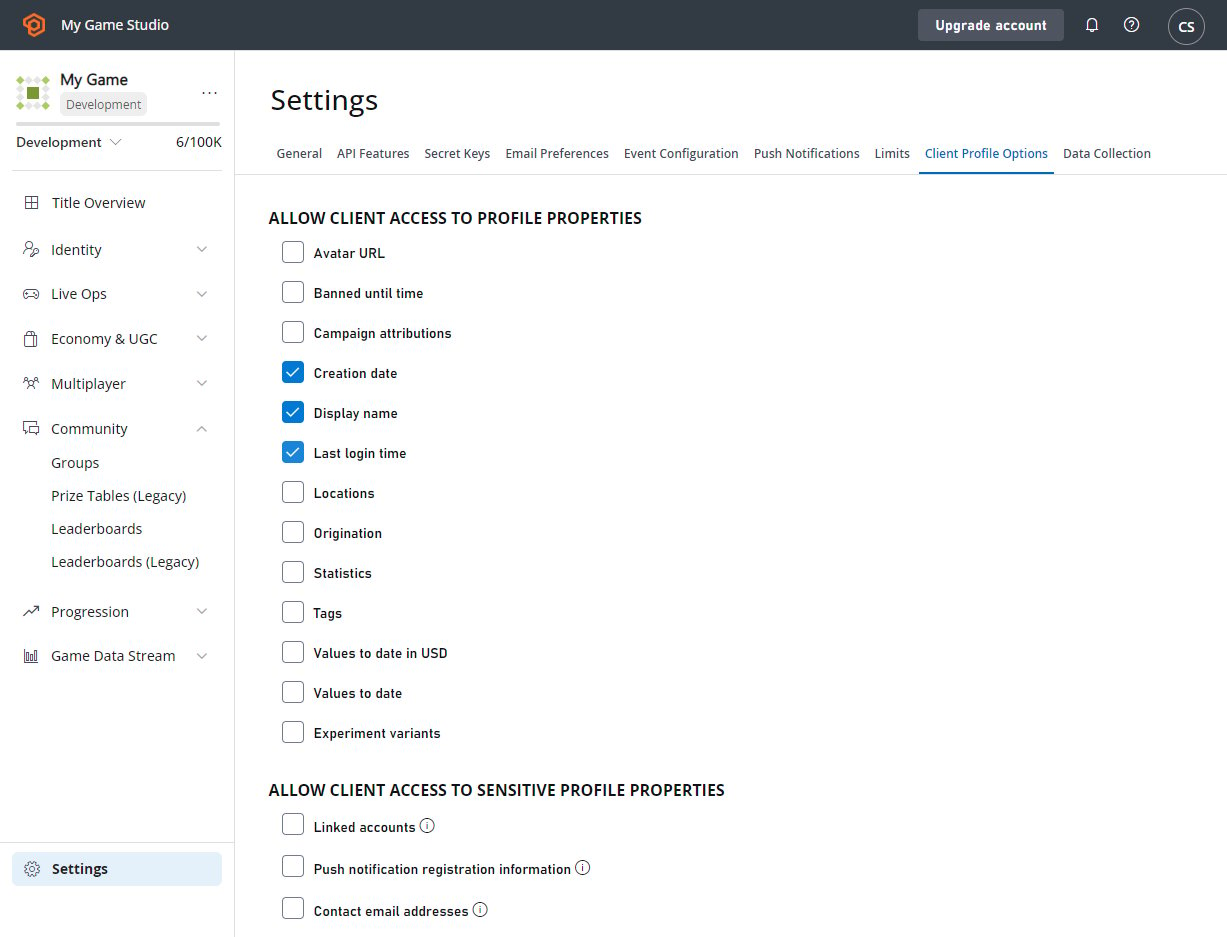 現在當您呼叫 1`CreatePlayerAndUpdateDisplayName` 時,它會傳回 [PlayerProfileModel](xref:titleid.playfabapi.com.server.accountmanagement.getplayerprofile#playerprofilemodel) 物件,其中包含使用者建立時間、上次登入時間以及顯示名稱 `UnicornTossMaster` 的資料。
## 透過登入作業取得玩家設定檔
在大多數情況下,您會希望在玩家登入後立即擷取玩家設定檔資料。PlayFab API 可讓您將登入呼叫和擷取玩家設定檔的呼叫合併為單一呼叫。
下列範例示範如何透過登入要求取得設定檔資訊,並以 `LoginWithCustomId` 為例。
這適用於*每一種*登入機制。
```csharp theme={null}
void CreatePlayerAndUpdateDisplayName(string customId) {
PlayFabClientAPI.LoginWithCustomID( new LoginWithCustomIDRequest() {
CustomId = customId,
// Define info request parameters
InfoRequestParameters = new GetPlayerCombinedInfoRequestParams() {
// And make sure PlayerProfile is included
GetPlayerProfile = true,
// Define rules for PlayerProfile request
ProfileConstraints = new PlayerProfileViewConstraints() {
// And make sure that both AvatarUrl and LastLogin are included.
ShowAvatarUrl = true,
ShowLastLogin = true,
}
}
},
result =>
{
// Extract the data you have requested
var avatarUrl = result.InfoResultPayload.PlayerProfile.AvatarUrl;
},
error => Debug.LogError(error.GenerateErrorReport()));
}
```
## Related topics
- [取得玩家設定檔](/zh-TW/services/playfab/api-references/rest/admin/account-management/get-player-profile.md)
- [設定預設語言](/zh-TW/services/playfab/live-service-management/game-configuration/title-communications/news/setting-default-languages.md)
- [使用電子郵件範本傳送帳戶復原電子郵件](/zh-TW/services/playfab/live-service-management/game-configuration/title-communications/emails/using-email-templates-to-send-an-account-recovery-email.md)
- [匯出區段中玩家的教學課程](/zh-TW/services/playfab/live-service-management/game-configuration/segmentation/segmentation-export-players-in-a-segment.md)
- [使用規則驗證聯絡電子郵件地址](/zh-TW/services/playfab/live-service-management/game-configuration/title-communications/emails/using-a-rule-to-verify-a-contact-email-address.md)
現在當您呼叫 1`CreatePlayerAndUpdateDisplayName` 時,它會傳回 [PlayerProfileModel](xref:titleid.playfabapi.com.server.accountmanagement.getplayerprofile#playerprofilemodel) 物件,其中包含使用者建立時間、上次登入時間以及顯示名稱 `UnicornTossMaster` 的資料。
## 透過登入作業取得玩家設定檔
在大多數情況下,您會希望在玩家登入後立即擷取玩家設定檔資料。PlayFab API 可讓您將登入呼叫和擷取玩家設定檔的呼叫合併為單一呼叫。
下列範例示範如何透過登入要求取得設定檔資訊,並以 `LoginWithCustomId` 為例。
這適用於*每一種*登入機制。
```csharp theme={null}
void CreatePlayerAndUpdateDisplayName(string customId) {
PlayFabClientAPI.LoginWithCustomID( new LoginWithCustomIDRequest() {
CustomId = customId,
// Define info request parameters
InfoRequestParameters = new GetPlayerCombinedInfoRequestParams() {
// And make sure PlayerProfile is included
GetPlayerProfile = true,
// Define rules for PlayerProfile request
ProfileConstraints = new PlayerProfileViewConstraints() {
// And make sure that both AvatarUrl and LastLogin are included.
ShowAvatarUrl = true,
ShowLastLogin = true,
}
}
},
result =>
{
// Extract the data you have requested
var avatarUrl = result.InfoResultPayload.PlayerProfile.AvatarUrl;
},
error => Debug.LogError(error.GenerateErrorReport()));
}
```
## Related topics
- [取得玩家設定檔](/zh-TW/services/playfab/api-references/rest/admin/account-management/get-player-profile.md)
- [設定預設語言](/zh-TW/services/playfab/live-service-management/game-configuration/title-communications/news/setting-default-languages.md)
- [使用電子郵件範本傳送帳戶復原電子郵件](/zh-TW/services/playfab/live-service-management/game-configuration/title-communications/emails/using-email-templates-to-send-an-account-recovery-email.md)
- [匯出區段中玩家的教學課程](/zh-TW/services/playfab/live-service-management/game-configuration/segmentation/segmentation-export-players-in-a-segment.md)
- [使用規則驗證聯絡電子郵件地址](/zh-TW/services/playfab/live-service-management/game-configuration/title-communications/emails/using-a-rule-to-verify-a-contact-email-address.md)