> ## Documentation Index
> Fetch the complete documentation index at: https://devdocs.xbox.com/llms.txt
> Use this file to discover all available pages before exploring further.
# Windows 的作業系統修補程式層級更新
> PlayFab 多人遊戲伺服器如何在受控容器上推出每月 Windows 作業系統修補程式更新,讓裝載的遊戲伺服器 VM 保持使用 Azure 認證的映像。
# Windows 的作業系統修補程式更新
PlayFab 多人遊戲伺服器的受控 Windows 容器會經歷有條理的作業系統修補程式更新程序,以確保遊戲伺服器使用最新的安全性更新運作。每個月,Azure Compute 都會認證一個 Windows 作業系統映像,並將其整合至多人遊戲伺服器中,讓開發人員在建立組建的過程中,透過 "Windows Server Core Preview" 切換開關進行選擇。我們鼓勵開發人員測試以 "Windows Server Core Preview" 選項建置的非生產遊戲伺服器。
 30 天後,多人遊戲伺服器會將 Windows Server Core Preview 移轉至 Windows Server Core 映像選項——表示這是經 PlayFab 核准、已可用於生產環境的作業系統映像。此程序每 30 天重複一次,將作業系統預覽映像循環轉換為其主線作業系統核心映像。如果遊戲伺服器所使用的作業系統核心版本與 PlayFab 的作業系統核心版本不符,PlayFab 會以最新的主線作業系統核心映像自動更新您的遊戲組建伺服器。此程序會自動套用,開發人員不需要變更組建。
## 修補程式更新週期
下圖說明作業系統修補程式層級的更新週期。
30 天後,多人遊戲伺服器會將 Windows Server Core Preview 移轉至 Windows Server Core 映像選項——表示這是經 PlayFab 核准、已可用於生產環境的作業系統映像。此程序每 30 天重複一次,將作業系統預覽映像循環轉換為其主線作業系統核心映像。如果遊戲伺服器所使用的作業系統核心版本與 PlayFab 的作業系統核心版本不符,PlayFab 會以最新的主線作業系統核心映像自動更新您的遊戲組建伺服器。此程序會自動套用,開發人員不需要變更組建。
## 修補程式更新週期
下圖說明作業系統修補程式層級的更新週期。
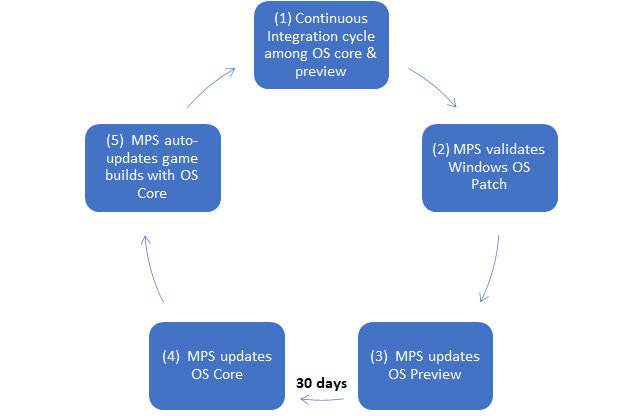 | 階段 | 關係人 | 描述 |
| - | - | - |
| 1 | 客戶 | 持續整合和測試程序以作業系統核心部署生產遊戲組建,並以作業系統預覽測試遊戲組建 |
| 2 | Azure | MPS 驗證新發佈的 Windows 作業系統修補程式 |
| 3 | MPS | PlayFab 以 Windows 作業系統修補程式取代 MPS 作業系統預覽 |
| 4 | MPS | PlayFab 以 30 天前的 MPS 作業系統預覽取代 MPS 作業系統核心 |
| 5 | MPS | PlayFab 以作業系統核心自動更新遊戲組建 |
## 最佳做法
1. 我們鼓勵開發人員使用作業系統預覽映像選項建立和測試非生產遊戲伺服器組建。
2. 具有成熟組建以及持續整合和部署程序的開發人員,應考量作業系統映像每 30 天更新一次的週期
## 限制
1. 修補程式更新程序每月進行一次
2. 開發人員無法選擇退出每月的作業系統修補程式層級更新
3. 修補程式更新程序只適用於 Windows 受控容器,不適用於自訂容器或 Linux。
* 遊戲伺服器組建建立後就無法變更。因此,開發人員無法在作業系統映像預覽和作業系統映像核心之間切換。- 如果組建所使用的版本比最新版本舊,生產環境中運作的遊戲伺服器將自動更新為最新的作業系統核心映像版本。這只會自動套用至任何新的多人遊戲伺服器配置要求。
## Related topics
- [使用 Game Manager 部署組建](/zh-TW/services/playfab/multiplayer/servers/deploy-using-game-manager.md)
- [PlayFab 遊戲伺服器的基本概念](/zh-TW/services/playfab/multiplayer/servers/basics-of-a-playfab-game-server.md)
- [WdDeleteOperationSummary](/zh-TW/reference/remoting/structs/wddeleteoperationsummary.md)
- [WdDeleteOptions](/zh-TW/reference/remoting/structs/wddeleteoptions.md)
- [WdDeleteSearchOptions](/zh-TW/reference/remoting/structs/wddeletesearchoptions.md)
| 階段 | 關係人 | 描述 |
| - | - | - |
| 1 | 客戶 | 持續整合和測試程序以作業系統核心部署生產遊戲組建,並以作業系統預覽測試遊戲組建 |
| 2 | Azure | MPS 驗證新發佈的 Windows 作業系統修補程式 |
| 3 | MPS | PlayFab 以 Windows 作業系統修補程式取代 MPS 作業系統預覽 |
| 4 | MPS | PlayFab 以 30 天前的 MPS 作業系統預覽取代 MPS 作業系統核心 |
| 5 | MPS | PlayFab 以作業系統核心自動更新遊戲組建 |
## 最佳做法
1. 我們鼓勵開發人員使用作業系統預覽映像選項建立和測試非生產遊戲伺服器組建。
2. 具有成熟組建以及持續整合和部署程序的開發人員,應考量作業系統映像每 30 天更新一次的週期
## 限制
1. 修補程式更新程序每月進行一次
2. 開發人員無法選擇退出每月的作業系統修補程式層級更新
3. 修補程式更新程序只適用於 Windows 受控容器,不適用於自訂容器或 Linux。
* 遊戲伺服器組建建立後就無法變更。因此,開發人員無法在作業系統映像預覽和作業系統映像核心之間切換。- 如果組建所使用的版本比最新版本舊,生產環境中運作的遊戲伺服器將自動更新為最新的作業系統核心映像版本。這只會自動套用至任何新的多人遊戲伺服器配置要求。
## Related topics
- [使用 Game Manager 部署組建](/zh-TW/services/playfab/multiplayer/servers/deploy-using-game-manager.md)
- [PlayFab 遊戲伺服器的基本概念](/zh-TW/services/playfab/multiplayer/servers/basics-of-a-playfab-game-server.md)
- [WdDeleteOperationSummary](/zh-TW/reference/remoting/structs/wddeleteoperationsummary.md)
- [WdDeleteOptions](/zh-TW/reference/remoting/structs/wddeleteoptions.md)
- [WdDeleteSearchOptions](/zh-TW/reference/remoting/structs/wddeletesearchoptions.md)