> ## Documentation Index
> Fetch the complete documentation index at: https://devdocs.xbox.com/llms.txt
> Use this file to discover all available pages before exploring further.
# 判斷 Windows 遊戲伺服器所需的 DLL
> 說明如何判斷遊戲伺服器所需的 DLL 清單,以及如何將該清單與 PlayFab MPS 中的 DLL 集合進行比較。
# 判斷需要包含在資產套件中的必要 DLL
本文可協助您產生在 PlayFab 多人遊戲伺服器中執行 Windows 遊戲伺服器所需的 DLL 清單。
根據預設,受控容器映像包含許多常用的 DLL。若要判斷需要哪些額外的 DLL,請將遊戲伺服器的 DLL 清單與受控容器映像中包含的 DLL 清單進行比較。任何額外的 DLL 都必須包含在您的資產 zip 檔案中。
## 判斷必要的 DLL
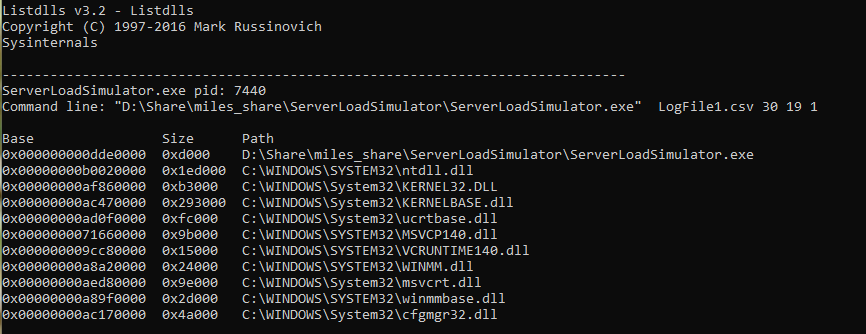
使用 [ListDlls](https://learn.microsoft.com/en-us/sysinternals/downloads/listdlls) 公用程式,列出在本機執行遊戲伺服器時載入的所有 DLL。若要產生清單:
1. 從 sysinternals 下載 [ListDlls](https://learn.microsoft.com/en-us/sysinternals/downloads/listdlls)。
2. 依照[本機偵錯步驟](/zh-TW/services/playfab/multiplayer/servers/locally-debugging-game-servers-and-integration-with-playfab)中的指示,以**處理序模式**在本機電腦上執行遊戲伺服器可執行檔,或在不使用 [LocalMultiplayerAgent](https://github.com/PlayFab/MpsAgent) 的情況下以獨立處理序執行。
3. 執行 listdlls 並指定執行中的遊戲伺服器作為參數。範例:`listdlls ServerLoadSimulator.exe`
4. 將輸出的清單與資產 zip 檔案中包含的 DLL 清單 (通常是與可執行檔位於相同資料夾中的所有內容) 進行比較。兩份清單之間的差異,就是遊戲伺服器所需的系統 DLL。
 ## 將必要的 DLL 與容器中包含的 DLL 進行比較
判斷出系統 DLL 清單後,下一步是判斷哪些系統 DLL 已包含在容器中。
1. 下載 PlayFab 多人遊戲容器映像。若要下載容器映像,請執行[本機偵錯步驟](/zh-TW/services/playfab/multiplayer/servers/locally-debugging-game-servers-and-integration-with-playfab)中所參考的 setup.ps1 指令碼。或者,配置新的 MPS 執行個體並透過遠端桌面連線。所有 Windows MPS 執行個體都會下載容器映像。
2. 執行下列命令,在新的 docker 容器中啟動命令列工作階段。您可能需要以系統管理員身分執行命令視窗。
```bash theme={null}
docker run -it mcr.microsoft.com/playfab/multiplayer:wsc-10.0.17134.950 cmd
```
將 "wsc-10.0.17134.950" 取代為您在步驟 1 中下載之 docker 映像的標記。如果您不確定正確的標記,請執行 `docker images` 列出已下載的映像。
## 將必要的 DLL 與容器中包含的 DLL 進行比較
判斷出系統 DLL 清單後,下一步是判斷哪些系統 DLL 已包含在容器中。
1. 下載 PlayFab 多人遊戲容器映像。若要下載容器映像,請執行[本機偵錯步驟](/zh-TW/services/playfab/multiplayer/servers/locally-debugging-game-servers-and-integration-with-playfab)中所參考的 setup.ps1 指令碼。或者,配置新的 MPS 執行個體並透過遠端桌面連線。所有 Windows MPS 執行個體都會下載容器映像。
2. 執行下列命令,在新的 docker 容器中啟動命令列工作階段。您可能需要以系統管理員身分執行命令視窗。
```bash theme={null}
docker run -it mcr.microsoft.com/playfab/multiplayer:wsc-10.0.17134.950 cmd
```
將 "wsc-10.0.17134.950" 取代為您在步驟 1 中下載之 docker 映像的標記。如果您不確定正確的標記,請執行 `docker images` 列出已下載的映像。 1. 從命令列中,找出與本機電腦上必要 DLL 所在資料夾相對應的資料夾。列出容器中存在的 DLL,並與您產生的必要 DLL 清單進行比較。任何在必要清單中但不存在於容器中的 DLL,都必須包含在您的資產 zip 檔案中。
2. 若要結束 cmd 處理序並讓容器停止,請輸入 `exit`。
## Related topics
- [直接連線以對遊戲伺服器進行偵錯](/zh-TW/services/playfab/multiplayer/servers/directly-debugging-game-servers.md)
- [撰寫遊戲伺服器組建](/zh-TW/services/playfab/multiplayer/servers/author-a-game-server-build.md)
- [Wrapper 範例](/zh-TW/services/playfab/multiplayer/servers/wrapper-sample.md)
- [調整待命規模](/zh-TW/services/playfab/multiplayer/servers/scaling-standby.md)
- [多人遊戲伺服器比較](/zh-TW/services/playfab/multiplayer/servers/server-comparison.md)
1. 從命令列中,找出與本機電腦上必要 DLL 所在資料夾相對應的資料夾。列出容器中存在的 DLL,並與您產生的必要 DLL 清單進行比較。任何在必要清單中但不存在於容器中的 DLL,都必須包含在您的資產 zip 檔案中。
2. 若要結束 cmd 處理序並讓容器停止,請輸入 `exit`。
## Related topics
- [直接連線以對遊戲伺服器進行偵錯](/zh-TW/services/playfab/multiplayer/servers/directly-debugging-game-servers.md)
- [撰寫遊戲伺服器組建](/zh-TW/services/playfab/multiplayer/servers/author-a-game-server-build.md)
- [Wrapper 範例](/zh-TW/services/playfab/multiplayer/servers/wrapper-sample.md)
- [調整待命規模](/zh-TW/services/playfab/multiplayer/servers/scaling-standby.md)
- [多人遊戲伺服器比較](/zh-TW/services/playfab/multiplayer/servers/server-comparison.md)