> ## Documentation Index
> Fetch the complete documentation index at: https://devdocs.xbox.com/llms.txt
> Use this file to discover all available pages before exploring further.
# 伺服器概觀頁面
> 使用 PlayFab Game Manager 中的伺服器概觀頁面,檢查多人遊戲伺服器組建的 VM、工作階段狀態和玩家人數,並要求伺服器。
本文說明 Game Manager 中多人遊戲伺服器特定組建的伺服器頁面。
若要前往此頁面,您需要從組建概觀頁面選取組建,然後選取頂端的 Servers 索引標籤。
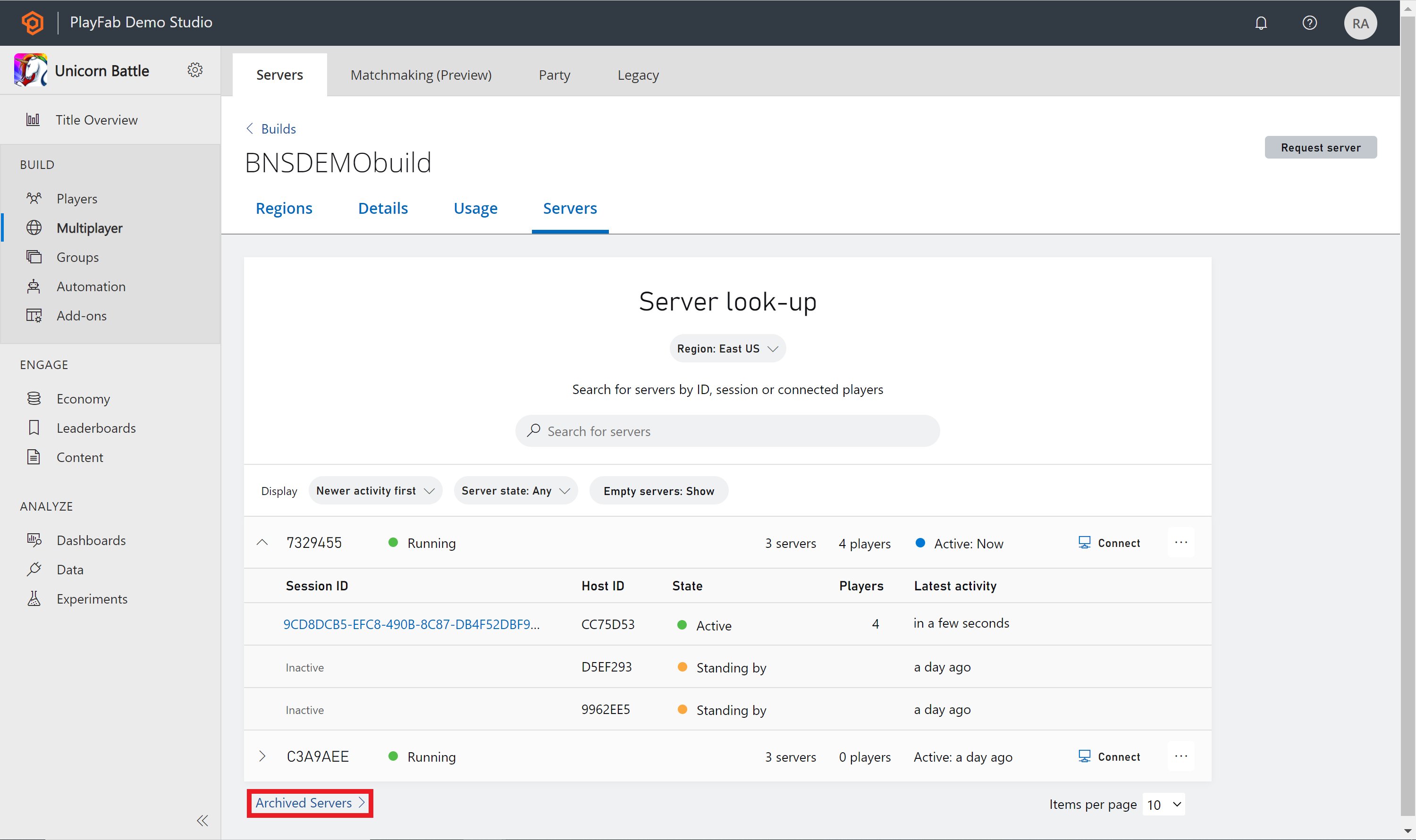
從 Servers 頁面,您可以查看虛擬機器 (VM) 的詳細資料。此頁面會列出所有 VM 及其伺服器。您可以搜尋特定伺服器、進行篩選或要求伺服器。展開 VM 後,每部伺服器都可以取得下列資訊:
* 工作階段識別碼 (僅限目前作用中時)
* 主機識別碼
* 工作階段狀態
* 已連線的玩家數
* 最新活動
若要尋找更多伺服器,您可以變更頁面頂端的 **Region** 篩選條件、搜尋伺服器,或根據 **Display** 旁的篩選條件進行排序。如果您想要要求伺服器,可以選取頁面右上方的 **Request server** 按鈕。
 對於 VM 或主機識別碼,只會顯示識別碼的最後七個字元。若要檢視完整的 VM 或主機識別碼,請將滑鼠停留在識別碼上。如果您想要複製識別碼,請選取識別碼本身,完成時識別碼旁會出現核取記號。
 ## 搜尋伺服器
搜尋伺服器時,您可以根據下列任何準則進行搜尋:
* VM 識別碼
* 伺服器主機識別碼
* 伺服器工作階段識別碼
* 伺服器 IPv4/IPv6 位址
* 伺服器 FQDN
* 已連線的玩家
所有搜尋結果都會依最新活動資料行排序。
## 伺服器詳細資料
伺服器變成作用中後,您可以選取工作階段識別碼,以瀏覽至 **Server Details** 頁面。
在伺服器詳細資料頁面上,您可以查看該特定伺服器的更多資訊,包括但不限於已連線的玩家和區域。您也可以選取右上角的按鈕,關閉伺服器或連線至 VM。
## 搜尋伺服器
搜尋伺服器時,您可以根據下列任何準則進行搜尋:
* VM 識別碼
* 伺服器主機識別碼
* 伺服器工作階段識別碼
* 伺服器 IPv4/IPv6 位址
* 伺服器 FQDN
* 已連線的玩家
所有搜尋結果都會依最新活動資料行排序。
## 伺服器詳細資料
伺服器變成作用中後,您可以選取工作階段識別碼,以瀏覽至 **Server Details** 頁面。
在伺服器詳細資料頁面上,您可以查看該特定伺服器的更多資訊,包括但不限於已連線的玩家和區域。您也可以選取右上角的按鈕,關閉伺服器或連線至 VM。
 ## 已封存的伺服器
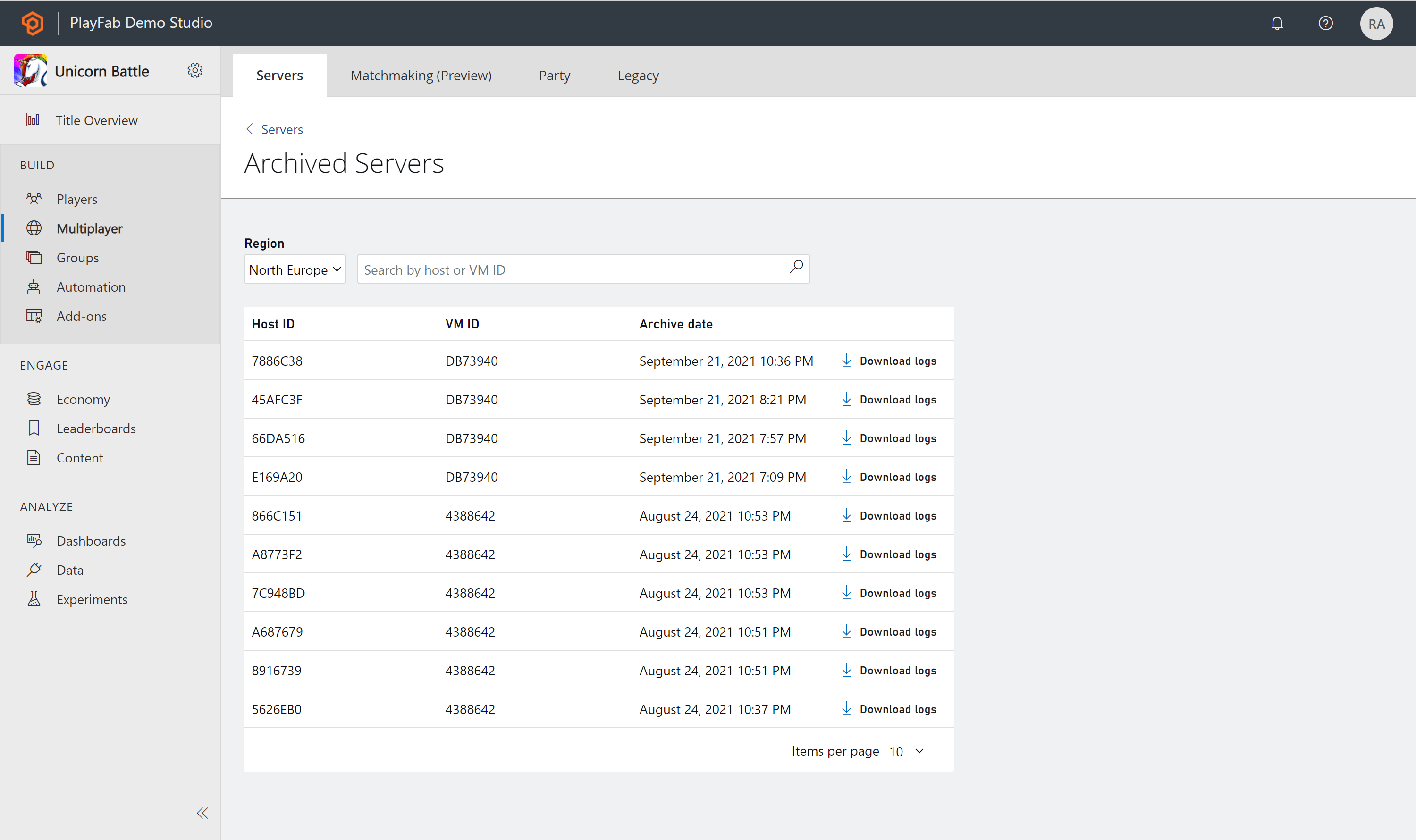
伺服器關閉後,狀態將變為已終止,並移至 **Archived servers** 頁面。如果您想要查看已封存的伺服器,請選取伺服器頁面底部名為 **Archived Servers** 的連結。已封存伺服器清單會顯示過去 30 天內已封存的伺服器。
## 已封存的伺服器
伺服器關閉後,狀態將變為已終止,並移至 **Archived servers** 頁面。如果您想要查看已封存的伺服器,請選取伺服器頁面底部名為 **Archived Servers** 的連結。已封存伺服器清單會顯示過去 30 天內已封存的伺服器。
 ## 伺服器記錄
如果您想要深入了解已封存的伺服器,可以下載 **Archived Servers** 下的記錄。每部伺服器旁都有一個 **Download logs** 按鈕,選取該按鈕會下載該伺服器記錄的 zip 檔案。
## 伺服器記錄
如果您想要深入了解已封存的伺服器,可以下載 **Archived Servers** 下的記錄。每部伺服器旁都有一個 **Download logs** 按鈕,選取該按鈕會下載該伺服器記錄的 zip 檔案。
 ## 另請參閱
* [封存和擷取多人遊戲伺服器記錄](/zh-TW/services/playfab/multiplayer/servers/archiving-and-retrieving-multiplayer-server-logs)
* [組建概觀](/zh-TW/services/playfab/multiplayer/servers/build-overview)
## Related topics
- [組建概觀頁面](/zh-TW/services/playfab/multiplayer/servers/build-overview.md)
- [Community 概觀頁面](/zh-TW/services/playfab/community/what-is-community.md)
- [身分識別概觀頁面](/zh-TW/services/playfab/identity/identity-overview.md)
- [部署 PlayFab 多人遊戲伺服器組建](/zh-TW/services/playfab/multiplayer/servers/deploying-playfab-multiplayer-server-builds.md)
- [伺服器](/zh-TW/services/playfab/multiplayer/servers/index.md)
## 另請參閱
* [封存和擷取多人遊戲伺服器記錄](/zh-TW/services/playfab/multiplayer/servers/archiving-and-retrieving-multiplayer-server-logs)
* [組建概觀](/zh-TW/services/playfab/multiplayer/servers/build-overview)
## Related topics
- [組建概觀頁面](/zh-TW/services/playfab/multiplayer/servers/build-overview.md)
- [Community 概觀頁面](/zh-TW/services/playfab/community/what-is-community.md)
- [身分識別概觀頁面](/zh-TW/services/playfab/identity/identity-overview.md)
- [部署 PlayFab 多人遊戲伺服器組建](/zh-TW/services/playfab/multiplayer/servers/deploying-playfab-multiplayer-server-builds.md)
- [伺服器](/zh-TW/services/playfab/multiplayer/servers/index.md)