> ## Documentation Index
> Fetch the complete documentation index at: https://devdocs.xbox.com/llms.txt
> Use this file to discover all available pages before exploring further.
# 撰寫自訂 CloudScript
> 撰寫可從 Unity 用戶端、PlayStream 規則和已排程的工作呼叫的自訂 PlayFab CloudScript JavaScript 函式,並提供 helloWorld 範例。
CloudScript 是 PlayFab 最多用途的功能之一。它允許用戶端程式碼要求執行您可以實作的任何種類自訂伺服器端功能,而且幾乎可以與*任何事物*搭配使用。除了來自用戶端或伺服器程式碼的明確執行要求之外,CloudScript 也可以為回應 PlayStream 事件 (透過建立*規則*) 或作為已排程工作的一部分而執行。
[使用 Azure Functions 的 CloudScript](/zh-TW/services/playfab/live-service-management/service-gateway/automation/cloudscript-af/quickstart) 在 CloudScript 原有的優點之上,提供更多支援的語言和更好的偵錯工作流程。
本教學課程涵蓋撰寫您的 CloudScript 程式碼。如需將 CloudScript 檔案上傳至遊戲的說明,請參閱 [CloudScript 快速入門](/zh-TW/services/playfab/live-service-management/service-gateway/automation/cloudscript/quickstart)。
本教學課程示範 Unity 程式碼範例,但 CloudScript 在所有 SDK 中的運作方式都類似。
本教學課程的必要條件:
* [已設定 PlayFab **Unity SDK** 的 **Unity** 環境](/zh-TW/services/playfab/sdks/unity3d/quickstart)
* 已在 `PlayFabSharedSettings` 物件中設定遊戲識別碼。
* 專案可以成功登入使用者。
## 開始使用:helloWorld
我們的 `helloWorld` 範例可在全新的遊戲上運作,不需要在 Game Manager 中進行任何修改。新遊戲的預設 CloudScript 檔案包含一個名為 `helloWorld` 的處理常式。它使用了一些基本功能:輸入參數、記錄、currentPlayerId 和傳回參數。
下列範例顯示預設的 `helloWorld` 函式程式碼 (不含註解)。
```javascript theme={null}
// CloudScript (JavaScript)
handlers.helloWorld = function (args, context) {
var message = "Hello " + currentPlayerId + "!";
log.info(message);
var inputValue = null;
if (args && args.hasOwnProperty("inputValue"))
inputValue = args.inputValue;
log.debug("helloWorld:", { input: inputValue });
return { messageValue: message };
}
```
### 解析程式碼
handler 物件已在 PlayFab CloudScript 環境中預先定義。您應該將任何 CloudScript 函式新增至此物件。
* `helloWorld` 是一個可供您的遊戲和 SDK 使用的函式,因為它是在 handler 物件中定義的。
* `args` 是來自呼叫端的任意物件。它是從 JSON 剖析而來,可以包含以任何方式格式化的任何資料。
請參閱下一節中的 **FunctionParameter**。
您應以零信任的態度看待此物件。遭到入侵的用戶端或惡意使用者可以在此以*任何*格式提供*任何*資訊。
* `Context` 是進階參數。在此範例中,它是 *null*。此參數由伺服器控制,是安全的。
* `currentPlayerId` 是一個全域變數,設定為要求此呼叫之玩家的 PlayFabId。此參數由伺服器控制,是安全的。\*\*注意:\*\*使用 ExecuteEntityCloudScript API 時,除非實體的實體鏈中有 MasterPlayerID,否則此參數為 null。
* `log.info`:`log` 是一個全域物件。它主要用於偵錯您的 CloudScript。`log` 物件公開下列方法:`info`、`debug` 和 `error`。本教學課程稍後會有更多詳細資料。
* `return`:您傳回的任何物件都會序列化為 JSON,並傳回給呼叫端。您可以傳回任何可 JSON 序列化的物件,並包含您想要的任何資料。
如果您的 CloudScript 將秘密資料傳回給用戶端,這是您的責任。遭到入侵的用戶端或惡意使用者可以檢查傳回的資料,*即使*您在一般遊戲過程中沒有向使用者顯示這些資料。
## 從 Unity 遊戲用戶端執行 CloudScript 函式
從用戶端內呼叫 CloudScript 函式非常直接。您首先必須建立 `ExecuteCloudScriptRequest`,並將 `ActionId` 屬性設定為您要執行的 CloudScript 函式名稱 (在此案例中為 `helloWorld`),然後透過我們的 API 將物件傳送至 PlayFab。
您只能呼叫附加至 handlers JavaScript 物件的 CloudScript 方法。
若要執行 CloudScript 方法,您的用戶端中需要下列幾行程式碼。
```csharp theme={null}
// Build the request object and access the API
private static void StartCloudHelloWorld()
{
PlayFabClientAPI.ExecuteCloudScript(new ExecuteCloudScriptRequest()
{
FunctionName = "helloWorld", // Arbitrary function name (must exist in your uploaded cloud.js file)
FunctionParameter = new { inputValue = "YOUR NAME" }, // The parameter provided to your function
GeneratePlayStreamEvent = true, // Optional - Shows this event in PlayStream
}, OnCloudHelloWorld, OnErrorShared);
}
// OnCloudHelloWorld defined in the next code block
```
### 解析程式碼
[ExecuteCloudScriptRequest](xref:titleid.playfabapi.com.client.server-sidecloudscript.executecloudscript#executecloudscriptrequest) 是任何 [PlayFabClientAPI.ExecuteCloudScript](xref:titleid.playfabapi.com.client.server-sidecloudscript.executecloudscript) 呼叫的要求類型。
* `ExecuteCloudScriptRequest.FunctionName` 是一個字串。其值應與 CloudScript 中定義的函式名稱相符。在此案例中為 `helloWorld`。
* `ExecuteCloudScriptRequest.FunctionParameter` 可以是任何能夠序列化為 JSON 的物件。它會成為 `helloWorld` 函式中的第一個 args 參數 (請參閱上一節中的 args)。
* `ExecuteCloudScriptRequest.GeneratePlayStreamEvent` 是選用的。如果為 true,就會將事件張貼至 PlayStream,您可以在 Game Manager 中檢視該事件,或將其用於其他 PlayStream 觸發程序。
視語言而定,`ExecuteCloudScript` 這一行的最後一部分涉及向 PlayFab CloudScript 伺服器發出要求,以及該語言特有的*結果*和*錯誤*處理部分。
例如,在 Unity、JavaScript 或 AS3 中,錯誤和結果處理是使用回呼函式提供的。
以下是錯誤處理方法的範例。
```csharp theme={null}
private static void OnCloudHelloWorld(ExecuteCloudScriptResult result) {
// CloudScript returns arbitrary results, so you have to evaluate them one step and one parameter at a time
Debug.Log(JsonWrapper.SerializeObject(result.FunctionResult));
JsonObject jsonResult = (JsonObject)result.FunctionResult;
object messageValue;
jsonResult.TryGetValue("messageValue", out messageValue); // note how "messageValue" directly corresponds to the JSON values set in CloudScript
Debug.Log((string)messageValue);
}
private static void OnErrorShared(PlayFabError error)
{
Debug.Log(error.GenerateErrorReport());
}
```
## 中級概觀:全域變數和進階引數
CloudScript 是一組以 V8 編譯並託管在 PlayFab 伺服器上的 JavaScript 函式。它可以存取 [PlayFab API 參考文件](/zh-TW/services/playfab/api-references)中列出的任何伺服器 API,以及*記錄器*、發出 CloudScript 要求之玩家的 PlayFab ID,以及要求中包含的任何資訊,這些全都以預設物件的形式提供。
CloudScript 函式本身是全域 handlers 物件的屬性。下表顯示這些預先定義變數的完整清單。
| 名稱 | 用途 |
| :- | :- |
| **server** | 可以存取 [PlayFab API 參考文件](/zh-TW/services/playfab/api-references)中列出的所有伺服器端 API 呼叫。它們可以像這樣 (同步) 呼叫:`var result = server.AuthenticateUserTicket(request);` |
| **http** | 執行同步 HTTP 要求,像這樣:`http.request(url, method, content, contentType, headers, logRequestAndResponse)`。`headers` 物件包含對應各種標頭及其值的屬性。`logRequestAndResponse` 是一個布林值,用於決定遊戲是否應將要求中的任何錯誤記錄為回應的一部分。 |
| **log** | 建立記錄陳述式並將其新增至回應。記錄有三個層級:`log.info()`、`log.debug()` 和 `log.error()`。這三個層級都接受一個訊息字串,以及一個包含要隨記錄一起包含之額外資料的選用物件。例如:`log.info('hello!', { time: new Date() });` |
| **currentPlayerId** | 觸發 CloudScript 呼叫之玩家的 PlayFab ID。 |
| **handlers** | 包含遊戲所有 CloudScript 函式的全域物件。可以透過此物件新增或呼叫函式。例如:`handlers.pop = function() {};`、`handlers.pop();`。 |
| **script** | 包含 `Revision` 和 `titleId` 的全域物件。`Revision` 代表目前正在執行之 CloudScript 的**修訂編號**,而 `titleId` 代表目前遊戲的識別碼。 |
此外,所有處理常式函式都會收到兩個參數,詳細說明如下。
| 名稱 | 用途 |
| :- | :- |
| **args** | 處理常式函式的第一個參數。`ExecuteCloudscript` 要求之 `FunctionParameter` 欄位的物件表示法。 |
| **context** | 處理常式函式的第二個參數。當要求由 PlayStream 事件動作觸發時,有關該要求的其他資訊,包括觸發動作之[事件的資料](/zh-TW/services/playfab/api-references/events) (context.playStreamEvent),以及與其相關聯之玩家的[設定檔資料](xref:titleid.playfabapi.com.client.accountmanagement.getplayerprofile#playerprofilemodel) (context.playerProfile) |
CloudScript 函式可以透過 `ExecuteCloudScript` API 或預設的 PlayStream 事件動作呼叫。
有關 `ExecuteCloudScript` 回應的完整詳細資料,請參閱 [ExecuteCloudScriptResult](xref:titleid.playfabapi.com.client.server-sidecloudscript.executecloudscript#executecloudscriptresult)。
## 中級:FunctionParameter 和 args
在上一節中,我們說明了如何填入 `request.FunctionParameter`,並在 `args` 參數中檢視該資訊。[CloudScript 快速入門](/zh-TW/services/playfab/live-service-management/service-gateway/automation/cloudscript/quickstart)示範如何上傳新的 CloudScript。
將兩者結合,我們可以提供另一個如何將引數從用戶端傳遞至 CloudScript 的範例。以先前的範例為基礎,依照下列方式修改 CloudScript 程式碼和您的用戶端程式碼。
```javascript theme={null}
handlers.helloWorld = function (args) {
// ALWAYS validate args parameter passed in from clients (Better than we do here)
var message = "Hello " + args.name + "!"; // Utilize the name parameter sent from client
log.info(message);
return { messageValue: message };
}
```
```csharp theme={null}
// Build the request object and access the API
private static void StartCloudHelloWorld()
{
PlayFabClientAPI.ExecuteCloudScript(new ExecuteCloudScriptRequest()
{
FunctionName = "helloWorld", // Arbitrary function name (must exist in your uploaded cloud.js file)
FunctionParameter = new { name = "YOUR NAME" }, // The parameter provided to your function
GeneratePlayStreamEvent = true, // Optional - Shows this event in PlayStream
}, OnCloudHelloWorld, OnErrorShared);
}
private static void OnCloudHelloWorld(ExecuteCloudScriptResult result) {
// CloudScript returns arbitrary results, so you have to evaluate them one step and one parameter at a time
Debug.Log(JsonWrapper.SerializeObject(result.FunctionResult));
JsonObject jsonResult = (JsonObject)result.FunctionResult;
object messageValue;
jsonResult.TryGetValue("messageValue", out messageValue); // note how "messageValue" directly corresponds to the JSON values set in CloudScript
Debug.Log((string)messageValue);
}
private static void OnErrorShared(PlayFabError error)
{
Debug.Log(error.GenerateErrorReport());
}
```
進行這些變更後,您現在就可以輕鬆地在 CloudScript 和用戶端之間傳送和接收資料。
請務必注意,任何來自用戶端的資料都容易遭到入侵和惡意利用。
您一律應該在更新後端*之前*驗證輸入參數。驗證輸入參數的程序會因遊戲而異,但最基本的驗證會檢查輸入是否在可接受的範圍和期間內。
## 中級:呼叫伺服器 API
如先前所述,在 CloudScript 方法內,您可以存取完整的伺服器 API 呼叫集合。這可讓您的雲端程式碼扮演專用伺服器的角色。
常見的伺服器工作:
* 更新玩家統計資料和資料。
* 授與項目和貨幣。
* 隨機產生遊戲資料。
* 安全地計算戰鬥結果等...
如需必要的參數和物件結構,請參閱我們的 [PlayFab API 參考文件](/zh-TW/services/playfab/api-references)中列出的伺服器 API。
下列範例來自一個可能的 CloudScript 處理常式。
```javascript theme={null}
// CloudScript (JavaScript)
//See: JSON.parse, JSON.stringify, parseInt and other built-in javascript helper functions for manipulating data
var currentState; // here we are calculating the current player's game state
// here we are fetching the "SaveState" key from PlayFab,
var playerData = server.GetUserReadOnlyData({"PlayFabId" : currentPlayerId, "Keys" : ["SaveState"]});
var previousState = {}; //if we return a matching key-value pair, then we can proceed otherwise we will need to create a new record.
if(playerData.Data.hasOwnProperty("SaveState"))
{
previousState = playerData.Data["SaveState"];
}
var writeToServer = {};
writeToServer["SaveState"] = previousState + currentState; // pseudo Code showing that the previous state is updated to the current state
var result = server.UpdateUserReadOnlyData({"PlayFabId" : currentPlayerId, "Data" : writeToServer, "Permission":"Public" });
if(result)
{
log.info(result);
}
else
{
log.error(result);
}
```
## 進階:PlayStream 事件動作
CloudScript 函式可以設定為回應 PlayStream 事件而執行。
1. 在任何瀏覽器中:
* 造訪 **PlayFab Game Manager**。
* 找到您的**遊戲**。
* 在側邊欄的 **Build** 下,前往 **Automation** 索引標籤。
* 前往 **Rules** 索引標籤。
頁面看起來會像下列範例。
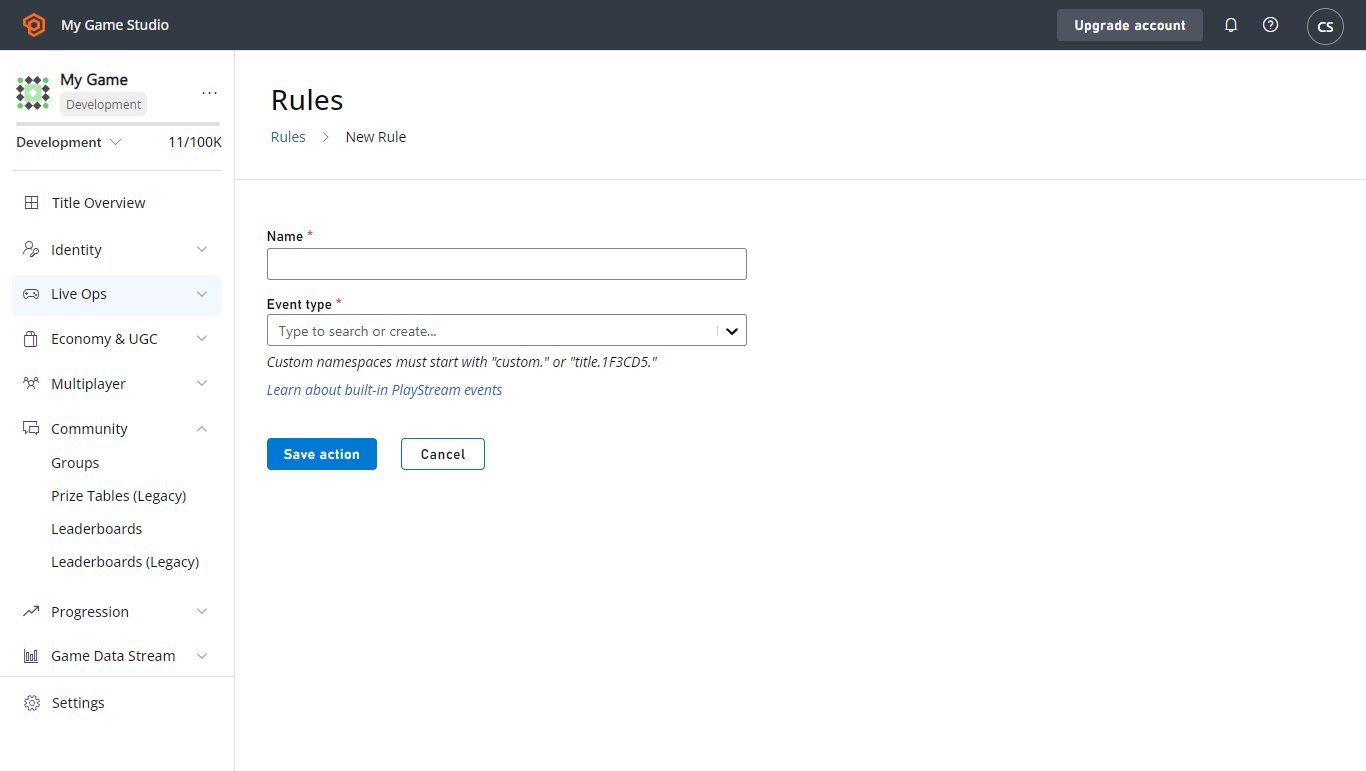
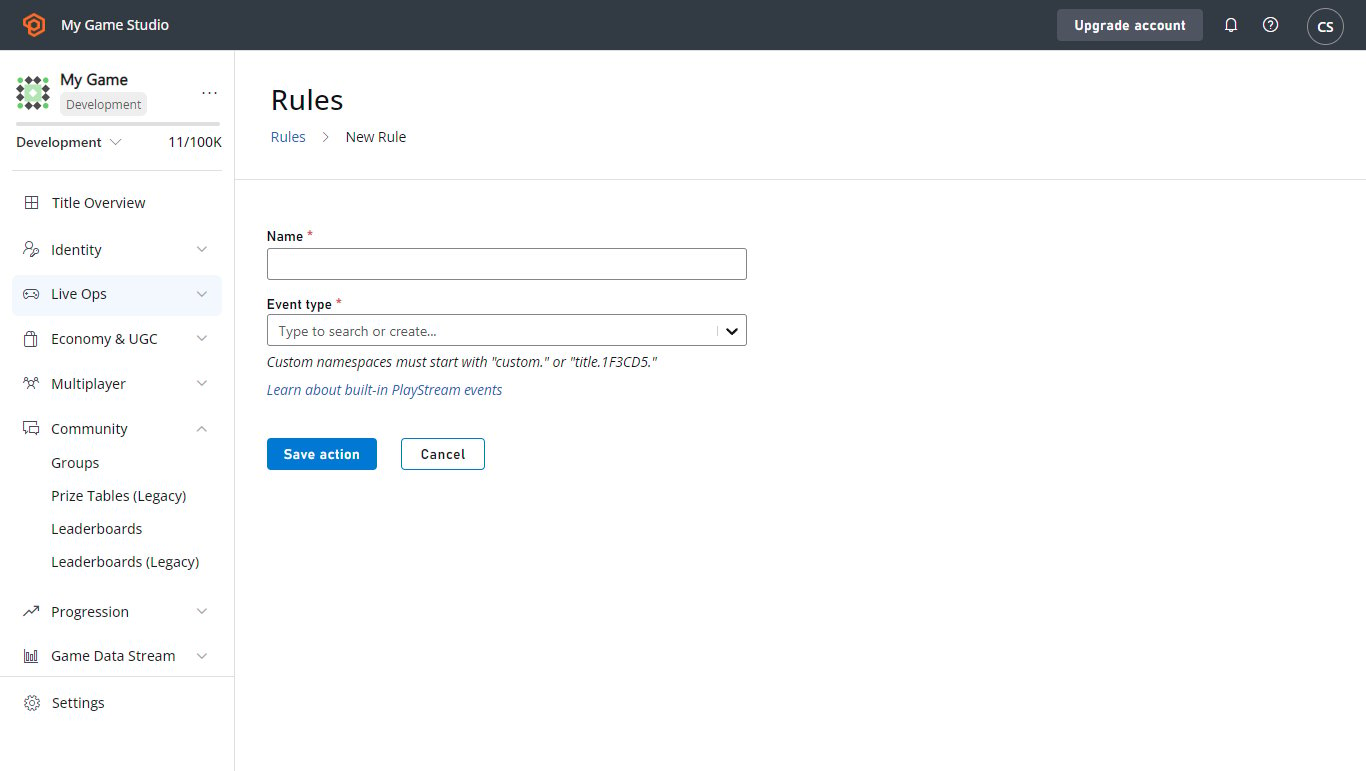 2. 使用 **New Rule** 按鈕建立新規則。
* 為新的**規則**命名。
* 選取將用作條件或動作之觸發程序的 **Event type**。
* 若要讓**規則**觸發 CloudScript 函式,請使用該區段中的按鈕新增**動作**。
* 然後在 **Type** 下拉式功能表中選取該選項。
* 在 **Cloud Script Function** 下拉式功能表中選取 **helloWorld** 函式。
* 選取 **Save action** 按鈕。
2. 使用 **New Rule** 按鈕建立新規則。
* 為新的**規則**命名。
* 選取將用作條件或動作之觸發程序的 **Event type**。
* 若要讓**規則**觸發 CloudScript 函式,請使用該區段中的按鈕新增**動作**。
* 然後在 **Type** 下拉式功能表中選取該選項。
* 在 **Cloud Script Function** 下拉式功能表中選取 **helloWorld** 函式。
* 選取 **Save action** 按鈕。
 3. 此**規則**現在已設定為在您所選類型的任何事件上觸發。若要測試它:
* 勾選 **Publish results as PlayStream Event** 方塊。
* 儲存**動作**。
* 然後觸發一個事件。
* 在 **PlayStream Monitor** 中,應該會出現一個對應於 CloudScript 執行的新事件,其中包含適當的資訊。
* 如需在偵錯工具中檢查 PlayStream 事件的詳細資訊,請參閱下一節[進階:偵錯 CloudScript](#advanced-debugging-cloudscript)。
事件動作在呼叫 CloudScript 函式時只能使用上線修訂。如果您在下拉式清單中找不到 **helloWorld** 函式,這是最可能的原因。
## 進階:偵錯 CloudScript
使用[使用 Azure Functions 的 CloudScript](/zh-TW/services/playfab/live-service-management/service-gateway/automation/cloudscript-af) 進行偵錯要容易得多。深入了解如何使用[使用 Azure Functions 的 CloudScript 本機偵錯](/zh-TW/services/playfab/live-service-management/service-gateway/automation/cloudscript-af/local-debugging-for-cloudscript-using-azure-functions)。
### 記錄
偵錯程式碼最重要的工具之一是*記錄*。我們的 CloudScript 提供了執行此功能的公用程式。
這以 `log` 物件的形式呈現,可以使用 `Info`、`Debug` 和 `Error` 方法記錄任何想要的訊息。
此外,透過設定 `logRequestAndResponse` 參數,HTTP 物件會記錄其在發出要求時遇到的任何錯誤。雖然設定這些記錄很簡單,但存取它們需要*一點*技巧。
以下是使用全部 4 種記錄類型的 CloudScript 函式範例。
```javascript theme={null}
handlers.logTest = function(args, context) {
log.info("This is a log statement!");
log.debug("This is a debug statement.");
log.error("This is... an error statement?");
// the last parameter indicates we want logging on errors
http.request('https://httpbin.org/status/404', 'post', '', 'text/plain', null, true);
};
```
若要執行此範例,請先將此函式新增至您的上線修訂,然後再繼續。
`logTest` 函式可以使用 `ExecuteCloudScript` 呼叫,如下所示。
```csharp theme={null}
// Invoke this on start of your application
void Login() {
PlayFabClientAPI.LoginWithCustomID(new LoginWithCustomIDRequest {
CreateAccount = true,
CustomId = "Starter"
}, result => RunLogTest(), null);
}
void RunLogTest() {
PlayFabClientAPI.ExecuteCloudScript(new ExecuteCloudScriptRequest {
FunctionName = "logTest",
// duplicates the response of the request to PlayStream
GeneratePlayStreamEvent = true
}, null, null);
}
// Logs evaluated in next code block
```
設定 `GeneratePlayStreamEvent` 會讓 CloudScript 函式呼叫產生 PlayStream 事件,其中包含回應的內容。若要找到 PlayStream 事件的內容:
* 前往您**遊戲**的 **Game Manager** 首頁或其 **PlayStream** 索引標籤。
* **PlayStream Debugger** 會在事件傳入時顯示事件。
* 事件到達時,選取事件右上角的藍色小 **Info** 圖示,如下所示。
3. 此**規則**現在已設定為在您所選類型的任何事件上觸發。若要測試它:
* 勾選 **Publish results as PlayStream Event** 方塊。
* 儲存**動作**。
* 然後觸發一個事件。
* 在 **PlayStream Monitor** 中,應該會出現一個對應於 CloudScript 執行的新事件,其中包含適當的資訊。
* 如需在偵錯工具中檢查 PlayStream 事件的詳細資訊,請參閱下一節[進階:偵錯 CloudScript](#advanced-debugging-cloudscript)。
事件動作在呼叫 CloudScript 函式時只能使用上線修訂。如果您在下拉式清單中找不到 **helloWorld** 函式,這是最可能的原因。
## 進階:偵錯 CloudScript
使用[使用 Azure Functions 的 CloudScript](/zh-TW/services/playfab/live-service-management/service-gateway/automation/cloudscript-af) 進行偵錯要容易得多。深入了解如何使用[使用 Azure Functions 的 CloudScript 本機偵錯](/zh-TW/services/playfab/live-service-management/service-gateway/automation/cloudscript-af/local-debugging-for-cloudscript-using-azure-functions)。
### 記錄
偵錯程式碼最重要的工具之一是*記錄*。我們的 CloudScript 提供了執行此功能的公用程式。
這以 `log` 物件的形式呈現,可以使用 `Info`、`Debug` 和 `Error` 方法記錄任何想要的訊息。
此外,透過設定 `logRequestAndResponse` 參數,HTTP 物件會記錄其在發出要求時遇到的任何錯誤。雖然設定這些記錄很簡單,但存取它們需要*一點*技巧。
以下是使用全部 4 種記錄類型的 CloudScript 函式範例。
```javascript theme={null}
handlers.logTest = function(args, context) {
log.info("This is a log statement!");
log.debug("This is a debug statement.");
log.error("This is... an error statement?");
// the last parameter indicates we want logging on errors
http.request('https://httpbin.org/status/404', 'post', '', 'text/plain', null, true);
};
```
若要執行此範例,請先將此函式新增至您的上線修訂,然後再繼續。
`logTest` 函式可以使用 `ExecuteCloudScript` 呼叫,如下所示。
```csharp theme={null}
// Invoke this on start of your application
void Login() {
PlayFabClientAPI.LoginWithCustomID(new LoginWithCustomIDRequest {
CreateAccount = true,
CustomId = "Starter"
}, result => RunLogTest(), null);
}
void RunLogTest() {
PlayFabClientAPI.ExecuteCloudScript(new ExecuteCloudScriptRequest {
FunctionName = "logTest",
// duplicates the response of the request to PlayStream
GeneratePlayStreamEvent = true
}, null, null);
}
// Logs evaluated in next code block
```
設定 `GeneratePlayStreamEvent` 會讓 CloudScript 函式呼叫產生 PlayStream 事件,其中包含回應的內容。若要找到 PlayStream 事件的內容:
* 前往您**遊戲**的 **Game Manager** 首頁或其 **PlayStream** 索引標籤。
* **PlayStream Debugger** 會在事件傳入時顯示事件。
* 事件到達時,選取事件右上角的藍色小 **Info** 圖示,如下所示。
 選取此圖示會顯示事件的原始 JSON,每個事件的詳細資料請參閱[這裡](/zh-TW/services/playfab/api-references/events)。下列範例中可以看到此 JSON 的範例。
* 如果我們將 `LogScript` MonoBehavior 新增至場景,執行遊戲會在 PlayStream 中產生此結果。
選取此圖示會顯示事件的原始 JSON,每個事件的詳細資料請參閱[這裡](/zh-TW/services/playfab/api-references/events)。下列範例中可以看到此 JSON 的範例。
* 如果我們將 `LogScript` MonoBehavior 新增至場景,執行遊戲會在 PlayStream 中產生此結果。
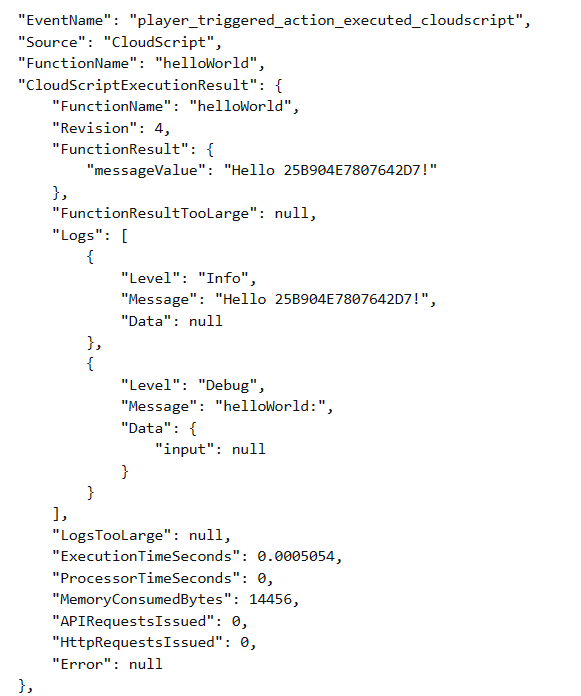 `ExecuteCloudScript` 呼叫的結果包含一個名為 `Logs` 的欄位,這是 CloudScript 函式所產生之記錄物件的清單。
您可以看到三個記錄呼叫,以及來自無效 HTTP 要求的記錄。與記錄呼叫不同,HTTP 要求記錄也使用了 `Data` 欄位。
此欄位是一個 JavaScript 物件,可以填入與記錄陳述式相關的任何資訊。對 log 的呼叫也可以使用第二個參數來使用此欄位,如下所示。
```javascript theme={null}
handlers.logTest = function(args, context) {
log.info("This is a log statement!", { what: "Here on business." });
log.debug("This is a debug statement.", { who: "I am a doctor, sir" });
log.error("This is... an error statement?", { why: "I'm here to fix the plumbing. Probably.", errCode: 123 });
};
```
這些呼叫都會以其第二個參數填入結果中的 `Data` 欄位。
由於記錄包含在結果中,用戶端程式碼可以回應記錄陳述式。`logTest` 函式中的錯誤是強制產生的,但用戶端程式碼可以調整為回應它。
```csharp theme={null}
void RunLogTest()
{
PlayFabClientAPI.ExecuteCloudScript(
new ExecuteCloudScriptRequest
{
FunctionName = "logTest",
// handy for logs because the response will be duplicated on PlayStream
GeneratePlayStreamEvent = true
},
result =>
{
var error123Present = false;
foreach (var log in result.Logs)
{
if (log.Level != "Error") continue;
var errData = (JsonObject) log.Data;
object errCode;
var errCodePresent = errData.TryGetValue("errCode", out errCode);
if (errCodePresent && (ulong) errCode == 123) error123Present = true;
}
if (error123Present)
Debug.Log("There was a bad, bad error!");
else
Debug.Log("Nice weather we're having.");
}, null);
}
```
如果執行此程式碼,輸出應該會指出存在錯誤。實際的錯誤回應可能是在 UI 中顯示錯誤,或將值儲存在記錄檔中。
## 進階:錯誤
在開發中,CloudScript 錯誤通常不會像 `log.error` 的情況那樣手動觸發。
幸運的是,[ExecuteCloudScript](xref:titleid.playfabapi.com.client.server-sidecloudscript.executecloudscript) 的回應包含 [ExecuteCloudScriptResult](xref:titleid.playfabapi.com.client.server-sidecloudscript.executecloudscript#executecloudscriptresult),其中包含 [ScriptExecutionError](xref:titleid.playfabapi.com.client.server-sidecloudscript.executecloudscript#scriptexecutionerror) 欄位。調整記錄一節中的最後一個範例,我們可以如下所示使用它。
```csharp theme={null}
void RunLogTest() {
PlayFabClientAPI.ExecuteCloudScript(new ExecuteCloudScriptRequest {
FunctionName = "logTest",
// handy for logs because the response will be duplicated on PlayStream
GeneratePlayStreamEvent = true
}, result => {
if(result.Error != null) {
Debug.Log(string.Format("There was error in the CloudScript function {0}:\n Error Code: {1}\n Message: {2}"
, result.FunctionName, result.Error.Error, result.Error.Message));
}
},
null);
}
```
如果發生某些錯誤,此程式碼會將其顯示在記錄中。
## Related topics
- [CloudScript 快速入門](/zh-TW/services/playfab/live-service-management/service-gateway/automation/cloudscript/quickstart.md)
- [PlayFab 即時服務管理文件](/zh-TW/services/playfab/live-service-management/index.md)
- [排程工作快速入門](/zh-TW/services/playfab/data-analytics/acting-data/scheduled-tasks/quickstart.md)
- [玩家禁止系統](/zh-TW/services/playfab/player-progression/player-data/player-bans.md)
- [使用 Azure Functions 的 PlayFab CloudScript 快速入門指南](/zh-TW/services/playfab/live-service-management/service-gateway/automation/cloudscript-af/quickstart.md)
`ExecuteCloudScript` 呼叫的結果包含一個名為 `Logs` 的欄位,這是 CloudScript 函式所產生之記錄物件的清單。
您可以看到三個記錄呼叫,以及來自無效 HTTP 要求的記錄。與記錄呼叫不同,HTTP 要求記錄也使用了 `Data` 欄位。
此欄位是一個 JavaScript 物件,可以填入與記錄陳述式相關的任何資訊。對 log 的呼叫也可以使用第二個參數來使用此欄位,如下所示。
```javascript theme={null}
handlers.logTest = function(args, context) {
log.info("This is a log statement!", { what: "Here on business." });
log.debug("This is a debug statement.", { who: "I am a doctor, sir" });
log.error("This is... an error statement?", { why: "I'm here to fix the plumbing. Probably.", errCode: 123 });
};
```
這些呼叫都會以其第二個參數填入結果中的 `Data` 欄位。
由於記錄包含在結果中,用戶端程式碼可以回應記錄陳述式。`logTest` 函式中的錯誤是強制產生的,但用戶端程式碼可以調整為回應它。
```csharp theme={null}
void RunLogTest()
{
PlayFabClientAPI.ExecuteCloudScript(
new ExecuteCloudScriptRequest
{
FunctionName = "logTest",
// handy for logs because the response will be duplicated on PlayStream
GeneratePlayStreamEvent = true
},
result =>
{
var error123Present = false;
foreach (var log in result.Logs)
{
if (log.Level != "Error") continue;
var errData = (JsonObject) log.Data;
object errCode;
var errCodePresent = errData.TryGetValue("errCode", out errCode);
if (errCodePresent && (ulong) errCode == 123) error123Present = true;
}
if (error123Present)
Debug.Log("There was a bad, bad error!");
else
Debug.Log("Nice weather we're having.");
}, null);
}
```
如果執行此程式碼,輸出應該會指出存在錯誤。實際的錯誤回應可能是在 UI 中顯示錯誤,或將值儲存在記錄檔中。
## 進階:錯誤
在開發中,CloudScript 錯誤通常不會像 `log.error` 的情況那樣手動觸發。
幸運的是,[ExecuteCloudScript](xref:titleid.playfabapi.com.client.server-sidecloudscript.executecloudscript) 的回應包含 [ExecuteCloudScriptResult](xref:titleid.playfabapi.com.client.server-sidecloudscript.executecloudscript#executecloudscriptresult),其中包含 [ScriptExecutionError](xref:titleid.playfabapi.com.client.server-sidecloudscript.executecloudscript#scriptexecutionerror) 欄位。調整記錄一節中的最後一個範例,我們可以如下所示使用它。
```csharp theme={null}
void RunLogTest() {
PlayFabClientAPI.ExecuteCloudScript(new ExecuteCloudScriptRequest {
FunctionName = "logTest",
// handy for logs because the response will be duplicated on PlayStream
GeneratePlayStreamEvent = true
}, result => {
if(result.Error != null) {
Debug.Log(string.Format("There was error in the CloudScript function {0}:\n Error Code: {1}\n Message: {2}"
, result.FunctionName, result.Error.Error, result.Error.Message));
}
},
null);
}
```
如果發生某些錯誤,此程式碼會將其顯示在記錄中。
## Related topics
- [CloudScript 快速入門](/zh-TW/services/playfab/live-service-management/service-gateway/automation/cloudscript/quickstart.md)
- [PlayFab 即時服務管理文件](/zh-TW/services/playfab/live-service-management/index.md)
- [排程工作快速入門](/zh-TW/services/playfab/data-analytics/acting-data/scheduled-tasks/quickstart.md)
- [玩家禁止系統](/zh-TW/services/playfab/player-progression/player-data/player-bans.md)
- [使用 Azure Functions 的 PlayFab CloudScript 快速入門指南](/zh-TW/services/playfab/live-service-management/service-gateway/automation/cloudscript-af/quickstart.md)