> ## Documentation Index
> Fetch the complete documentation index at: https://devdocs.xbox.com/llms.txt
> Use this file to discover all available pages before exploring further.
# CloudScript 中的 ES6 功能
> 使用字串插補、箭頭函式和解構等 ECMAScript 6 功能,在 strict 模式下撰寫更簡潔的 PlayFab CloudScript 處理常式。
CloudScript 執行階段環境支援大部分現代的 ECMAScript 6 功能。雖然這些功能大多是語法上的技巧,但您可以使用它們來改善和清理您的 CloudScript 程式碼。
此 [Cheat Sheet](https://devhints.io/es6) 提供了 ES6 功能的完整概觀。
本教學課程說明您可以在 CloudScript 中使用的幾個技巧。
部分功能需要 **strict** 模式。將下列程式碼放在 CloudScript 檔案的第一行,即可啟用此模式:`use strict;`
## 字串插補
為玩家撰寫訊息時,您可能會想使用多行插補字串。使用*反引號符號*建立插補字串。接著,您可以使用 `${ variable }` 語法將資料直接插入字串中。
這可讓您避免字串串連,並提高程式碼的可讀性。
反引號字串是逐字的,而且可以是多行。這表示您必須留意*所有縮排*,因為任何額外的空格/定位字元都會被擷取到字串中。
```javascript theme={null}
function sendPushNotification(playerName, prizeAmount, newLevel) {
let message = `Congratulations ${playerName}!
You have reached level ${newLevel}.
You get ${prizeAmount} coins for your efforts.`;
// Use message variable and send push notification
// ...
}
```
## 新方法和箭頭函式
ES6 帶來了使用箭頭運算子 `=>` 定義函式的*新*語法。下方顯示的程式碼片段展示了某些運算子用法的大致對應寫法。
```javascript theme={null}
// The following snippets:
const add = (a,b) => a+b;
const add = (a,b) => {
return a+b;
}
// Both translate into something like
function add(a, b) {
return a+b;
}
```
此運算子結合新的 `Array.findIndex` 方法,可讓您使用下列美觀且簡潔的程式碼依述詞進行搜尋。
```javascript theme={null}
const players = [...]; // Suppose this is an array of Player Profiles
// Search by predicate: find item in 'players' that has 'DisplayName' set to 'Bob':
const bobIndex = players.findIndex(p => p.DisplayName === 'Bob');
```
## 物件指派
`Object.assign` 方法可讓您輕鬆地以一組新的屬性和方法擴充任何物件。
此方法有多種用法,特別適用於擴充處理常式物件和建立處理常式群組。
```javascript theme={null}
let TestHandlers = {
TestLeaderboards : (args, ctx) => {
// Test leaderboards code
},
TestPrizes : (args, ctx) => {
// Test prizes code
}
// ...
}
let ProductionHandlers = {
CleanUp : (args, ctx) => {
// System clean up code
},
GrantTournamentAccess : (args, ctx) => {
// Another useful production code
}
// ...
}
// Install both handler groups:
Object.assign(handlers, TestHandlers);
Object.assign(handlers, ProductionHandlers);
// Comment out the group to disable it but keep the relevant code
// Object.assign(handlers, SomeOtherHandlers);
```
這不僅可讓您快速啟用和停用處理常式群組,還可讓您有一個處理處理常式的切入點,並以實用的程式碼 (例如例外狀況處理) 包裝它們。
下列程式碼以自動例外狀況記錄擴充了先前的程式碼片段。作為範例,我們會記錄問題 (這不一定總是有用),但您可以依喜好擴充此行為。
```javascript theme={null}
// Handlers installer wraps the handler to catch error
function installHandlers(handlersObject) {
for (let property in handlersObject) {
handlersObject[property] = wrapHandler(handlersObject,property)
}
Object.assign(handlers, handlersObject);
}
// Utility
function wrapHandler(obj, key) {
if (obj.hasOwnProperty(key) && typeof obj[key] === 'function') {
let original = obj[key]; // Take the original function
return function() { // return a new function that
try { // Wraps the original invocation with try
return original.apply(null,arguments); // Do not forget to pass arguments
} catch (error) { // If error occurs
log.error(error); // We log it, but you may want to retry / do something else
throw error; // Rethrow to keep the original behaviour
}
}
} else { // If property is not a function, ignore it
return obj[key];
}
}
// Install handler groups:
installHandlers(TestHandlers);
installHandlers(ProductionHandlers);
```
## Getter
您可以使用「Getter」將常見的 API 呼叫封裝成語法上更令人愉悅的外觀和風格。請考慮下列**遊戲資料**狀態。
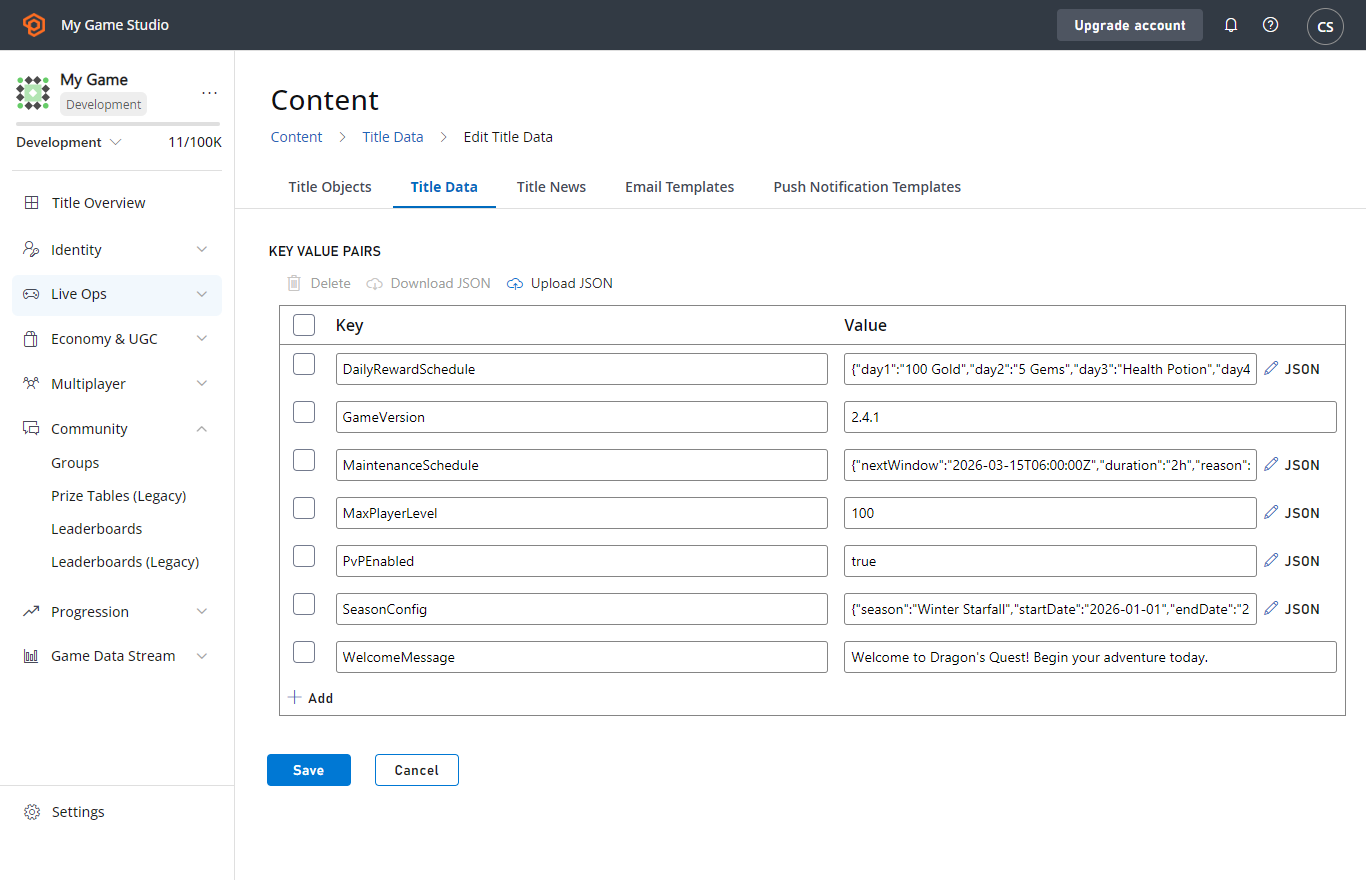 下列程式碼片段展示如何從 `TitleData` 擷取 `Foo` 和 `Bar` 資料,然後以非常直接的方式使用它們。
```javascript theme={null}
'use strict'
// Define
let App = {
get TitleData() {
// Please, consider limiting the query by defining certain keys that you need
return server.GetTitleData({}).Data;
},
}
// Use
handlers.TestFooBar = () => {
// Client code is clean and does not show the fact of calling any functions / making api request
var titleData = App.TitleData; // Note that this implementation makes an API call every time it's accessed
log.debug(titleData.Foo);
log.debug(titleData.Bar);
}
```
## Related topics
- [處理 CloudScript 中的錯誤](/zh-TW/services/playfab/live-service-management/service-gateway/automation/cloudscript/handling-errors-in-cloudscript.md)
- [CloudScript](/zh-TW/services/playfab/live-service-management/service-gateway/automation/cloudscript/index.md)
- [撰寫自訂 CloudScript](/zh-TW/services/playfab/live-service-management/service-gateway/automation/cloudscript/writing-custom-cloudscript.md)
- [從 CloudScript 進行 Webhook 呼叫](/zh-TW/services/playfab/live-service-management/service-gateway/automation/cloudscript/making-webhook-calls-from-cloudscript.md)
- [CloudScript 快速入門](/zh-TW/services/playfab/live-service-management/service-gateway/automation/cloudscript/quickstart.md)
下列程式碼片段展示如何從 `TitleData` 擷取 `Foo` 和 `Bar` 資料,然後以非常直接的方式使用它們。
```javascript theme={null}
'use strict'
// Define
let App = {
get TitleData() {
// Please, consider limiting the query by defining certain keys that you need
return server.GetTitleData({}).Data;
},
}
// Use
handlers.TestFooBar = () => {
// Client code is clean and does not show the fact of calling any functions / making api request
var titleData = App.TitleData; // Note that this implementation makes an API call every time it's accessed
log.debug(titleData.Foo);
log.debug(titleData.Bar);
}
```
## Related topics
- [處理 CloudScript 中的錯誤](/zh-TW/services/playfab/live-service-management/service-gateway/automation/cloudscript/handling-errors-in-cloudscript.md)
- [CloudScript](/zh-TW/services/playfab/live-service-management/service-gateway/automation/cloudscript/index.md)
- [撰寫自訂 CloudScript](/zh-TW/services/playfab/live-service-management/service-gateway/automation/cloudscript/writing-custom-cloudscript.md)
- [從 CloudScript 進行 Webhook 呼叫](/zh-TW/services/playfab/live-service-management/service-gateway/automation/cloudscript/making-webhook-calls-from-cloudscript.md)
- [CloudScript 快速入門](/zh-TW/services/playfab/live-service-management/service-gateway/automation/cloudscript/quickstart.md)