> ## Documentation Index
> Fetch the complete documentation index at: https://devdocs.xbox.com/llms.txt
> Use this file to discover all available pages before exploring further.
# 使用 Azure Functions 的 PlayFab CloudScript 快速入門指南
> 使用 Visual Studio Code 和 Unity 以 C# 撰寫使用 Azure Functions 的 PlayFab CloudScript,然後將函式連結至規則、已排程的工作或用戶端呼叫。
# 快速入門:撰寫使用 Azure Functions 的 PlayFab CloudScript
在本快速入門中,您將使用 Visual Studio Code、Azure Functions C# 和 Unity C# 撰寫使用 Azure Functions 的 CloudScript。完成本指南後,您將能夠將新的 CloudScript 連結至規則、已排程的工作,甚至從用戶端程式碼呼叫它。
## 必要條件
開始使用 PlayFab C# CloudScript 需要幾個步驟。
* 請造訪 Visual Studio Code 的[快速入門:使用 Visual Studio Code 建立 Azure Functions 專案](https://learn.microsoft.com/en-us/azure/azure-functions/create-first-function-vs-code-csharp?pivots=programming-language-csharp),設定完成後再返回此處。他們的快速入門指南涵蓋下列必要條件:
* [Azure 帳戶](https://azure.microsoft.com/free)。註冊 Azure 帳戶是免費的
* [Azure 訂用帳戶](https://learn.microsoft.com/en-us/azure/cost-management-billing/manage/create-subscription)
* 在 Azure 入口網站中設定的 Functions 應用程式資源
* 為了將使用 Azure Functions 之 CloudScript 的延遲降至最低,請將它們放在 *US-West*、*US-West 2* 或 *US-West 3* Azure 區域中。
* \*\*安全性注意事項:\*\*從安全性的角度來看,您應確保指定的函式秘密只與 PlayFab 搭配使用,而不要用它從任何其他來源呼叫相同的函式。
* \*\*安全性注意事項:\*\*對於佇列函式,您應該為佇列觸發程序所使用的佇列設定不同的儲存體帳戶。
* [PlayFab](https://developer.playfab.com/) 帳戶。
PlayFab Azure Functions 可以使用 Azure Functions V2 執行階段或更新版本,以及 .NET Core 2 或更新版本。建議您使用最新版本 (目前為 Azure Functions V4 和 .NET 6)。
## 建立 Azure 函式
1. 建立一個基本的 "HelloWorld" 範例函式。您可以依照[使用 Visual Studio Code 建立您的第一個函式指南](https://learn.microsoft.com/en-us/azure/azure-functions/functions-create-first-function-vs-code)了解如何執行此操作。如需使用 PlayFab 變數的程式碼範例,請參閱 [PlayFab 函式內容、變數和使用伺服器 SDK](#playfabfunctioncontext) 一節。
「使用 Visual Studio Code 建立您的第一個函式」指南會指示您將 Azure 函式的授權層級設定為 `Anonymous`。這樣做是為了簡化測試。在生產環境中,大多數情況下您不應使用 Anonymous 授權,因為它允許任何人呼叫您的函式端點。為了在 PlayFab 環境中適當保護您的函式,我們建議您使用 `Function` 層級授權。
2. 建立並部署函式後,前往 **Automation** > **Cloud Script**,然後選取頁面右上角的 **Register Function** 按鈕。
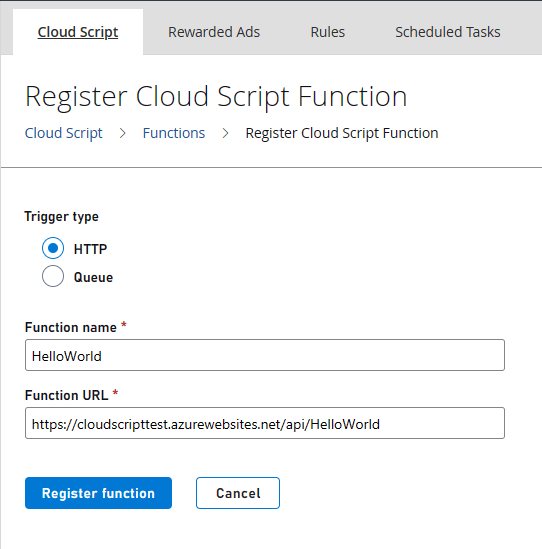 3. 在 **Name** 中,輸入函式的易記名稱。在 **Function URL** 中,輸入函式的 HTTP 觸發程序 URL。此 URL 可以在 Azure 函式資源的操作功能表中找到,如[快速入門:使用 Visual Studio Code 在 Azure 中建立函式](https://learn.microsoft.com/en-us/azure/azure-functions/create-first-function-vs-code-csharp?pivots=programming-language-csharp#run-the-function-in-azure)的「在 Azure 中執行函式」一節所示。如果您的 Azure 函式使用 `Function` 層級授權,URL 會包含授權金鑰。
如需部署 Azure 函式的詳細資訊,請參閱[使用 Visual Studio Code 部署 Azure Functions](https://learn.microsoft.com/azure/azure-functions/functions-develop-vs-code)。
## 從您的 PlayFab 遊戲使用和呼叫使用 Azure Functions 的 CloudScript
本指南中的範例程式碼是以 Unity C# 和 Azure Function C# 程式碼撰寫的。
現在您的函式已註冊,您可以使用 PlayFab API 從內部呼叫該函式。
### 從 Visual Studio Code 使用 HTTP 要求呼叫您的函式
使用 [REST Client 擴充功能](https://marketplace.visualstudio.com/items?itemName=humao.rest-client),您可以從 Visual Studio 內叫用函式。
```http theme={null}
@titleId = ????? # Enter your title ID here
@baseUrl = https://{{titleId}}.playfabapi.com
###
# @name LoginWithCustomID
POST {{baseUrl}}/Client/LoginWithCustomID
Accept-Encoding: gzip
Content-Type: application/json
{
"CustomId": "demo",
"CreateAccount": true,
"TitleId": "{{titleId}}"
}
@entityToken = {{LoginWithCustomID.response.body.$.data.EntityToken.EntityToken}}
@entity = {{LoginWithCustomID.response.body.$.data.EntityToken.Entity}}
###
# @name ExecuteFunction
POST {{baseUrl}}/CloudScript/ExecuteFunction
Accept-Encoding: gzip
Content-Type: application/json
X-EntityToken: {{entityToken}}
{
"FunctionName": "HelloWorld"
}
###
# @name GetObjects
POST {{baseUrl}}/Object/GetObjects
Accept-Encoding: gzip
Content-Type: application/json
X-EntityToken: {{entityToken}}
{
"Entity": {{entity}},
"Objects": ["obj1"]
}
```
將此程式碼貼到 Visual Studio Code 中副檔名為 .http 的檔案後,您應該可以選取 *LoginWithCustomID* 函式下的 *Send request* 以取得玩家的實體權杖,然後在 *LoginWithCustomID* 下叫用您的函式。叫用 *GetObjects* 應該會顯示您的 Azure 函式附加至玩家的物件。
### 從 Unity 呼叫您的函式
您可以在 Unity 中使用此程式碼叫用您的函式。
```c# theme={null}
//This snippet assumes that your game client is already logged into PlayFab.
using PlayFab;
using PlayFab.CloudScriptModels;
private void CallCSharpExecuteFunction()
{
PlayFabCloudScriptAPI.ExecuteFunction(new ExecuteFunctionRequest()
{
Entity = new PlayFab.CloudScriptModels.EntityKey()
{
Id = PlayFabSettings.staticPlayer.EntityId, //Get this from when you logged in,
Type = PlayFabSettings.staticPlayer.EntityType, //Get this from when you logged in
},
FunctionName = "HelloWorld", //This should be the name of your Azure Function that you created.
FunctionParameter = new Dictionary() { { "inputValue", "Test" } }, //This is the data that you would want to pass into your function.
GeneratePlayStreamEvent = false //Set this to true if you would like this call to show up in PlayStream
}, (ExecuteFunctionResult result) =>
{
if (result.FunctionResultTooLarge ?? false)
{
Debug.Log("This can happen if you exceed the limit that can be returned from an Azure Function, See PlayFab Limits Page for details.");
return;
}
Debug.Log($"The {result.FunctionName} function took {result.ExecutionTimeMilliseconds} to complete");
Debug.Log($"Result: {result.FunctionResult.ToString()}");
}, (PlayFabError error) =>
{
Debug.Log($"Opps Something went wrong: {error.GenerateErrorReport()}");
});
}
```
### PlayFab CloudScript 內容、變數和伺服器 SDK
使用以 Azure Functions 為基礎之 CloudScript 的一個優點,是 PlayStream 事件和玩家設定檔內容會自動傳遞至 Azure 函式。叫用 CloudScript 時,您會根據函式的叫用情境收到內容。例如,內容會因其是由 PlayStream 動作觸發還是直接從用戶端呼叫而有所不同。這包括代表其叫用 CloudScript 之實體的設定檔等資訊,以及可能用於叫用 CloudScript 的 PlayStream 事件。
1. 您需要透過套件管理員安裝 PlayFab SDK。若要執行此操作,請在 Visual Studio Code 中開啟終端機或 CMD 主控台並輸入:`dotnet add package PlayFabAllSDK`
2. 您需要包含 [CS2AFHelperClasses.cs](https://github.com/PlayFab/PlayFab-Samples/blob/master/Samples/CSharp/AzureFunctions/CS2AFHelperClasses.cs) 檔案,其中包含 `PlayFab.Samples` 的實作
3. 指令碼的執行可以透過多種方法進行 (API、已排程的工作、PlayStream 事件、進入和離開區段方法)。執行的內容對於實作您的 CloudScript 很重要。如需如何使用指令碼內容的詳細資料,請參閱[使用 CloudScript 內容模型教學課程](/zh-TW/services/playfab/live-service-management/service-gateway/automation/cloudscript-af/CloudScript-af-context)。
您可以使用 HelloWorld 範例作為您的第一個 Azure 函式。它會叫用實體 API,並向已驗證的玩家傳回問候語。傳統伺服器 API 也可以用類似的方式叫用;不過,您需要指定遊戲秘密金鑰才能進行呼叫。秘密金鑰可以儲存在[應用程式設定](https://learn.microsoft.com/en-us/azure/azure-functions/functions-how-to-use-azure-function-app-settings?tabs=portal#settings)中,並使用 `Environment.GetEnvironmentVariable()` 方法擷取。
```c# theme={null}
using PlayFab;
using PlayFab.Samples;
using PlayFab.DataModels;
using System.Collections.Generic;
using System.Threading.Tasks;
namespace PlayFabCS2AFSample.HelloWorld
{
public static class HelloWorld
{
[FunctionName("HelloWorld")]
public static async Task Run(
[HttpTrigger(AuthorizationLevel.Function, "get", "post", Route = null)] HttpRequest req,
ILogger log)
{
FunctionExecutionContext context = JsonConvert.DeserializeObject>(await req.ReadAsStringAsync());
dynamic args = context.FunctionArgument;
var message = $"Hello {context.CallerEntityProfile.Lineage.MasterPlayerAccountId}!";
log.LogInformation(message);
dynamic inputValue = null;
if (args != null && args["inputValue"] != null)
{
inputValue = args["inputValue"];
}
log.LogDebug($"HelloWorld: {new { input = inputValue} }");
// The profile of the entity specified in the 'ExecuteEntityCloudScript' request.
// Defaults to the authenticated entity in the X-EntityToken header.
var entityProfile = context.CallerEntityProfile;
var api = new PlayFabDataInstanceAPI(
new PlayFabApiSettings
{
TitleId = context.TitleAuthenticationContext.Id
},
new PlayFabAuthenticationContext
{
EntityToken = context.TitleAuthenticationContext.EntityToken
}
);
var apiResult = await api.SetObjectsAsync(
new SetObjectsRequest
{
Entity = new EntityKey
{
Id = entityProfile.Entity.Id,
Type = entityProfile.Entity.Type
},
Objects = new List {
new SetObject
{
ObjectName = "obj1",
DataObject = new
{
foo = "some server computed value",
prop1 = "bar"
}
}
}
});
return new { messageValue = message };
}
}
}
```
在範例中,呼叫端的 `CurrentPlayerId` 與我們傳統 CloudScript 實作中一樣可供使用。您在 `FunctionParameters` 欄位中傳遞的參數可在 *args* 中取得。但是,與[使用 Visual Studio Code 建立您的第一個函式指南](https://learn.microsoft.com/en-us/azure/azure-functions/create-first-function-vs-code-csharp)中的 Hello World 範例不同,參數是在 POST 本文中傳遞,而不是在查詢字串中。
若要從 PlayFab SDK 呼叫 HelloWorld Azure 函式,請使用 `ExecuteFunction`。
## 自動化規則中的 Azure Functions
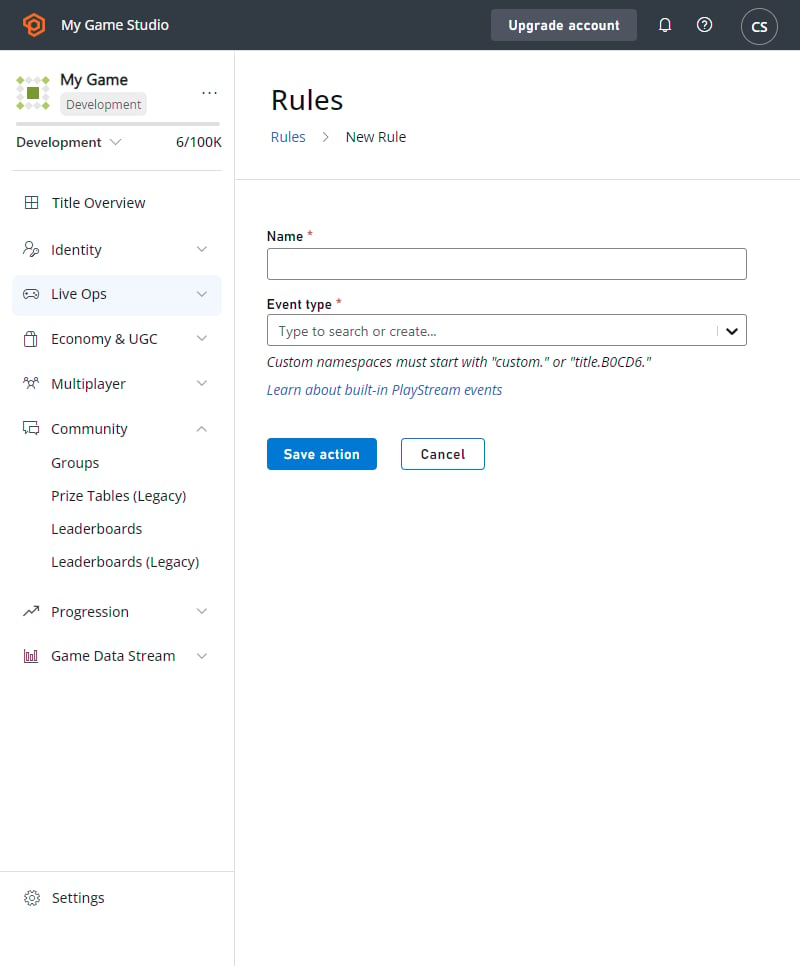
Azure Functions 也可以透過建立規則和已排程的工作來呼叫。這與我們的標準 CloudScript 運作方式相同。若要建立規則或已排程的工作,請前往 **Automation** > **Rules** 或 **Automation** > **Scheduled Tasks**。
* 選取 **New Rule**
* 輸入規則的名稱
* 選取觸發此規則的事件類型
* 新增動作
* 從動作下拉式清單中,選取 **Execute Azure Function**
下拉式清單中會列出您已註冊的可用 Azure Functions。
3. 在 **Name** 中,輸入函式的易記名稱。在 **Function URL** 中,輸入函式的 HTTP 觸發程序 URL。此 URL 可以在 Azure 函式資源的操作功能表中找到,如[快速入門:使用 Visual Studio Code 在 Azure 中建立函式](https://learn.microsoft.com/en-us/azure/azure-functions/create-first-function-vs-code-csharp?pivots=programming-language-csharp#run-the-function-in-azure)的「在 Azure 中執行函式」一節所示。如果您的 Azure 函式使用 `Function` 層級授權,URL 會包含授權金鑰。
如需部署 Azure 函式的詳細資訊,請參閱[使用 Visual Studio Code 部署 Azure Functions](https://learn.microsoft.com/azure/azure-functions/functions-develop-vs-code)。
## 從您的 PlayFab 遊戲使用和呼叫使用 Azure Functions 的 CloudScript
本指南中的範例程式碼是以 Unity C# 和 Azure Function C# 程式碼撰寫的。
現在您的函式已註冊,您可以使用 PlayFab API 從內部呼叫該函式。
### 從 Visual Studio Code 使用 HTTP 要求呼叫您的函式
使用 [REST Client 擴充功能](https://marketplace.visualstudio.com/items?itemName=humao.rest-client),您可以從 Visual Studio 內叫用函式。
```http theme={null}
@titleId = ????? # Enter your title ID here
@baseUrl = https://{{titleId}}.playfabapi.com
###
# @name LoginWithCustomID
POST {{baseUrl}}/Client/LoginWithCustomID
Accept-Encoding: gzip
Content-Type: application/json
{
"CustomId": "demo",
"CreateAccount": true,
"TitleId": "{{titleId}}"
}
@entityToken = {{LoginWithCustomID.response.body.$.data.EntityToken.EntityToken}}
@entity = {{LoginWithCustomID.response.body.$.data.EntityToken.Entity}}
###
# @name ExecuteFunction
POST {{baseUrl}}/CloudScript/ExecuteFunction
Accept-Encoding: gzip
Content-Type: application/json
X-EntityToken: {{entityToken}}
{
"FunctionName": "HelloWorld"
}
###
# @name GetObjects
POST {{baseUrl}}/Object/GetObjects
Accept-Encoding: gzip
Content-Type: application/json
X-EntityToken: {{entityToken}}
{
"Entity": {{entity}},
"Objects": ["obj1"]
}
```
將此程式碼貼到 Visual Studio Code 中副檔名為 .http 的檔案後,您應該可以選取 *LoginWithCustomID* 函式下的 *Send request* 以取得玩家的實體權杖,然後在 *LoginWithCustomID* 下叫用您的函式。叫用 *GetObjects* 應該會顯示您的 Azure 函式附加至玩家的物件。
### 從 Unity 呼叫您的函式
您可以在 Unity 中使用此程式碼叫用您的函式。
```c# theme={null}
//This snippet assumes that your game client is already logged into PlayFab.
using PlayFab;
using PlayFab.CloudScriptModels;
private void CallCSharpExecuteFunction()
{
PlayFabCloudScriptAPI.ExecuteFunction(new ExecuteFunctionRequest()
{
Entity = new PlayFab.CloudScriptModels.EntityKey()
{
Id = PlayFabSettings.staticPlayer.EntityId, //Get this from when you logged in,
Type = PlayFabSettings.staticPlayer.EntityType, //Get this from when you logged in
},
FunctionName = "HelloWorld", //This should be the name of your Azure Function that you created.
FunctionParameter = new Dictionary() { { "inputValue", "Test" } }, //This is the data that you would want to pass into your function.
GeneratePlayStreamEvent = false //Set this to true if you would like this call to show up in PlayStream
}, (ExecuteFunctionResult result) =>
{
if (result.FunctionResultTooLarge ?? false)
{
Debug.Log("This can happen if you exceed the limit that can be returned from an Azure Function, See PlayFab Limits Page for details.");
return;
}
Debug.Log($"The {result.FunctionName} function took {result.ExecutionTimeMilliseconds} to complete");
Debug.Log($"Result: {result.FunctionResult.ToString()}");
}, (PlayFabError error) =>
{
Debug.Log($"Opps Something went wrong: {error.GenerateErrorReport()}");
});
}
```
### PlayFab CloudScript 內容、變數和伺服器 SDK
使用以 Azure Functions 為基礎之 CloudScript 的一個優點,是 PlayStream 事件和玩家設定檔內容會自動傳遞至 Azure 函式。叫用 CloudScript 時,您會根據函式的叫用情境收到內容。例如,內容會因其是由 PlayStream 動作觸發還是直接從用戶端呼叫而有所不同。這包括代表其叫用 CloudScript 之實體的設定檔等資訊,以及可能用於叫用 CloudScript 的 PlayStream 事件。
1. 您需要透過套件管理員安裝 PlayFab SDK。若要執行此操作,請在 Visual Studio Code 中開啟終端機或 CMD 主控台並輸入:`dotnet add package PlayFabAllSDK`
2. 您需要包含 [CS2AFHelperClasses.cs](https://github.com/PlayFab/PlayFab-Samples/blob/master/Samples/CSharp/AzureFunctions/CS2AFHelperClasses.cs) 檔案,其中包含 `PlayFab.Samples` 的實作
3. 指令碼的執行可以透過多種方法進行 (API、已排程的工作、PlayStream 事件、進入和離開區段方法)。執行的內容對於實作您的 CloudScript 很重要。如需如何使用指令碼內容的詳細資料,請參閱[使用 CloudScript 內容模型教學課程](/zh-TW/services/playfab/live-service-management/service-gateway/automation/cloudscript-af/CloudScript-af-context)。
您可以使用 HelloWorld 範例作為您的第一個 Azure 函式。它會叫用實體 API,並向已驗證的玩家傳回問候語。傳統伺服器 API 也可以用類似的方式叫用;不過,您需要指定遊戲秘密金鑰才能進行呼叫。秘密金鑰可以儲存在[應用程式設定](https://learn.microsoft.com/en-us/azure/azure-functions/functions-how-to-use-azure-function-app-settings?tabs=portal#settings)中,並使用 `Environment.GetEnvironmentVariable()` 方法擷取。
```c# theme={null}
using PlayFab;
using PlayFab.Samples;
using PlayFab.DataModels;
using System.Collections.Generic;
using System.Threading.Tasks;
namespace PlayFabCS2AFSample.HelloWorld
{
public static class HelloWorld
{
[FunctionName("HelloWorld")]
public static async Task Run(
[HttpTrigger(AuthorizationLevel.Function, "get", "post", Route = null)] HttpRequest req,
ILogger log)
{
FunctionExecutionContext context = JsonConvert.DeserializeObject>(await req.ReadAsStringAsync());
dynamic args = context.FunctionArgument;
var message = $"Hello {context.CallerEntityProfile.Lineage.MasterPlayerAccountId}!";
log.LogInformation(message);
dynamic inputValue = null;
if (args != null && args["inputValue"] != null)
{
inputValue = args["inputValue"];
}
log.LogDebug($"HelloWorld: {new { input = inputValue} }");
// The profile of the entity specified in the 'ExecuteEntityCloudScript' request.
// Defaults to the authenticated entity in the X-EntityToken header.
var entityProfile = context.CallerEntityProfile;
var api = new PlayFabDataInstanceAPI(
new PlayFabApiSettings
{
TitleId = context.TitleAuthenticationContext.Id
},
new PlayFabAuthenticationContext
{
EntityToken = context.TitleAuthenticationContext.EntityToken
}
);
var apiResult = await api.SetObjectsAsync(
new SetObjectsRequest
{
Entity = new EntityKey
{
Id = entityProfile.Entity.Id,
Type = entityProfile.Entity.Type
},
Objects = new List {
new SetObject
{
ObjectName = "obj1",
DataObject = new
{
foo = "some server computed value",
prop1 = "bar"
}
}
}
});
return new { messageValue = message };
}
}
}
```
在範例中,呼叫端的 `CurrentPlayerId` 與我們傳統 CloudScript 實作中一樣可供使用。您在 `FunctionParameters` 欄位中傳遞的參數可在 *args* 中取得。但是,與[使用 Visual Studio Code 建立您的第一個函式指南](https://learn.microsoft.com/en-us/azure/azure-functions/create-first-function-vs-code-csharp)中的 Hello World 範例不同,參數是在 POST 本文中傳遞,而不是在查詢字串中。
若要從 PlayFab SDK 呼叫 HelloWorld Azure 函式,請使用 `ExecuteFunction`。
## 自動化規則中的 Azure Functions
Azure Functions 也可以透過建立規則和已排程的工作來呼叫。這與我們的標準 CloudScript 運作方式相同。若要建立規則或已排程的工作,請前往 **Automation** > **Rules** 或 **Automation** > **Scheduled Tasks**。
* 選取 **New Rule**
* 輸入規則的名稱
* 選取觸發此規則的事件類型
* 新增動作
* 從動作下拉式清單中,選取 **Execute Azure Function**
下拉式清單中會列出您已註冊的可用 Azure Functions。
 ## 偵錯您的 Azure 函式
透過 Azure 函式,您現在可以選擇在本機或在 Azure 入口網站中偵錯您的 CloudScript。若要深入了解入口網站偵錯,請參閱[使用 Azure 入口網站偵錯使用 Azure Functions 的 CloudScript](/zh-TW/services/playfab/live-service-management/service-gateway/automation/cloudscript-af/debugging-with-CloudScript-AF-Azure)。若要了解如何設定本機偵錯,請參閱[使用 Azure Functions 的 Cloudscript 本機偵錯](/zh-TW/services/playfab/live-service-management/service-gateway/automation/cloudscript-af/local-debugging-for-cloudscript-using-azure-functions)。
## 執行限制
對 Azure Functions 的 CloudScript 呼叫有逾時限制。如果您的 Webhook 執行時間過長,要求會在 PlayFab 中逾時。請確保您的程式碼可以足夠快速地執行,以維持在逾時限制之內。
| 來源 | 動作類型 | 限制 (秒) |
| - | - | -: |
| PlayFab API | HTTP 要求 | 10 |
| PlayStream V2 | HTTP 要求 | 10 |
| 已排程的工作 | HTTP 要求 | 4.5 |
| PlayStream V1 | HTTP 要求 | 1 |
| 佇列函式 | 佇列承載 | 1 |
## Related topics
- [使用 Azure Functions 的 PlayFab CloudScript](/zh-TW/services/playfab/live-service-management/service-gateway/automation/cloudscript-af/index.md)
- [適用於原生與 Phaser 的 JavaScript 快速入門](/zh-TW/services/playfab/sdks/javascript/quickstart.md)
- [CloudScript](/zh-TW/services/playfab/live-service-management/service-gateway/automation/cloudscript/index.md)
- [處理 CloudScript 中的錯誤](/zh-TW/services/playfab/live-service-management/service-gateway/automation/cloudscript/handling-errors-in-cloudscript.md)
- [CloudScript 快速入門](/zh-TW/services/playfab/live-service-management/service-gateway/automation/cloudscript/quickstart.md)
## 偵錯您的 Azure 函式
透過 Azure 函式,您現在可以選擇在本機或在 Azure 入口網站中偵錯您的 CloudScript。若要深入了解入口網站偵錯,請參閱[使用 Azure 入口網站偵錯使用 Azure Functions 的 CloudScript](/zh-TW/services/playfab/live-service-management/service-gateway/automation/cloudscript-af/debugging-with-CloudScript-AF-Azure)。若要了解如何設定本機偵錯,請參閱[使用 Azure Functions 的 Cloudscript 本機偵錯](/zh-TW/services/playfab/live-service-management/service-gateway/automation/cloudscript-af/local-debugging-for-cloudscript-using-azure-functions)。
## 執行限制
對 Azure Functions 的 CloudScript 呼叫有逾時限制。如果您的 Webhook 執行時間過長,要求會在 PlayFab 中逾時。請確保您的程式碼可以足夠快速地執行,以維持在逾時限制之內。
| 來源 | 動作類型 | 限制 (秒) |
| - | - | -: |
| PlayFab API | HTTP 要求 | 10 |
| PlayStream V2 | HTTP 要求 | 10 |
| 已排程的工作 | HTTP 要求 | 4.5 |
| PlayStream V1 | HTTP 要求 | 1 |
| 佇列函式 | 佇列承載 | 1 |
## Related topics
- [使用 Azure Functions 的 PlayFab CloudScript](/zh-TW/services/playfab/live-service-management/service-gateway/automation/cloudscript-af/index.md)
- [適用於原生與 Phaser 的 JavaScript 快速入門](/zh-TW/services/playfab/sdks/javascript/quickstart.md)
- [CloudScript](/zh-TW/services/playfab/live-service-management/service-gateway/automation/cloudscript/index.md)
- [處理 CloudScript 中的錯誤](/zh-TW/services/playfab/live-service-management/service-gateway/automation/cloudscript/handling-errors-in-cloudscript.md)
- [CloudScript 快速入門](/zh-TW/services/playfab/live-service-management/service-gateway/automation/cloudscript/quickstart.md)