> ## Documentation Index
> Fetch the complete documentation index at: https://devdocs.xbox.com/llms.txt
> Use this file to discover all available pages before exploring further.
# iOS 推播通知
> 建立 APNS 憑證、將其匯出為 .p12,並在 Game Manager 中上傳以進行傳遞,藉此設定 iOS 的 PlayFab 推播通知。
# iOS 推播通知
## 必要條件
本教學課程假設您熟悉我們的[推播通知快速入門](/zh-TW/services/playfab/live-service-management/game-configuration/title-communications/push-notifications/quickstart)中涵蓋的概念。
## 設定 Apple 通知通道
1. 確保您擁有有效的 iOS 開發 (APNS\_SANDBOX) 或生產 (APNS) 憑證。如果沒有,請從 **Apple Developer Portal** 的 **Certificates, Identities and Profiles** 下建立一個。
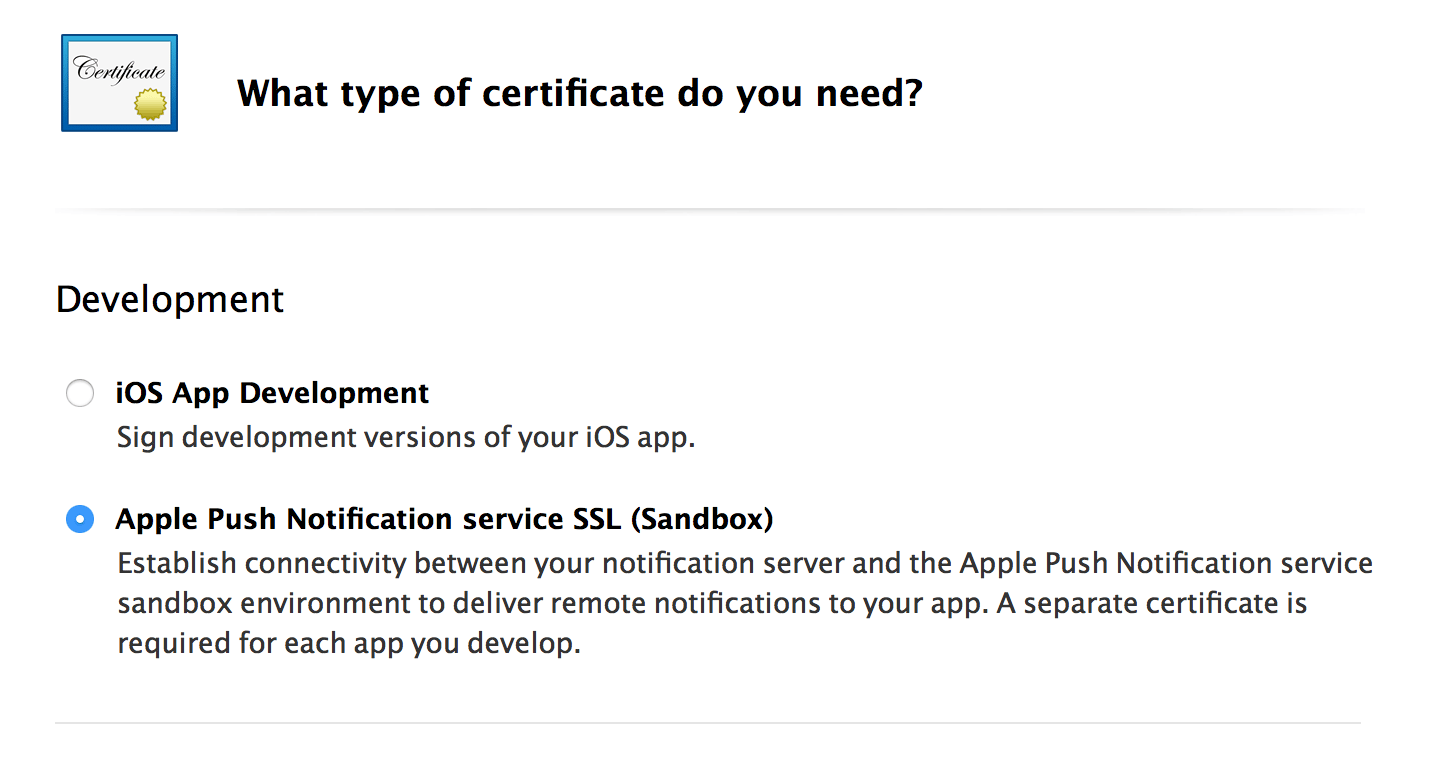 2. 匯出您選擇的憑證 (開發或生產):
* 首先,從 **Apple Developer Portal** 的 **Certificates, Identities and Profiles** 下下載憑證的複本。這會建立一個 **.cer** 檔案。
* 開啟憑證並將其安裝至您的 **Keychain Access**。
* 在 **Certificates** 子類別下檢視您已安裝的憑證。
* 將您的 **Keychain Access Certificate** 匯出為 **.p12** 格式。
2. 匯出您選擇的憑證 (開發或生產):
* 首先,從 **Apple Developer Portal** 的 **Certificates, Identities and Profiles** 下下載憑證的複本。這會建立一個 **.cer** 檔案。
* 開啟憑證並將其安裝至您的 **Keychain Access**。
* 在 **Certificates** 子類別下檢視您已安裝的憑證。
* 將您的 **Keychain Access Certificate** 匯出為 **.p12** 格式。
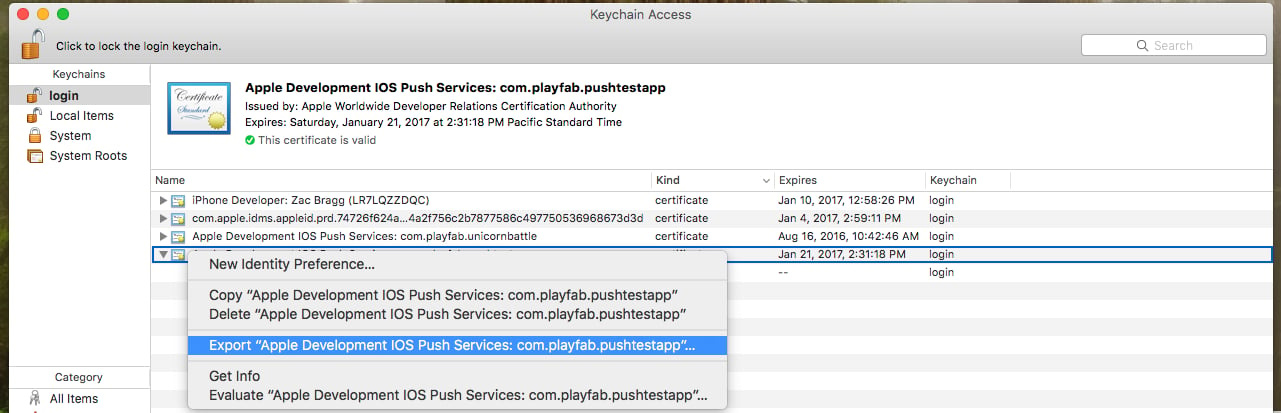 * 使用下列主控台命令將 **.p12 檔案**轉換為 **.pem 檔案**:
* `openssl pkcs12 -in apns-dev-cert.p12 -out apns-dev-cert.pem -nodes -clcerts`
* 取得 **.pem 檔案**後,您可以直接透過 PlayFab **Game Manager** 在**遊戲設定** > **Push Notifications** 下上傳。
* 或者,使用下方的產生器為 `SetupPushNotification` 製作 JSON 要求。
### SetupPushNotification 的 JSON 要求產生器
要求產生器會使用下列資訊來建立 JSON 要求:
* **Platform** - 使用下列其中一個值:APNS (iOS)、APNS\_SANDBOX (iOS)、GCM (Android)
* **Application Name** - 輸入傳送訊息之應用程式的名稱。
應用程式名稱只能由大寫和小寫 ASCII 字母、數字、底線、連字號和句點組成,長度必須介於 1 到 256 個字元之間。它們*也*必須是*唯一*的。
* **PEM Certificate / API Key** - 若為 iOS (APNS 或 APNS\_SANDBOX),請使用 PEM 檔案的完整內容。
產生 JSON 後,使用它來執行對 `SetupPushNotification` 的呼叫。回應應類似下列範例。
```json theme={null}
{
“code” : 200,
“status” : “OK”,
“data” :
{
“ARN” : “arn:*******/GCM/your_game_name”
}
}
```
恭喜!您現在已設定好遊戲的 iOS 訊息通道。
## 註冊您的 iOS 用戶端以接收推播
對於 iOS,您必須依賴 iOS 處理推播通知的預設行為,因為 PlayFab 目前並未在 Unity 上提供原生實作。
根據預設,遊戲在背景時收到的通知會路由至**通知**區域。
另一方面,遊戲是作用中應用程式時收到的通知會以無訊息方式接收,且不會顯示在**通知**區域中。
* 範例中的下列程式碼會在 `client Start()` 上執行。
```csharp theme={null}
// must be called before trying to obtain the push token
// an asynchronous call with no callback into native iOS code that takes a moment or two before
// the token is available. (so spin and wait, or call this one early on)
// this will always return null if your app is not signed
UnityEngine.iOS.NotificationServices.RegisterForNotifications(UnityEngine.iOS.NotificationType.Alert | UnityEngine.iOS.NotificationType.Badge | UnityEngine.iOS.NotificationType.Sound, true);
```
* 此時,如果使用者已選擇接收通知,我們就可以呼叫 PlayFab API [RegisterForIOSPushNotification](xref:titleid.playfabapi.com.client.platformspecificmethods.registerforiospushnotification)。
```csharp theme={null}
byte[] token = UnityEngine.iOS.NotificationServices.deviceToken;
if(token != null)
{
RegisterForIOSPushNotificationRequest request = new RegisterForIOSPushNotificationRequest();
request.DeviceToken = System.BitConverter.ToString(token).Replace("-", "").ToLower();
PlayFabClientAPI.RegisterForIOSPushNotification(request, (RegisterForIOSPushNotificationResult result) =>
{
Debug.Log("Push Registration Successful");
}, OnPlayFabError);
}
else
{
Debug.Log("Push Token was null!");
}
```
* 如果沒有發生錯誤,恭喜!您的 iOS 用戶端已成功連結至遊戲的 Apple 通知通道。
## iOS 疑難排解
* [確認您擁有有效的 .pem 檔案](https://docs.aws.amazon.com/sns/latest/dg/mobile-push-apns.html)。
* 確保 XCode 使用與 `SetupPushNotification` 中相同的憑證來簽署您的應用程式。
* 確認已在 XCode 中為您的組建啟用推播通知 API。
* 確認您的簽署憑證與 PlayFab 平台相符。執行 **[SetupPushNotification](xref:titleid.playfabapi.com.admin.title-widedatamanagement.setuppushnotification)** 時,請使用 `OverwriteOldARN = true` 將通道重新繫結至新平台。在指定時間,一個遊戲上只能有*一個* iOS 環境 (APNS 或 APNS\_SANDBOX) 處於作用中狀態。
## 其他支援
如需協助、錯誤範例和相關問題,請在我們的[論壇](https://community.playfab.com/index.html)中留言給我們。
目前,我們僅針對本文件中所述的標準流程支援我們的服務。如果您的團隊正在尋找與其他常見推播服務或外掛程式搭配使用的其他功能,請告訴我們!我們很樂意收到開發人員社群的意見反應。
## Related topics
- [註冊 iOS 推播通知](/zh-TW/services/playfab/api-references/rest/client/platform-specific-methods/register-for-ios-push-notification.md)
- [推播通知快速入門](/zh-TW/services/playfab/live-service-management/game-configuration/title-communications/push-notifications/quickstart.md)
- [推播通知](/zh-TW/services/playfab/live-service-management/game-configuration/title-communications/push-notifications/index.md)
- [傳送推播通知](/zh-TW/services/playfab/api-references/rest/server/account-management/send-push-notification.md)
- [設定推播通知](/zh-TW/services/playfab/api-references/rest/admin/title-wide-data-management/setup-push-notification.md)
* 使用下列主控台命令將 **.p12 檔案**轉換為 **.pem 檔案**:
* `openssl pkcs12 -in apns-dev-cert.p12 -out apns-dev-cert.pem -nodes -clcerts`
* 取得 **.pem 檔案**後,您可以直接透過 PlayFab **Game Manager** 在**遊戲設定** > **Push Notifications** 下上傳。
* 或者,使用下方的產生器為 `SetupPushNotification` 製作 JSON 要求。
### SetupPushNotification 的 JSON 要求產生器
要求產生器會使用下列資訊來建立 JSON 要求:
* **Platform** - 使用下列其中一個值:APNS (iOS)、APNS\_SANDBOX (iOS)、GCM (Android)
* **Application Name** - 輸入傳送訊息之應用程式的名稱。
應用程式名稱只能由大寫和小寫 ASCII 字母、數字、底線、連字號和句點組成,長度必須介於 1 到 256 個字元之間。它們*也*必須是*唯一*的。
* **PEM Certificate / API Key** - 若為 iOS (APNS 或 APNS\_SANDBOX),請使用 PEM 檔案的完整內容。
產生 JSON 後,使用它來執行對 `SetupPushNotification` 的呼叫。回應應類似下列範例。
```json theme={null}
{
“code” : 200,
“status” : “OK”,
“data” :
{
“ARN” : “arn:*******/GCM/your_game_name”
}
}
```
恭喜!您現在已設定好遊戲的 iOS 訊息通道。
## 註冊您的 iOS 用戶端以接收推播
對於 iOS,您必須依賴 iOS 處理推播通知的預設行為,因為 PlayFab 目前並未在 Unity 上提供原生實作。
根據預設,遊戲在背景時收到的通知會路由至**通知**區域。
另一方面,遊戲是作用中應用程式時收到的通知會以無訊息方式接收,且不會顯示在**通知**區域中。
* 範例中的下列程式碼會在 `client Start()` 上執行。
```csharp theme={null}
// must be called before trying to obtain the push token
// an asynchronous call with no callback into native iOS code that takes a moment or two before
// the token is available. (so spin and wait, or call this one early on)
// this will always return null if your app is not signed
UnityEngine.iOS.NotificationServices.RegisterForNotifications(UnityEngine.iOS.NotificationType.Alert | UnityEngine.iOS.NotificationType.Badge | UnityEngine.iOS.NotificationType.Sound, true);
```
* 此時,如果使用者已選擇接收通知,我們就可以呼叫 PlayFab API [RegisterForIOSPushNotification](xref:titleid.playfabapi.com.client.platformspecificmethods.registerforiospushnotification)。
```csharp theme={null}
byte[] token = UnityEngine.iOS.NotificationServices.deviceToken;
if(token != null)
{
RegisterForIOSPushNotificationRequest request = new RegisterForIOSPushNotificationRequest();
request.DeviceToken = System.BitConverter.ToString(token).Replace("-", "").ToLower();
PlayFabClientAPI.RegisterForIOSPushNotification(request, (RegisterForIOSPushNotificationResult result) =>
{
Debug.Log("Push Registration Successful");
}, OnPlayFabError);
}
else
{
Debug.Log("Push Token was null!");
}
```
* 如果沒有發生錯誤,恭喜!您的 iOS 用戶端已成功連結至遊戲的 Apple 通知通道。
## iOS 疑難排解
* [確認您擁有有效的 .pem 檔案](https://docs.aws.amazon.com/sns/latest/dg/mobile-push-apns.html)。
* 確保 XCode 使用與 `SetupPushNotification` 中相同的憑證來簽署您的應用程式。
* 確認已在 XCode 中為您的組建啟用推播通知 API。
* 確認您的簽署憑證與 PlayFab 平台相符。執行 **[SetupPushNotification](xref:titleid.playfabapi.com.admin.title-widedatamanagement.setuppushnotification)** 時,請使用 `OverwriteOldARN = true` 將通道重新繫結至新平台。在指定時間,一個遊戲上只能有*一個* iOS 環境 (APNS 或 APNS\_SANDBOX) 處於作用中狀態。
## 其他支援
如需協助、錯誤範例和相關問題,請在我們的[論壇](https://community.playfab.com/index.html)中留言給我們。
目前,我們僅針對本文件中所述的標準流程支援我們的服務。如果您的團隊正在尋找與其他常見推播服務或外掛程式搭配使用的其他功能,請告訴我們!我們很樂意收到開發人員社群的意見反應。
## Related topics
- [註冊 iOS 推播通知](/zh-TW/services/playfab/api-references/rest/client/platform-specific-methods/register-for-ios-push-notification.md)
- [推播通知快速入門](/zh-TW/services/playfab/live-service-management/game-configuration/title-communications/push-notifications/quickstart.md)
- [推播通知](/zh-TW/services/playfab/live-service-management/game-configuration/title-communications/push-notifications/index.md)
- [傳送推播通知](/zh-TW/services/playfab/api-references/rest/server/account-management/send-push-notification.md)
- [設定推播通知](/zh-TW/services/playfab/api-references/rest/admin/title-wide-data-management/setup-push-notification.md)