> ## Documentation Index
> Fetch the complete documentation index at: https://devdocs.xbox.com/llms.txt
> Use this file to discover all available pages before exploring further.
# Android 推播通知
> 設定 Firebase 專案、上傳伺服器私密金鑰,並使用 Unity3D 用戶端進行測試,以設定 Android 的 PlayFab 推播通知。
# Android 推播通知
## 必要條件
* [推播通知快速入門](/zh-TW/services/playfab/live-service-management/game-configuration/title-communications/push-notifications/quickstart)
* [Unity3D 快速入門](/zh-TW/services/playfab/sdks/unity3d/quickstart)
* **選用** [Unity Editor Extensions](https://blog.playfab.com/blog/new-unity-editor-extensions-beta)
* **選用** [Postman 快速入門](/zh-TW/services/playfab/sdks/postman/postman-quickstart)
## 設定 Android 通知通道
### Firebase 設定
您必須使用並同步三個 Google 網站。在 Google/Firebase 中,同時有專案和應用程式:
* **專案**:
* 如果您的專案尚未在 [Firebase 主控台](https://console.firebase.google.com/)中,請將其匯入。
* **應用程式**:
* [Firebase](https://console.firebase.google.com/) 專案包含應用程式。
* 確認您的應用程式在兩個位置都存在,且名稱和識別碼相同 (例如 [Unicorn Battle 和 com.playfab.unicornbattle2](https://play.google.com/store/apps/details?id=com.playfab.unicornbattle2))。
### PlayFab 需要伺服器私密金鑰檔案
* 您可以從 [Firebase 主控台](https://console.firebase.google.com/)取得此私密金鑰檔案
* **Firebase 主控台**:
* 選取您的**專案**或**應用程式**,然後找到 **Settings** 選項 (有許多方式可以做到,所有方式都會帶您到同一個地方)。
* 在 **Service accounts** 索引標籤中,選取 **Generate new private key** 按鈕以下載 JSON 檔案。
## 使用私密金鑰檔案
* 以下列兩種方式之一提供您的私密金鑰檔案:
1. 將私密金鑰檔案直接上傳至 **Game Manager UI**:(您**遊戲**的) **Settings** > **Push Notifications** > **Android**。
2. 或使用 Postman 或已啟用 Server API 方法的 Unity 專案呼叫 [SetupPushNotification](xref:titleid.playfabapi.com.admin.title-widedatamanagement.setuppushnotification)。
* Name:**your\_game\_name**
* Platform:**GCM**
* Credential:(**私密金鑰檔案內容的字串形式**):`{ ... }`
* Overwrite OldARN:`true`
* 您應該會收到 **HTTP 200 OK** 回應,其資料類似下列內容。
```json theme={null}
// Postman JSON result output
{
"code": 200,
"status": "OK",
"data": { "ARN" : "arn:*******/GCM/your_game_name" }
}
```
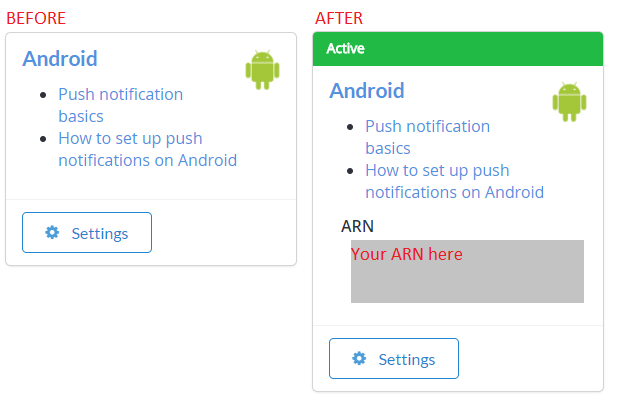
* 正確設定後 (使用任一方法),您應該會在 **Game Manager UI** 的 **(您遊戲的) Settings > Push Notifications > Android** 中看到此內容。
 ## 開始使用:Android + Unity 的推播通知
若要設定您的 Unity 專案:
* 建立新的 Unity 專案。
* **選用** 匯入 [PlayFab Unity Editor Extensions](https://aka.ms/playfabunityextension) 套件。
* 匯入 [Unity PlayFab SDK](https://aka.ms/playfabunitysdkdownload) 套件。
* 依照 [FCM Unity](https://firebase.google.com/docs/cloud-messaging/unity/client) 指南安裝 FCM 通訊,並設定推播通知專案。
* 完成後,您可以繼續依照本指南接收來自 PlayFab 的訊息。
* 我們將在下列範例中提供一個完整且可直接用於 FCM 的 monoBehaviour 指令碼,其中結合了 FCM 和 PlayFab。
* 在 FCM 指南中,您建立了一個設定 Firebase 外掛程式的 monobehavior 指令碼。
* 您可以繼續使用該 monobehavior 指令碼,或將其取代為下列範例中的指令碼。
### 設定您的第一個推播通知
在 Unity 中,開啟您在 FCM 教學課程中建立的指令碼,並取代其內容。
```csharp theme={null}
using PlayFab;
using PlayFab.ClientModels;
using PlayFab.Json;
using UnityEngine;
public class MsgCatcher : MonoBehaviour
{
public string pushToken;
public string playFabId;
public string lastMsg;
// OnGUI should be deleted/replaced with your own gui - This is only provided for debugging
public void OnGUI()
{
GUI.Label(new Rect(0, 0, Screen.width, 200), pushToken);
GUI.Label(new Rect(0, 200, Screen.width, Screen.height - 200), lastMsg);
}
private void OnPfFail(PlayFabError error)
{
Debug.Log("PlayFab: api error: " + error.GenerateErrorReport());
}
public void Start()
{
// PlayFabSettings.TitleId = "TITLE_ID";
Firebase.Messaging.FirebaseMessaging.TokenReceived += OnTokenReceived;
Firebase.Messaging.FirebaseMessaging.MessageReceived += OnMessageReceived;
LoginToPlayFab();
}
private void LoginToPlayFab()
{
#if UNITY_ANDROID
var request = new LoginWithAndroidDeviceIDRequest { AndroidDeviceId = SystemInfo.deviceUniqueIdentifier, CreateAccount = true, };
PlayFabClientAPI.LoginWithAndroidDeviceID(request, OnPfLogin, OnPfFail);
#endif
}
private void OnPfLogin(LoginResult result)
{
Debug.Log("PlayFab: login successful");
playFabId = result.PlayFabId;
RegisterForPush();
}
private void RegisterForPush()
{
if (string.IsNullOrEmpty(pushToken) || string.IsNullOrEmpty(playFabId))
return;
#if UNITY_ANDROID
var request = new AndroidDevicePushNotificationRegistrationRequest {
DeviceToken = pushToken,
SendPushNotificationConfirmation = true,
ConfirmationMessage = "Push notifications registered successfully"
};
PlayFabClientAPI.AndroidDevicePushNotificationRegistration(request, OnPfAndroidReg, OnPfFail);
#endif
}
private void OnPfAndroidReg(AndroidDevicePushNotificationRegistrationResult result)
{
Debug.Log("PlayFab: Push Registration Successful");
}
private void OnTokenReceived(object sender, Firebase.Messaging.TokenReceivedEventArgs token)
{
Debug.Log("PlayFab: Received Registration Token: " + token.Token);
pushToken = token.Token;
RegisterForPush();
}
private void OnMessageReceived(object sender, Firebase.Messaging.MessageReceivedEventArgs e)
{
Debug.Log("PlayFab: Received a new message from: " + e.Message.From);
lastMsg = "";
if (e.Message.Data != null)
{
lastMsg += "DATA: " + JsonWrapper.SerializeObject(e.Message.Data) + "\n";
Debug.Log("PlayFab: Received a message with data:");
foreach (var pair in e.Message.Data)
Debug.Log("PlayFab data element: " + pair.Key + "," + pair.Value);
}
if (e.Message.Notification != null)
{
Debug.Log("PlayFab: Received a notification:");
lastMsg += "TITLE: " + e.Message.Notification.Title + "\n";
lastMsg += "BODY: " + e.Message.Notification.Body + "\n";
}
}
}
```
在裝置上建置並執行您的 Unity 專案。如果您收到文字為 **Push notifications registered successfully** 的推播通知,表示一切如預期運作。
`PlayFabSettings.TitleId = TITLE_ID`。您必須設定自己的 `TitleId`。如果您不更新此 `TitleId`,此範例將無法運作,因為我們的遊戲是以我們的 Firebase 金鑰和設定註冊的,*而不是您的*。您可以取消註解此行,並將 `TITLE_ID` 取代為您的 `titleId`,或者您可以從上一節提到的選用 Editor Extensions 外掛程式中選擇您的遊戲。
### Android 疑難排解
* 確認您可以從 Firebase 主控台傳送測試推播通知。
* 如果無法傳送,表示您的 Firebase 外掛程式未正確設定,您應該檢閱 Firebase 文件以找出原因,或聯絡 Firebase 支援。
* 確保您的 FCM 用戶端 pushToken 已正確設定。
* 範例中的 `OnTokenReceived` 函式應該會被呼叫,並且應該具有有效的權杖。
* 如果它*沒有*被呼叫,表示您的 Firebase 外掛程式*未*正確設定,您應該檢閱 Firebase 文件以找出原因,或聯絡 Firebase 支援。
* 確保您的 `titleId` 已設定為您擁有的遊戲,且該遊戲已使用 Firebase 專案中的伺服器 API 金鑰註冊。
### 進階功能
在 **server.[SendPushNotification](xref:titleid.playfabapi.com.server.accountmanagement.sendpushnotification)** 中,您可以使用 **[request.Package](xref:titleid.playfabapi.com.server.accountmanagement.sendpushnotification#pushnotificationpackage).CustomData** 將任意資料傳遞至裝置。在先前的範例中,這會傳遞至具有下列註解的區段。
```csharp theme={null}
Debug.Log("PlayFab: Received a message with data:");
```
您可以依需求自訂用戶端接收器以利用該資料。**CustomData** 不會向玩家顯示,因此可用來將自訂遊戲資訊傳遞給您的用戶端,或使用 **FCM** 外掛程式在本機排程另一個未來的通知。
您也可以使用 **[request.Package](xref:titleid.playfabapi.com.server.accountmanagement.sendpushnotification#pushnotificationpackage).CustomData** 或要求 **[AdvancedPlatformDelivery](xref:titleid.playfabapi.com.server.accountmanagement.sendpushnotification#advancedpushplatformmsg)** 傳遞至許多協力廠商外掛程式。
協力廠商外掛程式傳遞不受支援也不提供保證,但可供進階使用者使用。
## 其他支援
如需協助、錯誤範例和相關問題,請在我們的[論壇](https://community.playfab.com/index.html)中留言給我們。
目前,我們僅針對本文件中所述的標準流程支援我們的服務。如果您的團隊正在尋找與其他常見推播服務或外掛程式搭配使用的其他功能,請告訴我們!我們很樂意收到開發人員社群的意見反應。
如需透過 Amazon SNS 的推播承載文件:
* [Amazon SNS 訊息和 JSON 格式](https://docs.aws.amazon.com/sns/latest/dg/json-formats.html)
## Related topics
- [推播通知快速入門](/zh-TW/services/playfab/live-service-management/game-configuration/title-communications/push-notifications/quickstart.md)
- [服務 C API 概觀 - PFPushNotifications.h](/zh-TW/services/playfab/api-references/c/pfpushnotifications/pfpushnotifications_members.md)
- [PFPushNotificationsServerSendPushNotificationAsync](/zh-TW/services/playfab/api-references/c/pfpushnotifications/functions/pfpushnotificationsserversendpushnotificationasync.md)
- [PFPushNotificationsServerSendPushNotificationFromTemplateAsync](/zh-TW/services/playfab/api-references/c/pfpushnotifications/functions/pfpushnotificationsserversendpushnotificationfromtemplateasync.md)
- [PlayFab 2015 年版本資訊](/zh-TW/services/playfab/release-notes/2015.md)
## 開始使用:Android + Unity 的推播通知
若要設定您的 Unity 專案:
* 建立新的 Unity 專案。
* **選用** 匯入 [PlayFab Unity Editor Extensions](https://aka.ms/playfabunityextension) 套件。
* 匯入 [Unity PlayFab SDK](https://aka.ms/playfabunitysdkdownload) 套件。
* 依照 [FCM Unity](https://firebase.google.com/docs/cloud-messaging/unity/client) 指南安裝 FCM 通訊,並設定推播通知專案。
* 完成後,您可以繼續依照本指南接收來自 PlayFab 的訊息。
* 我們將在下列範例中提供一個完整且可直接用於 FCM 的 monoBehaviour 指令碼,其中結合了 FCM 和 PlayFab。
* 在 FCM 指南中,您建立了一個設定 Firebase 外掛程式的 monobehavior 指令碼。
* 您可以繼續使用該 monobehavior 指令碼,或將其取代為下列範例中的指令碼。
### 設定您的第一個推播通知
在 Unity 中,開啟您在 FCM 教學課程中建立的指令碼,並取代其內容。
```csharp theme={null}
using PlayFab;
using PlayFab.ClientModels;
using PlayFab.Json;
using UnityEngine;
public class MsgCatcher : MonoBehaviour
{
public string pushToken;
public string playFabId;
public string lastMsg;
// OnGUI should be deleted/replaced with your own gui - This is only provided for debugging
public void OnGUI()
{
GUI.Label(new Rect(0, 0, Screen.width, 200), pushToken);
GUI.Label(new Rect(0, 200, Screen.width, Screen.height - 200), lastMsg);
}
private void OnPfFail(PlayFabError error)
{
Debug.Log("PlayFab: api error: " + error.GenerateErrorReport());
}
public void Start()
{
// PlayFabSettings.TitleId = "TITLE_ID";
Firebase.Messaging.FirebaseMessaging.TokenReceived += OnTokenReceived;
Firebase.Messaging.FirebaseMessaging.MessageReceived += OnMessageReceived;
LoginToPlayFab();
}
private void LoginToPlayFab()
{
#if UNITY_ANDROID
var request = new LoginWithAndroidDeviceIDRequest { AndroidDeviceId = SystemInfo.deviceUniqueIdentifier, CreateAccount = true, };
PlayFabClientAPI.LoginWithAndroidDeviceID(request, OnPfLogin, OnPfFail);
#endif
}
private void OnPfLogin(LoginResult result)
{
Debug.Log("PlayFab: login successful");
playFabId = result.PlayFabId;
RegisterForPush();
}
private void RegisterForPush()
{
if (string.IsNullOrEmpty(pushToken) || string.IsNullOrEmpty(playFabId))
return;
#if UNITY_ANDROID
var request = new AndroidDevicePushNotificationRegistrationRequest {
DeviceToken = pushToken,
SendPushNotificationConfirmation = true,
ConfirmationMessage = "Push notifications registered successfully"
};
PlayFabClientAPI.AndroidDevicePushNotificationRegistration(request, OnPfAndroidReg, OnPfFail);
#endif
}
private void OnPfAndroidReg(AndroidDevicePushNotificationRegistrationResult result)
{
Debug.Log("PlayFab: Push Registration Successful");
}
private void OnTokenReceived(object sender, Firebase.Messaging.TokenReceivedEventArgs token)
{
Debug.Log("PlayFab: Received Registration Token: " + token.Token);
pushToken = token.Token;
RegisterForPush();
}
private void OnMessageReceived(object sender, Firebase.Messaging.MessageReceivedEventArgs e)
{
Debug.Log("PlayFab: Received a new message from: " + e.Message.From);
lastMsg = "";
if (e.Message.Data != null)
{
lastMsg += "DATA: " + JsonWrapper.SerializeObject(e.Message.Data) + "\n";
Debug.Log("PlayFab: Received a message with data:");
foreach (var pair in e.Message.Data)
Debug.Log("PlayFab data element: " + pair.Key + "," + pair.Value);
}
if (e.Message.Notification != null)
{
Debug.Log("PlayFab: Received a notification:");
lastMsg += "TITLE: " + e.Message.Notification.Title + "\n";
lastMsg += "BODY: " + e.Message.Notification.Body + "\n";
}
}
}
```
在裝置上建置並執行您的 Unity 專案。如果您收到文字為 **Push notifications registered successfully** 的推播通知,表示一切如預期運作。
`PlayFabSettings.TitleId = TITLE_ID`。您必須設定自己的 `TitleId`。如果您不更新此 `TitleId`,此範例將無法運作,因為我們的遊戲是以我們的 Firebase 金鑰和設定註冊的,*而不是您的*。您可以取消註解此行,並將 `TITLE_ID` 取代為您的 `titleId`,或者您可以從上一節提到的選用 Editor Extensions 外掛程式中選擇您的遊戲。
### Android 疑難排解
* 確認您可以從 Firebase 主控台傳送測試推播通知。
* 如果無法傳送,表示您的 Firebase 外掛程式未正確設定,您應該檢閱 Firebase 文件以找出原因,或聯絡 Firebase 支援。
* 確保您的 FCM 用戶端 pushToken 已正確設定。
* 範例中的 `OnTokenReceived` 函式應該會被呼叫,並且應該具有有效的權杖。
* 如果它*沒有*被呼叫,表示您的 Firebase 外掛程式*未*正確設定,您應該檢閱 Firebase 文件以找出原因,或聯絡 Firebase 支援。
* 確保您的 `titleId` 已設定為您擁有的遊戲,且該遊戲已使用 Firebase 專案中的伺服器 API 金鑰註冊。
### 進階功能
在 **server.[SendPushNotification](xref:titleid.playfabapi.com.server.accountmanagement.sendpushnotification)** 中,您可以使用 **[request.Package](xref:titleid.playfabapi.com.server.accountmanagement.sendpushnotification#pushnotificationpackage).CustomData** 將任意資料傳遞至裝置。在先前的範例中,這會傳遞至具有下列註解的區段。
```csharp theme={null}
Debug.Log("PlayFab: Received a message with data:");
```
您可以依需求自訂用戶端接收器以利用該資料。**CustomData** 不會向玩家顯示,因此可用來將自訂遊戲資訊傳遞給您的用戶端,或使用 **FCM** 外掛程式在本機排程另一個未來的通知。
您也可以使用 **[request.Package](xref:titleid.playfabapi.com.server.accountmanagement.sendpushnotification#pushnotificationpackage).CustomData** 或要求 **[AdvancedPlatformDelivery](xref:titleid.playfabapi.com.server.accountmanagement.sendpushnotification#advancedpushplatformmsg)** 傳遞至許多協力廠商外掛程式。
協力廠商外掛程式傳遞不受支援也不提供保證,但可供進階使用者使用。
## 其他支援
如需協助、錯誤範例和相關問題,請在我們的[論壇](https://community.playfab.com/index.html)中留言給我們。
目前,我們僅針對本文件中所述的標準流程支援我們的服務。如果您的團隊正在尋找與其他常見推播服務或外掛程式搭配使用的其他功能,請告訴我們!我們很樂意收到開發人員社群的意見反應。
如需透過 Amazon SNS 的推播承載文件:
* [Amazon SNS 訊息和 JSON 格式](https://docs.aws.amazon.com/sns/latest/dg/json-formats.html)
## Related topics
- [推播通知快速入門](/zh-TW/services/playfab/live-service-management/game-configuration/title-communications/push-notifications/quickstart.md)
- [服務 C API 概觀 - PFPushNotifications.h](/zh-TW/services/playfab/api-references/c/pfpushnotifications/pfpushnotifications_members.md)
- [PFPushNotificationsServerSendPushNotificationAsync](/zh-TW/services/playfab/api-references/c/pfpushnotifications/functions/pfpushnotificationsserversendpushnotificationasync.md)
- [PFPushNotificationsServerSendPushNotificationFromTemplateAsync](/zh-TW/services/playfab/api-references/c/pfpushnotifications/functions/pfpushnotificationsserversendpushnotificationfromtemplateasync.md)
- [PlayFab 2015 年版本資訊](/zh-TW/services/playfab/release-notes/2015.md)