> ## Documentation Index
> Fetch the complete documentation index at: https://devdocs.xbox.com/llms.txt
> Use this file to discover all available pages before exploring further.
# 設定預設語言
> 設定 PlayFab 遊戲預設語言和每位玩家的慣用語言,讓當地語系化字串、電子郵件和新聞以正確的語言送達玩家。
PlayFab 正在推出代替遊戲開發人員儲存當地語系化字串的支援。此外,我們也正在新增必要的邏輯,以便為您的玩家提供其慣用語言的正確字串。
為了達成此目標,我們將利用兩個新的語言設定:一個與您的遊戲相關聯,另一個則儲存在每位玩家的實體設定檔上:
1. **遊戲預設語言**:表示您遊戲的主要支援語言。設定後,我們會要求您的遊戲至少在使用當地語系化字串的功能中支援此語言。
2. **玩家語言**:表示玩家的慣用語言。這可以針對每個遊戲個別設定。
使用這兩個設定,PlayFab 邏輯會將當地語系化字串與偏好該語言的玩家進行比對。沒有語言喜好設定的玩家會收到您遊戲指定之預設語言的字串。
偏好您的遊戲*不*支援之語言的玩家,*也*會根據您遊戲的預設語言收到字串。
本教學課程將逐步引導您了解如何設定遊戲的預設語言和玩家的慣用語言。
## 需求
本教學課程假設您具備下列 PlayFab 使用實務知識:
* 如何建立玩家的基本知識。這是必要的,因為在呼叫慣用語言邏輯之前,玩家必須*已經存在*且具備使用者名稱和密碼。
* 您已閱讀 [Game Manager 快速入門](/zh-TW/services/playfab/live-service-management/gamemanager/quickstart)。如果您不熟悉 Game Manager,這是檢視語言資訊的地方。
* 您具備如何使用玩家設定檔的知識,因為必須確認慣用語言已新增至玩家的設定檔。
* 請花點時間檢閱[取得玩家設定檔](/zh-TW/services/playfab/player-progression/player-data/getting-player-profiles)教學課程中提供的關於如何取得玩家設定檔的資訊。
## 第 1 節 – 玩家的慣用語言
在設定玩家的慣用語言之前,請先決定您要如何收集此資訊。您有幾個選項:
* 詢問玩家:在遊戲的功能表中新增選項。
* 推斷玩家的語言:呼叫提供的平台 API 來使用玩家裝置的語言 (例如 Android 的 `Locale.getDefault.getLanguage()`)。
世界上有許多語言,您的遊戲*可能無法*全部支援。雖然並非必要,但我們建議讓您的遊戲具備未來適應性,並儲存玩家實際的喜好設定。如果您之後再新增對該語言的支援,PlayFab 的邏輯會自動開始提供新的字串 (而不是預設字串)。
### 步驟 1 – 設定語言
PlayFab 可讓您從特定的語言清單中選擇要支援的語言。您可以呼叫 `GetLanguageList()` 方法來查看語言代碼。
使用 `SetProfileLanguage` API 時,語言字串必須以 ISO 639-1 格式指定 (例如 "en"、"es" 或 "ja")。目前不支援代碼 "zh"。
首先,我們將更新玩家的設定檔,以包含他們偏好從您的遊戲取得內容時使用的語言。
### C# 程式碼範例
```csharp theme={null}
void SetProfileLanguage(string language, int? profileExpectedVersion, EntityKey entity)
{
var request = new SetProfileLanguageRequest
{
Language = language,
ExpectedVersion = profileExpectedVersion,
Entity = entity
};
PlayFabProfilesAPI.SetProfileLanguage(request, res =>
{
Debug.Log("The language on the entity's profile has been updated.");
}, FailureCallback);
}
void FailureCallback(PlayFabError error)
{
Debug.LogWarning("Something went wrong with your API call. Here's some debug information:");
Debug.LogError(error.GenerateErrorReport());
}
```
### 步驟 2 – 查看語言是否已更新
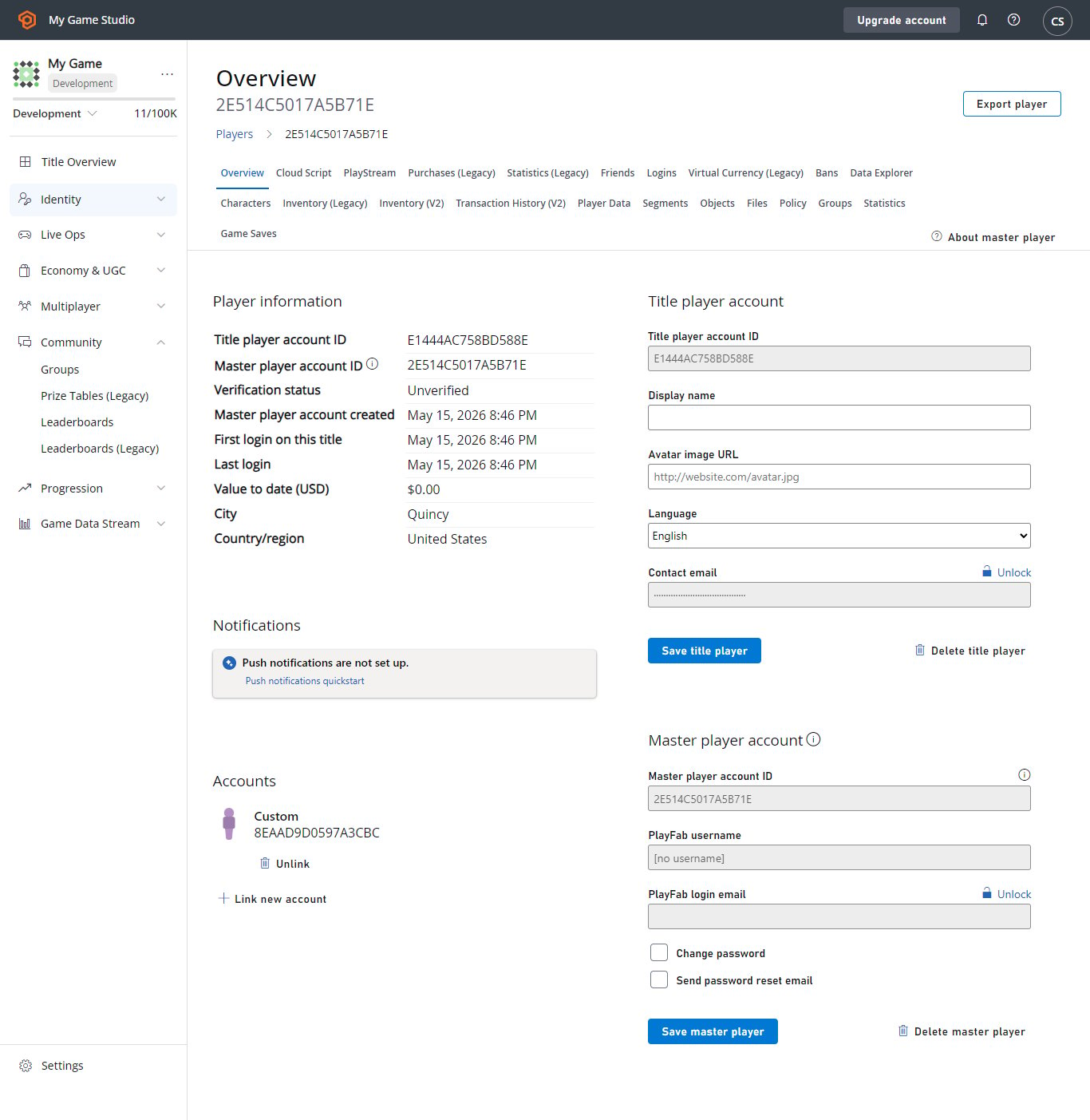
前往玩家的概觀。在 Game Manager 中,前往 **Player** > **Overview**。檢查其聯絡資訊區段是否已更新為其慣用語言。
您也可以使用下圖所示的 **Language** 下拉式功能表更新語言。
 接下來,瀏覽至玩家的 **PlayStream**,它會顯示 **Entity language updated** 事件。
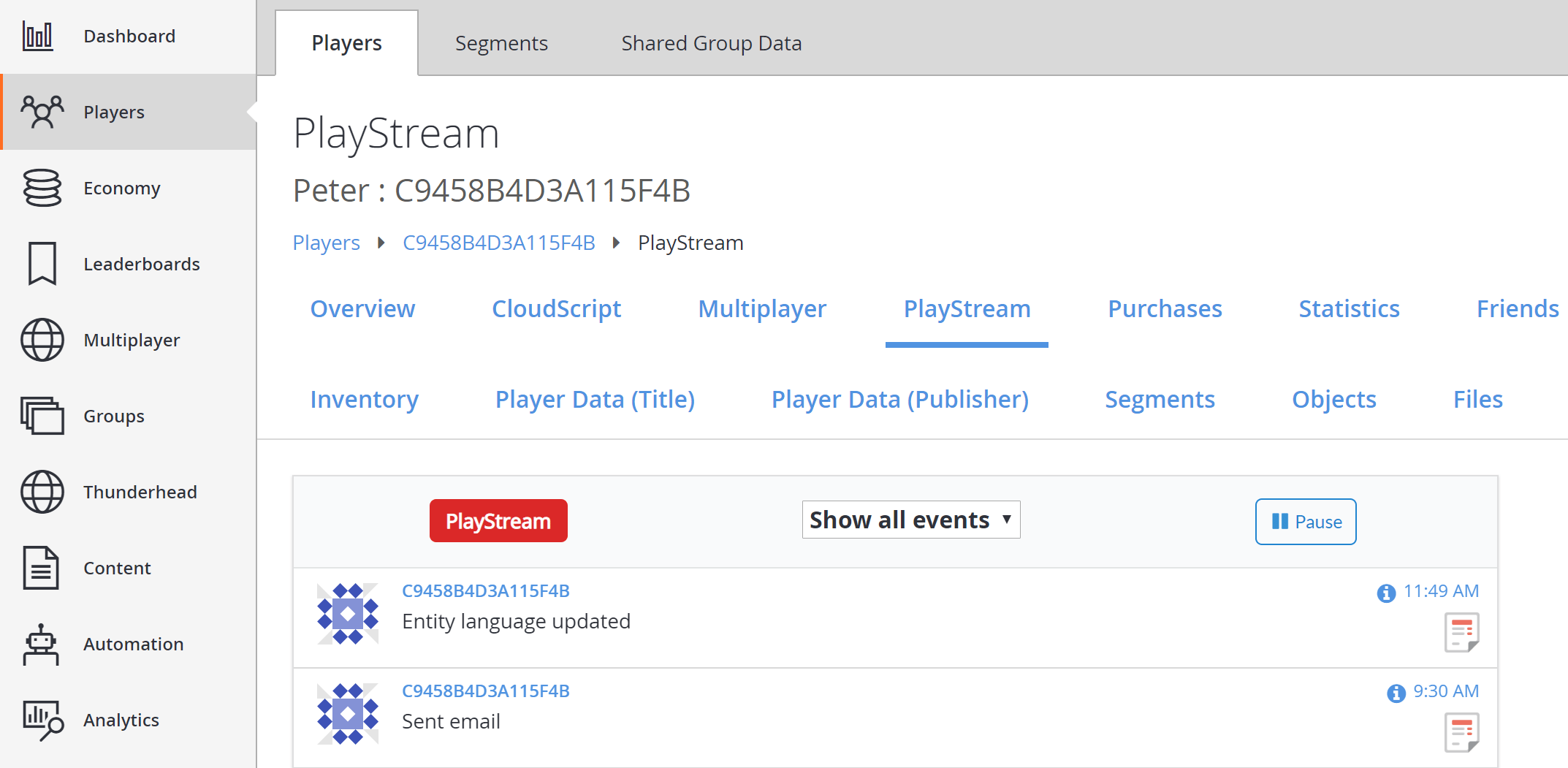 選取事件上的資訊圖示,會看到類似下列範例的 JSON。
```json theme={null}
{
"EventName": "entity_language_updated",
"Source": "PlayFab",
"Language": "en",
"EntityChain": "title_player_account!4CDA57A14A596E70//C9458B4D3A115F4B/36163DA3783B0C8A/",
"EntityLineage": {
"NamespaceId": "4CDA57A14A596E70",
"TitleId": "YourTitleId",
"MasterPlayerAccountId": "C9458B4D3A115F4B",
"TitlePlayerAccountId": "36163DA3783B0C8A",
"CharacterId": null,
"GroupId": null
},
"EventNamespace": "com.playfab",
"EventId": "f643e22a2a76462aaeaa3469afa31434",
"EntityType": "title_player_account",
"EntityId": "36163DA3783B0C8A",
"SourceType": "BackEnd",
"Timestamp": "2018-08-24T18:49:47.8755292Z",
"History": null,
"CustomTags": null,
"Reserved": null
}
```
## 第 2 節 – 設定遊戲預設語言
接下來,為您的遊戲設定預設語言。所有當地語系化功能現在都會將語言與內容的每個翻譯版本建立關聯。
遊戲需要預設語言。這可確保如果任何玩家的慣用語言未設定或不受支援,玩家仍可收到內容的預設版本。
首先,在左側功能表中選取 **Settings**,如下所示。
選取事件上的資訊圖示,會看到類似下列範例的 JSON。
```json theme={null}
{
"EventName": "entity_language_updated",
"Source": "PlayFab",
"Language": "en",
"EntityChain": "title_player_account!4CDA57A14A596E70//C9458B4D3A115F4B/36163DA3783B0C8A/",
"EntityLineage": {
"NamespaceId": "4CDA57A14A596E70",
"TitleId": "YourTitleId",
"MasterPlayerAccountId": "C9458B4D3A115F4B",
"TitlePlayerAccountId": "36163DA3783B0C8A",
"CharacterId": null,
"GroupId": null
},
"EventNamespace": "com.playfab",
"EventId": "f643e22a2a76462aaeaa3469afa31434",
"EntityType": "title_player_account",
"EntityId": "36163DA3783B0C8A",
"SourceType": "BackEnd",
"Timestamp": "2018-08-24T18:49:47.8755292Z",
"History": null,
"CustomTags": null,
"Reserved": null
}
```
## 第 2 節 – 設定遊戲預設語言
接下來,為您的遊戲設定預設語言。所有當地語系化功能現在都會將語言與內容的每個翻譯版本建立關聯。
遊戲需要預設語言。這可確保如果任何玩家的慣用語言未設定或不受支援,玩家仍可收到內容的預設版本。
首先,在左側功能表中選取 **Settings**,如下所示。
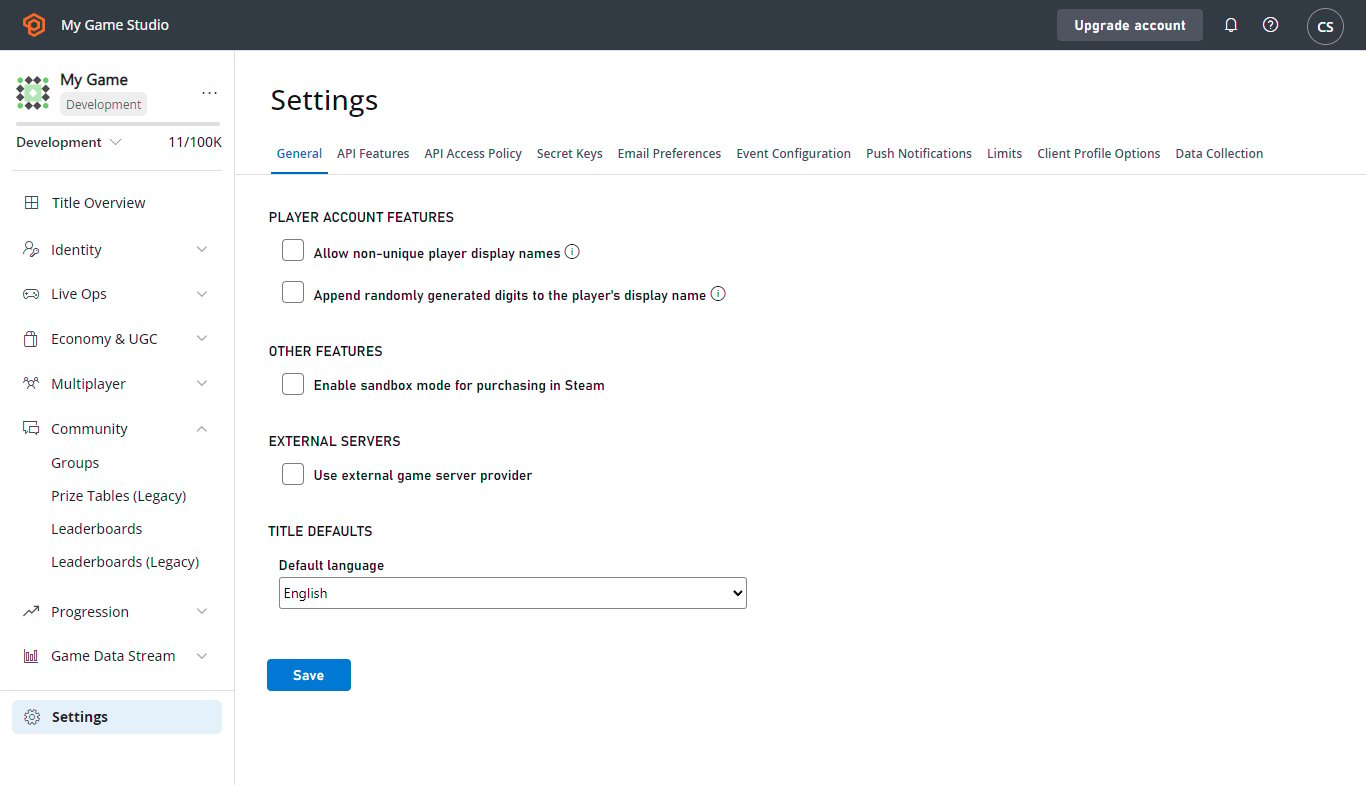
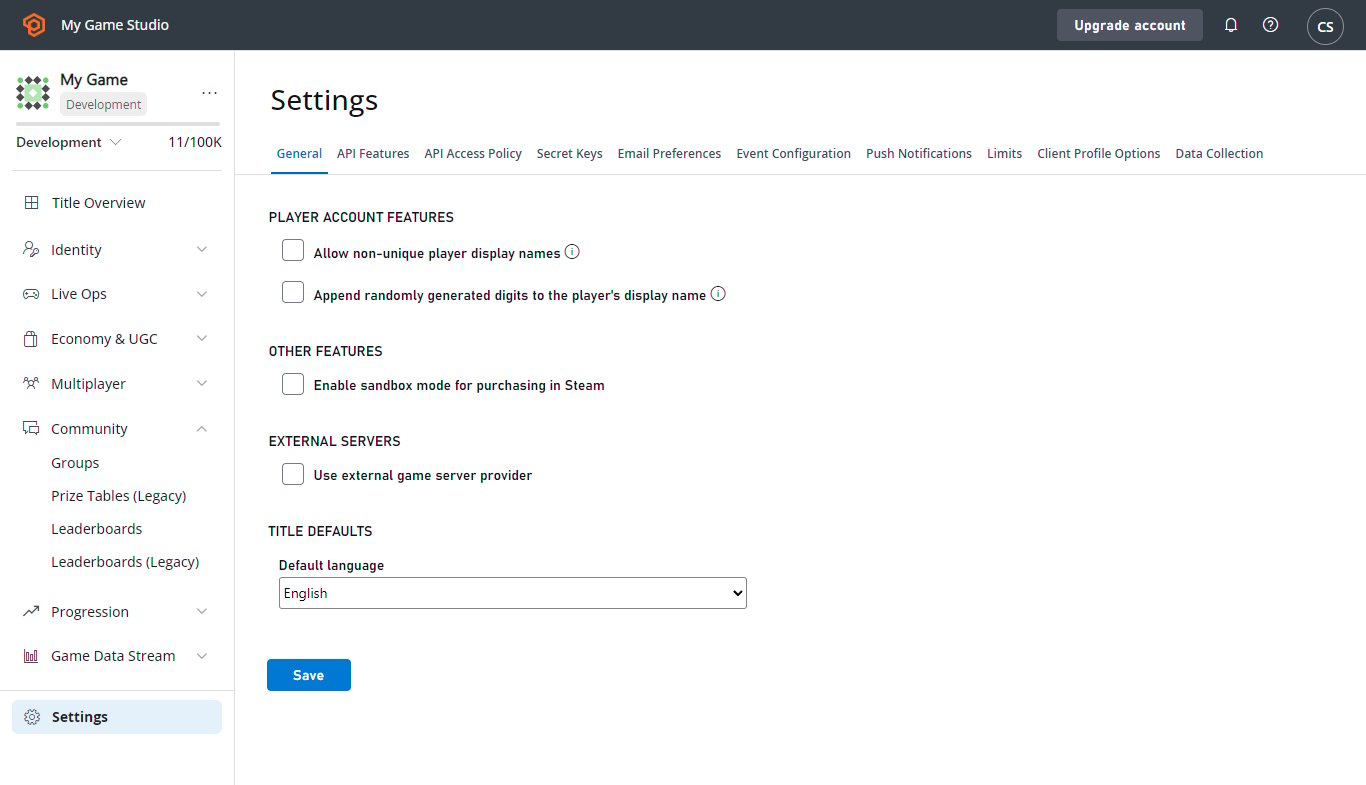
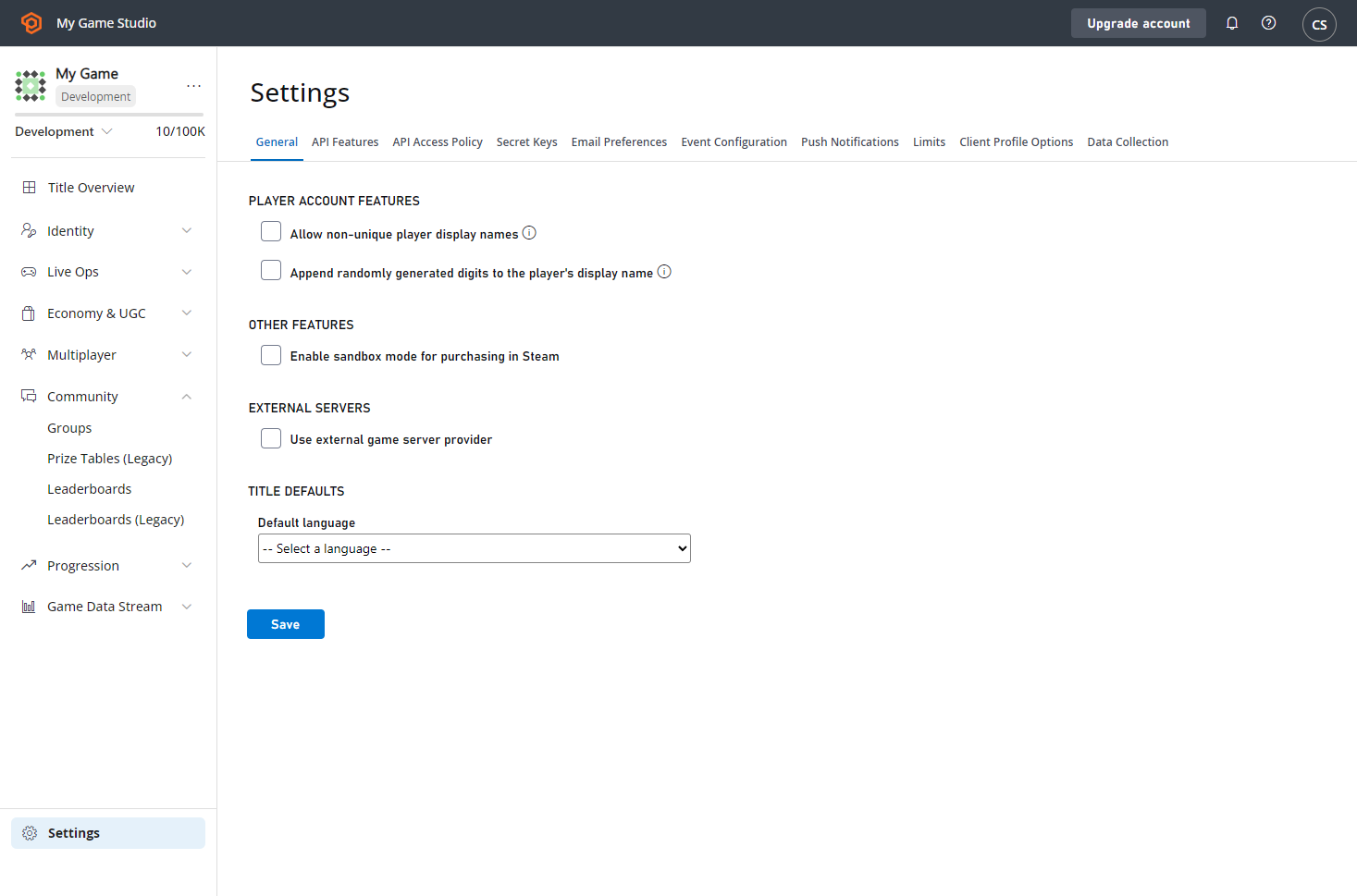 在 **General** 索引標籤中新的 **TITLE DEFAULTS** 標題下,找到 **Default language** 下拉式清單。您必須先設定預設語言,才能使用任何新增的當地語系化功能。
完成後,選取 **SAVE** 按鈕。如果更新成功,會出現訊息通知。
當您返回儀表板時,會在 **PlayStream** 事件清單中看到 **Title API settings changed** 事件,如下所示。
在 **General** 索引標籤中新的 **TITLE DEFAULTS** 標題下,找到 **Default language** 下拉式清單。您必須先設定預設語言,才能使用任何新增的當地語系化功能。
完成後,選取 **SAVE** 按鈕。如果更新成功,會出現訊息通知。
當您返回儀表板時,會在 **PlayStream** 事件清單中看到 **Title API settings changed** 事件,如下所示。
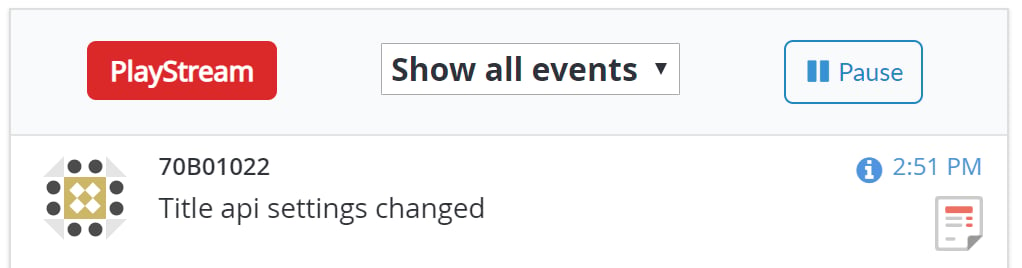 選取事件上的資訊圖示,會看到類似下列範例的 JSON。
```json theme={null}
{
"EventName": "title_api_settings_changed",
"PreviousSettingsValues": {
"DefaultLanguage": null
},
"SettingsValues": {
"DefaultLanguage": "en"
},
"UserId": "EAF83D52E282C291",
"DeveloperId": null,
"EventNamespace": "com.playfab",
"EntityType": "title",
"Source": "PlayFab",
"EventId": "108849a5e1424051b42256bc75b2e34b",
"EntityId": "YourTitleId",
"SourceType": "BackEnd",
"Timestamp": "2018-08-24T21:51:02.2215614Z",
"History": null,
"CustomTags": null,
"Reserved": null
}
```
## 第 3 節 – 更新遊戲預設語言
請務必記住,為遊戲設定預設語言,就是告訴 PlayFab 在您向*未*設定慣用語言,或選擇了與您支援的語言不相符之語言的玩家發出通訊時,使用該語言。
由於遊戲的預設語言是作為*後援*語言使用,PlayFab 會預期您的所有通訊都支援您的預設語言。
您*隨時*都可以變更遊戲預設語言,但 PlayFab 要求您目前的通訊範本支援您要變更的語言。
如果您更新遊戲的預設語言,您會看到介面現在顯示 **Edit** 連結。
選取事件上的資訊圖示,會看到類似下列範例的 JSON。
```json theme={null}
{
"EventName": "title_api_settings_changed",
"PreviousSettingsValues": {
"DefaultLanguage": null
},
"SettingsValues": {
"DefaultLanguage": "en"
},
"UserId": "EAF83D52E282C291",
"DeveloperId": null,
"EventNamespace": "com.playfab",
"EntityType": "title",
"Source": "PlayFab",
"EventId": "108849a5e1424051b42256bc75b2e34b",
"EntityId": "YourTitleId",
"SourceType": "BackEnd",
"Timestamp": "2018-08-24T21:51:02.2215614Z",
"History": null,
"CustomTags": null,
"Reserved": null
}
```
## 第 3 節 – 更新遊戲預設語言
請務必記住,為遊戲設定預設語言,就是告訴 PlayFab 在您向*未*設定慣用語言,或選擇了與您支援的語言不相符之語言的玩家發出通訊時,使用該語言。
由於遊戲的預設語言是作為*後援*語言使用,PlayFab 會預期您的所有通訊都支援您的預設語言。
您*隨時*都可以變更遊戲預設語言,但 PlayFab 要求您目前的通訊範本支援您要變更的語言。
如果您更新遊戲的預設語言,您會看到介面現在顯示 **Edit** 連結。
 依循此連結,您會看到與之前相同的下拉式清單。不過,如果您嘗試儲存電子郵件範本未完全支援的預設語言,您會看到一或多個類似下列的錯誤訊息。
 如果有錯誤,您可以依循提供的連結更新您的內容,以支援缺少的語言。解決所有錯誤後,預設語言變更就會被接受。
## 結論
在本教學課程中,您已了解如何設定和更新遊戲的預設語言以及玩家的慣用語言。
如果您對本教學課程有任何問題或意見反應,請透過我們的[論壇](https://community.playfab.com/questions/ask.html)或 Slack 頻道與我們聯絡。
## Related topics
- [當地語系化電子郵件範本](/zh-TW/services/playfab/live-service-management/game-configuration/title-communications/emails/localized-email-templates.md)
- [遊戲新聞快速入門](/zh-TW/services/playfab/live-service-management/game-configuration/title-communications/news/quickstart.md)
- [推播通知範本](/zh-TW/services/playfab/live-service-management/game-configuration/title-communications/push-notifications/push-notification-templates.md)
- [XBOX Manager:管理測試帳戶](/zh-TW/tools/tools-console/xbom/manager-tool-profiles.md)
- [XBOX Manager:管理主機與群組](/zh-TW/tools/tools-console/xbom/manager-tool-groups.md)
如果有錯誤,您可以依循提供的連結更新您的內容,以支援缺少的語言。解決所有錯誤後,預設語言變更就會被接受。
## 結論
在本教學課程中,您已了解如何設定和更新遊戲的預設語言以及玩家的慣用語言。
如果您對本教學課程有任何問題或意見反應,請透過我們的[論壇](https://community.playfab.com/questions/ask.html)或 Slack 頻道與我們聯絡。
## Related topics
- [當地語系化電子郵件範本](/zh-TW/services/playfab/live-service-management/game-configuration/title-communications/emails/localized-email-templates.md)
- [遊戲新聞快速入門](/zh-TW/services/playfab/live-service-management/game-configuration/title-communications/news/quickstart.md)
- [推播通知範本](/zh-TW/services/playfab/live-service-management/game-configuration/title-communications/push-notifications/push-notification-templates.md)
- [XBOX Manager:管理測試帳戶](/zh-TW/tools/tools-console/xbom/manager-tool-profiles.md)
- [XBOX Manager:管理主機與群組](/zh-TW/tools/tools-console/xbom/manager-tool-groups.md)