> ## Documentation Index
> Fetch the complete documentation index at: https://devdocs.xbox.com/llms.txt
> Use this file to discover all available pages before exploring further.
# XBOX Live 遊戲關聯
> 將您的 Partner Center 產品識別碼連結至遊戲識別碼,在 PlayFab 中為 LoginWithXbox 及相關 API 設定限定範圍的 XBOX Live 權杖驗證。
# 在 PlayFab 中設定 XBOX Live 遊戲關聯
了解如何將您的 Partner Center 產品識別碼連結至 PlayFab 遊戲識別碼,以設定限定範圍的權杖驗證。
## 概觀
在本教學課程中,您將了解如何透過指定 PlayFab API 在使用 XBOX Live 權杖參數時接受哪些 XBOX Live 遊戲權杖,來設定權杖驗證,讓您能更有效地控制整合行為,並啟用限定範圍的權杖接受。這些 API 包括 `Client/loginwithxbox`、`Client/LinkXboxAccount`、`Client/UnlinkXboxAccount`、`Client/ConsumeXboxEntitlement`、`Client/GetFriendLeaderboard`、`Client/GetFriendLeaderboardAroundCurrentUser`、`Client/GetFriendLeaderboardAroundPlayer`、`Client/ConsumeMicrosoftStoreEntitlements`、`Server/loginwithxbox`、`Server/LinkXboxAccount`、`Server/UnlinkXboxAccount`、`Server/GetFriendLeaderboard`、`Server/GetFriendsList`、`Server/GetFriendLeaderboardForEntity`、`Lobby/GetFriendLobbies`、`Server/GetFriendLeaderboardAroundPlayer`、`Inventory/RedeemMicrosoftStoreInventoryItems` 和 `Inventory/Redeem`。
## 需求
* 已註冊的 [PlayFab](https://developer.playfab.com/) 遊戲。
* 具有已啟用 XBOX Live 之遊戲的 [Partner Center](https://partner.microsoft.com/) 帳戶。
## Partner Center 產品識別碼和 XBOX Live 遊戲識別碼
首先,瀏覽至您 Partner Center 遊戲的產品頁面。
1. 在 Partner Center 儀表板中,瀏覽至 [Apps and Games](https://partner.microsoft.com/dashboard/apps-and-games/overview)。
2. 找到並選取您要與 PlayFab 建立關聯、已啟用 XBOX Live 的 Partner Center 遊戲。
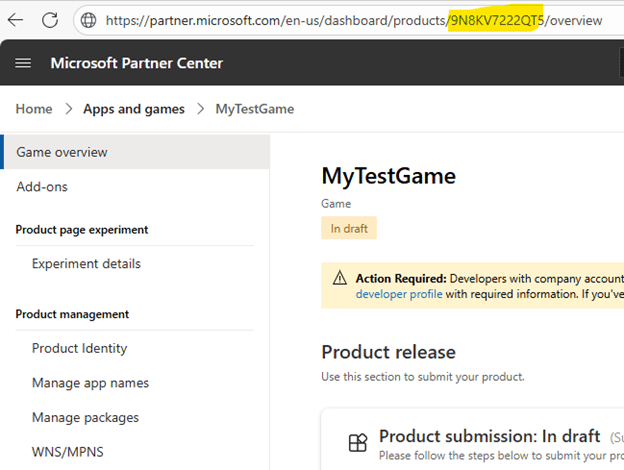
3. 從遊戲的 URL 中找出並複製產品識別碼 (Product ID)。
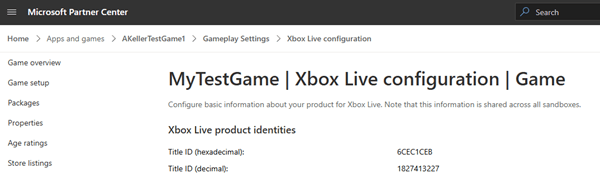
 4. 接著找出並複製 XBOX Live 遊戲識別碼。瀏覽至 **XBOX services > XBOX Settings**,並複製 **Title ID (decimal)** 值。
 ## 安裝 XBOX Live 附加元件
前往您遊戲的 [PlayFab Game Manager](https://developer.playfab.com/) 頁面。
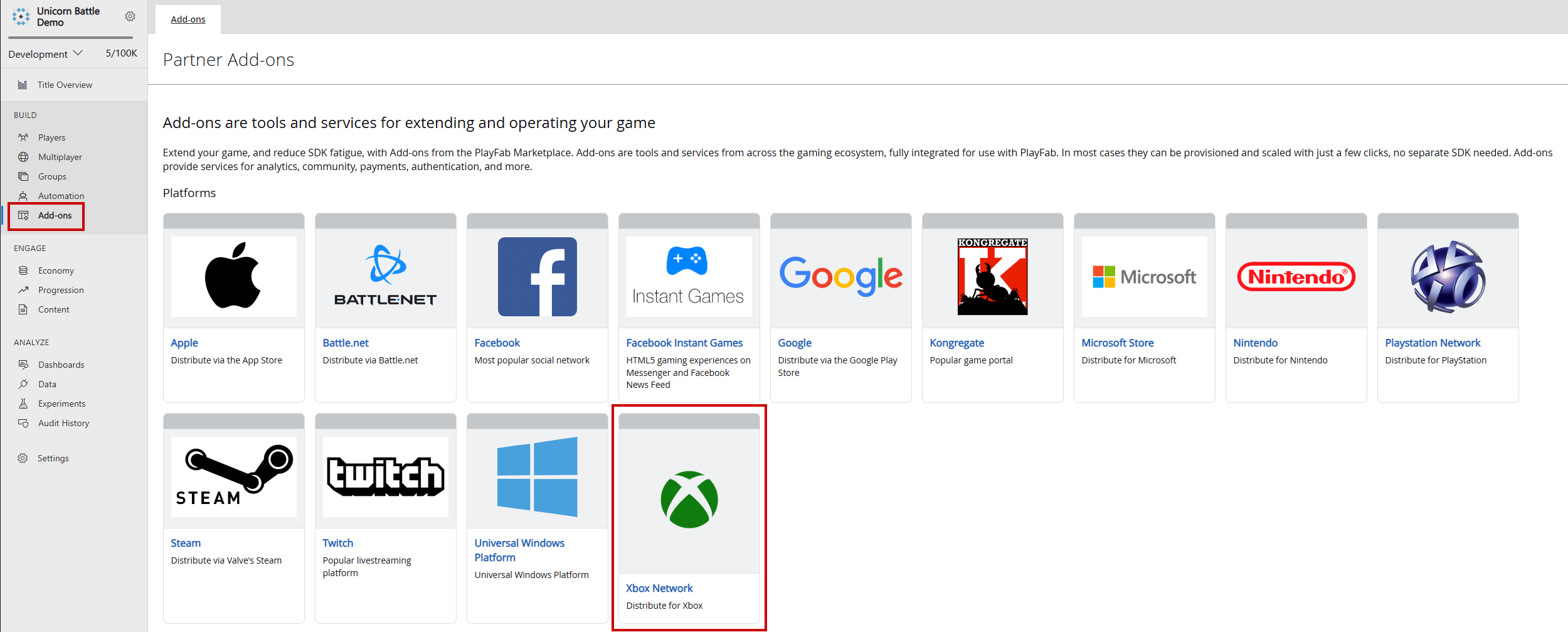
1. 在功能表中瀏覽至 **Add-ons**。
2. 找到並選取 **XBOX Live** 附加元件圖示/連結。
## 安裝 XBOX Live 附加元件
前往您遊戲的 [PlayFab Game Manager](https://developer.playfab.com/) 頁面。
1. 在功能表中瀏覽至 **Add-ons**。
2. 找到並選取 **XBOX Live** 附加元件圖示/連結。
 3. 使用 **Seller ID** 下拉式清單,從 Partner Center 選取正確的賣方識別碼。如果您沒有看到正確的賣方識別碼,請選取 **Sign in with a different partner center account**,並以正確的使用者登入。
4. 使用 **Product ID** 下拉式清單,找出將連結至 PlayFab 遊戲的 Partner Center 產品識別碼。確認 XBOX Live 遊戲識別碼與 Partner Center 中預期的 XBOX Live 遊戲識別碼相符。
3. 使用 **Seller ID** 下拉式清單,從 Partner Center 選取正確的賣方識別碼。如果您沒有看到正確的賣方識別碼,請選取 **Sign in with a different partner center account**,並以正確的使用者登入。
4. 使用 **Product ID** 下拉式清單,找出將連結至 PlayFab 遊戲的 Partner Center 產品識別碼。確認 XBOX Live 遊戲識別碼與 Partner Center 中預期的 XBOX Live 遊戲識別碼相符。
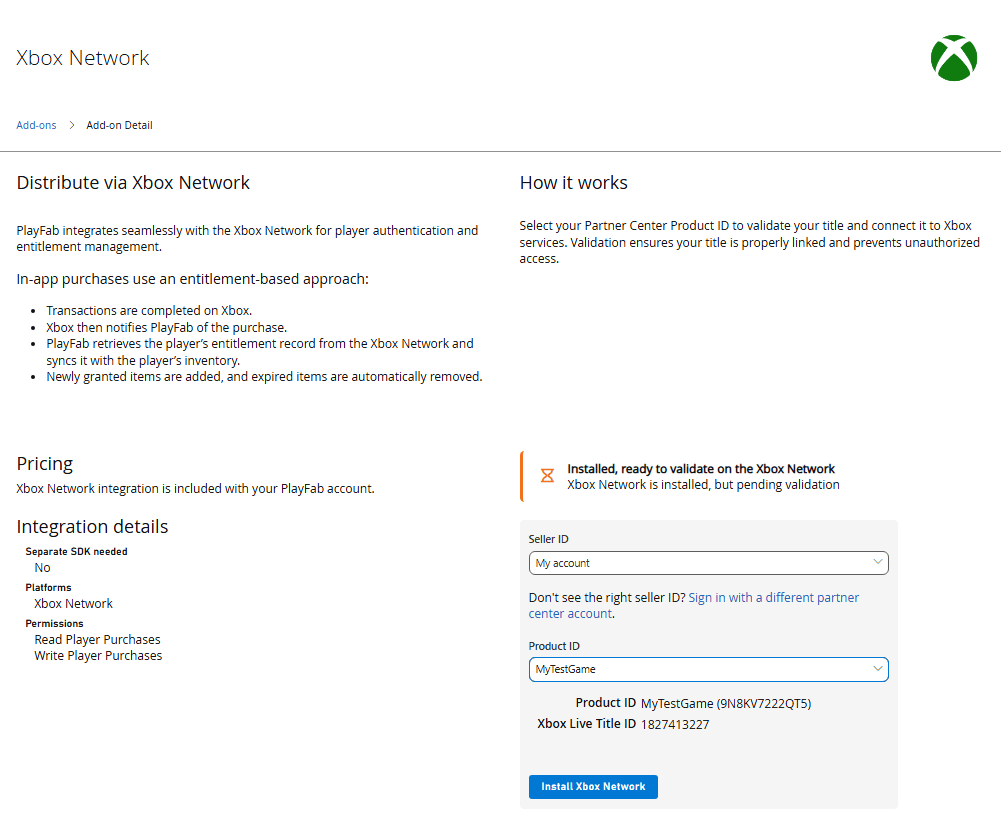 5. 選取 **Install XBOX Network** 以儲存設定,並將 API 呼叫限制為所選的 XBOX Live 遊戲識別碼。
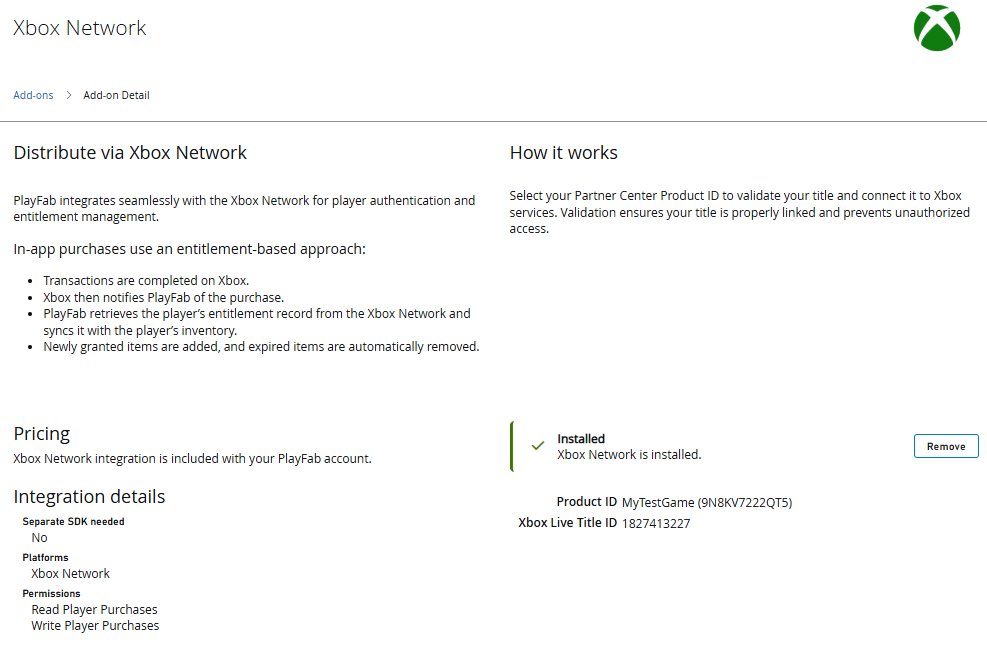 依照這些步驟,您就可以放心地在 PlayFab 中設定限定範圍的 XBOX Live 權杖驗證,確保只接受來自指定 Partner Center 遊戲的權杖。此設定可簡化跨平台驗證、強化遊戲專屬的安全性,並讓開發人員能夠在已啟用 XBOX 的服務中提供順暢且值得信賴的玩家體驗。
## 延伸閱讀
* [PlayFab 驗證概觀](/zh-TW/services/playfab/identity/player-identity/authentication)
* [登入基本概念和最佳做法](/zh-TW/services/playfab/identity/player-identity/login/login-basics-best-practices)
## Related topics
- [平台特定驗證](/zh-TW/services/playfab/identity/player-identity/platform-specific-authentication/index.md)
- [PlayFab 身分識別文件](/zh-TW/services/playfab/identity/index.md)
- [PFAccountManagementGetTitlePlayersFromXboxLiveIDsAsync](/zh-TW/services/playfab/api-references/c/pfaccountmanagement/functions/pfaccountmanagementgettitleplayersfromxboxliveidsasync.md)
- [Game Saves 快速入門](/zh-TW/services/playfab/player-progression/game-saves/quickstart.md)
- [XBOX 需求](/zh-TW/services/playfab/multiplayer/networking/xbox-requirements.md)
依照這些步驟,您就可以放心地在 PlayFab 中設定限定範圍的 XBOX Live 權杖驗證,確保只接受來自指定 Partner Center 遊戲的權杖。此設定可簡化跨平台驗證、強化遊戲專屬的安全性,並讓開發人員能夠在已啟用 XBOX 的服務中提供順暢且值得信賴的玩家體驗。
## 延伸閱讀
* [PlayFab 驗證概觀](/zh-TW/services/playfab/identity/player-identity/authentication)
* [登入基本概念和最佳做法](/zh-TW/services/playfab/identity/player-identity/login/login-basics-best-practices)
## Related topics
- [平台特定驗證](/zh-TW/services/playfab/identity/player-identity/platform-specific-authentication/index.md)
- [PlayFab 身分識別文件](/zh-TW/services/playfab/identity/index.md)
- [PFAccountManagementGetTitlePlayersFromXboxLiveIDsAsync](/zh-TW/services/playfab/api-references/c/pfaccountmanagement/functions/pfaccountmanagementgettitleplayersfromxboxliveidsasync.md)
- [Game Saves 快速入門](/zh-TW/services/playfab/player-progression/game-saves/quickstart.md)
- [XBOX 需求](/zh-TW/services/playfab/multiplayer/networking/xbox-requirements.md)